
Platform certification
1 Test environment
2 Install Java 17
3 Install ORDS
3.1 Create ords config and logs directories
3.2 Create an environment file
3.3 Create a self signed certificate
3.4 Convert the private key to DER format
3.5 Apply the environment file
3.6 Run the ords installer
4 Create ORDS startup and shutdown scripts
5 Configure firewall
6 Schema enablement (done by the Blitz Report installer)
7 Start ORDS
8 Access the ORDS url
9 Using an existing ORDS installation (e.g. for APEX)
10 Configure Blitz Report to use ORDS
11 Troubleshooting
11.1 ORDS OAuth token request returns HTTP 503 service_unavailable
11.2 Excel login fails with Server error (HTTP 404)
11.3 ORDS OAuth2 calls return HTTP 401 with a valid token
11.4 Blitz FSG balance refresh fails with HTTP Status 500 from Tomcat when using ORDS
11.5 Enable ORDS webservice access logging for debugging
11.6 ORDS returns “Database Credential Error” (574) or “Account Is Locked” (570)
11.7 ORDS OAuth token request returns HTTP 403 on a plain HTTP URL
11.8 ORDS webservice calls return HTTP 500 or 401 with ORA-00604 / ORA-01031
11.9 Installer reports “Could not enable XXEN for ORDS”
11.10 OAuth2 client ID and secret show as Not Found
12 Useful links
Introduction
This post explains how to install and configure ORDS in the standalone mode. Standalone mode relies on the built-in Jetty HTTP server and does not require installation of other technology stack components.
Note: if you’re setting up ORDS for use with Blitz Report, Oracle Database 12.2 or later is required.
Platform certification
ORDS is a Java application and Oracle does not publish a separate operating system certification matrix for it. In practice the platform constraint comes entirely from the Java prerequisite: the ORDS installation checklist requires Oracle Java 17 or 21, or Oracle GraalVM Enterprise Edition for Java 17 or 21. Wherever one of those is available, ORDS runs; where it is not, ORDS cannot be installed at all.
The table below shows the position for the server platforms commonly used with Oracle E-Business Suite.
| Platform | Oracle Java 17 / 21 availability | ORDS supported? |
|---|---|---|
| Linux x86-64 (Oracle Linux, RHEL, SUSE, Ubuntu) | Java 17 and Java 21 certified | Yes – recommended. It is also the only platform for which Oracle ships an ORDS RPM and a container image. |
| Microsoft Windows Server (2016 to 2025) | Java 17 and Java 21 certified | Yes |
| Oracle Solaris 11.4 SPARC | Java 17 only, from 17.0.19 (released April 2026). No Java 21 build | Possible, but limited – there is no Java 21 upgrade path, so Linux is the safer choice |
| Oracle Solaris x86 | No Java 17 or 21 build | No |
| IBM AIX on Power | No Oracle Java 17 or 21 build | No |
| HP-UX Itanium | No Java 17 or 21 build; Java 8 was the last release | No |
The ORDS host does not have to be the database server. ORDS is a mid-tier component that connects to the database over JDBC, so the operating system of your EBS database tier does not restrict your ORDS options. If your database runs on IBM AIX, HP-UX or Solaris, you can still install ORDS on a separate Linux server – or on an existing Linux EBS application tier – and point it at the database over SQL*Net. This is the recommended approach for those platforms.
Note on non-Oracle JDKs: third-party builds such as IBM Semeru Runtime do provide Java 17 on AIX. ORDS may well run on them, but the ORDS prerequisites list only Oracle Java and Oracle GraalVM Enterprise Edition, so this is not a certified configuration and we do not recommend it for production.
The remainder of this guide uses Oracle Linux. The commands are written for a Linux shell; the ORDS commands themselves are identical on Windows, but paths and the startup and shutdown scripts in section 4 need to be adapted.
1 Test environment
I installed ORDS on top of the following technology stack:
Operating system: Oracle Linux 8
Oracle Database 19c with one pluggable database
Note: This guide also works on Oracle Linux 7, which is still common for EBS R12.2 environments. See the note in section 3.3 for an OpenSSL compatibility adjustment required on OL7.
Prerequisites: Root or sudo access is required for creating directories under /u01, setting file ownership (chown), and configuring the firewall. The ORDS installation and configuration itself runs as the applmgr user.
2 Install Java 17
Download Java SE Development Kit 17.0.12 Linux x64 Compressed Archive
cd /u01 cp /downloads/jdk-17.0.12_linux-x64_bin.tar.gz . tar -xzvf jdk-17.0.12_linux-x64_bin.tar.gz mv jdk-17.0.12/ jdk chown -R applmgr:oinstall jdk rm -f jdk-17.0.12_linux-x64_bin.tar.gz |
The JDK 17 home is: /u01/jdk
3 Install ORDS
mkdir -p /u01/ords chown -R applmgr:oinstall /u01/ords cd /u01/ords wget https://download.oracle.com/otn_software/java/ords/ords-latest.zip unzip ords-latest.zip rm -f ords-latest.zip |
3.1 Create ords config and logs directories
mkdir -p /u01/ords_config mkdir -p /u01/ords_config/logs chown -R applmgr:oinstall /u01/ords_config |
3.2 Create an environment file
su - applmgr vi ~/ORDS.env export JAVA_HOME=/u01/jdk export ORDS_HOME=/u01/ords/ export ORDS_CONFIG=/u01/ords_config export PATH=/u01/ords/bin:$PATH export _JAVA_OPTIONS="-Xms1126M -Xmx1126M" |
3.3 Create a self signed certificate
mkdir -p /u01/ords_config/certificates cd /u01/ords_config/certificates openssl req -x509 -newkey rsa:2048 -sha256 -days 7300 -nodes \ -keyout ords_private_key.pem -out ords_certificate.pem -subj "/CN=r122.localdomain/O=Enginatics/OU=Development" \ -addext "subjectAltName=DNS:r122.localdomain" |
Oracle Linux 7 / OpenSSL 1.0.x: The -addext option requires OpenSSL 1.1.1 or later. On older systems (e.g. OL7 with OpenSSL 1.0.2), use a config file instead:
cat > /tmp/ords_cert.cnf << 'EOF' [req] default_bits = 2048 prompt = no default_md = sha256 distinguished_name = dn x509_extensions = v3_req [dn] CN = r122.localdomain O = Enginatics OU = Development [v3_req] subjectAltName = DNS:r122.localdomain EOF openssl req -x509 -newkey rsa:2048 -sha256 -days 7300 -nodes -keyout ords_private_key.pem -out ords_certificate.pem -config /tmp/ords_cert.cnf rm -f /tmp/ords_cert.cnf |
Replace r122.localdomain with your server’s hostname in both approaches.
3.4 Convert the private key to the DER format required by ORDS installer
openssl pkcs8 -topk8 -inform PEM -outform DER -in ords_private_key.pem -out ords_private_key.der -nocrypt openssl x509 -inform PEM -outform DER -in ords_certificate.pem -out ords_certificate.der |
3.5 Apply the environment file
su - applmgr source ~/ORDS.env |
3.6 Run the ords installer
In the example below I changed protocol to HTTPS and provided the path to the self-signed certificate generated earlier.
[applmgr@r122_Local ~]$ ords --config /u01/ords_config install

Picked up _JAVA_OPTIONS: -Xms1126M -Xmx1126M

ORDS: Release 25.3 Production on Wed Oct 29 12:29:31 2025

Copyright (c) 2010, 2025, Oracle.

Configuration:
  /u01/ords_config

The configuration folder /u01/ords_config does not contain any configuration files.

Oracle REST Data Services - Interactive Install

  Enter a number to select the TNS net service name to use. Total TNS net service names are 12. Showing only the first 9 TNS net service names from /u01/install/APPS/fs1/inst/apps/EBSDB_apps/ora/10.1.2/network/admin/tnsnames.ora. Additional option to Specify the database connection.
    [1] EBSDB        SERVICE_NAME=ebs_EBSDB
    [2] EBSDB_BALANCE SERVICE_NAME=ebs_EBSDB
    [3] EBSDB_FO     SERVICE_NAME=ebs_EBSDB
    [4] EBSDB_FO_PATCH SERVICE_NAME=EBSDB_ebs_patch
    [5] EBSDB_PATCH  SERVICE_NAME=EBSDB_ebs_patch
    [6] FNDFS_APPLTOP_APPS SID=FNDFS
    [7] FNDFS_APPS   SID=FNDFS
    [8] FNDFS_APPS.EXAMPLE.COM SID=FNDFS
    [9] FNDFS_EBSDB_APPS SID=FNDFS
    [S] Specify the database connection
    [T] Specify the TNS net service name
  Choose [1]: 1 <-- select your TNS alias
  Provide database user name with administrator privileges.
    Enter the administrator username: sys <-- database admin user
  Enter the database password for SYS AS SYSDBA: <-- enter SYS password

Retrieving information.
ORDS is not installed in the database. ORDS installation is required.

  Enter a number to update the value or select option A to Accept and Continue
    [1] Connection Type: TNS
    [2] TNS Connection: TNS_NAME=EBSDB TNS_FOLDER=/u01/install/APPS/fs1/inst/apps/EBSDB_apps/ora/10.1.2/network/admin
           Administrator User: SYS AS SYSDBA
    [3] Database password for ORDS runtime user (ORDS_PUBLIC_USER):
    [4] ORDS runtime user and schema tablespaces:  Default: SYSAUX Temporary TEMP
    [5] Additional Feature: Database Actions
    [6] Configure and start ORDS in Standalone Mode: Yes
    [7]    Protocol: HTTP
    [8]       HTTP Port: 8080
    [A] Accept and Continue - Create configuration and Install ORDS in the database
    [Q] Quit - Do not proceed. No changes
  Choose [A]: 7 <-- change protocol
  Enter a number to select the protocol
    [1] HTTP
    [2] HTTPS
  Choose [1]: 2 <-- select HTTPS
  Enter the HTTPS port [8443]:8443 <-- HTTPS port
  Enter a number to select the certificate type
    [1] Use self-signed certificate (generates automatically)
    [2] Use my SSL certificate (requires SSL certificate and SSL certificate private key)
  Choose [1]: 2 <-- use custom certificate
  Enter the path for the SSL Certificate: /u01/ords_config/certificates/ords_certificate.der
  Enter the path for the SSL Certificates private key: /u01/ords_config/certificates/ords_private_key.der
  Enter a number to update the value or select option A to Accept and Continue
    [1] Connection Type: TNS
    [2] TNS Connection: TNS_NAME=EBSDB TNS_FOLDER=/u01/install/APPS/fs1/inst/apps/EBSDB_apps/ora/10.1.2/network/admin
           Administrator User: SYS AS SYSDBA
    [3] Database password for ORDS runtime user (ORDS_PUBLIC_USER):
    [4] ORDS runtime user and schema tablespaces:  Default: SYSAUX Temporary TEMP
    [5] Additional Feature: Database Actions
    [6] Configure and start ORDS in Standalone Mode: Yes
    [7]    Protocol: HTTPS
    [8]       HTTPS Port: 8443
    [9]    Certificate Type: Use my SSL Certificate
    [10]      Path for the SSL Certificate: /u01/ords_config/certificates/ords_certificate.der
    [11]      Path for the SSL Certificate private key: /u01/ords_config/certificates/ords_private_key.der
    [A] Accept and Continue - Create configuration and Install ORDS in the database
    [Q] Quit - Do not proceed. No changes
  Choose [A]: A <-- accept and install
The setting named: db.connectionType was set to: tns in configuration: default
The setting named: db.tnsAliasName was set to: EBSDB in configuration: default
The setting named: db.tnsDirectory was set to: /u01/install/APPS/fs1/inst/apps/EBSDB_apps/ora/10.1.2/network/admin in configuration: default
The setting named: db.username was set to: ORDS_PUBLIC_USER in configuration: default
The setting named: db.password was set to: ****** in configuration: default
The setting named: feature.sdw was set to: true in configuration: default
The global setting named: database.api.enabled was set to: true
The setting named: restEnabledSql.active was set to: true in configuration: default
The global setting named: standalone.https.port was set to: 8443
The global setting named: standalone.https.cert was set to: /u01/ords_config/certificates/ords_certificate.der
The global setting named: standalone.https.cert.key was set to: /u01/ords_config/certificates/ords_private_key.der
The global setting named: standalone.doc.root was set to: /u01/ords_config/global/doc_root
The setting named: security.requestValidationFunction was set to: ords_util.authorize_plsql_gateway in configuration: default
2025-10-29T12:30:13.214Z INFO        Created folder /u01/ords_config/certificates/logs
2025-10-29T12:30:13.217Z INFO        The log file is defaulted to the current working directory located at /u01/ords_config/certificates/logs
2025-10-29T12:30:13.411Z INFO        Installing Oracle REST Data Services version 25.3.1.r2891312 in EBSDB
2025-10-29T12:30:19.612Z INFO        ... Verified database prerequisites
2025-10-29T12:30:20.634Z INFO        ... Created Oracle REST Data Services proxy user
2025-10-29T12:30:21.610Z INFO        ... Created Oracle REST Data Services schema
2025-10-29T12:30:23.759Z INFO        ... Granted privileges to Oracle REST Data Services
2025-10-29T12:30:34.947Z INFO ... Created Oracle REST Data Services database objects |
Non-interactive alternative: Instead of the interactive installer, you can run the install and configure HTTPS using command-line options. This is useful for scripted or automated deployments:
source ~/ORDS.env # Install ORDS into the database (enter the SYS password when prompted) ords --config /u01/ords_config install --admin-user "sys as sysdba" --db-tns-alias EBSDB --db-tns-dir /u01/install/APPS/fs1/inst/apps/EBSDB_apps/ora/10.1.2/network/admin --log-folder /u01/ords_config/logs # Configure HTTPS ords --config /u01/ords_config config set standalone.https.port 8443 ords --config /u01/ords_config config set standalone.https.cert /u01/ords_config/certificates/ords_certificate.der ords --config /u01/ords_config config set standalone.https.cert.key /u01/ords_config/certificates/ords_private_key.der ords --config /u01/ords_config config set standalone.doc.root /u01/ords_config/global/doc_root |
For fully unattended installs, you can pipe the password via --password-stdin. See the ORDS documentation for details.
4 Create ORDS startup and shutdown scripts
vi start_ords.sh

export JAVA_HOME=/u01/jdk
export ORDS_HOME=/u01/ords/
export ORDS_CONFIG=/u01/ords_config
export PATH=/u01/ords/bin:$PATH
export _JAVA_OPTIONS="-Xms1126M -Xmx1126M"
LOGFILE=/u01/ords_config/logs/ords-`date +"%Y""%m""%d"`.log
nohup ${ORDS_HOME}/bin/ords --config ${ORDS_CONFIG} serve >> $LOGFILE 2>&1 &
echo "View log file with : tail -f $LOGFILE"


vi stop_ords.sh

#!/bin/bash
kill -9 `ps -ef | grep [o]rds.war | awk '{print $2}'`

chmod u+x start_ords.sh stop_ords.sh |
5 Configure firewall
Add the ORDS https port to the allowed ports:
firewall-cmd --permanent --zone=your_custom_zone --add-port=8443/tcp firewall-cmd --reload |
6 Schema enablement (done by the Blitz Report installer)
The Blitz Report installation script enables the custom application schema (e.g. XXEN) for ORDS and creates the REST endpoints and the OAuth2 client in it (section 10). Do not run any ORDS commands for Blitz Report yourself, and never enable the APPS schema for ORDS. Continue with section 7.
7 Start ORDS
./start_ords.sh |
8 Access the ORDS url
The URL depends on your server host name, protocol and port that you chose. In my case it was:
https://r122.localdomain:8443/ords/ |
Important: The URL must use the exact hostname specified in the SSL certificate’s CN/SAN field (e.g. r122.localdomain). Connecting via localhost or an IP address will result in an “HTTP ERROR 400 Invalid SNI” error due to ORDS SNI (Server Name Indication) validation.
9 Using an existing ORDS installation (e.g. for APEX)
If your environment already has ORDS installed — for example, for Oracle APEX — you do not need to install ORDS again. The Blitz Report installation script will automatically enable the custom application schema and configure the required endpoints. Do not run any ORDS commands for Blitz Report yourself; continue with section 10.
10 Configure Blitz Report to use ORDS
Once ORDS is installed and reachable, Blitz Report has to be pointed at it. The Blitz Report installation/upgrade script does all of the following automatically when the connection type is left blank — the steps are listed here for verification, or for switching an existing instance from ISG or mod_plsql.
1. Set the connection type to ORDS. ORDS is the default transport, selected by leaving the Blitz Report Webservice Connection Type profile option (XXEN_WEBSERVICE_CONNECTION_TYPE) blank. The only valid non-blank values are ISG and MOD_PLSQL — do not set the literal value ORDS, which is treated as a non-default transport and causes the automatic ORDS configuration below to be skipped.
2. Run the Blitz Report installation/upgrade. With the profile blank, the installer enables the custom application schema (e.g. XXEN) for ORDS (section 6) and runs configure_ords.sql as that custom schema, registering the xxen_webservices module, its REST endpoints and the OAuth2 client. The endpoints are then reachable under /ords// — for schema XXEN, /ords/xxen/.
3. Set the ORDS URL. Set the Blitz Report Webservice ORDS URL profile option (XXEN_WEBSERVICE_ORDS_URL) to the base path — protocol, host, port, ORDS context and schema alias, ending with / and without the module name:
https://r122.localdomain:8443/ords/xxen/ |
If the add-in later returns a 404, this URL is almost always the cause — see section 11.2.
4. Validate. Run the DBA ORDS Configuration Validation report. It confirms the schema enablement, module, endpoints and OAuth2 client are all in place, and prints the exact fix SQL for anything missing. If the installer reports that it could not enable the schema, see section 11.9; if the report shows the OAuth2 Client ID and Secret as Not Found, see section 11.10.
11 Troubleshooting
The notes below apply to all ORDS deployments — standalone Jetty, Tomcat, or Weblogic. The Blitz Report-specific ORDS configuration is applied automatically by the upgrade script; this section covers cases where it doesn’t go through cleanly.
11.1 ORDS OAuth token request returns HTTP 503 service_unavailable
Symptom: ORDS REST endpoints are reachable, but requests to the OAuth token endpoint fail with:
Status: 503
Response: {"error":"service_unavailable","error_description":"Service Unavailable"} |
Cause: The ORDS / APEX metadata in the database is incomplete or corrupted, so the OAuth token service cannot initialise even though the rest of ORDS is responding.
Fix: Run the ORDS repair command. It must be executed as SYS AS SYSDBA — running it as an application schema fails because the user does not have the privileges required to repair the internal APEX metadata objects.
ords --config /u01/ords_config install repair |
Replace /u01/ords_config with your own ORDS configuration directory (see section 3.1). When prompted, connect as sys as sysdba.
After the repair completes, restart ORDS (see section 7). OAuth token generation should then succeed.
11.2 Excel login fails with Server error (HTTP 404)
After the user clicks Connect in the browser, the Blitz Report Excel add-in shows “The browser login succeeded but the session could not be validated. Server error (HTTP 404).” ORDS is reachable but the URL path is wrong, most commonly the schema alias, and sometimes the pool prefix or context. A wrong host or port shows “No response from the server (timeout or network error)” instead.
Fix: set the Blitz Report Webservice ORDS URL profile option (XXEN_WEBSERVICE_ORDS_URL) to the correct base path, ending with /:
protocol://ords-host:ords-port/ords-context/schema-alias/ |
Example: https://ordstest.example.com:8443/ords/afs/
A login does not change the Webservice URL stored in an add-in environment, so update it as well: open a new output of the Blitz Report Add-in Environment Setup report, or correct the Webservice URL under Connection Details in the add-in’s Environments.
Find the correct URL:
- Run the DBA ORDS Configuration Validation report. Section 6. Configuration shows the schema alias and derived URL.
- Or log in to SQL Developer Web as the Blitz custom schema user (XXEN, XXAFS, etc.) and navigate to REST > Modules > xxen_webservices > Edit Module. The Preview URL shows the full path; remove the trailing
xxen_webservices/to get the profile value. - Or, on the ORDS host, check the Tomcat access log (
$CATALINA_BASE/logs/localhost_access_log.YYYY-MM-DD.txt) for any successful response under/ords/. The path before/xxen_webservices/is the correct base URL.
The installer cannot always guess the URL: the ORDS server may run on a different host than the EBS app server, on a custom port, or behind a reverse proxy. The schema alias is typically the lowercased custom schema name (e.g. xxen for schema XXEN), but a DBA may have configured it differently when running ords_admin.enable_schema — for example schema XXAFS exposed under alias /afs/. Multi-pool ORDS deployments add a pool prefix between /ords/ and the schema alias.
11.3 ORDS OAuth2 calls return HTTP 401 with a valid token
OAuth2 token requests succeed (HTTP 200 with an access_token) but subsequent calls to /xxen_webservices/* return 401 Unauthorized. This typically means another module in the same parsing schema has a pre-existing URL-pattern privilege (e.g. pattern /* requiring a custom role) that intercepts xxen_webservices calls. ORDS enforces every matching privilege, so the xxen_webservices OAuth client must hold that privilege’s roles too. If the response body or the ORDS log shows ORA-00604 and ORA-01031, see section 11.8.
Fix: run the DBA ORDS Configuration Validation report. Section 5. URL-pattern Privileges lists every privilege whose pattern intercepts /xxen_webservices/* calls and flags any required role not held by the OAuth client. Each Error row’s Detail column prints the exact oauth.grant_client_role(...) SQL needed to fix it. Example:
-- Run as the parsing schema (e.g. XXAFS, XXEN): begin oauth.grant_client_role( p_client_name => 'xxen_webservices', p_role_name => 'afs_role'); commit; end; / |
No ORDS or Tomcat restart is required — ORDS reads OAuth role grants on every token validation. Reversible via oauth.revoke_client_role(...).
11.4 Blitz FSG balance refresh fails with HTTP Status 500 from Tomcat when using ORDS
When refreshing a large FSG workbook over an ORDS connection deployed on Apache Tomcat, Excel may show a “Blitz FSG – Webservice Error” dialog with HTTP status: 500 and an HTML response body that begins with <!doctype html> and contains Type Exception Report. The error appears just after the progress dialog reaches the “Balance formula details gathered, constructing webservice” stage.
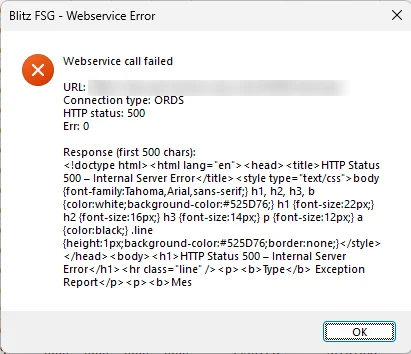
Cause: The size of the POST body sent by Blitz FSG to the ORDS endpoint exceeds Tomcat’s maxPostSize limit (default 2 MB / 2,097,152 bytes). A workbook containing several thousand balance() formulas with many account segments and long ledger names can easily produce a single POST body larger than 2 MB.
Fix: Raise Tomcat’s POST body limits. Edit $CATALINA_HOME/conf/server.xml and add or update these attributes on the HTTP/HTTPS <Connector> that serves the ORDS port:
maxPostSize="-1"— disables the 2 MB POST body limit. Use a specific larger value such as52428800(50 MB) if an unlimited body is not desirable.maxSwallowSize="-1"— prevents Tomcat from aborting partial uploads at 2 MB.connectionTimeout="600000"— raises the 20-second socket timeout to 10 minutes for long-running balance calculations.
Restart Tomcat after the change.
Workaround: If you cannot change the Tomcat configuration (e.g. no access to server-side files), reduce the batch size so each POST stays well below 2 MB by lowering these profile options at Site level:
- Blitz FSG Initial Batch Size — e.g. 1000
- Blitz FSG Maximum Batch Size — e.g. 5000
Lowering the batch size means the FSG framework needs more round-trips, which reduces overall throughput. Prefer the Tomcat fix above when possible.
Diagnosis tip: If the underlying error is something other than POST body size (e.g. ORDS connection pool timeout or a PL/SQL exception in xxen_fsg.balance), the actual stack trace is logged to Tomcat’s catalina.out and localhost..log. Check those logs before raising maxPostSize if the fix above does not resolve the issue.
11.5 Enable ORDS webservice access logging for debugging
Use standalone access logging when troubleshooting calls from Blitz Report, Excel, OAuth token generation, HTTP status errors, or URL routing problems. It records HTTP request metadata such as timestamp, method, URI, status code, remote address and user agent. It does not normally capture full request or response payloads.
Enable access logs
mkdir -p /u01/ords_config/logs/access ords --config /u01/ords_config config set standalone.access.log /u01/ords_config/logs/access ords --config /u01/ords_config config set standalone.access.log.retainDays 7 |
The standalone.access.log.retainDays setting controls how many days of rotated access logs are retained. A value of 7 is usually sufficient for troubleshooting webservice calls while limiting disk usage. Increase it temporarily, for example to 14 or 30 days, if a longer troubleshooting period is required:
ords --config /u01/ords_config config set standalone.access.log.retainDays 14 |
To verify the configured log directory and retention period:
ords --config /u01/ords_config config list | grep standalone.access.log |
Restart ORDS
cd ~ ./stop_ords.sh ./start_ords.sh |
Monitor the logs during a test call
Trigger the failing Blitz Report or ORDS webservice action, then check the newest access log file:
ls -ltr /u01/ords_config/logs/access tail -f /u01/ords_config/logs/access/* |
Use the access log to confirm whether the request reaches ORDS at all, which HTTP path is being called, the response status, and whether the request is arriving at the expected host and context path.
Disable access logs after troubleshooting (optional)
Access logs rotate by date and ORDS removes old files according to standalone.access.log.retainDays. If permanent access logging is not required, remove both access log settings after troubleshooting and restart ORDS:
ords --config /u01/ords_config config unset standalone.access.log ords --config /u01/ords_config config unset standalone.access.log.retainDays cd ~ ./stop_ords.sh ./start_ords.sh |
Security note: access logs may contain IP addresses, URL paths, query strings, user agents and other request metadata. Review them before sharing externally, especially if OAuth or troubleshooting URLs include sensitive parameters.
11.6 ORDS returns “Database Credential Error” (574) or “Account Is Locked” (570)
Symptom: An ORDS installation that used to work suddenly stops serving requests. Instead of the expected response, the browser or the Blitz Report Excel add-in shows an ORDS error page with one of the following:
Database Credential Error HTTP Status Code: 574 ORDS was unable to make a connection to the database. The username or password of the database user specified by db.username configuration setting is invalid. The connection pool named: |default|lo| had the following error(s): ORA-01017: invalid username/password; logon denied |
Account Is Locked HTTP Status Code: 570 ORDS was unable to make a connection to the database. The database user specified by db.username configuration setting is locked. The connection pool named: |default|lo| had the following error(s): ORA-28000: The account is locked. |
Cause: Both errors come from the same place — the database user that the ORDS connection pool logs in with. That user is ORDS_PUBLIC_USER by default and is stored in the pool’s db.username setting; the pool name printed in the message (|default|lo|) identifies the default pool.
- ORA-01017 (574) — the password held in the ORDS configuration wallet no longer matches the password in the database. This typically happens after a DBA resets the
ORDS_PUBLIC_USERpassword, after a database clone or refresh where the ORDS configuration was copied from another environment, or after the password expired and was reset in the database only. - ORA-28000 (570) — the database account is locked. The usual reason is the password profile: with the
DEFAULTprofile,PASSWORD_LIFE_TIMEis 180 days andFAILED_LOGIN_ATTEMPTSis 10, so the password eventually expires and ORDS — which keeps retrying the pool with the stale password — burns through the failed login attempts and the account is locked. It can also be locked manually or by a security policy.
The two errors are often the same incident at different stages: the password expires or is changed, ORDS retries, the failed logins accumulate, and the 574 turns into a 570.
Diagnosis: Check the account status in the database:
sqlplus / as sysdba

select username, account_status, lock_date, expiry_date, profile
from   dba_users
where username in ('ORDS_PUBLIC_USER','ORDS_METADATA'); |
Only ACCOUNT_STATUS = OPEN works. EXPIRED, EXPIRED(GRACE), LOCKED(TIMED) and EXPIRED & LOCKED all produce the errors above.
Confirm which user the failing pool actually uses:
ords --config /u01/ords_config config list |
The output shows db.username for the pool. db.password is a secret and is stored in the pool’s wallet under /u01/ords_config/databases/default/wallet, so it is not printed by config list. If you need to see it, retrieve it with:
ords --config /u01/ords_config config get --secret db.password |
You can then test whether the retrieved password is still valid by logging in with it:
sqlplus ords_public_user@EBSDB |
If SQL*Plus connects, the password stored in the wallet still matches the database. An ORA-01017 confirms that the stored password is stale and has to be reset as described below, and an ORA-28000 means the account is locked.
Fix — step 1: unlock the account and set a known password in the database
sqlplus / as sysdba alter user ords_public_user identified by "new_password" account unlock; |
If the account keeps expiring every few months, ask your DBA to assign ORDS_PUBLIC_USER a profile with PASSWORD_LIFE_TIME UNLIMITED, as is normally done for other application accounts. Otherwise this issue will come back on the profile’s expiry cycle.
Fix — step 2: store the same password on the ORDS side
Because db.password is a secret, it cannot be set with config set — it has to be written to the pool wallet with config secret:
ords --config /u01/ords_config config --db-pool default secret db.password |
ORDS prompts for the password twice and writes it to the wallet of the default pool. Use the matching --db-pool name if the error message shows a pool other than |default|lo|.
For scripted or unattended use, pipe the password in instead:
ords --config /u01/ords_config config --db-pool default secret --password-stdin db.password < /tmp/opu.txt rm -f /tmp/opu.txt |
Fix — step 3: restart ORDS
The connection pool is built at startup, so the new password only takes effect after a restart (see sections 4 and 7):
cd ~ ./stop_ords.sh ./start_ords.sh |
Verify: re-open the ORDS URL (section 8) and re-run the failing Blitz Report action. The account status in dba_users should stay OPEN. If the error persists, confirm the credentials independently with sqlplus ords_public_user@EBSDB and check the ORDS log file in /u01/ords_config/logs.
Related status codes: ORDS reports other database connectivity problems in the same 57x range — 571 Database Connection Error (the database or listener is not reachable, e.g. ORA-12541 / ORA-01034) and 572 Recoverable Database Connection Error (a transient failure that ORDS will retry). Those are not credential problems and are not fixed by resetting db.password.
11.7 ORDS OAuth token request returns HTTP 403 on a plain HTTP URL
Symptom: Login from the Blitz Report Excel add-in fails, and the add-in displays an error dialog containing:
The browser login succeeded but the session could not be validated. Authentication failed (HTTP 401). Please check your credentials. |
The credentials are not the cause, and the HTTP 403 that actually blocks the login is never shown on screen: the add-in reports only the resulting 401. The 403 appears solely in the add-in debug log BlitzReport_Debug.txt in %TEMP%, where the token request can be seen failing before any endpoint call is made:
get_ords_token: Failed - Status:403 Response Status: 401 |
Cause: ORDS verifies that all OAuth2 requests are received over HTTPS and, per the Oracle documentation, “will refuse to service any such requests received over HTTP, returning an HTTP status code of 403 Forbidden”. This is controlled by the ORDS setting security.verifySSL, which defaults to true. When the Blitz Report Webservice ORDS URL profile option (XXEN_WEBSERVICE_ORDS_URL) begins with http://, no bearer token can be obtained and every webservice call then fails with 401.
Fix: serve ORDS over HTTPS and set the profile option to the https:// URL, ending with /. Sections 3.3 and 3.4 cover creating the certificate, and section 10 covers setting the profile option. A self signed or internal CA certificate is sufficient, because the add-in does not validate the ORDS server certificate.
Workaround (development and test environments only): where HTTPS is not available, allow OAuth2 over HTTP on the ORDS host and restart ORDS (see section 7):
ords --config /u01/ords_config config set security.verifySSL false |
Oracle documents this setting as appropriate for development and test environments only, and never for production, because the OAuth client credentials are then transmitted in clear text. To reverse it once HTTPS is available, delete the setting so that it returns to its default of true, and restart ORDS:
ords --config /u01/ords_config config delete security.verifySSL |
Note that config set writes to the default database pool unless --global or --db-pool is specified, so check which file under the ORDS configuration directory holds the entry before deleting it. Move all add-in users to the https:// URL before re-enabling the check: the ORDS URL is held in each user’s add-in environment record, so anyone who has not re-run the Blitz Report Add-in Environment Setup report still holds the http:// URL and stops connecting as soon as the check is active again.
Diagnosis tip: run the DBA ORDS Configuration Validation report. Section 6. Configuration reports the protocol of the effective ORDS URL and flags an http:// URL as an error, and also confirms whether the OAuth client id and secret can be retrieved.
11.8 ORDS webservice calls return HTTP 500 or 401 with ORA-00604 / ORA-01031
Symptom: Blitz Report or Blitz FSG webservice calls over ORDS fail, and Excel shows a Webservice Error dialog with Connection type: ORDS, HTTP status: 500 and an ORDS HTML error page as the response:
Webservice call failed URL: https://ords-host:8443/ords/xxen/ Connection type: ORDS HTTP status: 500 Err: 0 Response (first 500 chars): <!DOCTYPE html> <html> <style type="text/css" media="screen"> ... |
The ORDS log (e.g. catalina.out for Tomcat, or the ORDS log file in /u01/ords_config/logs) shows an InternalServerException for the /xxen_webservices/ calls (e.g. login or get_lov_records), caused by ORA-00604 and ORA-01031 on the ORDS handler metadata query:
SEVERE ... POST ords-host /ords/xxen/xxen_webservices/get_lov_records 500 An unexpected error with the following message occurred: InternalServerException [statusCode=500, logLevel=SEVERE, reasons=[]] ... Caused by: java.sql.SQLException: ORA-00604: error occurred at recursive SQL level 1 ORA-01031: insufficient privileges ... Caused by: Error : 604, Position : 0, Sql = select nvl(h.items_per_page,m.items_per_page) items_per_page, ... cursor(select p.name, p.bind_variable_name, ... from ORDS_METADATA.user_ords_parameters p where p.handler_id = h.id) parameters, h.source from ORDS_METADATA.user_ords_modules m, ORDS_METADATA.user_ords_templates t, ORDS_METADATA.user_ords_handlers h where ... |
ORDS 26.3 reports the same failure as HTTP 401 Unauthorized, with the ORA errors in the response body. The Excel login then ends with The browser login succeeded but the session could not be validated, the OAuth token request can fail with HTTP 500 server_error, and the ORDS log shows a WARNING with the same Caused by query:
WARNING ... POST ords-host /ords/xxen/xxen_webservices/user_responsibilities 401 ORA-00604: error occurred at recursive SQL level 1 ORA-01031: insufficient privileges |
Cause: Oracle Database bug 29049673, a problem with view merging of nested CURSOR expressions introduced in Oracle Database 18c. ORDS reads its REST handler metadata with such a query, which fails before any Blitz Report code is executed. Depending on the roles and privileges involved, only some schemas are affected. This is a database issue, not an ORDS or Blitz Report issue. See Oracle Support notes KB398154 and KB303973.
Workaround: connect as SYS AS SYSDBA to the pluggable database (PDB) that ORDS connects to and disable the corresponding fix control:
sqlplus / as sysdba alter session set container=<your_pdb>; alter system set "_fix_control"='20648883:OFF'; |
The change takes effect immediately, without a database restart. Then restart ORDS, because the database connections it opened before the change keep failing, and retry the failing Blitz Report or Blitz FSG action. Oracle E-Business Suite databases usually have other _fix_control values set already, so record the current setting with show parameter _fix_control before the change and make sure these values are kept when the parameter is written to the spfile.
11.9 Installer reports “Could not enable XXEN for ORDS”
Symptom: the Blitz Report installation log shows the following, and the ORDS endpoints are not configured:
Warning: Could not enable XXEN for ORDS. Output: ... A DBA may need to run: ords_admin.enable_schema(p_schema=>'XXEN'); Skipping ORDS configuration. |
Fix: connect as the Blitz Report custom schema (XXEN by default), never as APPS, enable the schema for ORDS, and then re-run the Blitz Report installation:
sqlplus xxen

begin
  ords.enable_schema(
    p_enabled=>true,
    p_schema=>'XXEN',
    p_url_mapping_type=>'BASE_PATH',
    p_auto_rest_auth=>true
  );
  commit;
end;
/ |
The schema is then exposed under /ords/xxen/, the base path of the Blitz Report Webservice ORDS URL profile option (see section 10).
11.10 OAuth2 client ID and secret show as Not Found
Symptom: the Blitz Report installation log shows WARNING: OAuth client credentials unavailable - cannot perform end-to-end token verification., and the DBA ORDS Configuration Validation report shows OAuth2 Client ID and OAuth2 Client Secret as Not Found, although the module and endpoints are in place.
Cause: APPS reads the OAuth2 client credentials through the package XXEN_WEBSERVICES_ORDS_AUTH, which is owned by the custom schema, and has no privilege to execute it. Connected as APPS, the following query fails with ORA-00904:
select xxen.xxen_webservices_ords_auth.ords_client_id from dual; |
Fix: connect as the custom schema (XXEN by default) and grant execute to APPS:
sqlplus xxen grant execute on xxen_webservices_ords_auth to apps; |
Then re-run the DBA ORDS Configuration Validation report, which should show the client ID and secret as available.
12 Useful links
You may find more information on ORDS on these links:
https://redstack.dev/2022/05/17/installing-oracle-rest-data-services/
https://blog.cloudnueva.com/running-ords-standalone-mode
https://www.thatjeffsmith.com/archive/2024/06/ords-installs-upgrades-the-tns-edition/
https://oracle-base.com/articles/misc/oracle-rest-data-services-ords-installation-on-tomcat-22-onward
https://oracle-base.com/articles/misc/oracle-rest-data-services-ords-standalone-mode-22-onward
https://docs.oracle.com/en/database/oracle/oracle-rest-data-services/25.2/ordig/installing-and-configuring-oracle-rest-data-services.html#GUID-2D13E9CD-EB0C-4CE7-82B8-45BD5C62897B