
QA Plan Relationship Upload

Description
QA Plan Relationship Upload creates, updates and deletes Oracle Quality parent-child collection plan relationships from Excel. Each row links a parent plan to a child plan in an inventory organization, with the entry and layout mode of the child plan, and optionally an element relationship (for example the parent’s Item copied to the child) and a criterion that controls when child results are entered.
When to use it
- Link existing collection plans as parent and child in bulk, across one or more inventory organizations.
- Copy element values from parent to child plans, for example Item, by defining the element relationship together with the plan relationship.
- Change the entry mode, layout mode, auto row count or default parent specification of existing relationships in bulk.
- Change the relationship type or link flag of existing element relationships, or the operator and values of existing criteria.
- Remove obsolete plan relationships, or copy relationship setups between environments.
Before you start
- Access to the upload in Blitz Report.
- The parent and the child collection plan already exist in the organization. The upload links existing plans and does not create them.
- Every element you relate or use as a criterion is already on its plan: the parent and criteria elements on the parent plan, the child element on the child plan.
Step 1 – Set the parameters
Open QA Plan Relationship Upload in Blitz Report and set the parameters:
| Parameter | Meaning |
|---|---|
| Upload Mode | Create opens an empty sheet for new relationships; Create, Update (default) downloads existing relationships for editing and lets you add new ones. |
| Organization | The inventory organization whose plan relationships are downloaded. Only organizations with collection plans are listed. |
| Parent Plan | Downloads only the relationships of this parent plan. |
| Child Plan | Downloads only the relationships of this child plan. |
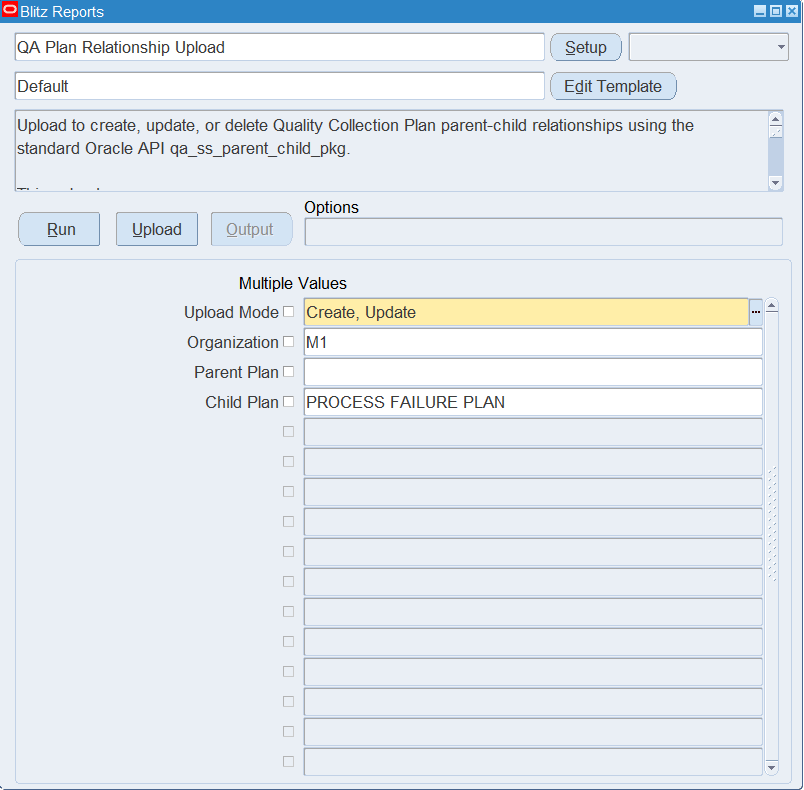
Step 2 – Run to download the Excel file
Click Run. The Excel file downloads and opens with one row per existing plan relationship and its element relationships and criteria, or an empty sheet.
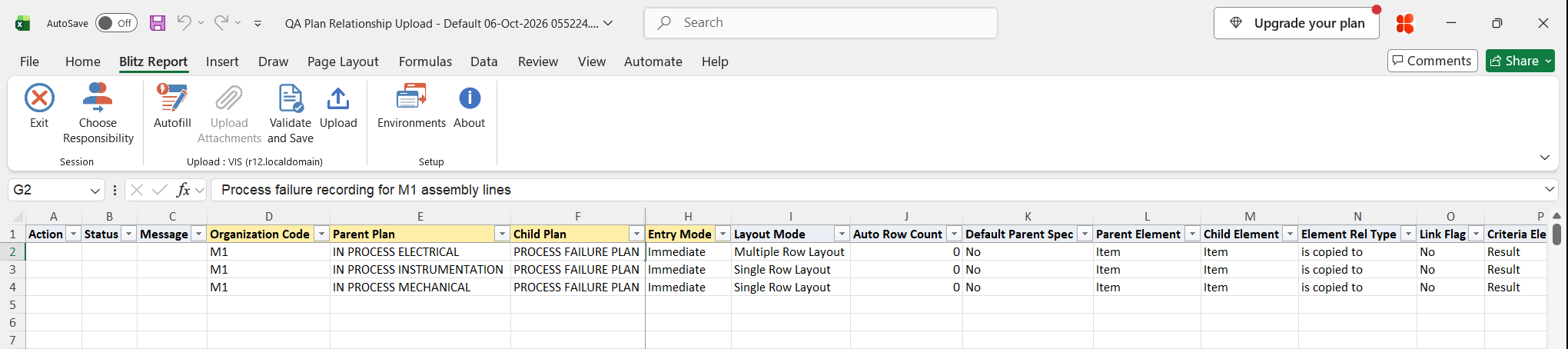
Step 3 – Enter or change the relationships
Organization Code, Parent Plan and Child Plan identify a relationship; the plan lists show the plans of the row’s organization. Set the Entry Mode:
- Immediate – child results are entered right after the parent record.
- Delayed – child results are entered later.
- Automatic – child records are created automatically when the parent record meets the criteria.
- History – child records are created automatically when the parent record changes.
Optionally set Layout Mode (Single Row Layout or Multiple Row Layout), Auto Row Count and Default Parent Spec. Blank values default to 0 and No.
To relate elements, enter a Parent Element and a Child Element with the Element Rel Type (for example is copied to, is sum of, is average of; default is copied to) and the Link Flag. For a criterion, enter a Criteria Element from the parent plan, a Criteria Operator (for example equals, between, is entered) and the Criteria From Value and, for ranges, Criteria To Value.
The upload checks whether the parent and child plan are already related: if not, the row creates the relationship with its element relationship and criterion; if they are, the row updates the relationship and the existing element relationship and criterion that match the row’s elements. To remove a relationship, set Delete Record to Yes.
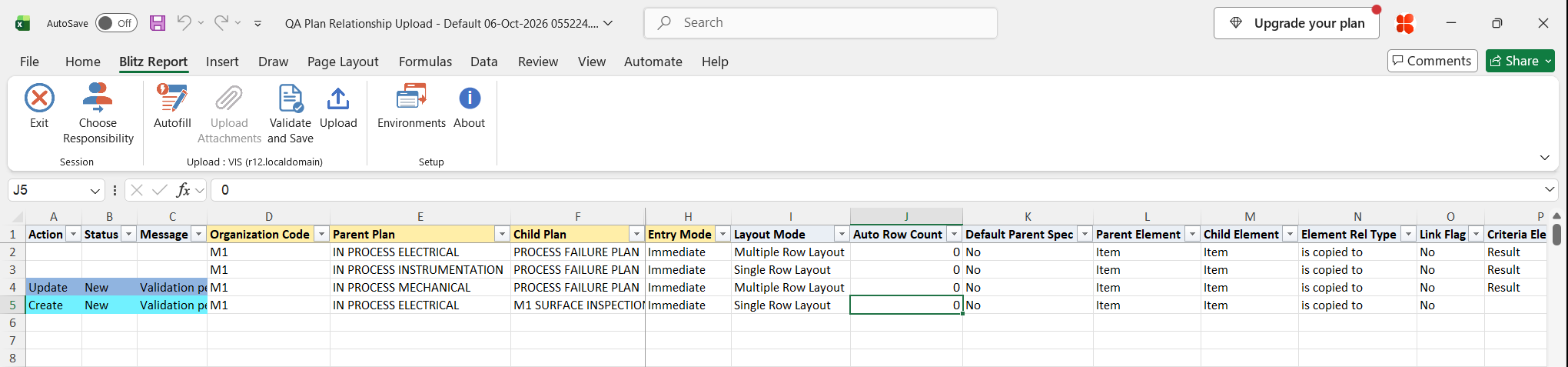
Step 4 – Validate and Save
Click Validate and Save. This checks for missing required values and saves the file. Correct any rows it flags before uploading.
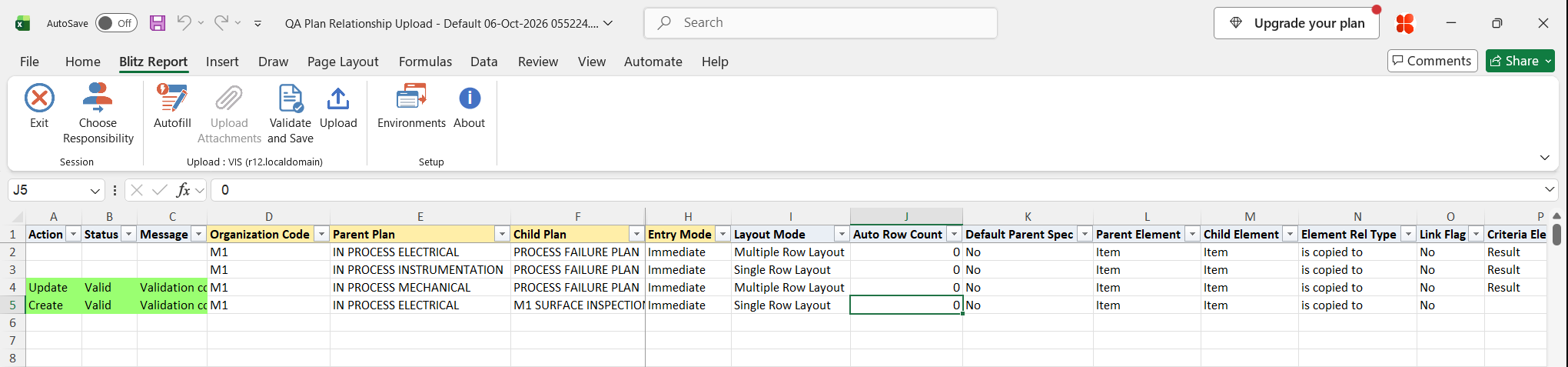
Step 5 – Upload the file
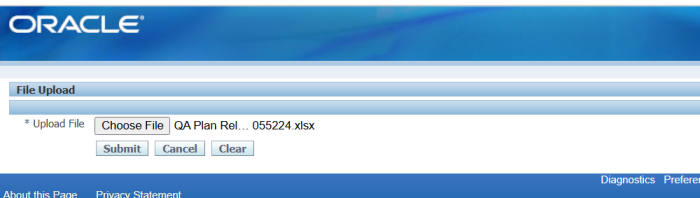
In Blitz Report click Upload and select the saved file. This submits the upload request, which creates, updates or deletes each plan relationship.
Step 6 – Review the result report
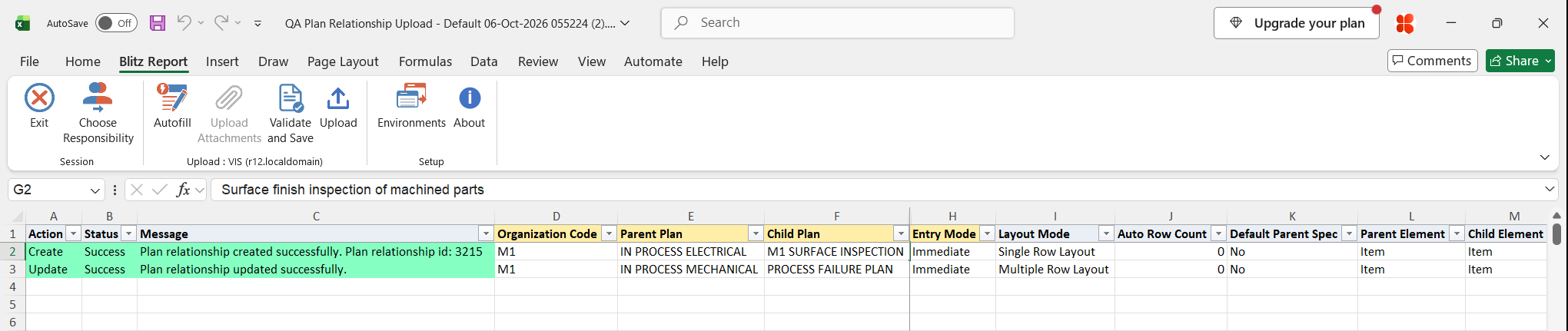
When the request completes, a result report opens listing every uploaded row with its status and message, and the relationship as it is now stored in Oracle Quality.
What’s produced
- Parent-child collection plan relationships created, updated or deleted, with their element relationships and criteria.
- A result report listing every row with a status (success or error) and a message.
Common questions
Do I need to create the plans first?
Yes. The parent and child plans and their elements must already exist in the organization.
How does the upload decide between create and update?
By the parent and child plan. If the two plans are not yet related, the row creates the relationship; otherwise it updates it.
Are element relationships and criteria required?
No. An element relationship is processed only when both Parent Element and Child Element are filled, a criterion only when both Criteria Element and Criteria Operator are filled.
Can I add an element relationship or criterion to an existing relationship?
No. On an existing relationship the upload updates only the element relationships and criteria that already exist for the row’s elements. New element relationships and criteria are added when the relationship is created.
Why does a relationship appear on several rows?
The download shows one row for each element relationship and criterion of the relationship.
How do I delete a relationship?
Download in Create, Update mode, set Delete Record to Yes on the row and upload. The Yes option is available once Parent Plan and Child Plan are filled.
Troubleshooting
| Message | Cause | What to do |
|---|---|---|
| Plan relationship does not exist for deletion. | Delete Record is Yes but the parent and child plan are not related. | Check the organization and the parent and child plan names, or clear Delete Record. |
| Plan relationship validation failed: … | Oracle Quality rejected the relationship, for example the plans cannot be related or the entry or layout mode is invalid. | Read the Oracle reason that follows the message and correct the row. |
| Element relationship validation failed: … | Oracle Quality rejected the parent and child element pairing or the relationship type. | Check that both elements are on their plans and that the Element Rel Type is valid for them. |
| Parent Plan or Child Plan list is empty | The Organization Code of the row has no collection plans. | Enter an Organization Code that has collection plans. |
SQL 45 lines
select null action_, null status_, null message_, null modified_columns_, mp.organization_code, qpp.name parent_plan, qpc.name child_plan, qpc.description child_plan_description, xxen_util.meaning(qppr.data_entry_mode,'QA_PC_DATA_ENTRY_MODE',250) entry_mode, xxen_util.meaning(qppr.layout_mode,'QA_PC_LAYOUT_MODE',250) layout_mode, qppr.auto_row_count, xxen_util.meaning(decode(qppr.default_parent_spec,1,'Y','N'),'YES_NO',0) default_parent_spec, qc_p.name parent_element, qc_c.name child_element, xxen_util.meaning(qper.element_relationship_type,'QA_PC_ELEMENT_RELATIONSHIP',250) element_rel_type, xxen_util.meaning(decode(qper.link_flag,1,'Y','N'),'YES_NO',0) link_flag, qc_cr.name criteria_element, xxen_util.meaning(qpcc.operator,'QA_PC_OPERATOR',700) criteria_operator, qpcc.low_value criteria_from_value, qpcc.high_value criteria_to_value, null delete_record, qppr.plan_relationship_id, qper.element_relationship_id, qpcc.criteria_id from mtl_parameters mp, qa_plans qpp, qa_pc_plan_relationship qppr, qa_plans qpc, qa_pc_element_relationship qper, qa_chars qc_p, qa_chars qc_c, qa_pc_criteria qpcc, qa_chars qc_cr where 1=1 and qpp.organization_id=mp.organization_id and qppr.parent_plan_id=qpp.plan_id and qpc.plan_id=qppr.child_plan_id and qper.plan_relationship_id(+)=qppr.plan_relationship_id and qc_p.char_id(+)=qper.parent_char_id and qc_c.char_id(+)=qper.child_char_id and qpcc.plan_relationship_id(+)=qppr.plan_relationship_id and qc_cr.char_id(+)=qpcc.char_id |
Parameters 4
| Parameter | Type | List of values SQL | |
|---|---|---|---|
| Upload Mode | LOV |
| |
| Organization | LOV |
| |
| Parent Plan | LOV |
| |
| Child Plan | LOV |
|