
OPM Formula Upload

Description
OPM Formula Upload creates and updates Oracle Process Manufacturing (OPM) formulas from Excel through the Oracle formula APIs: the formula header together with its ingredient, product and by-product lines, and optionally the formula and formula line descriptive flexfields. You can load new formulas or new versions of existing formulas, change header values and lines of existing formulas, add lines, and delete individual lines.
When to use it
- Mass-load new formulas, with all their lines, instead of keying them into the Formulas window.
- Create a new version of an existing formula, for example with changed ingredient quantities.
- Bulk-update header values (description, class, owner) on many existing formulas.
- Add lines, or change quantities, UOMs, scaling and other line attributes, on existing formulas in bulk.
- Remove specific formula lines in bulk.
Before you start
- Your responsibility has organization access to the process-enabled owner organization. The Organization Code list and the download only include process-enabled organizations your responsibility can access.
- The items are recipe-enabled in the owner organization, and each line’s UOM can be converted from the item’s primary UOM.
- Every new formula needs at least one Ingredient line and at least one Product line.
Step 1 – Set the parameters
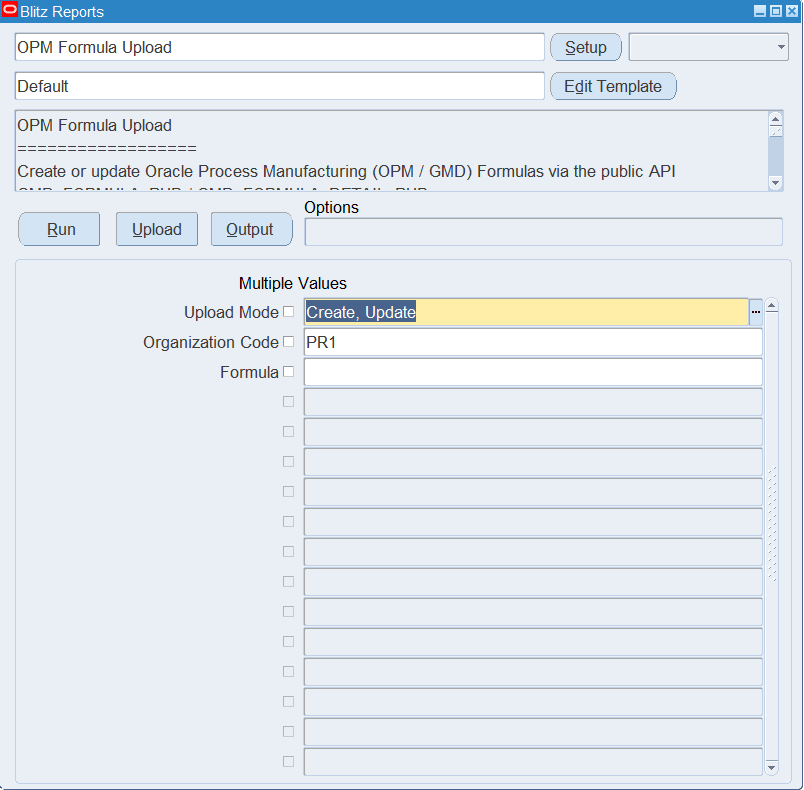
Open OPM Formula Upload in Blitz Report and set the parameters:
| Parameter | Meaning |
|---|---|
| Upload Mode | Create (default) opens an empty sheet for new formulas; Create, Update downloads existing formulas for editing and lets you add new ones. |
| Organization Code | The process-enabled owner organization whose formulas are downloaded. |
| Formula | Downloads only this formula number, with all its versions. |
In Create, Update mode, inactive and deleted formulas are not downloaded. Leave Formula empty to download all formulas of the organization. The example downloads all formulas of process organization PR1.
Step 2 – Run to download the Excel file
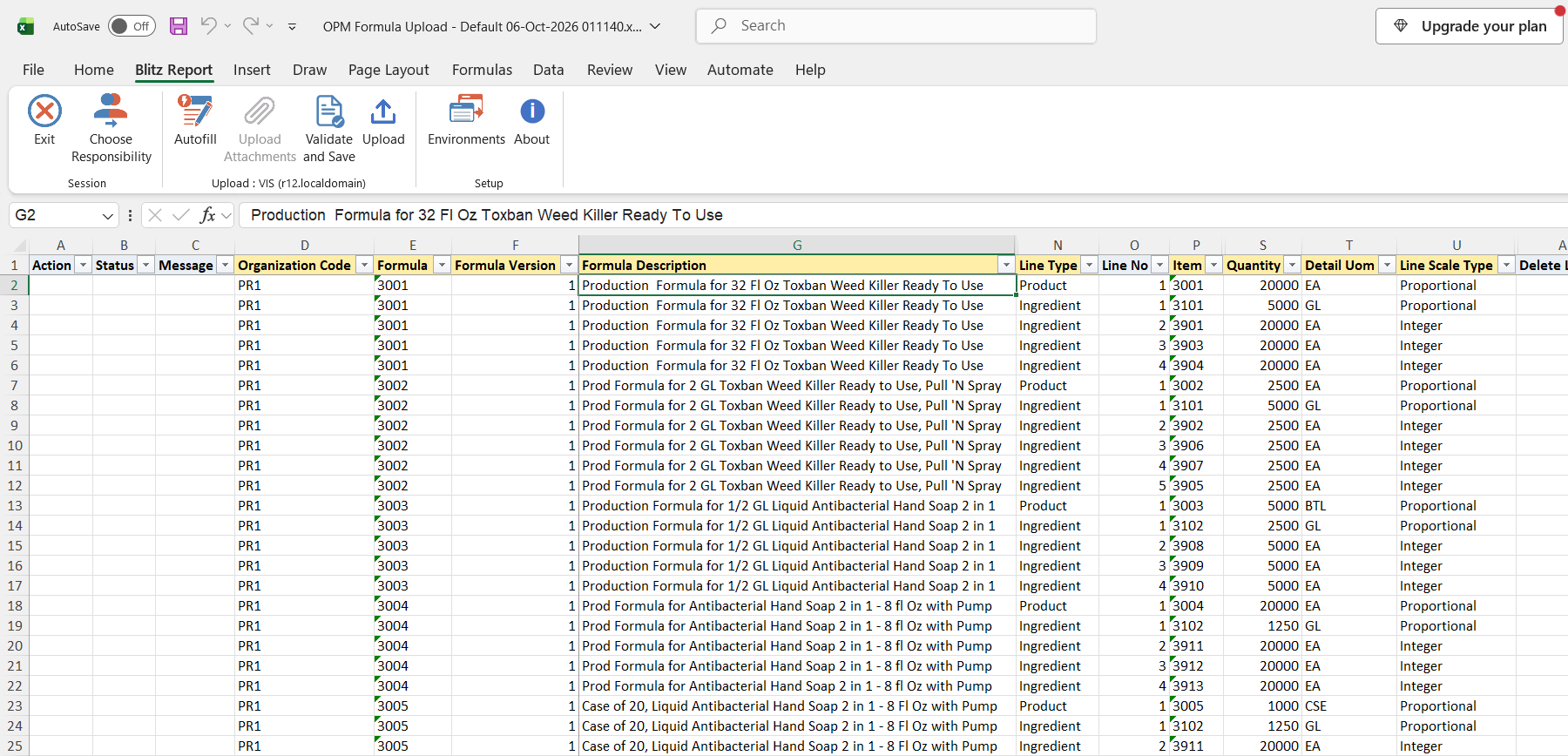
Click Run. The Excel file downloads and opens, with one row per line of each existing formula, or an empty sheet in Create mode.
Step 3 – Enter or change the formulas
Each row is one formula line. The header columns (Organization Code, Formula, Formula Version, Formula Description, Formula Description 2, Formula Class, Owner, Header Scale Type, Calculate Product Quantity) repeat on every line of the same formula, and the rows of one formula must be kept together. Organization Code, Formula and Formula Version identify a formula: a combination that does not exist yet creates a new formula, or a new version when the formula number already exists. Formula numbers are stored in upper case.
On each line enter the Line Type (Ingredient, Product or By-Product), Line No, Item, Quantity and Line Scale Type. Item Description is filled in from the item, and Detail Uom defaults to the item’s primary UOM. Optional line columns left empty default to Release Type Automatic, Phantom Type Not Phantom, Rework Type Not Rework, Contribute To Yield and Contribute To Step Quantity Yes, Scrap Factor and Cost Allocation 0, so enter the Cost Allocation on product lines (1 for a formula with a single product). The Owner of a new formula defaults to your user.
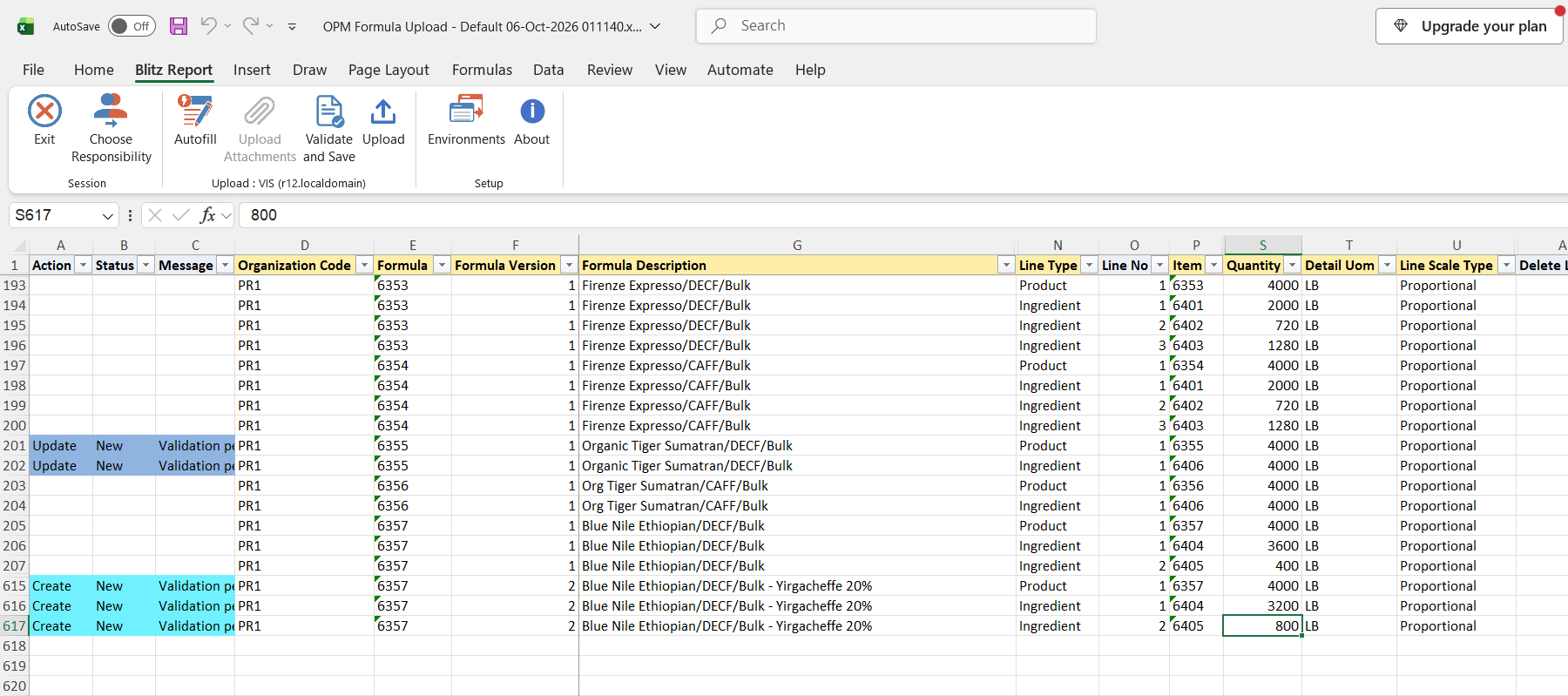
On a downloaded formula you can change the header values and the line values, and add rows (without a line) for new lines. To change a header value, change it on every row of the formula. To remove an existing line, set Delete Line to Yes on its row; it is offered only on downloaded lines. Formula Status is for information: new formulas are created with status New, and the status of an existing formula is not changed. Calculate Product Quantity is set when a formula is created and is not changed on existing formulas.
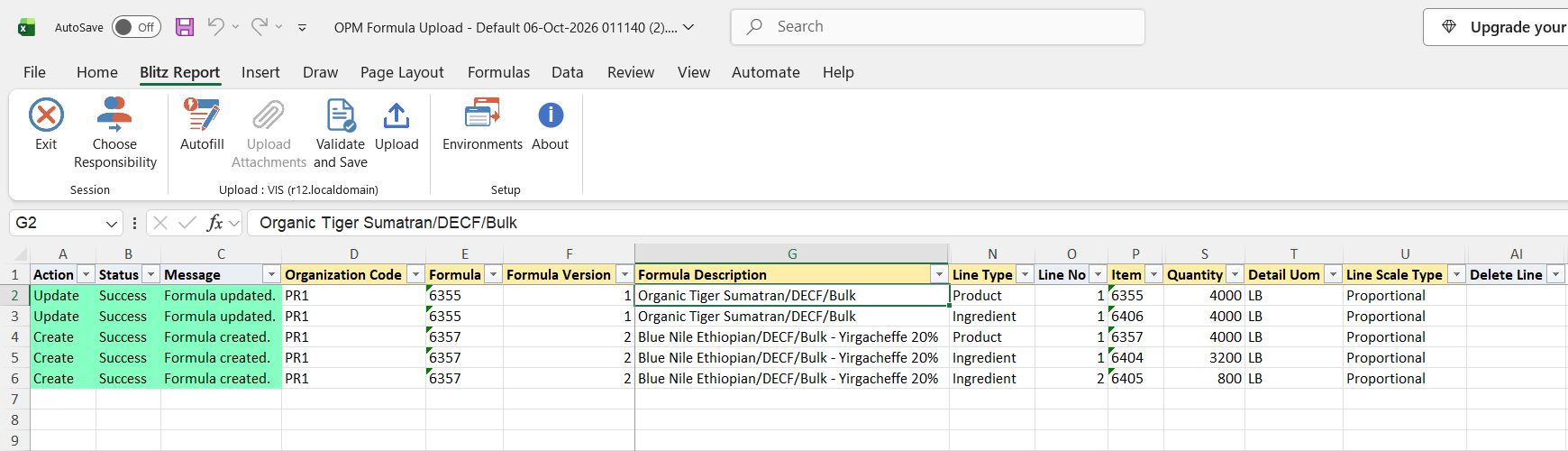
In the example, the description of formula 6355 is changed on both of its rows, and three rows add version 2 of formula 6357 with a product line and two ingredient lines using a different blend of green beans.
Step 4 – Validate and Save
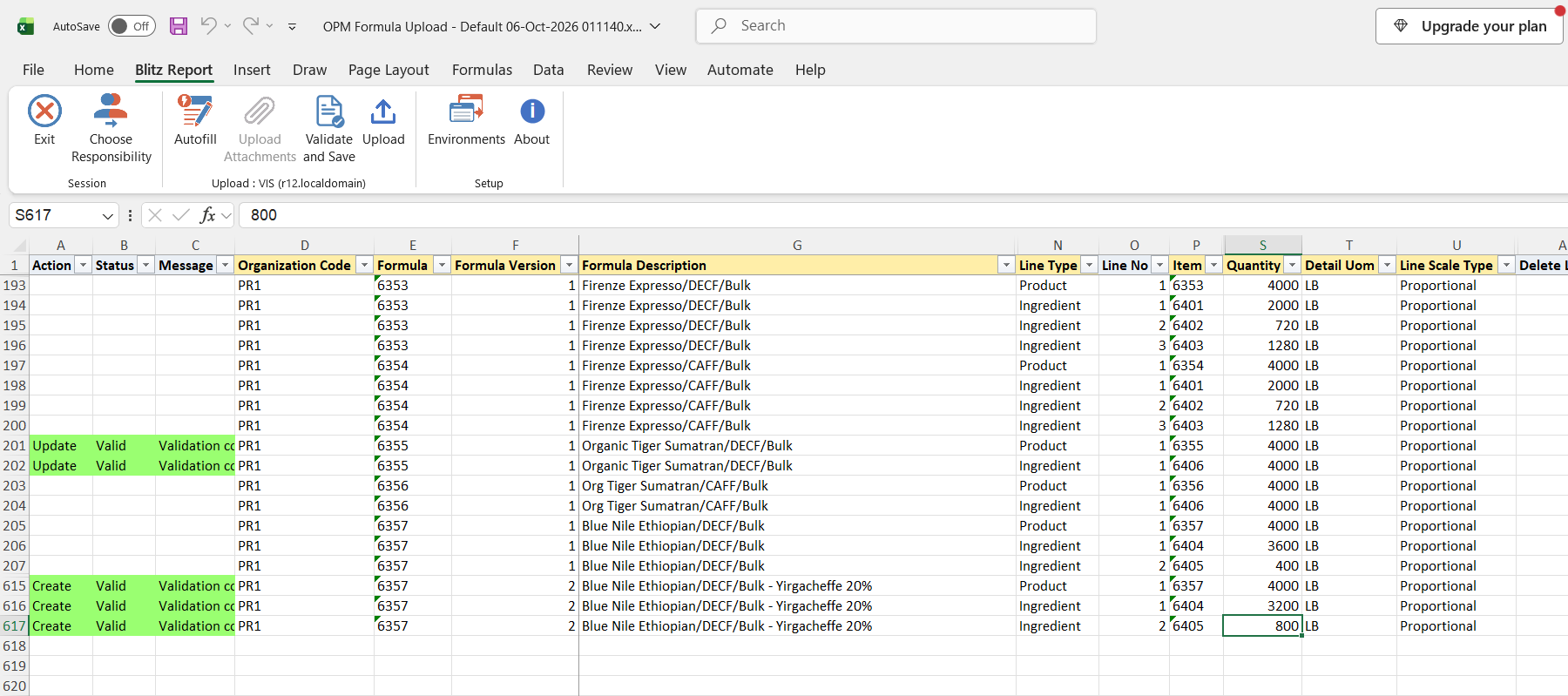
Click Validate and Save. This checks for missing required values and saves the file. Correct any rows it flags before uploading.
Step 5 – Upload the file
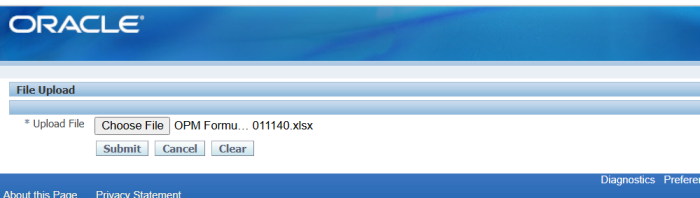
In Blitz Report click Upload and select the saved file. This submits the upload request, which processes each formula as a unit: it creates the formula with all its lines, or updates the header and then updates, adds and deletes the lines.
Step 6 – Review the result report
When the request completes, a result report opens listing every uploaded row with its status and message, Formula created. or Formula updated. for successful rows. If any row of a formula fails, nothing is saved for that formula and all its rows show the error.
What’s produced
- New formulas and formula versions in status New, with their ingredient, product and by-product lines.
- Updated formula headers and lines on existing formulas, with added and deleted lines.
- A result report listing every row with a status (success or error) and a message.
Common questions
How do I create a new version of a formula?
Add new rows with the same Organization Code and Formula, a Formula Version that does not exist yet, and all lines of the new version, including at least one Ingredient and one Product line.
Can I change a formula’s status with the upload?
No. New formulas start in status New, and status changes go through the formula status approval in Oracle.
Can I delete a whole formula?
No. The upload deletes individual lines only (Delete Line = Yes); it does not delete or inactivate the formula header.
Can I change a formula’s organization or version?
No. Organization Code, Formula and Formula Version identify the formula. Entering different values creates a new formula or version instead.
Can I load the descriptive flexfields?
Yes. The default template hides them; run the upload without a template, or with a template that includes the formula and formula line flexfield columns, to enter the context and attribute values.
Why does the Organization Code list not show my organization?
It only lists process-enabled organizations that your current responsibility has access to. Switch to a responsibility with access to the organization.
Troubleshooting
| Message | Cause | What to do |
|---|---|---|
| A formula must have at least one Ingredient and at least one Product line. | A new formula or version has no Product row, or no Ingredient row. | Add the missing line rows for that formula, kept together with its other rows, and upload again. |
| Organization “…” is not a valid process-enabled organization. | The Organization Code does not exist or is not process-enabled. | Use a process-enabled organization from the list. |
| Formula attributes: … | A formula descriptive flexfield value failed validation. | Check the context and values against the flexfield setup. |
| Formula line attributes: … | A formula line descriptive flexfield value failed validation. | Check the context and values against the flexfield setup. |
| Other messages from Oracle, for example on items, UOMs or quantities | The Oracle formula API rejected the formula, for example because an item is not recipe-enabled or the UOM cannot be converted from the item’s primary UOM. | Correct the value the message names, and upload again. |
| All rows of a formula show the same error | One row of the formula failed, and the formula is processed as a unit. | Fix the row the message refers to and upload the formula again. |
SQL 218 lines
select null action_, null status_, null message_, null modified_columns_, row_number() over (order by x.formula, x.formula_version, x.line_type_sort, x.line_no) upload_row, x.organization_code, x.formula, x.formula_version, x.formula_description, x.formula_description_2, x.formula_class, x.owner, x.header_scale_type, x.calculate_product_quantity, x.formula_status, x.line_type, x.line_no, x.item, x.item_description, x.revision, x.quantity, x.detail_uom, x.line_scale_type, x.release_type, x.scrap_factor, x.phantom_type, x.rework_type, x.contribute_to_yield, x.contribute_to_step_quantity, x.cost_allocation, x.product_percent, x.by_product_type, x.scale_multiple, x.scale_rounding_variance, x.rounding_direction, x.ingredient_end_date, x.delete_line, x.fa_attribute_category, x.fa_attribute1, x.fa_attribute2, x.fa_attribute3, x.fa_attribute4, x.fa_attribute5, x.fa_attribute6, x.fa_attribute7, x.fa_attribute8, x.fa_attribute9, x.fa_attribute10, x.fa_attribute11, x.fa_attribute12, x.fa_attribute13, x.fa_attribute14, x.fa_attribute15, x.fa_attribute16, x.fa_attribute17, x.fa_attribute18, x.fa_attribute19, x.fa_attribute20, x.fa_attribute21, x.fa_attribute22, x.fa_attribute23, x.fa_attribute24, x.fa_attribute25, x.fa_attribute26, x.fa_attribute27, x.fa_attribute28, x.fa_attribute29, x.fa_attribute30, x.ld_attribute_category, x.ld_attribute1, x.ld_attribute2, x.ld_attribute3, x.ld_attribute4, x.ld_attribute5, x.ld_attribute6, x.ld_attribute7, x.ld_attribute8, x.ld_attribute9, x.ld_attribute10, x.ld_attribute11, x.ld_attribute12, x.ld_attribute13, x.ld_attribute14, x.ld_attribute15, x.ld_attribute16, x.ld_attribute17, x.ld_attribute18, x.ld_attribute19, x.ld_attribute20, x.ld_attribute21, x.ld_attribute22, x.ld_attribute23, x.ld_attribute24, x.ld_attribute25, x.ld_attribute26, x.ld_attribute27, x.ld_attribute28, x.ld_attribute29, x.ld_attribute30, x.formula_id, x.formula_line_id from ( select mp.organization_code, ffmv.formula_no formula, ffmv.formula_vers formula_version, ffmv.formula_desc1 formula_description, ffmv.formula_desc2 formula_description_2, ffmv.formula_class, (select fu.user_name from fnd_user fu where fu.user_id=ffmv.owner_id) owner, xxen_util.meaning(to_char(ffmv.scale_type),'SCALE_TYPE',552) header_scale_type, xxen_util.meaning(ffmv.auto_product_calc,'YES_NO',552) calculate_product_quantity, (select gsv.meaning from gmd_status_vl gsv where gsv.status_code=ffmv.formula_status) formula_status, xxen_util.meaning(to_char(fmd.line_type),'GMD_FORMULA_ITEM_TYPE',552) line_type, fmd.line_no, msiv.concatenated_segments item, msiv.description item_description, fmd.revision, fmd.qty quantity, fmd.detail_uom, xxen_util.meaning(to_char(fmd.scale_type),'SCALE_TYPE',552) line_scale_type, xxen_util.meaning(to_char(fmd.release_type),'GMD_MATERIAL_RELEASE_TYPE',552) release_type, fmd.scrap_factor, decode(fmd.phantom_type,0,'Not Phantom',1,'Automatic Phantom',2,'Manual Phantom') phantom_type, xxen_util.meaning(to_char(fmd.rework_type),'GMD_REWORK_TYPE',552) rework_type, xxen_util.meaning(fmd.contribute_yield_ind,'YES_NO',552) contribute_to_yield, xxen_util.meaning(fmd.contribute_step_qty_ind,'YES_NO',552) contribute_to_step_quantity, fmd.cost_alloc cost_allocation, fmd.prod_percent product_percent, xxen_util.meaning(fmd.by_product_type,'GMD_BY_PRODUCT_TYPE',552) by_product_type, fmd.scale_multiple, fmd.scale_rounding_variance, xxen_util.meaning(to_char(fmd.rounding_direction),'GMD_ROUNDING_DIRECTION',552) rounding_direction, fmd.ingredient_end_date, to_char(null) delete_line, xxen_util.display_flexfield_context(552,'FORMULA_FLEX',ffmv.attribute_category) fa_attribute_category, xxen_util.display_flexfield_value(552,'FORMULA_FLEX',ffmv.attribute_category,'ATTRIBUTE1',ffmv.rowid,ffmv.attribute1) fa_attribute1, xxen_util.display_flexfield_value(552,'FORMULA_FLEX',ffmv.attribute_category,'ATTRIBUTE2',ffmv.rowid,ffmv.attribute2) fa_attribute2, xxen_util.display_flexfield_value(552,'FORMULA_FLEX',ffmv.attribute_category,'ATTRIBUTE3',ffmv.rowid,ffmv.attribute3) fa_attribute3, xxen_util.display_flexfield_value(552,'FORMULA_FLEX',ffmv.attribute_category,'ATTRIBUTE4',ffmv.rowid,ffmv.attribute4) fa_attribute4, xxen_util.display_flexfield_value(552,'FORMULA_FLEX',ffmv.attribute_category,'ATTRIBUTE5',ffmv.rowid,ffmv.attribute5) fa_attribute5, xxen_util.display_flexfield_value(552,'FORMULA_FLEX',ffmv.attribute_category,'ATTRIBUTE6',ffmv.rowid,ffmv.attribute6) fa_attribute6, xxen_util.display_flexfield_value(552,'FORMULA_FLEX',ffmv.attribute_category,'ATTRIBUTE7',ffmv.rowid,ffmv.attribute7) fa_attribute7, xxen_util.display_flexfield_value(552,'FORMULA_FLEX',ffmv.attribute_category,'ATTRIBUTE8',ffmv.rowid,ffmv.attribute8) fa_attribute8, xxen_util.display_flexfield_value(552,'FORMULA_FLEX',ffmv.attribute_category,'ATTRIBUTE9',ffmv.rowid,ffmv.attribute9) fa_attribute9, xxen_util.display_flexfield_value(552,'FORMULA_FLEX',ffmv.attribute_category,'ATTRIBUTE10',ffmv.rowid,ffmv.attribute10) fa_attribute10, xxen_util.display_flexfield_value(552,'FORMULA_FLEX',ffmv.attribute_category,'ATTRIBUTE11',ffmv.rowid,ffmv.attribute11) fa_attribute11, xxen_util.display_flexfield_value(552,'FORMULA_FLEX',ffmv.attribute_category,'ATTRIBUTE12',ffmv.rowid,ffmv.attribute12) fa_attribute12, xxen_util.display_flexfield_value(552,'FORMULA_FLEX',ffmv.attribute_category,'ATTRIBUTE13',ffmv.rowid,ffmv.attribute13) fa_attribute13, xxen_util.display_flexfield_value(552,'FORMULA_FLEX',ffmv.attribute_category,'ATTRIBUTE14',ffmv.rowid,ffmv.attribute14) fa_attribute14, xxen_util.display_flexfield_value(552,'FORMULA_FLEX',ffmv.attribute_category,'ATTRIBUTE15',ffmv.rowid,ffmv.attribute15) fa_attribute15, xxen_util.display_flexfield_value(552,'FORMULA_FLEX',ffmv.attribute_category,'ATTRIBUTE16',ffmv.rowid,ffmv.attribute16) fa_attribute16, xxen_util.display_flexfield_value(552,'FORMULA_FLEX',ffmv.attribute_category,'ATTRIBUTE17',ffmv.rowid,ffmv.attribute17) fa_attribute17, xxen_util.display_flexfield_value(552,'FORMULA_FLEX',ffmv.attribute_category,'ATTRIBUTE18',ffmv.rowid,ffmv.attribute18) fa_attribute18, xxen_util.display_flexfield_value(552,'FORMULA_FLEX',ffmv.attribute_category,'ATTRIBUTE19',ffmv.rowid,ffmv.attribute19) fa_attribute19, xxen_util.display_flexfield_value(552,'FORMULA_FLEX',ffmv.attribute_category,'ATTRIBUTE20',ffmv.rowid,ffmv.attribute20) fa_attribute20, xxen_util.display_flexfield_value(552,'FORMULA_FLEX',ffmv.attribute_category,'ATTRIBUTE21',ffmv.rowid,ffmv.attribute21) fa_attribute21, xxen_util.display_flexfield_value(552,'FORMULA_FLEX',ffmv.attribute_category,'ATTRIBUTE22',ffmv.rowid,ffmv.attribute22) fa_attribute22, xxen_util.display_flexfield_value(552,'FORMULA_FLEX',ffmv.attribute_category,'ATTRIBUTE23',ffmv.rowid,ffmv.attribute23) fa_attribute23, xxen_util.display_flexfield_value(552,'FORMULA_FLEX',ffmv.attribute_category,'ATTRIBUTE24',ffmv.rowid,ffmv.attribute24) fa_attribute24, xxen_util.display_flexfield_value(552,'FORMULA_FLEX',ffmv.attribute_category,'ATTRIBUTE25',ffmv.rowid,ffmv.attribute25) fa_attribute25, xxen_util.display_flexfield_value(552,'FORMULA_FLEX',ffmv.attribute_category,'ATTRIBUTE26',ffmv.rowid,ffmv.attribute26) fa_attribute26, xxen_util.display_flexfield_value(552,'FORMULA_FLEX',ffmv.attribute_category,'ATTRIBUTE27',ffmv.rowid,ffmv.attribute27) fa_attribute27, xxen_util.display_flexfield_value(552,'FORMULA_FLEX',ffmv.attribute_category,'ATTRIBUTE28',ffmv.rowid,ffmv.attribute28) fa_attribute28, xxen_util.display_flexfield_value(552,'FORMULA_FLEX',ffmv.attribute_category,'ATTRIBUTE29',ffmv.rowid,ffmv.attribute29) fa_attribute29, xxen_util.display_flexfield_value(552,'FORMULA_FLEX',ffmv.attribute_category,'ATTRIBUTE30',ffmv.rowid,ffmv.attribute30) fa_attribute30, xxen_util.display_flexfield_context(552,'FM_DETAIL_FLEX',fmd.attribute_category) ld_attribute_category, xxen_util.display_flexfield_value(552,'FM_DETAIL_FLEX',fmd.attribute_category,'ATTRIBUTE1',fmd.rowid,fmd.attribute1) ld_attribute1, xxen_util.display_flexfield_value(552,'FM_DETAIL_FLEX',fmd.attribute_category,'ATTRIBUTE2',fmd.rowid,fmd.attribute2) ld_attribute2, xxen_util.display_flexfield_value(552,'FM_DETAIL_FLEX',fmd.attribute_category,'ATTRIBUTE3',fmd.rowid,fmd.attribute3) ld_attribute3, xxen_util.display_flexfield_value(552,'FM_DETAIL_FLEX',fmd.attribute_category,'ATTRIBUTE4',fmd.rowid,fmd.attribute4) ld_attribute4, xxen_util.display_flexfield_value(552,'FM_DETAIL_FLEX',fmd.attribute_category,'ATTRIBUTE5',fmd.rowid,fmd.attribute5) ld_attribute5, xxen_util.display_flexfield_value(552,'FM_DETAIL_FLEX',fmd.attribute_category,'ATTRIBUTE6',fmd.rowid,fmd.attribute6) ld_attribute6, xxen_util.display_flexfield_value(552,'FM_DETAIL_FLEX',fmd.attribute_category,'ATTRIBUTE7',fmd.rowid,fmd.attribute7) ld_attribute7, xxen_util.display_flexfield_value(552,'FM_DETAIL_FLEX',fmd.attribute_category,'ATTRIBUTE8',fmd.rowid,fmd.attribute8) ld_attribute8, xxen_util.display_flexfield_value(552,'FM_DETAIL_FLEX',fmd.attribute_category,'ATTRIBUTE9',fmd.rowid,fmd.attribute9) ld_attribute9, xxen_util.display_flexfield_value(552,'FM_DETAIL_FLEX',fmd.attribute_category,'ATTRIBUTE10',fmd.rowid,fmd.attribute10) ld_attribute10, xxen_util.display_flexfield_value(552,'FM_DETAIL_FLEX',fmd.attribute_category,'ATTRIBUTE11',fmd.rowid,fmd.attribute11) ld_attribute11, xxen_util.display_flexfield_value(552,'FM_DETAIL_FLEX',fmd.attribute_category,'ATTRIBUTE12',fmd.rowid,fmd.attribute12) ld_attribute12, xxen_util.display_flexfield_value(552,'FM_DETAIL_FLEX',fmd.attribute_category,'ATTRIBUTE13',fmd.rowid,fmd.attribute13) ld_attribute13, xxen_util.display_flexfield_value(552,'FM_DETAIL_FLEX',fmd.attribute_category,'ATTRIBUTE14',fmd.rowid,fmd.attribute14) ld_attribute14, xxen_util.display_flexfield_value(552,'FM_DETAIL_FLEX',fmd.attribute_category,'ATTRIBUTE15',fmd.rowid,fmd.attribute15) ld_attribute15, xxen_util.display_flexfield_value(552,'FM_DETAIL_FLEX',fmd.attribute_category,'ATTRIBUTE16',fmd.rowid,fmd.attribute16) ld_attribute16, xxen_util.display_flexfield_value(552,'FM_DETAIL_FLEX',fmd.attribute_category,'ATTRIBUTE17',fmd.rowid,fmd.attribute17) ld_attribute17, xxen_util.display_flexfield_value(552,'FM_DETAIL_FLEX',fmd.attribute_category,'ATTRIBUTE18',fmd.rowid,fmd.attribute18) ld_attribute18, xxen_util.display_flexfield_value(552,'FM_DETAIL_FLEX',fmd.attribute_category,'ATTRIBUTE19',fmd.rowid,fmd.attribute19) ld_attribute19, xxen_util.display_flexfield_value(552,'FM_DETAIL_FLEX',fmd.attribute_category,'ATTRIBUTE20',fmd.rowid,fmd.attribute20) ld_attribute20, xxen_util.display_flexfield_value(552,'FM_DETAIL_FLEX',fmd.attribute_category,'ATTRIBUTE21',fmd.rowid,fmd.attribute21) ld_attribute21, xxen_util.display_flexfield_value(552,'FM_DETAIL_FLEX',fmd.attribute_category,'ATTRIBUTE22',fmd.rowid,fmd.attribute22) ld_attribute22, xxen_util.display_flexfield_value(552,'FM_DETAIL_FLEX',fmd.attribute_category,'ATTRIBUTE23',fmd.rowid,fmd.attribute23) ld_attribute23, xxen_util.display_flexfield_value(552,'FM_DETAIL_FLEX',fmd.attribute_category,'ATTRIBUTE24',fmd.rowid,fmd.attribute24) ld_attribute24, xxen_util.display_flexfield_value(552,'FM_DETAIL_FLEX',fmd.attribute_category,'ATTRIBUTE25',fmd.rowid,fmd.attribute25) ld_attribute25, xxen_util.display_flexfield_value(552,'FM_DETAIL_FLEX',fmd.attribute_category,'ATTRIBUTE26',fmd.rowid,fmd.attribute26) ld_attribute26, xxen_util.display_flexfield_value(552,'FM_DETAIL_FLEX',fmd.attribute_category,'ATTRIBUTE27',fmd.rowid,fmd.attribute27) ld_attribute27, xxen_util.display_flexfield_value(552,'FM_DETAIL_FLEX',fmd.attribute_category,'ATTRIBUTE28',fmd.rowid,fmd.attribute28) ld_attribute28, xxen_util.display_flexfield_value(552,'FM_DETAIL_FLEX',fmd.attribute_category,'ATTRIBUTE29',fmd.rowid,fmd.attribute29) ld_attribute29, xxen_util.display_flexfield_value(552,'FM_DETAIL_FLEX',fmd.attribute_category,'ATTRIBUTE30',fmd.rowid,fmd.attribute30) ld_attribute30, ffmv.formula_id, fmd.formulaline_id formula_line_id, decode(fmd.line_type,1,1,-1,2,2,3) line_type_sort from fm_form_mst_vl ffmv, fm_matl_dtl fmd, mtl_parameters mp, mtl_system_items_vl msiv where ffmv.formula_id=fmd.formula_id and ffmv.owner_organization_id=mp.organization_id and fmd.inventory_item_id=msiv.inventory_item_id and fmd.organization_id=msiv.organization_id and ffmv.delete_mark=0 and nvl(ffmv.inactive_ind,0)=0 and ffmv.owner_organization_id in (select oav.organization_id from org_access_view oav where oav.resp_application_id=fnd_global.resp_appl_id and oav.responsibility_id=fnd_global.resp_id) and :p_upload_mode like '%'||xxen_upload.action_update ) x where 1=1 |
Parameters 3
| Parameter | Type | List of values SQL | |
|---|---|---|---|
| Upload Mode | LOV |
| |
| Organization Code | LOV |
| |
| Formula | Char |
|