
INV Stock Locator Upload
INV Stock Locator Upload creates, updates and deletes Oracle Inventory stock locators – the row, rack and bin combinations within a subinventory – in bulk from Excel. Download the locators of an organization (optionally filtered by subinventory, locator range, locator type or material status), add new ones, edit attributes such as description, picking and dropping order, capacity, dimensions and coordinates, or flag rows for deletion, then upload.
When to use it
- Mass-create locators for a new or reorganized warehouse or subinventory layout.
- Load many bin, rack or shelf locators that would be tedious to enter in the Stock Locators window.
- Bulk-update locator attributes: description, type, picking and dropping order, capacity (units, weight, volume), dimensions, coordinates, alias or descriptive flexfield values.
- Change the material status of many locators at once.
- Deactivate locators by setting a disable date.
- Delete obsolete locators that carry no transaction history.
Before you start
- Access to the upload in Blitz Report from an Inventory responsibility with access to the organizations you load.
- The organization uses locator control – organizations with locator control “None” have no locators and are not listed.
- The subinventory exists in the organization, and the locator’s segment values are valid for the Stock Locators flexfield.
Choose a template
| Template | Use it for |
|---|---|
| Locator by concatenated segment (default) | Entering each locator as one string in the Concatenated Segments column, with the segments joined by the flexfield delimiter (for example 1.2.4). |
| Locator by individual segments | Entering each locator across separate columns, one per Stock Locators flexfield segment. Also adds the descriptive flexfield columns (Attribute Category and attributes). |
Step 1 – Set the parameters
Open INV Stock Locator Upload in Blitz Report, choose the template and set the parameters:
| Parameter | Meaning |
|---|---|
| Upload Mode | Create opens an empty sheet for new locators; Create, Update (default) downloads existing locators for editing or deletion and lets you add new ones. |
| Organization Code | The inventory organization. Defaults to your current organization; the list shows the locator-controlled organizations your responsibility can access. |
| Subinventory | Restricts the download to one subinventory. |
| Locator | Downloads a single locator. |
| Locator From / Locator To | Downloads a range of locators. Locator To defaults to Locator From. |
| Locator Type | Restricts the download to one locator type, for example Storage Locator. |
| Status | Restricts the download to locators with this material status. |
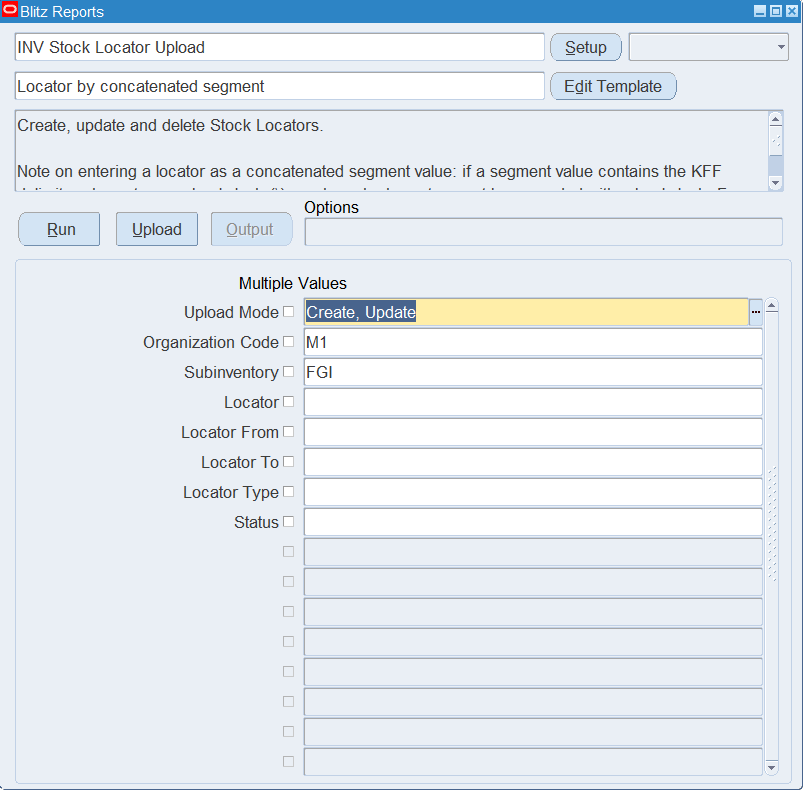
Step 2 – Run to download the Excel file
Click Run. The Excel file downloads and opens with one row per existing locator, or an empty sheet in Create mode.
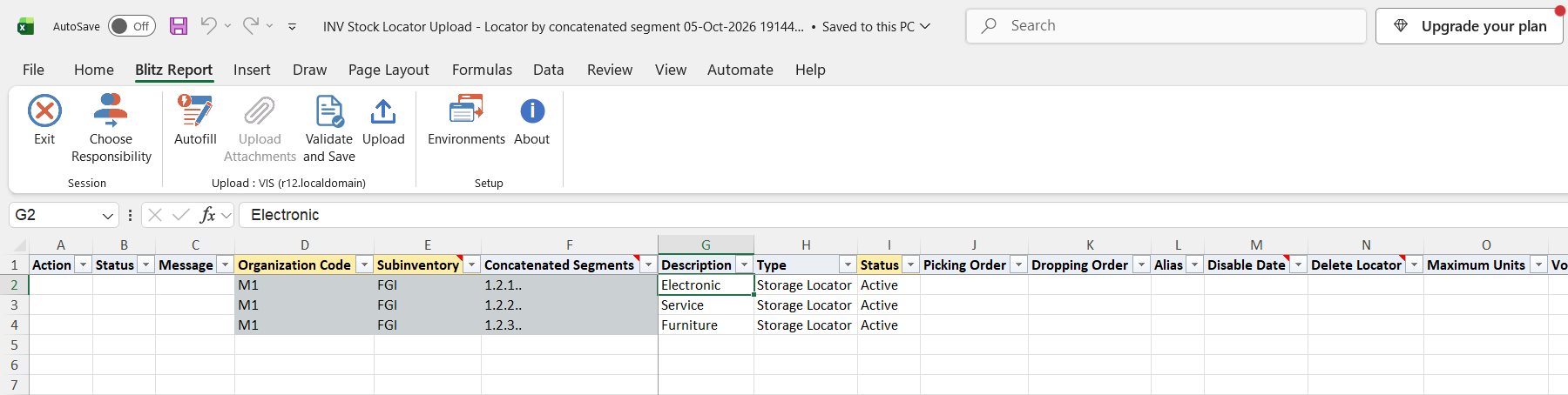
Step 3 – Enter or change the locators
Organization Code, Subinventory and Concatenated Segments identify a locator and cannot be changed on a downloaded row. On downloaded rows change the Description, Type, Status, Picking Order, Dropping Order, Alias, capacity (Maximum Units, Maximum Weight with Weight Uom, Maximum Volume with Volume Uom), dimensions (Dimension Uom, Dimension Length, Dimension Width, Dimension Height) or X Coordinate, Y Coordinate and Z Coordinate. Pick Uom applies only to WMS-enabled organizations.
- New locators – add rows with the Organization Code, Subinventory and the locator, either as Concatenated Segments or, in the individual segments template, in the segment columns. Trailing empty segments can be left out (1.2.4 instead of 1.2.4..). Status defaults to Active.
- Deactivate – enter a Disable Date. The date must not be earlier than yesterday.
- Delete – set Delete Locator to Yes on a downloaded row. Oracle refuses the delete if the locator is still in use, for example by on-hand quantities or transactions.
If a segment value contains the flexfield delimiter or a backslash, precede each such character with a backslash in Concatenated Segments. For example, with delimiter ‘.’, the segment value 1\4\4. is entered as 1\\4\\4\.
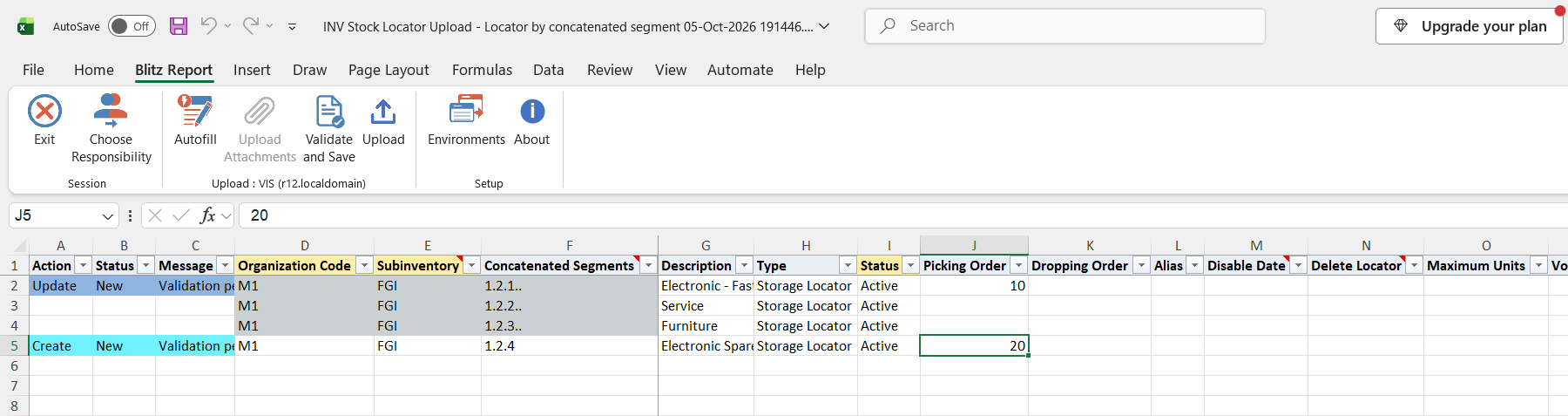
Step 4 – Validate and Save
Click Validate and Save. This checks for missing required values and saves the file. Correct any rows it flags before uploading.
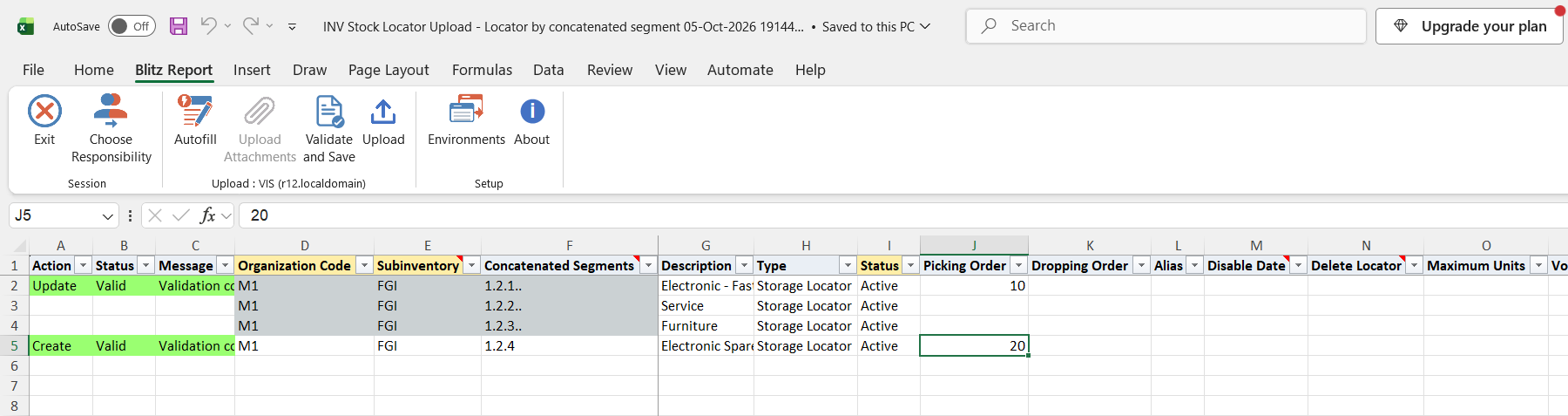
Step 5 – Upload the file
In Blitz Report click Upload and select the saved file. This submits the upload request, which creates, updates or deletes each locator.
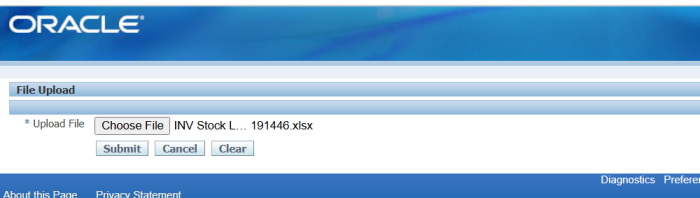
Step 6 – Review the result report
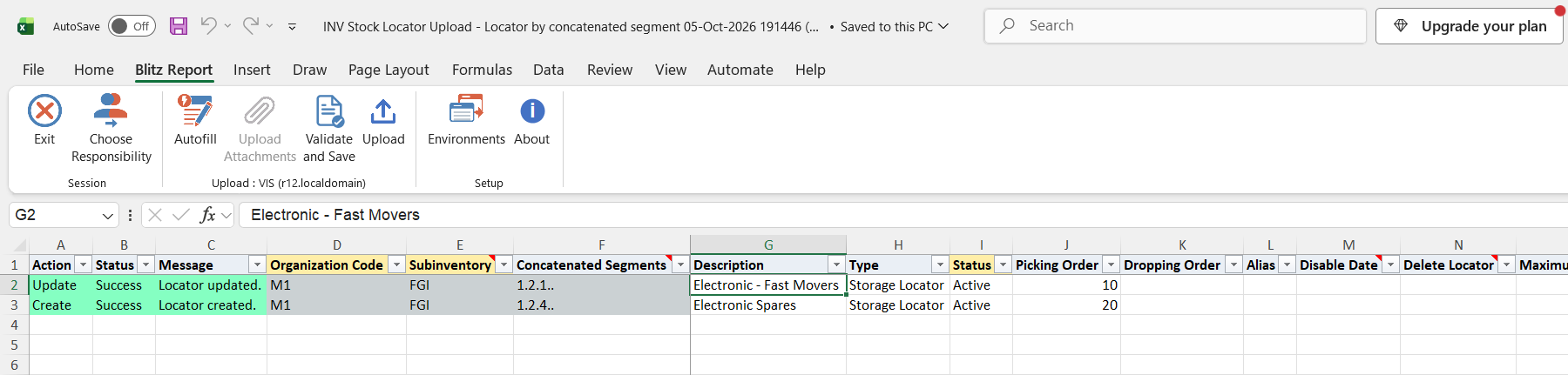
When the request completes, a result report opens listing every uploaded row with its status and message, such as “Locator created.”, “Locator updated.”, “Locator deleted.” or “No change.”
What’s produced
- Stock locators created, updated or deleted in the selected inventory organization.
- A result report listing every row with a status (success or error) and a message.
Common questions
Can I rename a locator or move it to another subinventory?
No. The organization, subinventory and segment values of an existing locator cannot be changed. Create the new locator instead, and delete or disable the old one.
How do I delete a locator?
Download in Create, Update mode, set Delete Locator to Yes on the locator’s row and upload. If Oracle rejects the delete because the locator is in use, set a Disable Date instead.
Why don’t I see all my inventory organizations?
The list shows only organizations your responsibility can access and that use locator control.
Which template should I use?
Whichever suits your data. Both create the same locators; they differ only in whether you enter the locator as one string or across separate segment columns. Use the individual segments template to maintain descriptive flexfield values.
What happens if I add a row for a locator that already exists?
The row is matched to the existing locator by organization and segment values and processed as an update of that locator. Its Subinventory must match the existing locator’s.
How are project and task locators handled?
In project-enabled organizations, a locator with project or task segments needs a matching physical locator with the same row, rack and bin but no project and task. If none exists, the upload creates it with the same subinventory and locator type.
My row says “No change.” – did anything happen?
None of the values differed from what is stored, so the locator was left untouched. This is not an error.
Troubleshooting
| Message | Cause | What to do |
|---|---|---|
| Organization Code is required. / Subinventory is required. | The row has no Organization Code or Subinventory. | Enter both values. |
| Locator (Concatenated Segments or individual Segments) is required. | The row has neither Concatenated Segments nor segment values. | Enter the locator. |
| Concatenated Segments (…) does not match individual segments (…). Enter only one of these representations or ensure they are consistent. | Both Concatenated Segments and the segment columns are filled with different values. | Enter the locator only one way, or make both agree. |
| Organization Code cannot be changed for an existing locator. | The organization of a downloaded row was changed. | Restore the original value. Add a new row to create the locator in another organization. |
| Subinventory cannot be changed for an existing locator. | The subinventory of a downloaded row was changed, or a new row uses the segment values of a locator that exists in another subinventory. | Keep the existing subinventory, or use different segment values for the new locator. |
| Concatenated Segments cannot be changed for an existing locator. Original: … Uploaded: … | The segment values of a downloaded row were changed. | Restore the original value and add a new row for the new locator. |
| Locator (internal id …) no longer exists. It may have been deleted since the template was downloaded. | The locator was deleted after the download. | Download the file again. |
| Locator does not exist in the Organization. Nothing to delete. | Delete Locator is Yes for a locator that does not exist. | Check the organization and segment values. |
| Inactive On date must be greater than or equal to yesterday. | The Disable Date is earlier than yesterday. | Enter yesterday, today or a later date. |
select to_char(null) action_, to_char(null) status_, to_char(null) message_, null modified_columns_, milk.inventory_location_id, mp.organization_code, milk.subinventory_code subinventory, fnd_flex_xml_publisher_apis.process_kff_combination_1('lov','INV','MTLL',101,milk.organization_id,milk.inventory_location_id,'ALL','N','VALUE','ALL_ENABLED') concatenated_segments, case when 1<=:segment_count then fnd_flex_xml_publisher_apis.process_kff_combination_1('lov','INV','MTLL',101,milk.organization_id,milk.inventory_location_id,'1','N','VALUE','ALL_ENABLED') end loc_segment_dsp1, case when 2<=:segment_count then fnd_flex_xml_publisher_apis.process_kff_combination_1('lov','INV','MTLL',101,milk.organization_id,milk.inventory_location_id,'2','N','VALUE','ALL_ENABLED') end loc_segment_dsp2, case when 3<=:segment_count then fnd_flex_xml_publisher_apis.process_kff_combination_1('lov','INV','MTLL',101,milk.organization_id,milk.inventory_location_id,'3','N','VALUE','ALL_ENABLED') end loc_segment_dsp3, case when 4<=:segment_count then fnd_flex_xml_publisher_apis.process_kff_combination_1('lov','INV','MTLL',101,milk.organization_id,milk.inventory_location_id,'4','N','VALUE','ALL_ENABLED') end loc_segment_dsp4, case when 5<=:segment_count then fnd_flex_xml_publisher_apis.process_kff_combination_1('lov','INV','MTLL',101,milk.organization_id,milk.inventory_location_id,'5','N','VALUE','ALL_ENABLED') end loc_segment_dsp5, case when 6<=:segment_count then fnd_flex_xml_publisher_apis.process_kff_combination_1('lov','INV','MTLL',101,milk.organization_id,milk.inventory_location_id,'6','N','VALUE','ALL_ENABLED') end loc_segment_dsp6, case when 7<=:segment_count then fnd_flex_xml_publisher_apis.process_kff_combination_1('lov','INV','MTLL',101,milk.organization_id,milk.inventory_location_id,'7','N','VALUE','ALL_ENABLED') end loc_segment_dsp7, case when 8<=:segment_count then fnd_flex_xml_publisher_apis.process_kff_combination_1('lov','INV','MTLL',101,milk.organization_id,milk.inventory_location_id,'8','N','VALUE','ALL_ENABLED') end loc_segment_dsp8, case when 9<=:segment_count then fnd_flex_xml_publisher_apis.process_kff_combination_1('lov','INV','MTLL',101,milk.organization_id,milk.inventory_location_id,'9','N','VALUE','ALL_ENABLED') end loc_segment_dsp9, case when 10<=:segment_count then fnd_flex_xml_publisher_apis.process_kff_combination_1('lov','INV','MTLL',101,milk.organization_id,milk.inventory_location_id,'10','N','VALUE','ALL_ENABLED') end loc_segment_dsp10, case when 11<=:segment_count then fnd_flex_xml_publisher_apis.process_kff_combination_1('lov','INV','MTLL',101,milk.organization_id,milk.inventory_location_id,'11','N','VALUE','ALL_ENABLED') end loc_segment_dsp11, case when 12<=:segment_count then fnd_flex_xml_publisher_apis.process_kff_combination_1('lov','INV','MTLL',101,milk.organization_id,milk.inventory_location_id,'12','N','VALUE','ALL_ENABLED') end loc_segment_dsp12, case when 13<=:segment_count then fnd_flex_xml_publisher_apis.process_kff_combination_1('lov','INV','MTLL',101,milk.organization_id,milk.inventory_location_id,'13','N','VALUE','ALL_ENABLED') end loc_segment_dsp13, case when 14<=:segment_count then fnd_flex_xml_publisher_apis.process_kff_combination_1('lov','INV','MTLL',101,milk.organization_id,milk.inventory_location_id,'14','N','VALUE','ALL_ENABLED') end loc_segment_dsp14, case when 15<=:segment_count then fnd_flex_xml_publisher_apis.process_kff_combination_1('lov','INV','MTLL',101,milk.organization_id,milk.inventory_location_id,'15','N','VALUE','ALL_ENABLED') end loc_segment_dsp15, case when 16<=:segment_count then fnd_flex_xml_publisher_apis.process_kff_combination_1('lov','INV','MTLL',101,milk.organization_id,milk.inventory_location_id,'16','N','VALUE','ALL_ENABLED') end loc_segment_dsp16, case when 17<=:segment_count then fnd_flex_xml_publisher_apis.process_kff_combination_1('lov','INV','MTLL',101,milk.organization_id,milk.inventory_location_id,'17','N','VALUE','ALL_ENABLED') end loc_segment_dsp17, case when 18<=:segment_count then fnd_flex_xml_publisher_apis.process_kff_combination_1('lov','INV','MTLL',101,milk.organization_id,milk.inventory_location_id,'18','N','VALUE','ALL_ENABLED') end loc_segment_dsp18, case when 19<=:segment_count then fnd_flex_xml_publisher_apis.process_kff_combination_1('lov','INV','MTLL',101,milk.organization_id,milk.inventory_location_id,'19','N','VALUE','ALL_ENABLED') end loc_segment_dsp19, case when 20<=:segment_count then fnd_flex_xml_publisher_apis.process_kff_combination_1('lov','INV','MTLL',101,milk.organization_id,milk.inventory_location_id,'20','N','VALUE','ALL_ENABLED') end loc_segment_dsp20, milk.description, xxen_util.meaning(to_char(milk.inventory_location_type),'MTL_LOCATOR_TYPES',700) type, mmsv.status_code status, milk.picking_order, milk.dropping_order, milk.alias, milk.disable_date, milk.location_maximum_units maximum_units, milk.volume_uom_code volume_uom, milk.max_cubic_area maximum_volume, milk.location_weight_uom_code weight_uom, milk.max_weight maximum_weight, milk.pick_uom_code pick_uom, milk.dimension_uom_code dimension_uom, milk.length dimension_length, milk.width dimension_width, milk.height dimension_height, milk.x_coordinate, milk.y_coordinate, milk.z_coordinate, xxen_util.display_flexfield_context(401,'MTL_ITEM_LOCATIONS',milk.attribute_category) attribute_category, xxen_util.display_flexfield_value(401,'MTL_ITEM_LOCATIONS',milk.attribute_category,'ATTRIBUTE1',milk.rowid,milk.attribute1) loc_attribute1, xxen_util.display_flexfield_value(401,'MTL_ITEM_LOCATIONS',milk.attribute_category,'ATTRIBUTE2',milk.rowid,milk.attribute2) loc_attribute2, xxen_util.display_flexfield_value(401,'MTL_ITEM_LOCATIONS',milk.attribute_category,'ATTRIBUTE3',milk.rowid,milk.attribute3) loc_attribute3, xxen_util.display_flexfield_value(401,'MTL_ITEM_LOCATIONS',milk.attribute_category,'ATTRIBUTE4',milk.rowid,milk.attribute4) loc_attribute4, xxen_util.display_flexfield_value(401,'MTL_ITEM_LOCATIONS',milk.attribute_category,'ATTRIBUTE5',milk.rowid,milk.attribute5) loc_attribute5, xxen_util.display_flexfield_value(401,'MTL_ITEM_LOCATIONS',milk.attribute_category,'ATTRIBUTE6',milk.rowid,milk.attribute6) loc_attribute6, xxen_util.display_flexfield_value(401,'MTL_ITEM_LOCATIONS',milk.attribute_category,'ATTRIBUTE7',milk.rowid,milk.attribute7) loc_attribute7, xxen_util.display_flexfield_value(401,'MTL_ITEM_LOCATIONS',milk.attribute_category,'ATTRIBUTE8',milk.rowid,milk.attribute8) loc_attribute8, xxen_util.display_flexfield_value(401,'MTL_ITEM_LOCATIONS',milk.attribute_category,'ATTRIBUTE9',milk.rowid,milk.attribute9) loc_attribute9, xxen_util.display_flexfield_value(401,'MTL_ITEM_LOCATIONS',milk.attribute_category,'ATTRIBUTE10',milk.rowid,milk.attribute10) loc_attribute10, xxen_util.display_flexfield_value(401,'MTL_ITEM_LOCATIONS',milk.attribute_category,'ATTRIBUTE11',milk.rowid,milk.attribute11) loc_attribute11, xxen_util.display_flexfield_value(401,'MTL_ITEM_LOCATIONS',milk.attribute_category,'ATTRIBUTE12',milk.rowid,milk.attribute12) loc_attribute12, xxen_util.display_flexfield_value(401,'MTL_ITEM_LOCATIONS',milk.attribute_category,'ATTRIBUTE13',milk.rowid,milk.attribute13) loc_attribute13, xxen_util.display_flexfield_value(401,'MTL_ITEM_LOCATIONS',milk.attribute_category,'ATTRIBUTE14',milk.rowid,milk.attribute14) loc_attribute14, xxen_util.display_flexfield_value(401,'MTL_ITEM_LOCATIONS',milk.attribute_category,'ATTRIBUTE15',milk.rowid,milk.attribute15) loc_attribute15, to_char(null) delete_locator, to_number(null) upload_row from mtl_item_locations_kfv milk, mtl_parameters mp, mtl_material_statuses_vl mmsv where 1=1 and mp.organization_id=milk.organization_id and mp.organization_id in (select oav.organization_id from org_access_view oav where oav.resp_application_id=fnd_global.resp_appl_id and oav.responsibility_id=fnd_global.resp_id) and mmsv.status_id(+)=milk.status_id |
| Parameter Name | SQL text | Validation | |
|---|---|---|---|
| Upload Mode |
| LOV | |
| Organization Code |
| LOV | |
| Subinventory |
| LOV | |
| Locator |
| LOV | |
| Locator From |
| LOV | |
| Locator To |
| LOV | |
| Locator Type |
| LOV | |
| Status |
| LOV |