
OPM Routing Upload

Description
OPM Routing Upload creates and updates Oracle Process Manufacturing (OPM) routings from Excel through the Oracle routing APIs: the routing header, its routing steps, each referencing an existing operation, and the dependencies between steps. Each spreadsheet row is one routing step. You can create new routings or new routing versions, change steps of existing routings, add steps and dependencies, and delete steps and dependencies.
When to use it
- Mass-create OPM routings with their steps instead of keying them into the Routings window, for example during an implementation or a new plant rollout.
- Create a new version of an existing routing from the same or different operations.
- Add steps or step dependencies to existing routings in bulk.
- Change step quantity, release type or minimum transfer quantity on many routing steps.
- Remove obsolete routing steps or individual step dependencies across many routings.
- Maintain the routing and routing step descriptive flexfields in bulk.
Before you start
- Your responsibility has organization access to the process-enabled organization that owns the routings. The Organization Code list and the download only include process-enabled organizations your responsibility can access.
- The operations you reference already exist in that organization with the operation version you enter. The upload does not create operations.
- Routing classes, units of measure and owners you enter exist; choose them from the lists in the Excel file.
Step 1 – Set the parameters
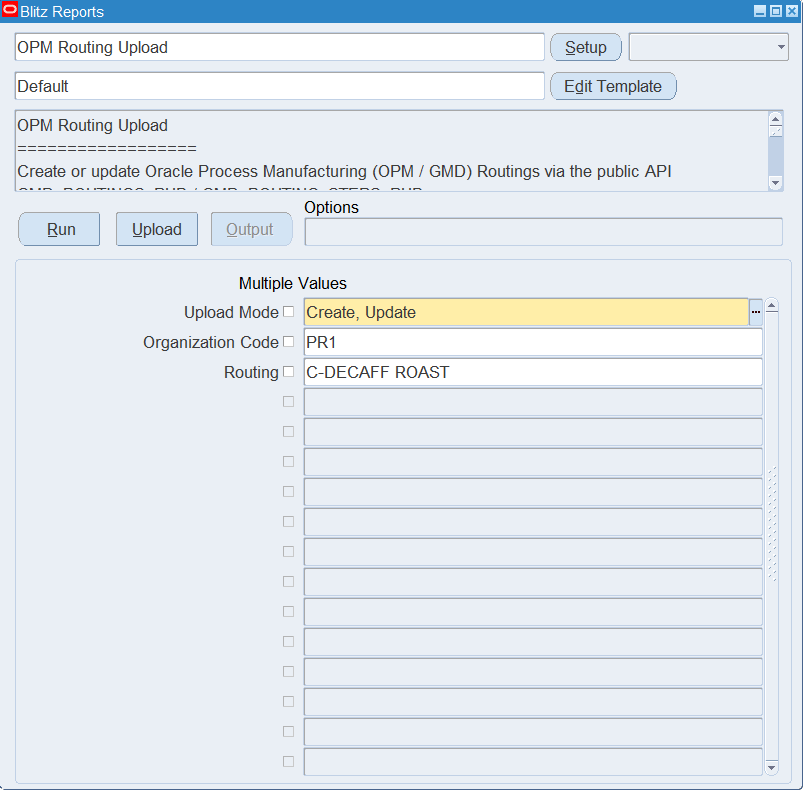
Open OPM Routing Upload in Blitz Report and set the parameters:
| Parameter | Meaning |
|---|---|
| Upload Mode | Create (default) opens an empty sheet for new routings; Create, Update downloads existing routings for editing and lets you add new ones. |
| Organization Code | Restricts the download to routings owned by this process-enabled organization. |
| Routing | Restricts the download to one routing number, with all its versions. Enter the exact routing number in upper case. |
The example downloads routing C-DECAFF ROAST of process organization PR1.
Step 2 – Run to download the Excel file
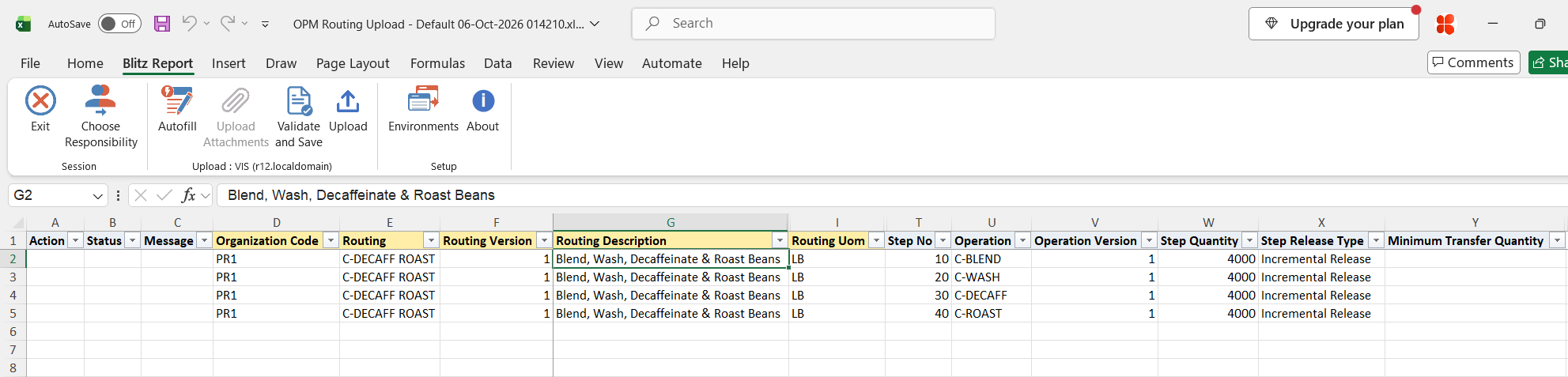
Click Run. The Excel file downloads and opens, with one row per step of each existing routing (routings marked for deletion are not downloaded), or an empty sheet in Create mode. Existing step dependencies are not downloaded, so Depends On Step No is empty on downloaded rows.
Step 3 – Enter or change the data
Each row is one routing step. The header columns (Organization Code, Routing, Routing Version, Routing Description, Routing Class, Routing Uom, Routing Quantity, process loss, effective dates, Enforce Step Dependency, Contiguous, Routing Status, Owner) repeat on every step of the same routing, and the rows of one routing must be kept together. Organization Code, Routing and Routing Version identify a routing: a combination that does not exist yet creates a new routing, or a new version when the routing number already exists. Routing numbers are stored in upper case.
- New routing or version: enter the header columns with at least Routing Description and Routing Uom, and one row per step with Step No, Operation, Operation Version, Step Quantity and Step Release Type (Automatic Release, Manual Release or Incremental Release). A new routing gets the Routing Status you enter, or New when it is empty, and starts today when Effective Start Date is empty.
- Existing routing: on downloaded steps you can change Step Quantity, Step Release Type, Minimum Transfer Quantity and the step flexfield. Of the header columns, Routing Class, Routing Uom, Fixed Process Loss Uom and Owner are updated; the description, quantities, process loss, effective dates, step dependency flags and the status of an existing routing are not changed. Add rows with a new Step No to add steps.
- Step dependencies: to make a step follow another, enter the predecessor in Depends On Step No on the step’s row, optionally with Standard Delay, Minimum Delay, Maximum Delay, Transfer Percent, Rework Code and Chargeable. For a second predecessor add a row that repeats the Step No with Operation empty and a different Depends On Step No. Dependencies are finish-to-start. Add the dependencies of a new routing in a second upload, after the routing has been created (see Troubleshooting).
- Deleting: set Delete Step to Yes on a downloaded step to remove it with its dependencies, or enter Depends On Step No and set Delete Dependency to Yes to remove one dependency.
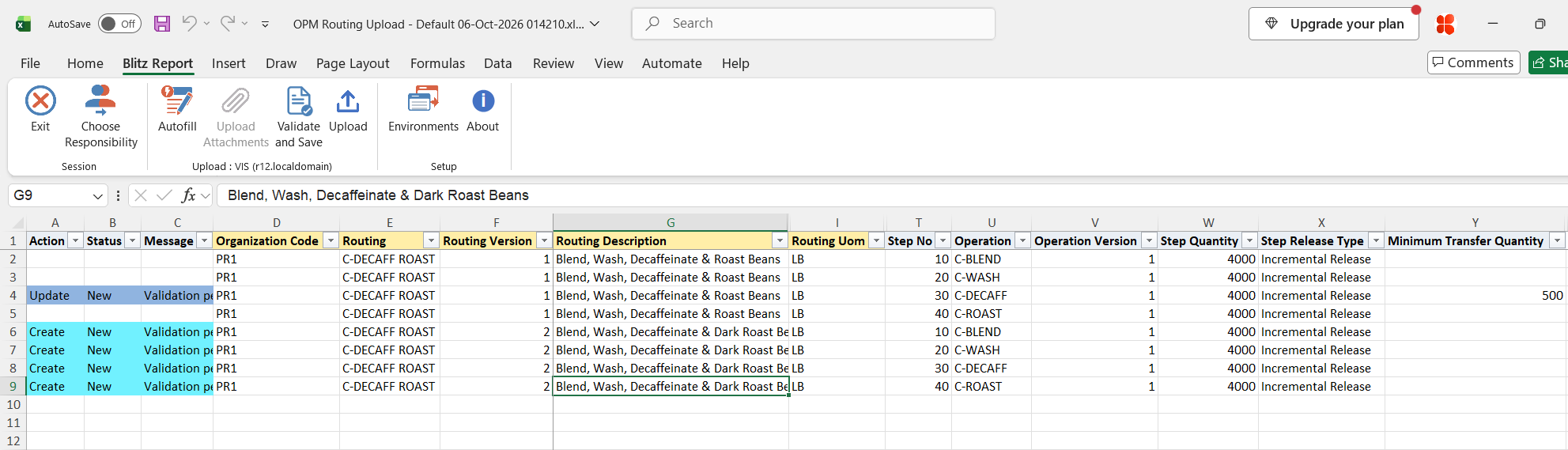
In the example the minimum transfer quantity of step 30 of version 1 is set to 500, and four rows add version 2 with a new description and the same four operations.
Step 4 – Validate and Save
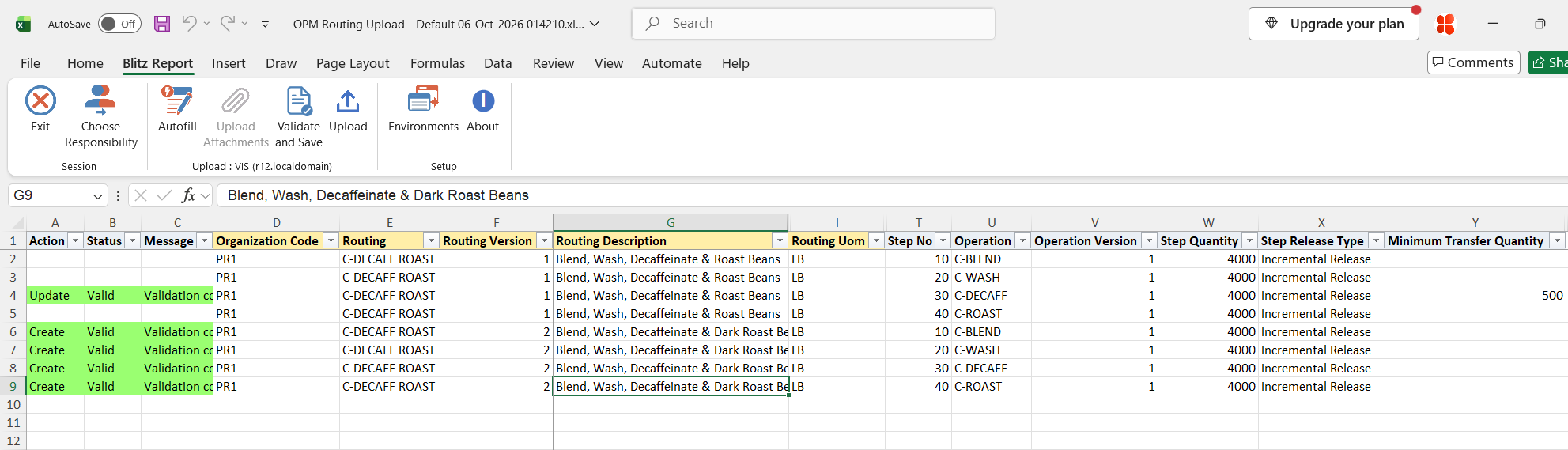
Click Validate and Save. This checks for missing required values and saves the file. Correct any rows it flags before uploading.
Step 5 – Upload the file
In Blitz Report click Upload and select the saved file. This submits the upload request, which processes the rows routing by routing: it creates a new routing with all its steps, or updates the header and steps of an existing routing, adds steps and dependencies, and then deletes the flagged dependencies and steps.
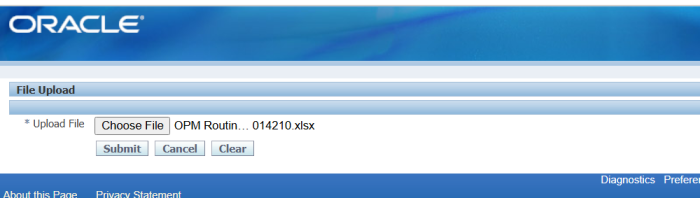
Step 6 – Review the result report
When the request completes, a result report opens listing every uploaded row with its status and message, Routing created. or Routing updated., or the error that stopped the routing.
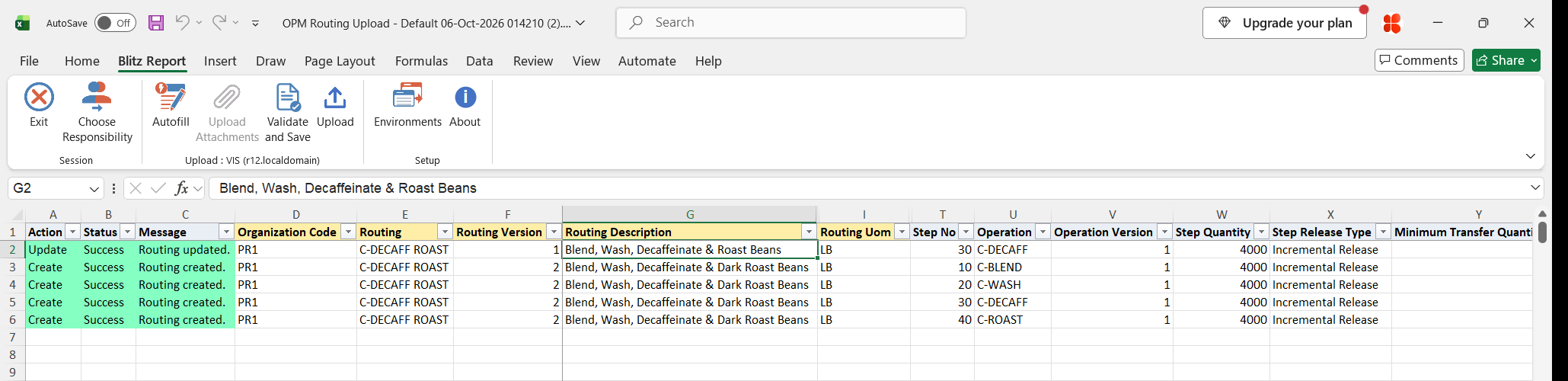
What’s produced
- Routings created or updated in Oracle Process Manufacturing, with their steps and step dependencies; steps and dependencies deleted where flagged.
- A result report listing every row with a status (success or error) and a message.
Common questions
Can I create operations with this upload?
No. Operations must already exist; the upload references them by operation number and version.
Why are the description and quantity of an existing routing not changed?
The Oracle routing API only updates Routing Class, Routing Uom, Fixed Process Loss Uom and Owner on an existing routing. Description, quantity, process loss and effective dates are set when the routing is created; to change them, create a new routing version.
Can I change the routing status?
Only when the routing is created. The status of an existing routing is kept; change it in the Oracle Routings window.
What happens if one row of a routing fails?
All rows of that routing version are rolled back and show the same error message. Other routings in the file are still processed.
How do I give a step two predecessors?
Add a second row that repeats the Step No, leave Operation empty, and enter the other predecessor in Depends On Step No.
Why can’t I choose Yes in Delete Step or Delete Dependency?
Delete Step is offered only on downloaded steps, and Delete Dependency only on rows with a Depends On Step No.
Troubleshooting
| Message | Cause | What to do |
|---|---|---|
| ORA-20001: Organization “<code>” is not a valid process-enabled organization. | The Organization Code is not a process-enabled inventory organization. | Use a process organization from the list. |
| ORA-20001: Operation “<operation>” version “<version>” not found in organization “<code>”. | The operation and version do not exist in the routing’s organization, or the operation is marked for deletion. | Check the Operation, Operation Version and Organization Code. |
| ORA-20001: A routing must have at least one step. | The rows of a routing contain no step with an Operation. | Add at least one row with Step No, Operation and Operation Version. |
| ORA-20001: Field Validation : Missing ROUTINGSTEP_NO_UOM User-Defined Exception in Package GMD_ROUTINGS_PUB Procedure INSERT_ROUTING | A new routing was uploaded with Depends On Step No filled. | Upload the new routing without Depends On Step No. Then download it in Create, Update mode, enter the dependencies on its steps and upload again. |
| ORA-20001: Routing attributes: … / Routing step attributes: … | A routing or routing step descriptive flexfield value failed validation. | Correct the attribute values for the chosen context. |
SQL 215 lines
select null action_, null status_, null message_, null modified_columns_, row_number() over (order by x.routing, x.routing_version, x.step_no) upload_row, x.organization_code, x.routing, x.routing_version, x.routing_description, x.routing_class, x.routing_uom, x.routing_quantity, x.process_loss, x.fixed_process_loss, x.fixed_process_loss_uom, x.effective_start_date, x.effective_end_date, x.enforce_step_dependency, x.contiguous, x.routing_status, x.owner, x.step_no, x.operation, x.operation_version, x.step_quantity, x.step_release_type, x.minimum_transfer_quantity, x.operation_yield, x.depends_on_step_no, x.standard_delay, x.minimum_delay, x.maximum_delay, x.transfer_percent, x.rework_code, x.chargeable, x.delete_step, x.delete_dependency, x.ra_attribute_category, x.ra_attribute1, x.ra_attribute2, x.ra_attribute3, x.ra_attribute4, x.ra_attribute5, x.ra_attribute6, x.ra_attribute7, x.ra_attribute8, x.ra_attribute9, x.ra_attribute10, x.ra_attribute11, x.ra_attribute12, x.ra_attribute13, x.ra_attribute14, x.ra_attribute15, x.ra_attribute16, x.ra_attribute17, x.ra_attribute18, x.ra_attribute19, x.ra_attribute20, x.ra_attribute21, x.ra_attribute22, x.ra_attribute23, x.ra_attribute24, x.ra_attribute25, x.ra_attribute26, x.ra_attribute27, x.ra_attribute28, x.ra_attribute29, x.ra_attribute30, x.sa_attribute_category, x.sa_attribute1, x.sa_attribute2, x.sa_attribute3, x.sa_attribute4, x.sa_attribute5, x.sa_attribute6, x.sa_attribute7, x.sa_attribute8, x.sa_attribute9, x.sa_attribute10, x.sa_attribute11, x.sa_attribute12, x.sa_attribute13, x.sa_attribute14, x.sa_attribute15, x.sa_attribute16, x.sa_attribute17, x.sa_attribute18, x.sa_attribute19, x.sa_attribute20, x.sa_attribute21, x.sa_attribute22, x.sa_attribute23, x.sa_attribute24, x.sa_attribute25, x.sa_attribute26, x.sa_attribute27, x.sa_attribute28, x.sa_attribute29, x.sa_attribute30, x.routing_id, x.routingstep_id from ( select mp.organization_code, grv.routing_no routing, grv.routing_vers routing_version, grv.routing_desc routing_description, grv.routing_class, grv.routing_uom, grv.routing_qty routing_quantity, grv.process_loss, grv.fixed_process_loss, grv.fixed_process_loss_uom, grv.effective_start_date, grv.effective_end_date, xxen_util.meaning(decode(grv.enforce_step_dependency,1,'Y','N'),'YES_NO',0) enforce_step_dependency, xxen_util.meaning(decode(grv.contiguous_ind,1,'Y','N'),'YES_NO',0) contiguous, (select gsv.meaning from gmd_status_vl gsv where gsv.status_code=grv.routing_status) routing_status, (select fu.user_name from fnd_user fu where fu.user_id=grv.owner_id) owner, frd.routingstep_no step_no, gov.oprn_no operation, gov.oprn_vers operation_version, frd.step_qty step_quantity, xxen_util.meaning(to_char(frd.steprelease_type),'RELEASE_TYPE',553) step_release_type, frd.minimum_transfer_qty minimum_transfer_quantity, frd.oprn_yield operation_yield, to_number(null) depends_on_step_no, to_number(null) standard_delay, to_number(null) minimum_delay, to_number(null) maximum_delay, to_number(null) transfer_percent, to_char(null) rework_code, to_char(null) chargeable, to_char(null) delete_step, to_char(null) delete_dependency, xxen_util.display_flexfield_context(552,'FM_ROUT_HDR_FLEX',grv.attribute_category) ra_attribute_category, xxen_util.display_flexfield_value(552,'FM_ROUT_HDR_FLEX',grv.attribute_category,'ATTRIBUTE1',grv.rowid,grv.attribute1) ra_attribute1, xxen_util.display_flexfield_value(552,'FM_ROUT_HDR_FLEX',grv.attribute_category,'ATTRIBUTE2',grv.rowid,grv.attribute2) ra_attribute2, xxen_util.display_flexfield_value(552,'FM_ROUT_HDR_FLEX',grv.attribute_category,'ATTRIBUTE3',grv.rowid,grv.attribute3) ra_attribute3, xxen_util.display_flexfield_value(552,'FM_ROUT_HDR_FLEX',grv.attribute_category,'ATTRIBUTE4',grv.rowid,grv.attribute4) ra_attribute4, xxen_util.display_flexfield_value(552,'FM_ROUT_HDR_FLEX',grv.attribute_category,'ATTRIBUTE5',grv.rowid,grv.attribute5) ra_attribute5, xxen_util.display_flexfield_value(552,'FM_ROUT_HDR_FLEX',grv.attribute_category,'ATTRIBUTE6',grv.rowid,grv.attribute6) ra_attribute6, xxen_util.display_flexfield_value(552,'FM_ROUT_HDR_FLEX',grv.attribute_category,'ATTRIBUTE7',grv.rowid,grv.attribute7) ra_attribute7, xxen_util.display_flexfield_value(552,'FM_ROUT_HDR_FLEX',grv.attribute_category,'ATTRIBUTE8',grv.rowid,grv.attribute8) ra_attribute8, xxen_util.display_flexfield_value(552,'FM_ROUT_HDR_FLEX',grv.attribute_category,'ATTRIBUTE9',grv.rowid,grv.attribute9) ra_attribute9, xxen_util.display_flexfield_value(552,'FM_ROUT_HDR_FLEX',grv.attribute_category,'ATTRIBUTE10',grv.rowid,grv.attribute10) ra_attribute10, xxen_util.display_flexfield_value(552,'FM_ROUT_HDR_FLEX',grv.attribute_category,'ATTRIBUTE11',grv.rowid,grv.attribute11) ra_attribute11, xxen_util.display_flexfield_value(552,'FM_ROUT_HDR_FLEX',grv.attribute_category,'ATTRIBUTE12',grv.rowid,grv.attribute12) ra_attribute12, xxen_util.display_flexfield_value(552,'FM_ROUT_HDR_FLEX',grv.attribute_category,'ATTRIBUTE13',grv.rowid,grv.attribute13) ra_attribute13, xxen_util.display_flexfield_value(552,'FM_ROUT_HDR_FLEX',grv.attribute_category,'ATTRIBUTE14',grv.rowid,grv.attribute14) ra_attribute14, xxen_util.display_flexfield_value(552,'FM_ROUT_HDR_FLEX',grv.attribute_category,'ATTRIBUTE15',grv.rowid,grv.attribute15) ra_attribute15, xxen_util.display_flexfield_value(552,'FM_ROUT_HDR_FLEX',grv.attribute_category,'ATTRIBUTE16',grv.rowid,grv.attribute16) ra_attribute16, xxen_util.display_flexfield_value(552,'FM_ROUT_HDR_FLEX',grv.attribute_category,'ATTRIBUTE17',grv.rowid,grv.attribute17) ra_attribute17, xxen_util.display_flexfield_value(552,'FM_ROUT_HDR_FLEX',grv.attribute_category,'ATTRIBUTE18',grv.rowid,grv.attribute18) ra_attribute18, xxen_util.display_flexfield_value(552,'FM_ROUT_HDR_FLEX',grv.attribute_category,'ATTRIBUTE19',grv.rowid,grv.attribute19) ra_attribute19, xxen_util.display_flexfield_value(552,'FM_ROUT_HDR_FLEX',grv.attribute_category,'ATTRIBUTE20',grv.rowid,grv.attribute20) ra_attribute20, xxen_util.display_flexfield_value(552,'FM_ROUT_HDR_FLEX',grv.attribute_category,'ATTRIBUTE21',grv.rowid,grv.attribute21) ra_attribute21, xxen_util.display_flexfield_value(552,'FM_ROUT_HDR_FLEX',grv.attribute_category,'ATTRIBUTE22',grv.rowid,grv.attribute22) ra_attribute22, xxen_util.display_flexfield_value(552,'FM_ROUT_HDR_FLEX',grv.attribute_category,'ATTRIBUTE23',grv.rowid,grv.attribute23) ra_attribute23, xxen_util.display_flexfield_value(552,'FM_ROUT_HDR_FLEX',grv.attribute_category,'ATTRIBUTE24',grv.rowid,grv.attribute24) ra_attribute24, xxen_util.display_flexfield_value(552,'FM_ROUT_HDR_FLEX',grv.attribute_category,'ATTRIBUTE25',grv.rowid,grv.attribute25) ra_attribute25, xxen_util.display_flexfield_value(552,'FM_ROUT_HDR_FLEX',grv.attribute_category,'ATTRIBUTE26',grv.rowid,grv.attribute26) ra_attribute26, xxen_util.display_flexfield_value(552,'FM_ROUT_HDR_FLEX',grv.attribute_category,'ATTRIBUTE27',grv.rowid,grv.attribute27) ra_attribute27, xxen_util.display_flexfield_value(552,'FM_ROUT_HDR_FLEX',grv.attribute_category,'ATTRIBUTE28',grv.rowid,grv.attribute28) ra_attribute28, xxen_util.display_flexfield_value(552,'FM_ROUT_HDR_FLEX',grv.attribute_category,'ATTRIBUTE29',grv.rowid,grv.attribute29) ra_attribute29, xxen_util.display_flexfield_value(552,'FM_ROUT_HDR_FLEX',grv.attribute_category,'ATTRIBUTE30',grv.rowid,grv.attribute30) ra_attribute30, xxen_util.display_flexfield_context(552,'FM_ROUT_DTL_FLEX',frd.attribute_category) sa_attribute_category, xxen_util.display_flexfield_value(552,'FM_ROUT_DTL_FLEX',frd.attribute_category,'ATTRIBUTE1',frd.rowid,frd.attribute1) sa_attribute1, xxen_util.display_flexfield_value(552,'FM_ROUT_DTL_FLEX',frd.attribute_category,'ATTRIBUTE2',frd.rowid,frd.attribute2) sa_attribute2, xxen_util.display_flexfield_value(552,'FM_ROUT_DTL_FLEX',frd.attribute_category,'ATTRIBUTE3',frd.rowid,frd.attribute3) sa_attribute3, xxen_util.display_flexfield_value(552,'FM_ROUT_DTL_FLEX',frd.attribute_category,'ATTRIBUTE4',frd.rowid,frd.attribute4) sa_attribute4, xxen_util.display_flexfield_value(552,'FM_ROUT_DTL_FLEX',frd.attribute_category,'ATTRIBUTE5',frd.rowid,frd.attribute5) sa_attribute5, xxen_util.display_flexfield_value(552,'FM_ROUT_DTL_FLEX',frd.attribute_category,'ATTRIBUTE6',frd.rowid,frd.attribute6) sa_attribute6, xxen_util.display_flexfield_value(552,'FM_ROUT_DTL_FLEX',frd.attribute_category,'ATTRIBUTE7',frd.rowid,frd.attribute7) sa_attribute7, xxen_util.display_flexfield_value(552,'FM_ROUT_DTL_FLEX',frd.attribute_category,'ATTRIBUTE8',frd.rowid,frd.attribute8) sa_attribute8, xxen_util.display_flexfield_value(552,'FM_ROUT_DTL_FLEX',frd.attribute_category,'ATTRIBUTE9',frd.rowid,frd.attribute9) sa_attribute9, xxen_util.display_flexfield_value(552,'FM_ROUT_DTL_FLEX',frd.attribute_category,'ATTRIBUTE10',frd.rowid,frd.attribute10) sa_attribute10, xxen_util.display_flexfield_value(552,'FM_ROUT_DTL_FLEX',frd.attribute_category,'ATTRIBUTE11',frd.rowid,frd.attribute11) sa_attribute11, xxen_util.display_flexfield_value(552,'FM_ROUT_DTL_FLEX',frd.attribute_category,'ATTRIBUTE12',frd.rowid,frd.attribute12) sa_attribute12, xxen_util.display_flexfield_value(552,'FM_ROUT_DTL_FLEX',frd.attribute_category,'ATTRIBUTE13',frd.rowid,frd.attribute13) sa_attribute13, xxen_util.display_flexfield_value(552,'FM_ROUT_DTL_FLEX',frd.attribute_category,'ATTRIBUTE14',frd.rowid,frd.attribute14) sa_attribute14, xxen_util.display_flexfield_value(552,'FM_ROUT_DTL_FLEX',frd.attribute_category,'ATTRIBUTE15',frd.rowid,frd.attribute15) sa_attribute15, xxen_util.display_flexfield_value(552,'FM_ROUT_DTL_FLEX',frd.attribute_category,'ATTRIBUTE16',frd.rowid,frd.attribute16) sa_attribute16, xxen_util.display_flexfield_value(552,'FM_ROUT_DTL_FLEX',frd.attribute_category,'ATTRIBUTE17',frd.rowid,frd.attribute17) sa_attribute17, xxen_util.display_flexfield_value(552,'FM_ROUT_DTL_FLEX',frd.attribute_category,'ATTRIBUTE18',frd.rowid,frd.attribute18) sa_attribute18, xxen_util.display_flexfield_value(552,'FM_ROUT_DTL_FLEX',frd.attribute_category,'ATTRIBUTE19',frd.rowid,frd.attribute19) sa_attribute19, xxen_util.display_flexfield_value(552,'FM_ROUT_DTL_FLEX',frd.attribute_category,'ATTRIBUTE20',frd.rowid,frd.attribute20) sa_attribute20, xxen_util.display_flexfield_value(552,'FM_ROUT_DTL_FLEX',frd.attribute_category,'ATTRIBUTE21',frd.rowid,frd.attribute21) sa_attribute21, xxen_util.display_flexfield_value(552,'FM_ROUT_DTL_FLEX',frd.attribute_category,'ATTRIBUTE22',frd.rowid,frd.attribute22) sa_attribute22, xxen_util.display_flexfield_value(552,'FM_ROUT_DTL_FLEX',frd.attribute_category,'ATTRIBUTE23',frd.rowid,frd.attribute23) sa_attribute23, xxen_util.display_flexfield_value(552,'FM_ROUT_DTL_FLEX',frd.attribute_category,'ATTRIBUTE24',frd.rowid,frd.attribute24) sa_attribute24, xxen_util.display_flexfield_value(552,'FM_ROUT_DTL_FLEX',frd.attribute_category,'ATTRIBUTE25',frd.rowid,frd.attribute25) sa_attribute25, xxen_util.display_flexfield_value(552,'FM_ROUT_DTL_FLEX',frd.attribute_category,'ATTRIBUTE26',frd.rowid,frd.attribute26) sa_attribute26, xxen_util.display_flexfield_value(552,'FM_ROUT_DTL_FLEX',frd.attribute_category,'ATTRIBUTE27',frd.rowid,frd.attribute27) sa_attribute27, xxen_util.display_flexfield_value(552,'FM_ROUT_DTL_FLEX',frd.attribute_category,'ATTRIBUTE28',frd.rowid,frd.attribute28) sa_attribute28, xxen_util.display_flexfield_value(552,'FM_ROUT_DTL_FLEX',frd.attribute_category,'ATTRIBUTE29',frd.rowid,frd.attribute29) sa_attribute29, xxen_util.display_flexfield_value(552,'FM_ROUT_DTL_FLEX',frd.attribute_category,'ATTRIBUTE30',frd.rowid,frd.attribute30) sa_attribute30, grv.routing_id, frd.routingstep_id from gmd_routings_vl grv, fm_rout_dtl frd, gmd_operations_vl gov, mtl_parameters mp where grv.routing_id=frd.routing_id and frd.oprn_id=gov.oprn_id and grv.owner_organization_id=mp.organization_id and grv.delete_mark=0 and grv.owner_organization_id in (select oav.organization_id from org_access_view oav where oav.resp_application_id=fnd_global.resp_appl_id and oav.responsibility_id=fnd_global.resp_id) and :p_upload_mode like '%'||xxen_upload.action_update ) x where 1=1 |
Parameters 3
| Parameter | Type | List of values SQL | |
|---|---|---|---|
| Upload Mode | LOV |
| |
| Organization Code | LOV |
| |
| Routing | Char |
|