
PA Task Upload
PA Task Upload creates and updates Oracle Projects tasks from Excel: top tasks and subtasks in the work breakdown structure of existing projects, with their dates, organization, task manager, classification, flags, billing, burden and transfer price schedules and descriptive flexfield values. Each row is created as a new task or updated as an existing one, depending on whether its task number already exists in the project.
When to use it
- Build out the work breakdown structure of an existing project with new top tasks and subtasks.
- Add several subtasks under existing parent tasks in one pass.
- Mass-update task attributes such as names, descriptions, dates, organization, task manager, service type or work type.
- Apply consistent billing, burden and transfer price schedules across many tasks at once.
- Download the tasks of one or more projects, edit them in Excel and upload the changes instead of editing them one at a time.
Before you start
- Access to the upload in Blitz Report under a Projects responsibility for the operating unit of the projects.
- The projects already exist. The upload does not create projects.
- For projects with workplan versioning enabled, the project has a working structure version that is not locked by another user. Tasks are added to and updated in that working version.
Step 1 – Set the parameters
Open PA Task Upload in Blitz Report and set the parameters:
| Parameter | Meaning |
|---|---|
| Upload Mode | Create (default) opens an empty sheet to enter new tasks; Create, Update downloads the existing tasks for editing and lets you add new ones. |
| Operating Unit | The operating unit of the projects (required). |
| Project Number | Downloads the tasks of this project. |
| Project Name | Downloads the tasks of the project with this name. |
| Project Type | Restricts the download to projects of this type. |
| Project Status | Restricts the download to projects with this status. |
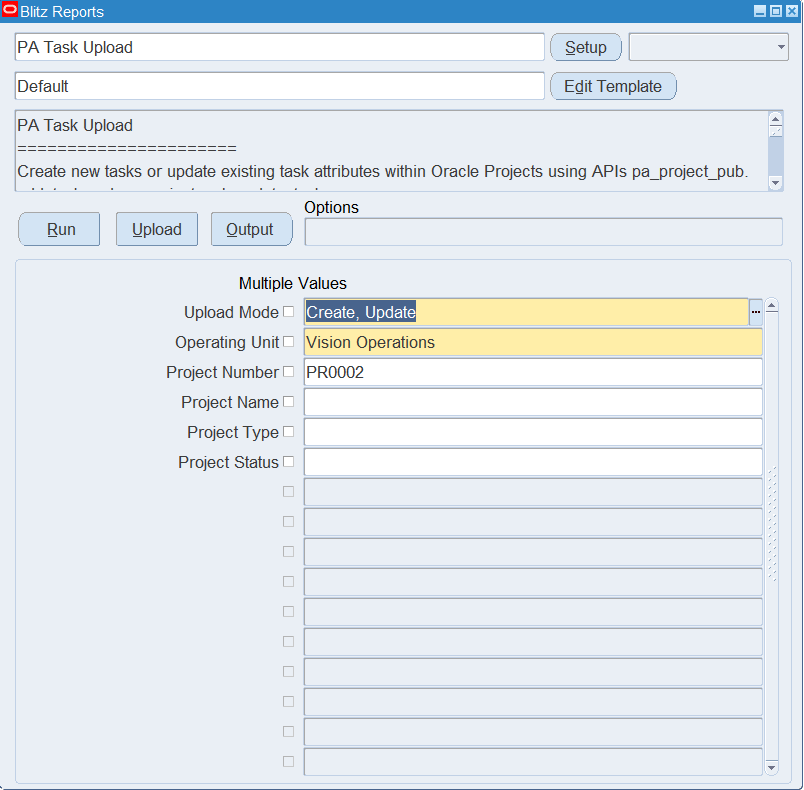
Step 2 – Run to download the Excel file
Click Run. The Excel file downloads and opens with one row per existing task in work breakdown structure order, showing each task’s WBS level and parent task number, or an empty sheet in Create mode.
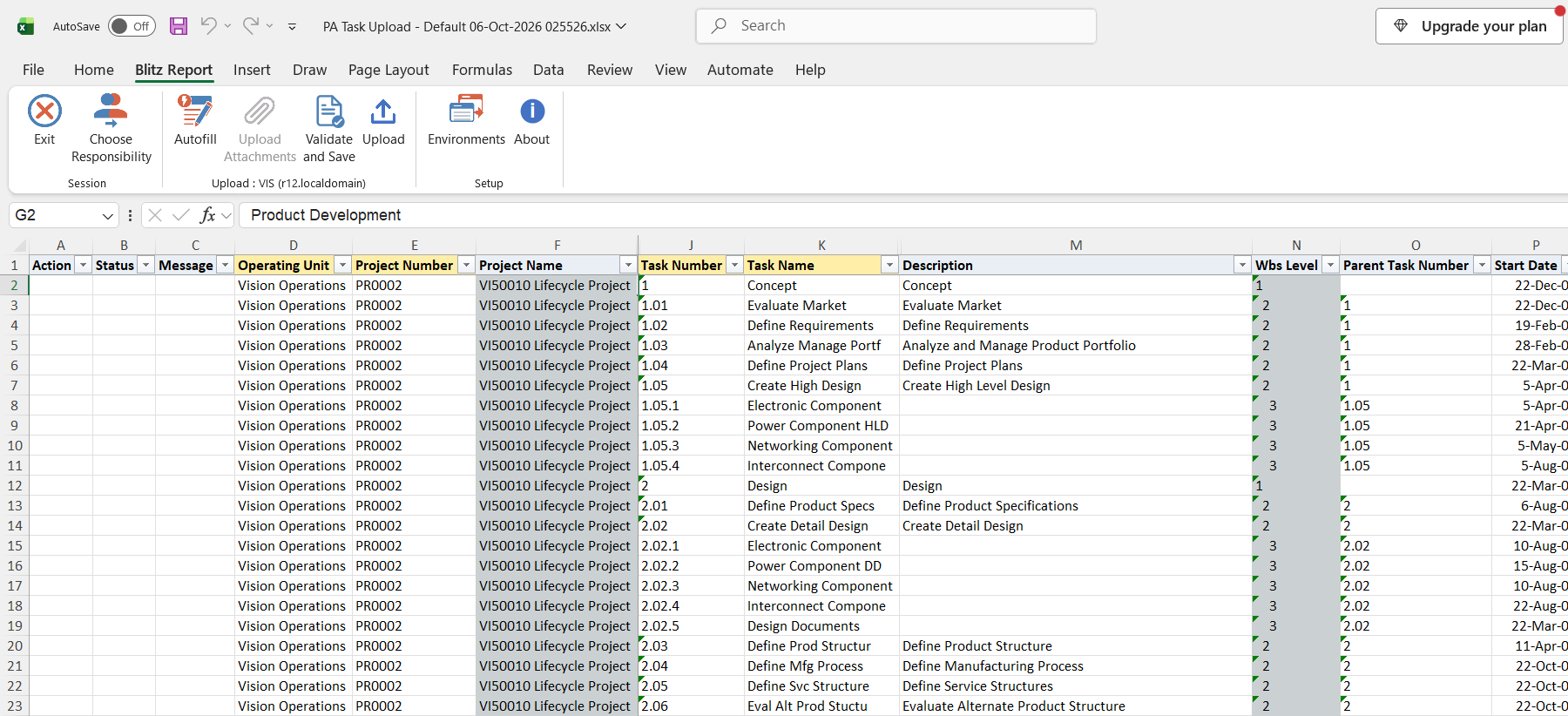
Step 3 – Enter or change the tasks
Operating Unit, Project Number, Task Number and Task Name are required. The project’s name, type, status and manager fill in from the Project Number. The Task Number identifies the task and cannot be changed on a downloaded row; change the Task Name (up to 20 characters), Long Task Name, Description, Start Date, End Date, Organization, Task Manager, Service Type, Work Type or any of the flag, schedule and rate columns.
To add a task, enter a row with a new Task Number. Leave Parent Task Number blank for a top task, or enter the number of an existing task in the same project to create a subtask. Flag columns such as Allow Charges and Billable accept Yes; a blank flag leaves the current setting unchanged.
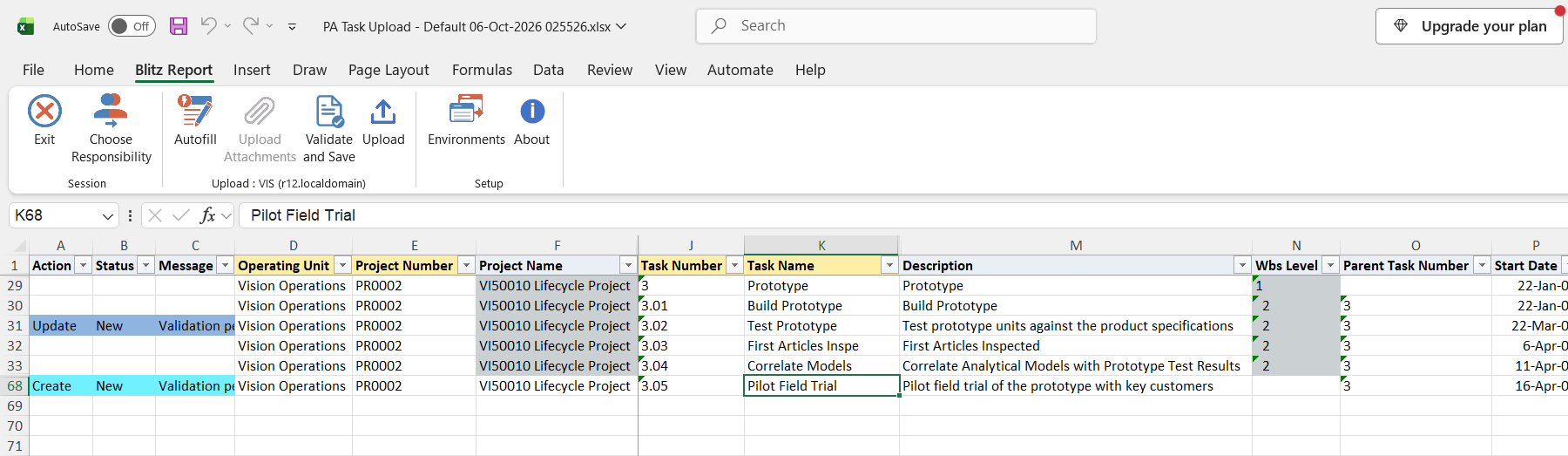
Step 4 – Validate and Save
Click Validate and Save. This checks for missing required values and saves the file. Correct any rows it flags before uploading.
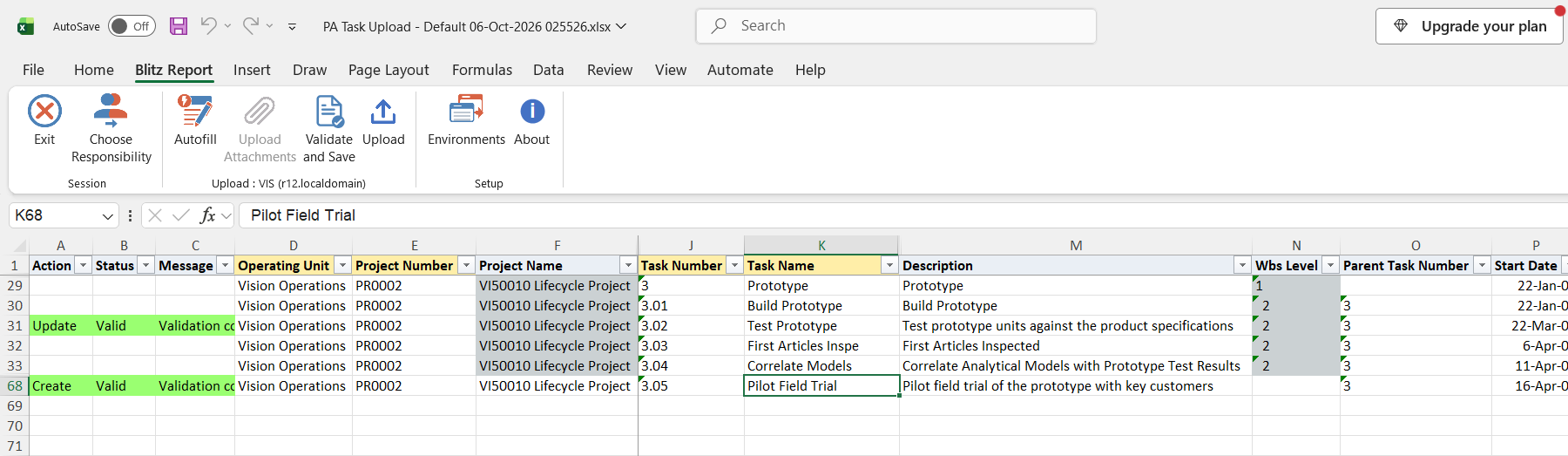
Step 5 – Upload the file
In Blitz Report click Upload and select the saved file. This submits the upload request, which adds each new task and updates each changed task.
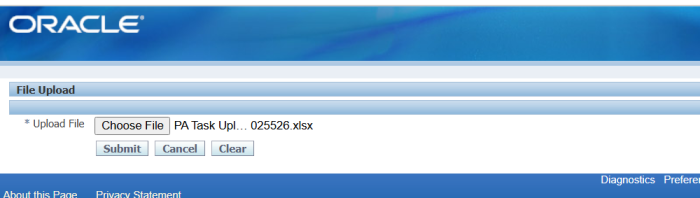
Step 6 – Review the result report
When the request completes, a result report opens listing every uploaded row with its status and message.
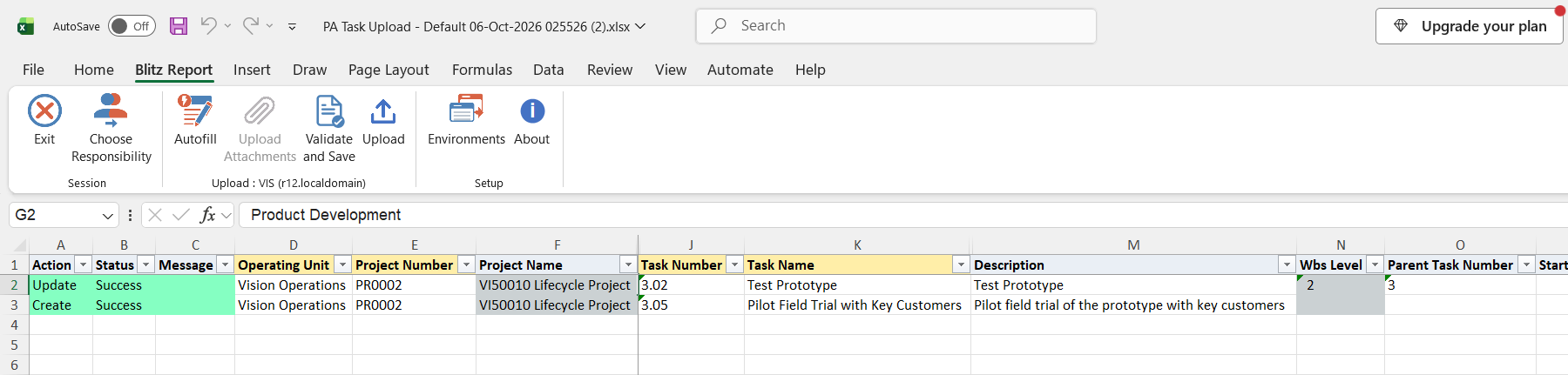
What’s produced
- New top tasks and subtasks, and updated task attributes, in the projects’ work breakdown structure. For projects with workplan versioning, the changes are made in the working structure version.
- A result report listing every row with a status (success or error) and a message.
Common questions
Can I create a project with this upload?
No. It only adds and updates tasks of existing projects.
Can I delete a task?
No. There is no delete action.
Can I change a task number?
No. The Task Number is the key used to find the task; a different number creates a new task.
How do I make a subtask?
Enter the parent’s task number in Parent Task Number. The parent must already be a task of the same project.
When are new tasks of a versioned project available for charging?
For projects with workplan versioning, new tasks are added to the working structure version. Publish the working version in Projects to make them part of the financial structure, after which they also appear in the download.
Can I switch a flag such as Billable off?
No. The flag columns accept Yes, and a blank flag keeps the task’s current setting.
Troubleshooting
| Message | Cause | What to do |
|---|---|---|
| Parent task number … not found in project. | The Parent Task Number is not a task of that project. | Correct the parent task number, or create the parent task first. |
| The structure version cannot be updated. Please specify a different structure version. | The project’s structure version cannot take new tasks, for example because its working version is locked by another user or the project has workplan versioning without a working version. | In Projects, have the working version unlocked, or create a working version from the Workplan tab, then upload again. |
| MOAC initialization failed | The operating unit context could not be set for the row’s operating unit. | Run the upload under a responsibility with access to that operating unit. |
| API returned an unspecified error. | Oracle Projects rejected the row without a message. | Check the row’s values against the project setup, for example dates within the project dates and an organization that is valid for project tasks. |
select null action_, null status_, null message_, null request_id_, null modified_columns_, -- operating unit haouv.name operating_unit, -- project ppv.segment1 project_number, ppv.name project_name, ppv.project_type, ppv.project_status_m project_status, ppf0.full_name project_manager, -- task pt.task_id, pt.task_number, pt.task_name, pt.long_task_name, pt.description, lpad(' ',2*(pt.wbs_level-1))||pt.wbs_level wbs_level, pt2.task_number parent_task_number, -- task dates pt.start_date, pt.completion_date end_date, -- organization haouv2.name organization, -- task manager ppf.full_name task_manager, -- service type xxen_util.meaning(pt.service_type_code,'SERVICE TYPE',275) service_type, -- work type pwtv.name work_type, -- flags decode(pt.chargeable_flag,'Y',xxen_util.meaning('Y','YES_NO',0)) allow_charges, decode(pt.billable_flag,'Y',xxen_util.meaning('Y','YES_NO',0)) billable, decode(pt.ready_to_bill_flag,'Y',xxen_util.meaning('Y','YES_NO',0)) ready_to_bill, decode(pt.ready_to_distribute_flag,'Y',xxen_util.meaning('Y','YES_NO',0)) ready_to_distribute, decode(pt.limit_to_txn_controls_flag,'Y',xxen_util.meaning('Y','YES_NO',0)) limit_to_txn_controls, decode(pt.receive_project_invoice_flag,'Y',xxen_util.meaning('Y','YES_NO',0)) receive_inter_project_invoices, decode(pt.retirement_cost_flag,'Y',xxen_util.meaning('Y','YES_NO',0)) retirement_cost, -- billing schedules xxen_util.meaning(pt.labor_sch_type,'PROJECT SCHEDULE TYPE',275) labor_schedule_type, psbrsa4.std_bill_rate_schedule labor_std_bill_rate_schedule, pt.labor_schedule_fixed_date, pt.labor_schedule_discount, xxen_util.meaning(pt.labor_disc_reason_code,'RATE AND DISCOUNT REASON',275) labor_discount_reason, xxen_util.meaning(pt.non_labor_sch_type,'PROJECT SCHEDULE TYPE',275) non_labor_schedule_type, haouv4.name non_labor_bill_rate_org, psbrsa5.std_bill_rate_schedule non_labor_std_bill_rate_sched, pt.non_labor_schedule_fixed_date, pt.non_labor_schedule_discount, xxen_util.meaning(pt.non_labor_disc_reason_code,'RATE AND DISCOUNT REASON',275) non_labor_discount_reason, pt.labor_cost_multiplier_name, psbrsa1.std_bill_rate_schedule employee_bill_rate_schedule, psbrsa2.std_bill_rate_schedule job_bill_rate_schedule, psbrsa3.std_bill_rate_schedule non_labor_bill_rate_schedule, xxen_util.meaning(pt.invoice_method,'INVOICE METHOD',275) invoice_method, xxen_util.meaning(pt.gen_etc_source_code,'PA_TASK_LVL_ETC_SRC',275) generate_etc_source, xxen_util.meaning(pt.adj_on_std_inv,'PA_ADJ_ON_STD_INV',275) adjust_on_standard_invoice, -- burden schedules pirsab1.ind_rate_sch_name cost_burden_schedule, pt.cost_ind_sch_fixed_date cost_ind_schedule_fixed_date, pirsab2.ind_rate_sch_name revenue_burden_schedule, pt.rev_ind_sch_fixed_date revenue_ind_sched_fixed_dt, pirsab3.ind_rate_sch_name invoice_burden_schedule, pt.inv_ind_sch_fixed_date invoice_ind_sched_fixed_dt, -- cross charge decode(pt.allow_cross_charge_flag,'Y',xxen_util.meaning('Y','YES_NO',0)) allow_cross_charge, decode(pt.cc_process_labor_flag,'Y',xxen_util.meaning('Y','YES_NO',0)) cross_charge_process_labor, decode(pt.cc_process_nl_flag,'Y',xxen_util.meaning('Y','YES_NO',0)) cross_charge_process_non_labor, pctsb1.name labor_transfer_price_schedule, pt.labor_tp_fixed_date labor_transfer_price_fixed_dt, pctsb2.name non_labor_transfer_price_sched, pt.nl_tp_fixed_date non_labor_xfer_price_fxd_dt, -- intercompany pctsb3.name ic_labor_transfer_price_sched, pt.ic_labor_tp_fixed_date ic_labor_transfer_price_fxd_dt, pctsb4.name ic_non_lab_xfer_price_sched, pt.ic_nl_tp_fixed_date ic_non_lab_xfer_price_fxd_dt, -- rate info gdct1.user_conversion_type project_rate_type, pt.project_rate_date, gdct2.user_conversion_type task_functional_cost_rate_type, pt.taskfunc_cost_rate_date task_functional_cost_rate_date, -- capital interest decode(pt.cint_eligible_flag,'Y',xxen_util.meaning('Y','YES_NO',0)) capital_interest_eligible, pt.cint_stop_date capital_interest_stop_date, -- address hl.address1||nvl2(hl.city,', '||hl.city,null)||nvl2(hl.state,', '||hl.state,null)||nvl2(hl.country,', '||hl.country,null) address, -- customer hp.party_name customer_name, -- DFF xxen_util.display_flexfield_context(275,'PA_TASKS_DESC_FLEX',pt.attribute_category) attribute_category, xxen_util.display_flexfield_value(275,'PA_TASKS_DESC_FLEX',pt.attribute_category,'ATTRIBUTE1',pt.rowid,pt.attribute1) attribute1, xxen_util.display_flexfield_value(275,'PA_TASKS_DESC_FLEX',pt.attribute_category,'ATTRIBUTE2',pt.rowid,pt.attribute2) attribute2, xxen_util.display_flexfield_value(275,'PA_TASKS_DESC_FLEX',pt.attribute_category,'ATTRIBUTE3',pt.rowid,pt.attribute3) attribute3, xxen_util.display_flexfield_value(275,'PA_TASKS_DESC_FLEX',pt.attribute_category,'ATTRIBUTE4',pt.rowid,pt.attribute4) attribute4, xxen_util.display_flexfield_value(275,'PA_TASKS_DESC_FLEX',pt.attribute_category,'ATTRIBUTE5',pt.rowid,pt.attribute5) attribute5, xxen_util.display_flexfield_value(275,'PA_TASKS_DESC_FLEX',pt.attribute_category,'ATTRIBUTE6',pt.rowid,pt.attribute6) attribute6, xxen_util.display_flexfield_value(275,'PA_TASKS_DESC_FLEX',pt.attribute_category,'ATTRIBUTE7',pt.rowid,pt.attribute7) attribute7, xxen_util.display_flexfield_value(275,'PA_TASKS_DESC_FLEX',pt.attribute_category,'ATTRIBUTE8',pt.rowid,pt.attribute8) attribute8, xxen_util.display_flexfield_value(275,'PA_TASKS_DESC_FLEX',pt.attribute_category,'ATTRIBUTE9',pt.rowid,pt.attribute9) attribute9, xxen_util.display_flexfield_value(275,'PA_TASKS_DESC_FLEX',pt.attribute_category,'ATTRIBUTE10',pt.rowid,pt.attribute10) attribute10, null publish_structure, 0 upload_row from pa_projects_v ppv, pa_tasks pt, pa_tasks pt2, hr_all_organization_units_vl haouv, hr_all_organization_units_vl haouv2, hr_all_organization_units_vl haouv4, per_all_people_f ppf, per_all_people_f ppf0, pa_project_parties ppp, pa_work_types_vl pwtv, pa_std_bill_rate_schedules_all psbrsa1, pa_std_bill_rate_schedules_all psbrsa2, pa_std_bill_rate_schedules_all psbrsa3, pa_std_bill_rate_schedules_all psbrsa4, pa_std_bill_rate_schedules_all psbrsa5, pa_ind_rate_schedules_all_bg pirsab1, pa_ind_rate_schedules_all_bg pirsab2, pa_ind_rate_schedules_all_bg pirsab3, pa_cc_tp_schedules_bg pctsb1, pa_cc_tp_schedules_bg pctsb2, pa_cc_tp_schedules_bg pctsb3, pa_cc_tp_schedules_bg pctsb4, gl_daily_conversion_types gdct1, gl_daily_conversion_types gdct2, hz_party_sites hps, hz_locations hl, hz_cust_accounts hca, hz_parties hp where 1=1 and ppv.template_flag='N' and ppv.org_id=haouv.organization_id and ppv.project_id=pt.project_id and pt.parent_task_id=pt2.task_id(+) and pt.carrying_out_organization_id=haouv2.organization_id and pt.task_manager_person_id=ppf.person_id(+) and trunc(sysdate) between ppf.effective_start_date(+) and ppf.effective_end_date(+) and ppv.project_id=ppp.project_id(+) and ppp.project_role_id(+)=1 and nvl(ppp.end_date_active(+),sysdate)>=sysdate and ppp.resource_source_id=ppf0.person_id(+) and trunc(sysdate) between ppf0.effective_start_date(+) and ppf0.effective_end_date(+) and pt.work_type_id=pwtv.work_type_id(+) and pt.emp_bill_rate_schedule_id=psbrsa1.bill_rate_sch_id(+) and pt.job_bill_rate_schedule_id=psbrsa2.bill_rate_sch_id(+) and pt.non_lab_std_bill_rt_sch_id=psbrsa3.bill_rate_sch_id(+) and pt.labor_std_bill_rate_schdl=psbrsa4.std_bill_rate_schedule(+) and pt.labor_bill_rate_org_id=psbrsa4.org_id(+) and pt.non_labor_std_bill_rate_schdl=psbrsa5.std_bill_rate_schedule(+) and pt.non_labor_bill_rate_org_id=psbrsa5.org_id(+) and pt.cost_ind_rate_sch_id=pirsab1.ind_rate_sch_id(+) and pt.rev_ind_rate_sch_id=pirsab2.ind_rate_sch_id(+) and pt.inv_ind_rate_sch_id=pirsab3.ind_rate_sch_id(+) and pt.non_labor_bill_rate_org_id=haouv4.organization_id(+) and pt.labor_tp_schedule_id=pctsb1.tp_schedule_id(+) and pt.nl_tp_schedule_id=pctsb2.tp_schedule_id(+) and pt.ic_labor_tp_schedule_id=pctsb3.tp_schedule_id(+) and pt.ic_nl_tp_schedule_id=pctsb4.tp_schedule_id(+) and pt.project_rate_type=gdct1.conversion_type(+) and pt.taskfunc_cost_rate_type=gdct2.conversion_type(+) and pt.address_id=hps.party_site_id(+) and hps.location_id=hl.location_id(+) and pt.customer_id=hca.cust_account_id(+) and hca.party_id=hp.party_id(+) |
| Parameter Name | SQL text | Validation | |
|---|---|---|---|
| Upload Mode |
| LOV | |
| Operating Unit |
| LOV | |
| Project Number |
| LOV | |
| Project Name |
| LOV | |
| Project Type |
| LOV | |
| Project Status |
| LOV |