
FND Flex Value Upload
FND Flex Value Upload creates and updates the values of an Oracle value set from Excel – independent, dependent, translatable independent and translatable dependent value sets. You can add values, change their descriptions, enabled status and active dates, mark parent values with a rollup group, and add or remove the child value ranges that roll up under a parent.
When to use it
- Mass-load new values into an independent or dependent value set, for example new cost centre, project or product codes.
- Re-label values by updating their descriptions in bulk.
- Disable values, or set their active dates, in bulk.
- Maintain the translated value and description of translatable value sets.
- Mark parent values, assign rollup groups and maintain the child value ranges of a hierarchy.
- Copy values between environments by downloading from one and uploading to another.
Before you start
- The value set already exists. The upload maintains the values inside it, not the value set definition. Table validated value sets are not supported.
- For a dependent value set, the independent value it depends on already exists.
- For a rollup group, the rollup group is defined for the value set.
Step 1 – Set the parameters
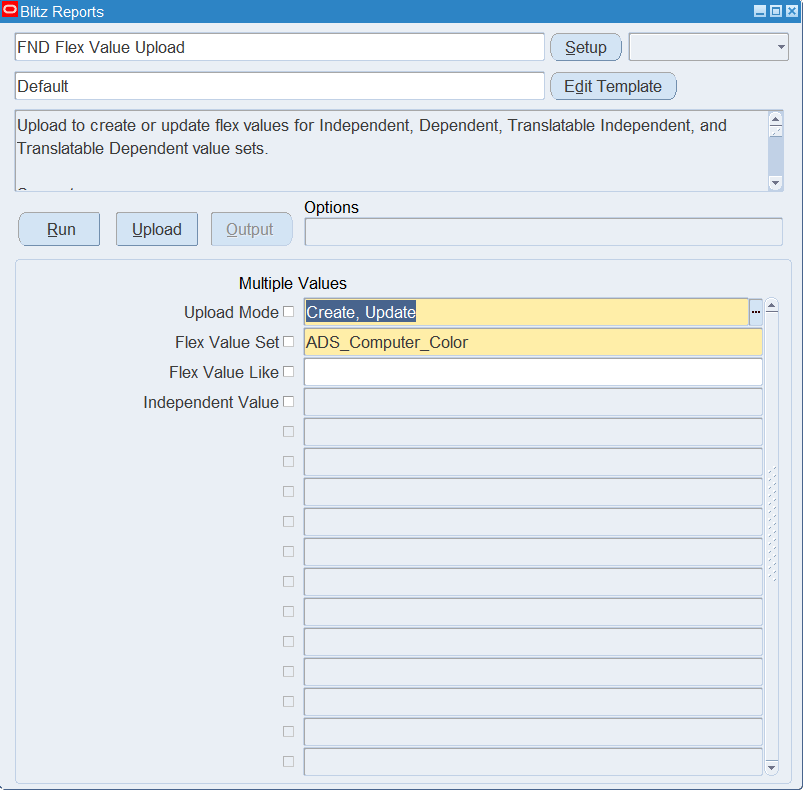
Open FND Flex Value Upload in Blitz Report and set the parameters:
| Parameter | Meaning |
|---|---|
| Upload Mode | Create opens an empty sheet for new values; Create, Update (default) downloads the existing values for editing and lets you add new ones. |
| Flex Value Set | The value set to download and maintain. The list shows the validation type of each value set. |
| Flex Value Like | Downloads only the values matching this text; use % as a wildcard, for example 41%. |
| Independent Value | For a dependent value set, downloads only the values that depend on this independent value. Available once a dependent value set is selected. |
Step 2 – Run to download the Excel file
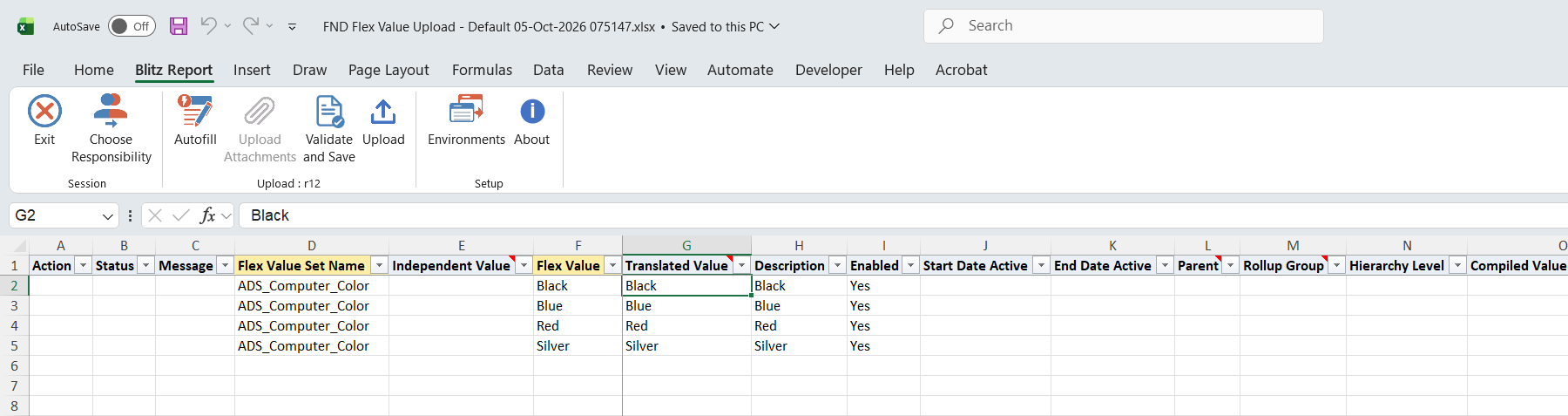
Click Run. The Excel file downloads and opens with one row per existing value, or an empty sheet in Create mode. A parent value with several child ranges is listed once per range.
Step 3 – Enter or change the values
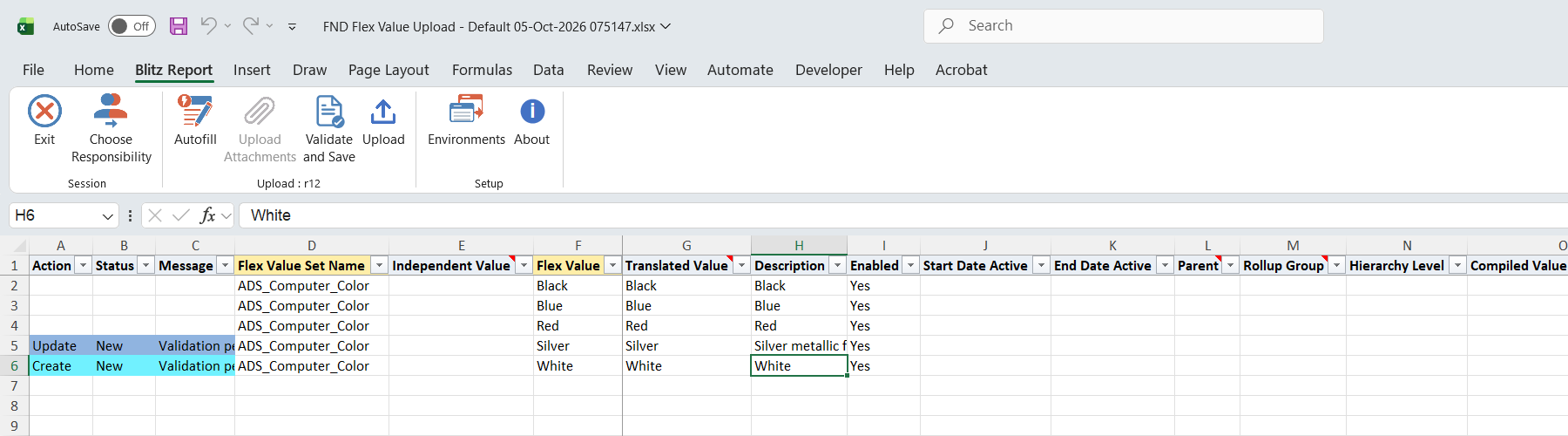
On a downloaded row, change the Description, Enabled, Start Date Active or End Date Active. To add a value, add a row with the Flex Value Set Name, the Flex Value and a Description; for a dependent value set also pick the Independent Value it belongs to. New rows default Enabled to Yes and Translated Value to the flex value; for a translatable value set, enter the user-facing text in Translated Value. A blank Enabled disables the value.
For a hierarchy, set Parent to Yes and choose a Rollup Group (independent value sets). To add a child range under a parent, enter Child Range Low and Child Range High and optionally a Range Attribute (child or parent values, default child). To remove a range, set Delete Range to Yes on the row of that range; the parent value itself is kept.
Compiled Value Attributes holds the segment qualifier values of key flexfield segments, such as Allow Budgeting, Allow Posting and Account Type for an accounting segment, one per line. Leave it blank on a new value to take the qualifier defaults.
Step 4 – Validate and Save
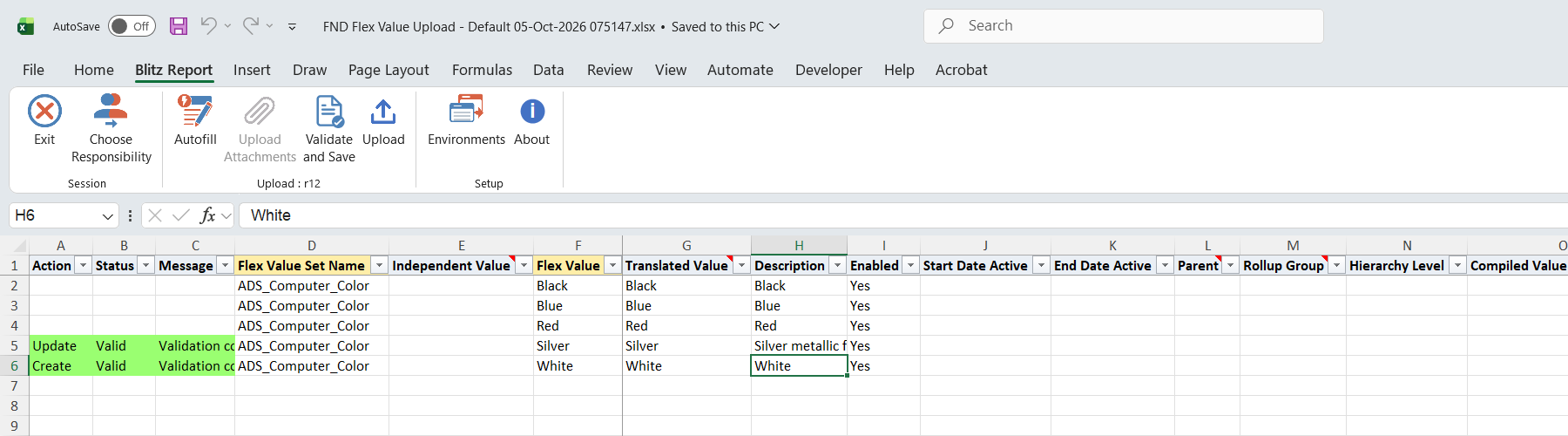
Click Validate and Save. This checks for missing required values and the child range columns (entered only on a parent value, both ends present, low not greater than high) and saves the file. Correct any rows it flags before uploading.
Step 5 – Upload the file
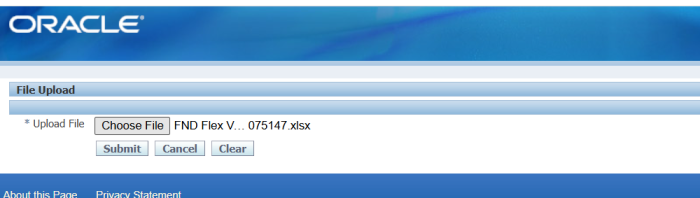
In Blitz Report click Upload and select the saved file. This submits the upload request, which creates or updates each value and adds or removes the child ranges.
Step 6 – Review the result report
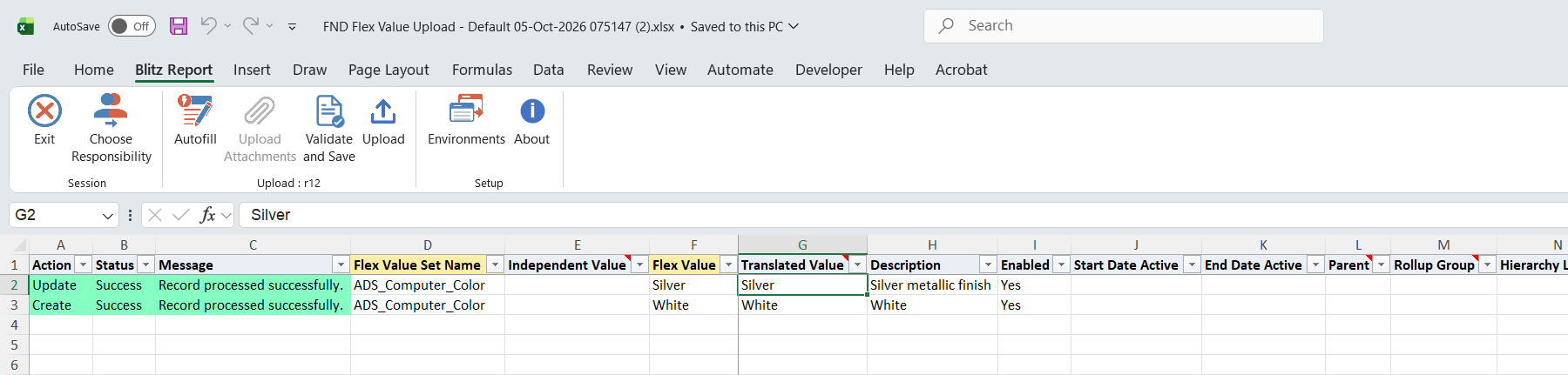
When the request completes, a result report opens listing every uploaded row with its status and message.
What’s produced
- Value set values created or updated, with their parent flags, rollup groups and child ranges.
- A result report listing every row with a status (success or error) and a message.
Common questions
How does the upload decide between create and update?
It looks the value up by value set, flex value and, for a dependent value set, independent value. An existing value is updated, otherwise it is created.
Can I delete a value?
No. To retire a value, clear Enabled or set an End Date Active. Delete Range removes only a child range from a parent.
What goes in Independent Value?
For a dependent value set, the value of the independent value set it depends on. Leave it blank for an independent value set.
I changed child ranges but the hierarchy is not updated in reports – why?
Run the standard concurrent program Compile value set hierarchies for the value set after hierarchy changes, as you would after maintaining ranges in the Values window.
Where are the descriptive flexfield columns?
The Default template leaves out Value Category and the Attribute columns. To maintain them, create a template of your own that includes these columns.
Troubleshooting
| Message | Cause | What to do |
|---|---|---|
| Child range columns can only be entered for parent values. | Child Range Low, Child Range High or Range Attribute on a row where Parent is not Yes. | Set Parent to Yes, or clear the child range columns. |
| Both Child Range Low and Child Range High must be specified. | Only one end of the range was entered. | Enter both ends of the range. |
| Child Range Low must be less than or equal to Child Range High. | The range is reversed. | Swap the low and high values. |
| Delete Range requires a child range to identify which range to delete. | Delete Range is Yes on a row without a child range. | Enter the Child Range Low and High of the range to delete. |
| Child range … not found for deletion. | The parent has no range with exactly this low and high value. | Download the parent again and set Delete Range on the downloaded range row. |
| Rollup group ‘…’ not found for value set ‘…’. | The Rollup Group is not defined for this value set. | Pick the rollup group from the list, or define it for the value set first. |
| Value set ‘…’ not found. | The Flex Value Set Name does not exist. | Pick the value set from the list. |
select null action_, null status_, null message_, null modified_columns_, ffvs.flex_value_set_name, ffvs0.flex_value_set_name parent_flex_value_set, ffv.parent_flex_value_low independent_value, ffv.flex_value, ffvt.flex_value_meaning translated_value, ffvt.description, xxen_util.yes(ffv.enabled_flag) enabled, ffv.start_date_active, ffv.end_date_active, xxen_util.yes(ffv.summary_flag) parent, ffhv.hierarchy_name rollup_group, ffv.hierarchy_level, ffv.compiled_value_attributes, ffvnh.child_flex_value_low child_range_low, ffvnh.child_flex_value_high child_range_high, xxen_util.meaning(ffvnh.range_attribute,'RANGE_ATTRIBUTE',0) range_attribute, ffv.attribute_sort_order, xxen_util.display_flexfield_context(0,'FND_FLEX_VALUES',ffv.value_category) value_category, xxen_util.display_flexfield_value(0,'FND_FLEX_VALUES',ffv.value_category,'ATTRIBUTE1',ffv.rowid,ffv.attribute1) attribute1, xxen_util.display_flexfield_value(0,'FND_FLEX_VALUES',ffv.value_category,'ATTRIBUTE2',ffv.rowid,ffv.attribute2) attribute2, xxen_util.display_flexfield_value(0,'FND_FLEX_VALUES',ffv.value_category,'ATTRIBUTE3',ffv.rowid,ffv.attribute3) attribute3, xxen_util.display_flexfield_value(0,'FND_FLEX_VALUES',ffv.value_category,'ATTRIBUTE4',ffv.rowid,ffv.attribute4) attribute4, xxen_util.display_flexfield_value(0,'FND_FLEX_VALUES',ffv.value_category,'ATTRIBUTE5',ffv.rowid,ffv.attribute5) attribute5, xxen_util.display_flexfield_value(0,'FND_FLEX_VALUES',ffv.value_category,'ATTRIBUTE6',ffv.rowid,ffv.attribute6) attribute6, xxen_util.display_flexfield_value(0,'FND_FLEX_VALUES',ffv.value_category,'ATTRIBUTE7',ffv.rowid,ffv.attribute7) attribute7, xxen_util.display_flexfield_value(0,'FND_FLEX_VALUES',ffv.value_category,'ATTRIBUTE8',ffv.rowid,ffv.attribute8) attribute8, xxen_util.display_flexfield_value(0,'FND_FLEX_VALUES',ffv.value_category,'ATTRIBUTE9',ffv.rowid,ffv.attribute9) attribute9, xxen_util.display_flexfield_value(0,'FND_FLEX_VALUES',ffv.value_category,'ATTRIBUTE10',ffv.rowid,ffv.attribute10) attribute10, xxen_util.display_flexfield_value(0,'FND_FLEX_VALUES',ffv.value_category,'ATTRIBUTE11',ffv.rowid,ffv.attribute11) attribute11, xxen_util.display_flexfield_value(0,'FND_FLEX_VALUES',ffv.value_category,'ATTRIBUTE12',ffv.rowid,ffv.attribute12) attribute12, xxen_util.display_flexfield_value(0,'FND_FLEX_VALUES',ffv.value_category,'ATTRIBUTE13',ffv.rowid,ffv.attribute13) attribute13, xxen_util.display_flexfield_value(0,'FND_FLEX_VALUES',ffv.value_category,'ATTRIBUTE14',ffv.rowid,ffv.attribute14) attribute14, xxen_util.display_flexfield_value(0,'FND_FLEX_VALUES',ffv.value_category,'ATTRIBUTE15',ffv.rowid,ffv.attribute15) attribute15, xxen_util.display_flexfield_value(0,'FND_FLEX_VALUES',ffv.value_category,'ATTRIBUTE16',ffv.rowid,ffv.attribute16) attribute16, xxen_util.display_flexfield_value(0,'FND_FLEX_VALUES',ffv.value_category,'ATTRIBUTE17',ffv.rowid,ffv.attribute17) attribute17, xxen_util.display_flexfield_value(0,'FND_FLEX_VALUES',ffv.value_category,'ATTRIBUTE18',ffv.rowid,ffv.attribute18) attribute18, xxen_util.display_flexfield_value(0,'FND_FLEX_VALUES',ffv.value_category,'ATTRIBUTE19',ffv.rowid,ffv.attribute19) attribute19, xxen_util.display_flexfield_value(0,'FND_FLEX_VALUES',ffv.value_category,'ATTRIBUTE20',ffv.rowid,ffv.attribute20) attribute20, xxen_util.display_flexfield_value(0,'FND_FLEX_VALUES',ffv.value_category,'ATTRIBUTE21',ffv.rowid,ffv.attribute21) attribute21, xxen_util.display_flexfield_value(0,'FND_FLEX_VALUES',ffv.value_category,'ATTRIBUTE22',ffv.rowid,ffv.attribute22) attribute22, xxen_util.display_flexfield_value(0,'FND_FLEX_VALUES',ffv.value_category,'ATTRIBUTE23',ffv.rowid,ffv.attribute23) attribute23, xxen_util.display_flexfield_value(0,'FND_FLEX_VALUES',ffv.value_category,'ATTRIBUTE24',ffv.rowid,ffv.attribute24) attribute24, xxen_util.display_flexfield_value(0,'FND_FLEX_VALUES',ffv.value_category,'ATTRIBUTE25',ffv.rowid,ffv.attribute25) attribute25, xxen_util.display_flexfield_value(0,'FND_FLEX_VALUES',ffv.value_category,'ATTRIBUTE26',ffv.rowid,ffv.attribute26) attribute26, xxen_util.display_flexfield_value(0,'FND_FLEX_VALUES',ffv.value_category,'ATTRIBUTE27',ffv.rowid,ffv.attribute27) attribute27, xxen_util.display_flexfield_value(0,'FND_FLEX_VALUES',ffv.value_category,'ATTRIBUTE28',ffv.rowid,ffv.attribute28) attribute28, xxen_util.display_flexfield_value(0,'FND_FLEX_VALUES',ffv.value_category,'ATTRIBUTE29',ffv.rowid,ffv.attribute29) attribute29, xxen_util.display_flexfield_value(0,'FND_FLEX_VALUES',ffv.value_category,'ATTRIBUTE30',ffv.rowid,ffv.attribute30) attribute30, ffv.attribute31, ffv.attribute32, ffv.attribute33, ffv.attribute34, ffv.attribute35, ffv.attribute36, ffv.attribute37, ffv.attribute38, ffv.attribute39, ffv.attribute40, ffv.attribute41, ffv.attribute42, ffv.attribute43, ffv.attribute44, ffv.attribute45, ffv.attribute46, ffv.attribute47, ffv.attribute48, ffv.attribute49, ffv.attribute50, to_char(null) delete_range, null upload_row from fnd_flex_value_sets ffvs, fnd_flex_value_sets ffvs0, fnd_flex_values ffv, fnd_flex_values_tl ffvt, fnd_flex_hierarchies_vl ffhv, fnd_flex_value_norm_hierarchy ffvnh where :p_upload_mode like '%'||xxen_upload.action_update and 1=1 and ffvs.flex_value_set_name=:p_flex_value_set_name and ffvs.parent_flex_value_set_id=ffvs0.flex_value_set_id(+) and ffvs.flex_value_set_id=ffv.flex_value_set_id and ffv.flex_value_id=ffvt.flex_value_id and ffvt.language=userenv('lang') and ffv.structured_hierarchy_level=ffhv.hierarchy_id(+) and ffv.flex_value_set_id=ffvnh.flex_value_set_id(+) and ffv.flex_value=ffvnh.parent_flex_value(+) |
| Parameter Name | SQL text | Validation | |
|---|---|---|---|
| Upload Mode |
| LOV | |
| Flex Value Set |
| LOV | |
| Flex Value Like |
| Char | |
| Independent Value |
| LOV |