
PA Project Asset Upload

Description
PA Project Asset Upload creates and updates the project assets of an Oracle Projects capital project from Excel, and adds or removes their asset-to-task assignments, using the standard Oracle Projects public API. It downloads the existing Estimated and As-Built assets of one project for editing and maintains the project asset records, and assigns the asset lines of the project to its assets. It does not capitalize the assets or create assets in Oracle Assets.
When to use it
- Load the estimated capital assets of a new capital project in one go.
- Record as-built assets before generating asset lines and capitalizing.
- Maintain asset attributes such as description, book, asset category, location, estimated cost, units, in-service dates, depreciation expense account and identification numbers across many assets.
- Assign assets to project tasks, or remove assignments, in bulk.
- Assign the asset lines generated by PRC: Generate Asset Lines to project assets, or change their description, as Assign Asset in the Capital Projects form does.
Before you start
- Use a responsibility that may update the project: you are a key member of the project, or the responsibility has cross-project update access (for example a Projects responsibility with the PA: Cross Project User — Update profile set to Yes).
- The capital project exists in the operating unit. Only projects of a capital project type are offered.
- The book, asset categories, asset keys, locations, depreciation expense accounts and tasks you reference exist.
Choose a template
| Template | Use it for |
|---|---|
| Default (default) | All columns except the descriptive flexfield attributes. |
| Asset Lines | Assigning the asset lines of a project to project assets. Downloads one row per asset line in Create, Update mode, with the line’s task, description, asset category, cost, transfer status and asset. |
Step 1 – Set the parameters
Open PA Project Asset Upload in Blitz Report and set the parameters:
| Parameter | Meaning |
|---|---|
| Upload Mode | Create (default) opens an empty sheet for new assets; Create, Update downloads the project’s existing Estimated and As-Built assets for editing and lets you add new ones. |
| Operating Unit | The operating unit of the project. Restricts the Project Number list. |
| Project Number | The capital project whose assets are downloaded and uploaded. |
| Asset Lines | Asset Lines template, set to Yes: downloads the asset lines of the project, one row per line, to assign them to project assets, instead of the assets. |
| Unassigned Asset Lines Only | Asset Lines template: Yes downloads only the asset lines that are not assigned to an asset yet. |
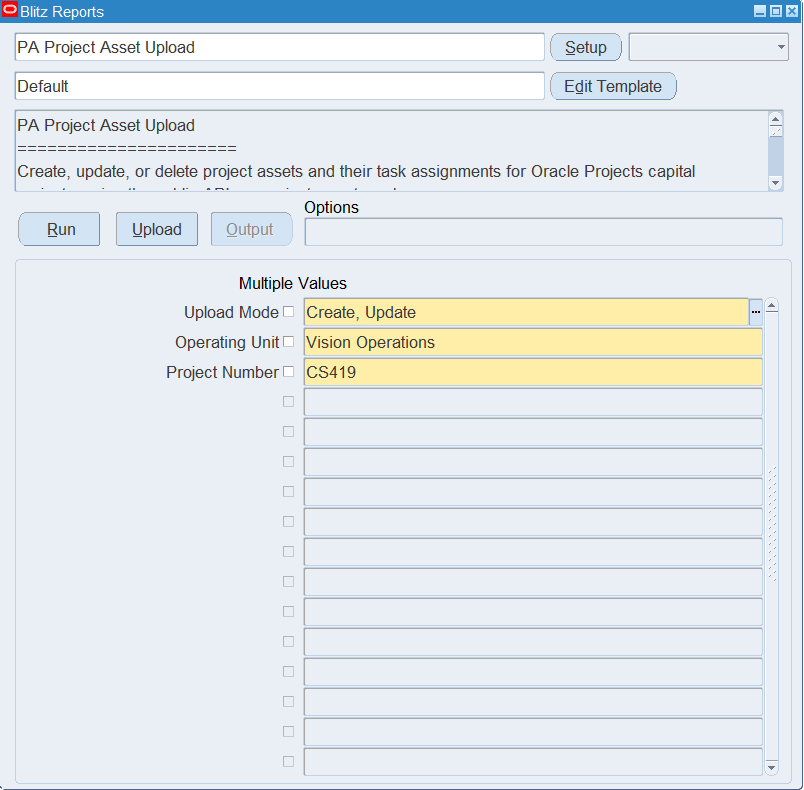
Step 2 – Run to download the Excel file
Click Run. The Excel file downloads and opens with one row per asset and task assignment of the project, or an empty sheet in Create mode.
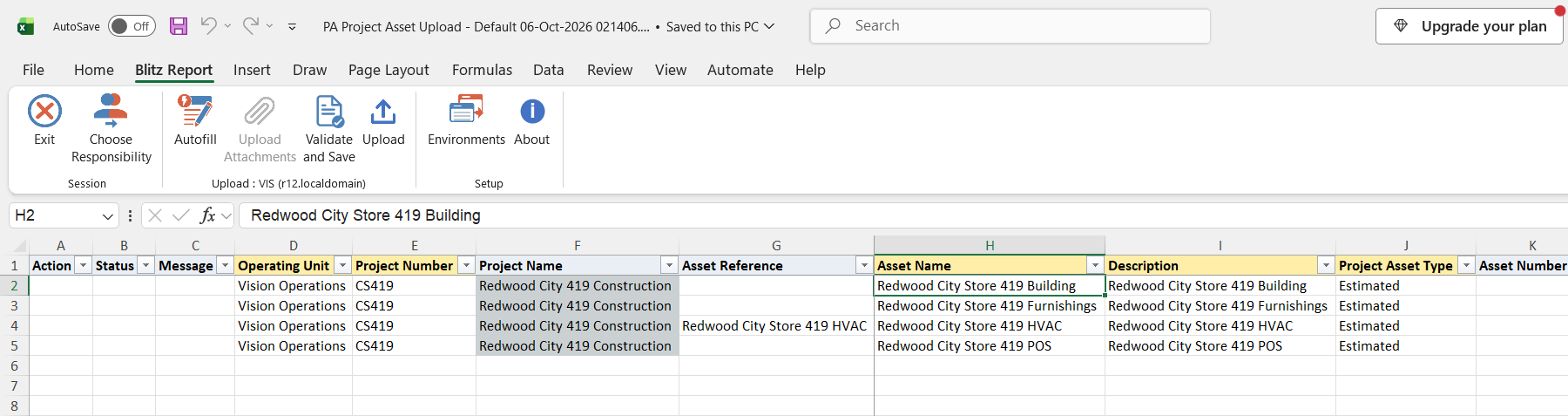
Step 3 – Enter or change the assets
Change the values of a downloaded asset, or add a row for a new asset with the Operating Unit, Project Number, Asset Name, Description and Project Asset Type (Estimated, the default, or As-Built). Add the Oracle Assets details as needed: Book, Asset Category (the list shows the categories of the selected book), Asset Key, Location, Employee Name, Estimated In Service Date or Actual In Service Date, Estimated Asset Units, Actual Units, Estimated Cost, Parent Asset Number, Depreciate, Amortize Adjustments, Depreciation Expense Account (expense accounts of the operating unit’s ledger) and Capital Hold, plus manufacturer, model, serial and tag numbers.
An asset that already exists on the project, matched by Asset Reference or Asset Name, is updated; otherwise it is created. Asset Reference defaults to the Asset Name. On an existing asset, an empty column keeps the current value, except Capital Hold, which is removed when left empty.
To assign an asset to a task, enter the Assignment Task Number. For several tasks, repeat the asset on consecutive rows with a different task each; the asset values are taken from the first of these rows. Set Rollup to Yes to confirm the task is a top task. To remove an assignment, set Delete Assignment to Yes on the row with that task.
Asset lines (Asset Lines template): each row is one asset line of the project. Line Asset Name assigns the line to a project asset, as Assign Asset in the Capital Projects form does. The list shows the assets assigned to the line’s task, placed in service and not on capital hold; the asset must be assigned to the line’s task, or the task carries a common assignment. Clearing Line Asset Name unassigns the line. Line Description can be changed; Line Task Number, Line Asset Category, Line Cost and Line Transfer Status are read-only. Transferred lines cannot be changed.
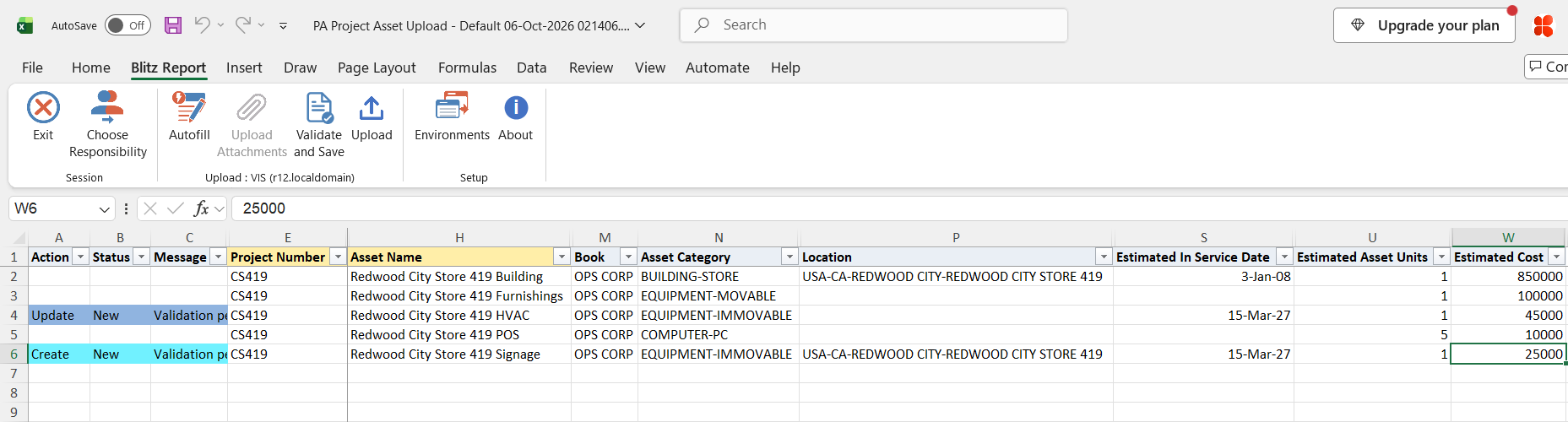
Step 4 – Validate and Save
Click Validate and Save. This checks for missing required values and saves the file. Correct any rows it flags before uploading.
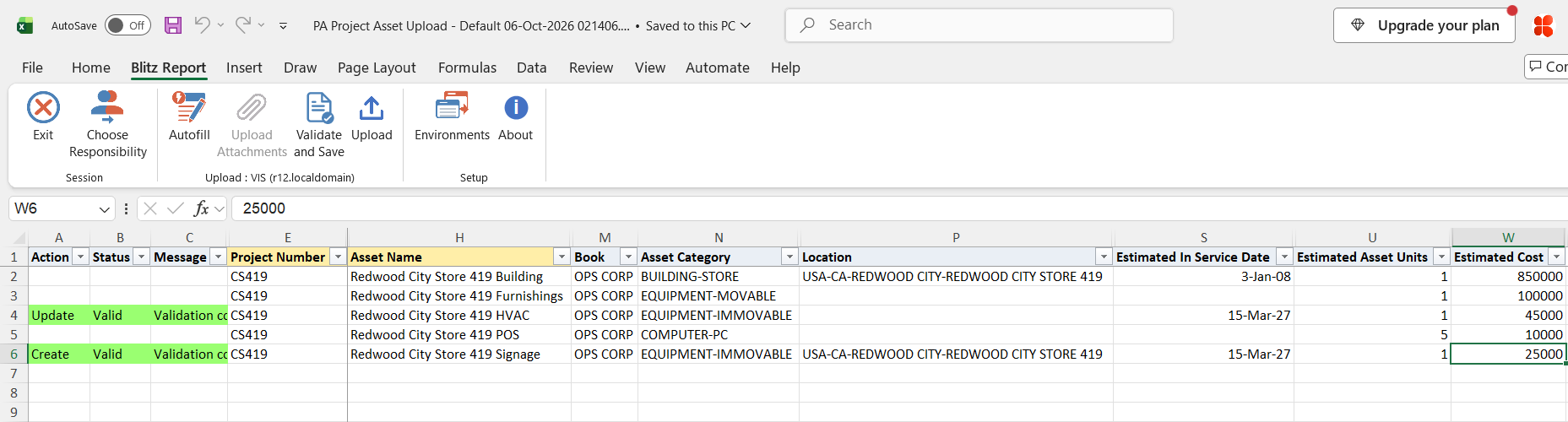
Step 5 – Upload the file
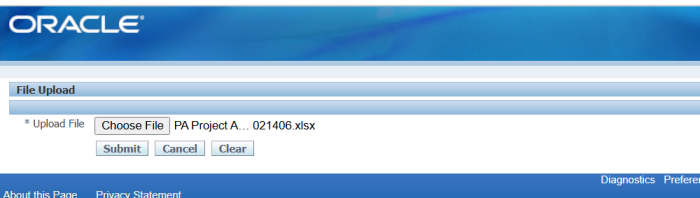
In Blitz Report click Upload and select the saved file. This submits the upload request, which creates or updates each asset and adds or deletes its task assignments.
Step 6 – Review the result report
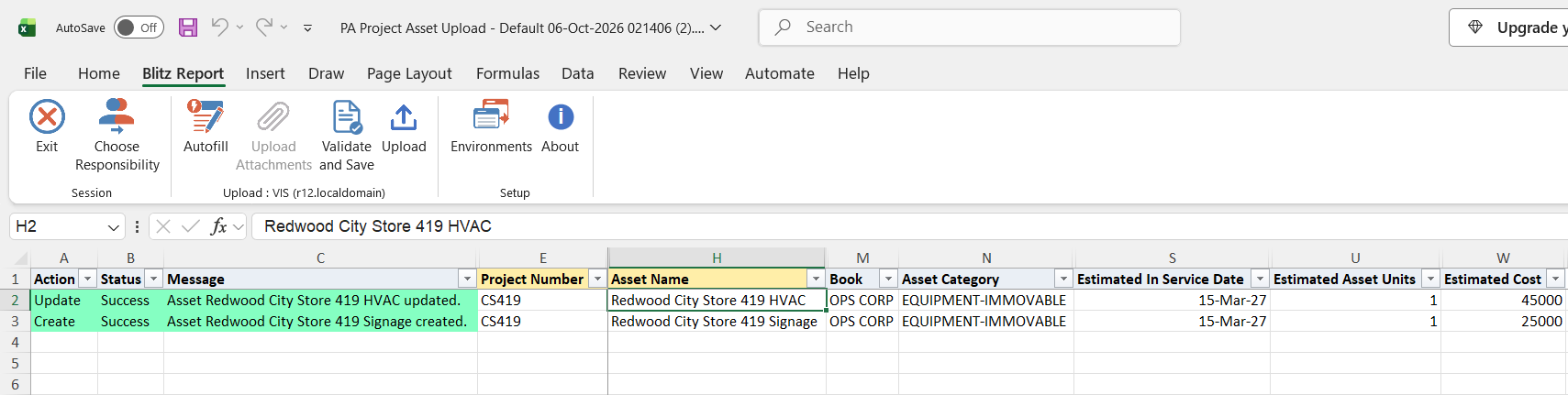
When the request completes, a result report opens listing every uploaded row with its status and message, for example Asset … created., Asset … updated. or Assignment to task … added. A row that fails is rolled back completely, including its asset changes. Asset line rows show Asset line assigned to asset …., Asset line unassigned., Asset line updated. or No change.
What’s produced
- Project assets created or updated on the capital project, with their task assignments added or deleted.
- Asset lines assigned to project assets or unassigned, and their descriptions changed.
- A result report listing every row with a status (success or error) and a message.
Common questions
Does the upload capitalize assets or create them in Oracle Assets?
No. It maintains the project asset definitions, their task assignments and the assets of the asset lines only. Generate asset lines and run capitalization in Oracle Projects as usual.
Can I delete a project asset?
No. Only asset-to-task assignments can be deleted, with Delete Assignment = Yes.
Which asset types can I maintain?
Estimated and As-Built. Retirement adjustment assets are not downloaded or created.
How do I create an asset without a task assignment?
Leave Assignment Task Number empty.
How do I change the descriptive flexfield of an existing assignment?
Assignments cannot be updated. Delete the assignment with Delete Assignment = Yes, upload, then add it again with the new values. A row for an assignment that already exists is reported as unchanged.
Where are the descriptive flexfield columns?
The Default template hides them. Show the asset and assignment attribute columns by running without a template or by adding them to your own template.
Troubleshooting
| Message | Cause | What to do |
|---|---|---|
| Failed to create project asset: You do not have update privileges on this project. A project can be updated only by its key members or users with cross-project responsibility . | Your user is not a key member of the project and the responsibility has no cross-project update access (also reported as Failed to update project asset). | Upload from a responsibility with cross-project update access, or ask to be added as a key member. |
| Failed to add assignment: Project: ‘…’ Cannot assign asset to task when project-level assignments exist. | The project’s assets are assigned at project level, so task assignments are not allowed. | Leave Assignment Task Number empty for this project, or remove the project-level assignments in Oracle Projects first. |
| Invalid Asset Category: … / Invalid Asset Key: … / Invalid Location: … | The value is not an existing asset category, asset key or location combination. | Select the value from the column’s list. |
| Invalid Depreciation Expense Account: … | The account combination does not exist in the chart of accounts of the operating unit’s ledger. | Select the account from the column’s list. |
| Rollup=Yes requires Task Number to be a top task. | Rollup is Yes for a lower-level task. | Enter a top task, or leave Rollup empty. |
| Failed to create project asset: … / Failed to update project asset: … / Failed to add assignment: … / Failed to delete assignment: … | Oracle Projects rejected the asset or assignment, for example because of an invalid date, units or book and category combination. The text after the colon is the Oracle message. | Correct the value named in the message and upload again. |
| Asset DFF: … / Assignment DFF: … | A descriptive flexfield value is invalid or required. | Correct the attribute columns as the message describes. |
| Assignment to task … not found (nothing to delete). | Delete Assignment is Yes but the asset is not assigned to that task. | No action needed; check the task number if you expected an assignment. |
| The asset is not assigned to the task of this asset line, has no actual in service date, is on capital hold, or belongs to another capital event. | The Line Asset Name is not an asset the line can be assigned to. | Pick the asset from the Line Asset Name list, or assign the asset to the line’s task first. |
| Asset line … does not exist for this project. | The row’s asset line is not an asset line of the project. | Download the asset lines of the project again. |
| Oracle Projects message that a transferred asset line cannot be updated | The asset line has already been transferred to Oracle Assets. | Leave the line unchanged. |
SQL 218 lines
select null action_, null status_, null message_, null request_id_, null modified_columns_, -- operating unit and project haouv.name operating_unit, ppa.segment1 project_number, ppa.name project_name, -- asset identity ppaa.project_asset_id, ppaa.pm_asset_reference asset_reference, ppaa.asset_name, ppaa.asset_description description, xxen_util.meaning(ppaa.project_asset_type,'PROJECT_ASSET_TYPES',275) project_asset_type, ppaa.asset_number, xxen_util.meaning(ppaa.pm_product_code,'PM_PRODUCT_CODE',275) product_source, -- FA book and KFFs ppaa.book_type_code book, fcbk.concatenated_segments asset_category, fakk.concatenated_segments asset_key, flk.concatenated_segments location, -- employee papf.full_name employee_name, papf.employee_number, -- dates ppaa.estimated_in_service_date, ppaa.date_placed_in_service actual_in_service_date, -- units and cost ppaa.estimated_asset_units, ppaa.asset_units actual_units, ppaa.estimated_cost, -- parent asset fa.asset_number parent_asset_number, -- flags decode(ppaa.depreciate_flag,'Y',xxen_util.meaning('Y','YES_NO',0)) depreciate, decode(ppaa.amortize_flag,'Y',xxen_util.meaning('Y','YES_NO',0)) amortize_adjustments, gcck.concatenated_segments depreciation_expense_account, decode(ppaa.capital_hold_flag,'Y',xxen_util.meaning('Y','YES_NO',0)) capital_hold, -- identification ppaa.manufacturer_name, ppaa.model_number, ppaa.serial_number, ppaa.tag_number, -- asset DFF xxen_util.display_flexfield_context(275,'PA_PROJECT_ASSETS',ppaa.attribute_category) asset_attribute_category, xxen_util.display_flexfield_value(275,'PA_PROJECT_ASSETS',ppaa.attribute_category,'ATTRIBUTE1',ppaa.rowid,ppaa.attribute1) asset_attribute1, xxen_util.display_flexfield_value(275,'PA_PROJECT_ASSETS',ppaa.attribute_category,'ATTRIBUTE2',ppaa.rowid,ppaa.attribute2) asset_attribute2, xxen_util.display_flexfield_value(275,'PA_PROJECT_ASSETS',ppaa.attribute_category,'ATTRIBUTE3',ppaa.rowid,ppaa.attribute3) asset_attribute3, xxen_util.display_flexfield_value(275,'PA_PROJECT_ASSETS',ppaa.attribute_category,'ATTRIBUTE4',ppaa.rowid,ppaa.attribute4) asset_attribute4, xxen_util.display_flexfield_value(275,'PA_PROJECT_ASSETS',ppaa.attribute_category,'ATTRIBUTE5',ppaa.rowid,ppaa.attribute5) asset_attribute5, xxen_util.display_flexfield_value(275,'PA_PROJECT_ASSETS',ppaa.attribute_category,'ATTRIBUTE6',ppaa.rowid,ppaa.attribute6) asset_attribute6, xxen_util.display_flexfield_value(275,'PA_PROJECT_ASSETS',ppaa.attribute_category,'ATTRIBUTE7',ppaa.rowid,ppaa.attribute7) asset_attribute7, xxen_util.display_flexfield_value(275,'PA_PROJECT_ASSETS',ppaa.attribute_category,'ATTRIBUTE8',ppaa.rowid,ppaa.attribute8) asset_attribute8, xxen_util.display_flexfield_value(275,'PA_PROJECT_ASSETS',ppaa.attribute_category,'ATTRIBUTE9',ppaa.rowid,ppaa.attribute9) asset_attribute9, xxen_util.display_flexfield_value(275,'PA_PROJECT_ASSETS',ppaa.attribute_category,'ATTRIBUTE10',ppaa.rowid,ppaa.attribute10) asset_attribute10, xxen_util.display_flexfield_value(275,'PA_PROJECT_ASSETS',ppaa.attribute_category,'ATTRIBUTE11',ppaa.rowid,ppaa.attribute11) asset_attribute11, xxen_util.display_flexfield_value(275,'PA_PROJECT_ASSETS',ppaa.attribute_category,'ATTRIBUTE12',ppaa.rowid,ppaa.attribute12) asset_attribute12, xxen_util.display_flexfield_value(275,'PA_PROJECT_ASSETS',ppaa.attribute_category,'ATTRIBUTE13',ppaa.rowid,ppaa.attribute13) asset_attribute13, xxen_util.display_flexfield_value(275,'PA_PROJECT_ASSETS',ppaa.attribute_category,'ATTRIBUTE14',ppaa.rowid,ppaa.attribute14) asset_attribute14, xxen_util.display_flexfield_value(275,'PA_PROJECT_ASSETS',ppaa.attribute_category,'ATTRIBUTE15',ppaa.rowid,ppaa.attribute15) asset_attribute15, -- assignment pt.task_id assignment_task_id, pt.task_number assignment_task_number, decode(case when pt.task_id is not null and pt.task_id=pt.top_task_id then 'Y' end,'Y',xxen_util.meaning('Y','YES_NO',0)) rollup, null delete_assignment, -- assignment DFF xxen_util.display_flexfield_context(275,'PA_PROJECT_ASSET_ASSIGNMENTS',paas.attribute_category) assign_attribute_category, xxen_util.display_flexfield_value(275,'PA_PROJECT_ASSET_ASSIGNMENTS',paas.attribute_category,'ATTRIBUTE1',paas.rowid,paas.attribute1) assign_attribute1, xxen_util.display_flexfield_value(275,'PA_PROJECT_ASSET_ASSIGNMENTS',paas.attribute_category,'ATTRIBUTE2',paas.rowid,paas.attribute2) assign_attribute2, xxen_util.display_flexfield_value(275,'PA_PROJECT_ASSET_ASSIGNMENTS',paas.attribute_category,'ATTRIBUTE3',paas.rowid,paas.attribute3) assign_attribute3, xxen_util.display_flexfield_value(275,'PA_PROJECT_ASSET_ASSIGNMENTS',paas.attribute_category,'ATTRIBUTE4',paas.rowid,paas.attribute4) assign_attribute4, xxen_util.display_flexfield_value(275,'PA_PROJECT_ASSET_ASSIGNMENTS',paas.attribute_category,'ATTRIBUTE5',paas.rowid,paas.attribute5) assign_attribute5, xxen_util.display_flexfield_value(275,'PA_PROJECT_ASSET_ASSIGNMENTS',paas.attribute_category,'ATTRIBUTE6',paas.rowid,paas.attribute6) assign_attribute6, xxen_util.display_flexfield_value(275,'PA_PROJECT_ASSET_ASSIGNMENTS',paas.attribute_category,'ATTRIBUTE7',paas.rowid,paas.attribute7) assign_attribute7, xxen_util.display_flexfield_value(275,'PA_PROJECT_ASSET_ASSIGNMENTS',paas.attribute_category,'ATTRIBUTE8',paas.rowid,paas.attribute8) assign_attribute8, xxen_util.display_flexfield_value(275,'PA_PROJECT_ASSET_ASSIGNMENTS',paas.attribute_category,'ATTRIBUTE9',paas.rowid,paas.attribute9) assign_attribute9, xxen_util.display_flexfield_value(275,'PA_PROJECT_ASSET_ASSIGNMENTS',paas.attribute_category,'ATTRIBUTE10',paas.rowid,paas.attribute10) assign_attribute10, xxen_util.display_flexfield_value(275,'PA_PROJECT_ASSET_ASSIGNMENTS',paas.attribute_category,'ATTRIBUTE11',paas.rowid,paas.attribute11) assign_attribute11, xxen_util.display_flexfield_value(275,'PA_PROJECT_ASSET_ASSIGNMENTS',paas.attribute_category,'ATTRIBUTE12',paas.rowid,paas.attribute12) assign_attribute12, xxen_util.display_flexfield_value(275,'PA_PROJECT_ASSET_ASSIGNMENTS',paas.attribute_category,'ATTRIBUTE13',paas.rowid,paas.attribute13) assign_attribute13, xxen_util.display_flexfield_value(275,'PA_PROJECT_ASSET_ASSIGNMENTS',paas.attribute_category,'ATTRIBUTE14',paas.rowid,paas.attribute14) assign_attribute14, xxen_util.display_flexfield_value(275,'PA_PROJECT_ASSET_ASSIGNMENTS',paas.attribute_category,'ATTRIBUTE15',paas.rowid,paas.attribute15) assign_attribute15, -- asset line to_number(null) asset_line_id, null line_task_number, null line_description, null line_asset_category, to_number(null) line_cost, null line_transfer_status, null line_asset_name, to_number(null) upload_row from pa_projects_all ppa, hr_all_organization_units_vl haouv, pa_project_assets_all ppaa, pa_project_asset_assignments paas, pa_tasks pt, fa_categories_b_kfv fcbk, fa_asset_keywords_kfv fakk, fa_locations_kfv flk, fa_additions_v fa, gl_code_combinations_kfv gcck, per_all_people_f papf where 1=1 and nvl(:p_asset_lines,'N')='N' and ppa.org_id=haouv.organization_id and ppa.project_id=ppaa.project_id and ppaa.project_asset_type in ('AS-BUILT','ESTIMATED') and ppaa.project_asset_id=paas.project_asset_id(+) and paas.project_id(+)<>0 and paas.task_id=pt.task_id(+) and ppaa.asset_category_id=fcbk.category_id(+) and ppaa.asset_key_ccid=fakk.code_combination_id(+) and ppaa.location_id=flk.location_id(+) and ppaa.parent_asset_id=fa.asset_id(+) and ppaa.depreciation_expense_ccid=gcck.code_combination_id(+) and ppaa.assigned_to_person_id=papf.person_id(+) and trunc(sysdate) between papf.effective_start_date(+) and papf.effective_end_date(+) union all select null action_, null status_, null message_, null request_id_, null modified_columns_, haouv.name operating_unit, ppa.segment1 project_number, ppa.name project_name, to_number(null) project_asset_id, null asset_reference, null asset_name, null description, null project_asset_type, null asset_number, null product_source, null book, null asset_category, null asset_key, null location, null employee_name, null employee_number, to_date(null) estimated_in_service_date, to_date(null) actual_in_service_date, to_number(null) estimated_asset_units, to_number(null) actual_units, to_number(null) estimated_cost, null parent_asset_number, null depreciate, null amortize_adjustments, null depreciation_expense_account, null capital_hold, null manufacturer_name, null model_number, null serial_number, null tag_number, null asset_attribute_category, null asset_attribute1, null asset_attribute2, null asset_attribute3, null asset_attribute4, null asset_attribute5, null asset_attribute6, null asset_attribute7, null asset_attribute8, null asset_attribute9, null asset_attribute10, null asset_attribute11, null asset_attribute12, null asset_attribute13, null asset_attribute14, null asset_attribute15, to_number(null) assignment_task_id, null assignment_task_number, null rollup, null delete_assignment, null assign_attribute_category, null assign_attribute1, null assign_attribute2, null assign_attribute3, null assign_attribute4, null assign_attribute5, null assign_attribute6, null assign_attribute7, null assign_attribute8, null assign_attribute9, null assign_attribute10, null assign_attribute11, null assign_attribute12, null assign_attribute13, null assign_attribute14, null assign_attribute15, pal.project_asset_line_id asset_line_id, pt.task_number line_task_number, pal.description line_description, fcbk.concatenated_segments line_asset_category, pal.current_asset_cost line_cost, xxen_util.meaning(pal.transfer_status_code,'TRANSFER STATUS',275) line_transfer_status, ppaa.asset_name line_asset_name, to_number(null) upload_row from pa_projects_all ppa, hr_all_organization_units_vl haouv, pa_project_asset_lines_all pal, pa_tasks pt, fa_categories_b_kfv fcbk, pa_project_assets_all ppaa where 1=1 and 2=2 and :p_asset_lines='Y' and ppa.org_id=haouv.organization_id and ppa.project_id=pal.project_id and pal.task_id=pt.task_id(+) and pal.asset_category_id=fcbk.category_id(+) and pal.project_asset_id=ppaa.project_asset_id(+) |
Parameters 5
| Parameter | Type | List of values SQL | |
|---|---|---|---|
| Upload Mode | LOV |
| |
| Operating Unit | LOV |
| |
| Project Number | LOV |
| |
| Asset Lines | LOV | ||
| Unassigned Asset Lines Only | LOV |
|