
AP Distribution Set Upload

Description
AP Distribution Set Upload creates and updates Oracle Payables distribution sets and their lines in bulk from Excel – the equivalent of the Distribution Sets window (Setup > Invoice > Distribution Sets). Oracle provides no interface or API for distribution sets, so this upload applies the same rules as the window: the line percentages of a set must add up to 100 (Full) or 0 (Skeleton), and each set is saved completely or not at all.
When to use it
- Set up distribution sets for a new operating unit or during a data migration.
- Rebalance the percentages or change the accounts of existing sets, for example after a department restructuring.
- Copy a set to another operating unit, or build similar sets from an existing one.
- Deactivate many sets at once by entering an Inactive On date.
Before you start
- Your responsibility has access to the operating units you load, and the Payables options are defined for them.
- For project related lines, Oracle Projects is installed and the project, task, expenditure type and expenditure organization are valid for Payables.
Step 1 – Set the parameters
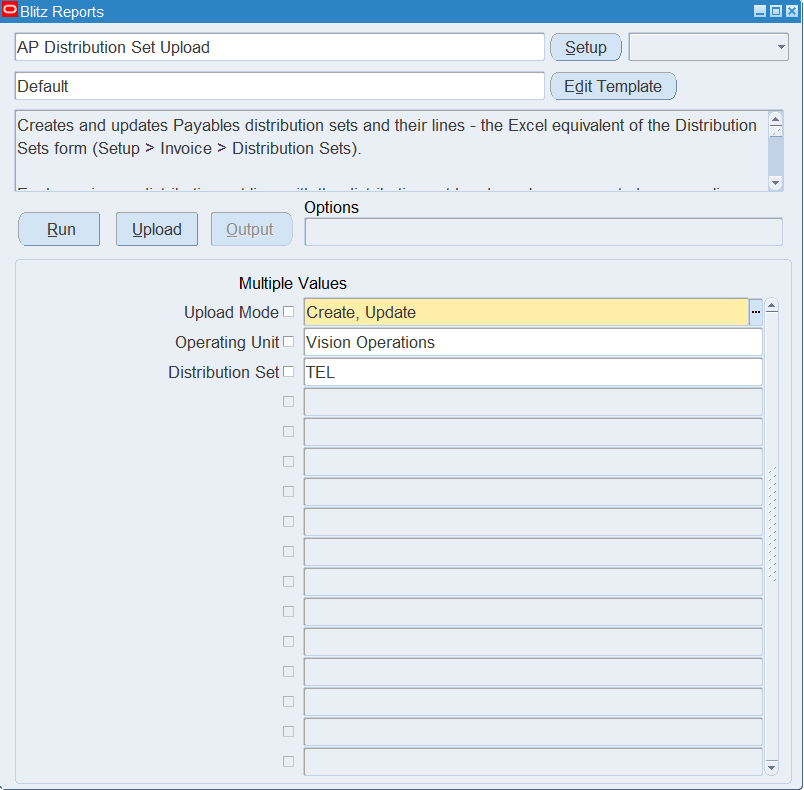
Open AP Distribution Set Upload in Blitz Report and set the parameters:
| Parameter | Meaning |
|---|---|
| Upload Mode | Create opens an empty sheet for new sets; Create, Update (default) downloads existing sets for editing and lets you add new ones. |
| Operating Unit | Restricts the download to one operating unit. Defaults to your default operating unit. |
| Distribution Set | Restricts the download to one distribution set. |
Step 2 – Run to download the Excel file
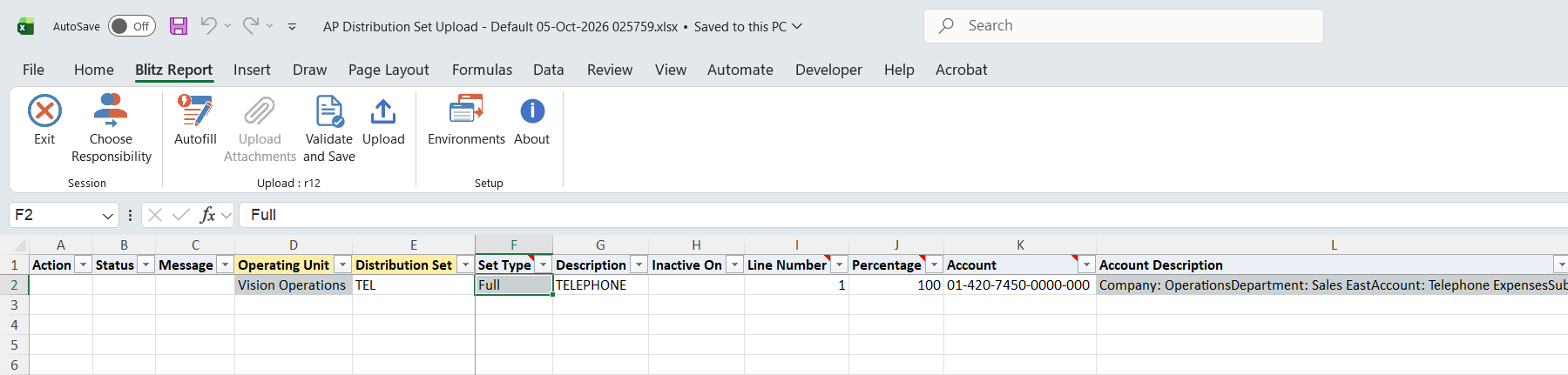
Click Run. The Excel file downloads and opens with one row per distribution set line. The set’s header columns (Operating Unit, Distribution Set, Set Type, Description, Inactive On) are repeated on each of its lines.
Step 3 – Enter or change the distribution sets
- Header – enter the Operating Unit and Distribution Set name, and optionally the Description and Inactive On date. The header values are taken from the first row of each set, so enter header changes there. Set Type is derived: Full when the lines add up to 100, Skeleton when they add up to 0.
- Lines – on each row enter the Line Number, Percentage and Account, and optionally the Line Description and Income Tax Type. The line number identifies the line within its set.
- Project related lines – enter Project, Task, Expenditure Type and Expenditure Organization together and leave the Account blank. The account is derived by the Projects account generator, as in the Distribution Sets window.
- Delete Line – set it to Yes on a downloaded line to delete that line.
- Header only – leave all line columns blank to create or update a set header without lines.
Each set must end up with line percentages adding up to 100 or 0. The check includes existing lines that are not in your file.
Step 4 – Validate and Save
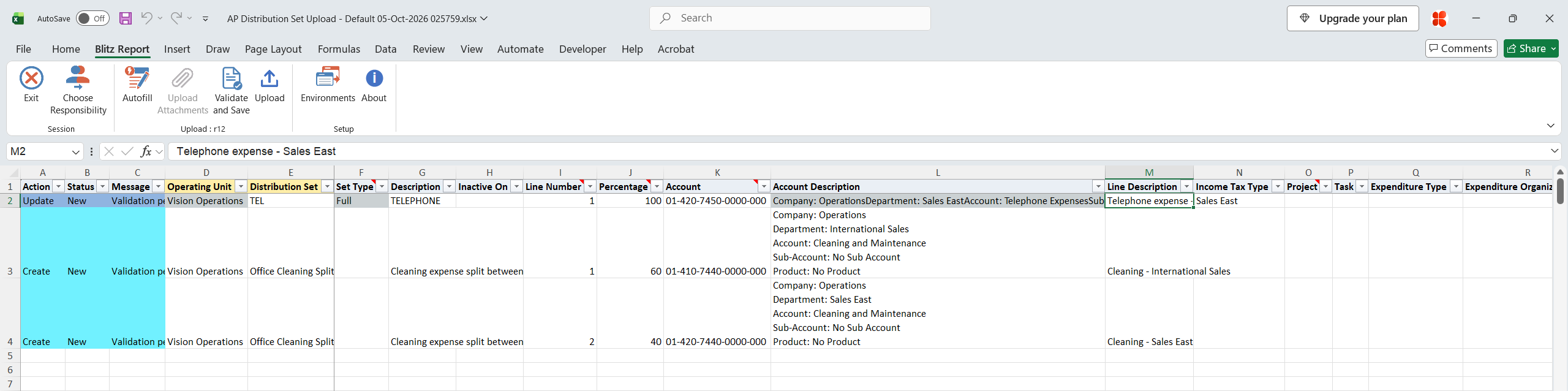
Click Validate and Save. This checks for missing required values and saves the file. Correct any rows it flags before uploading.
Step 5 – Upload the file
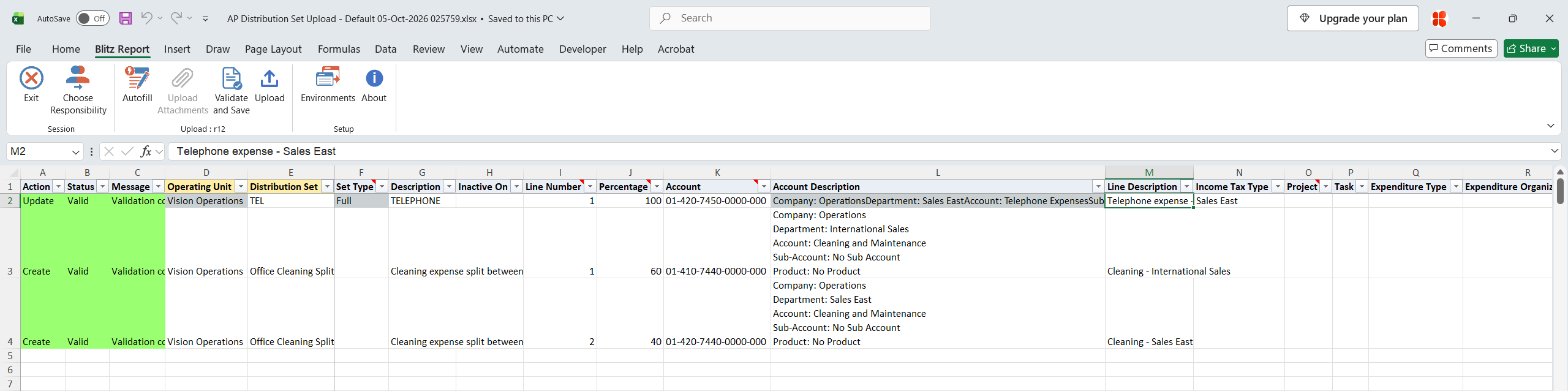
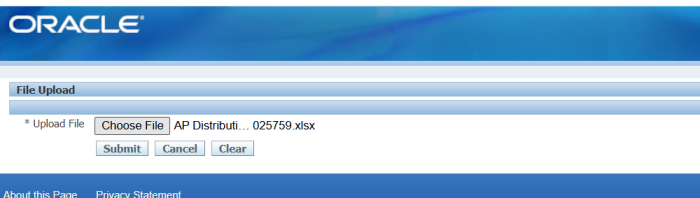
In Blitz Report click Upload and select the saved file. This submits the upload request, which creates or updates each distribution set and its lines.
Step 6 – Review the result report
When the request completes, a result report opens listing every uploaded row with its status and message, for example “Distribution set created. Line 1 created.”, “Line 2 updated.”, “Line 3 deleted.” or “No change.”.

What’s produced
- Distribution sets and lines created or updated, and lines deleted, in the chosen operating units. Each set’s type (Full or Skeleton) is set from its line total.
- A result report listing every row with a status (success or error) and a message.
Common questions
Why were rows with no errors of their own not saved?
A distribution set is saved as a whole. If any of its rows fails, or its line percentages do not add up to 100 or 0, none of its rows are saved, and the other rows show “Not saved because of errors in other rows of Distribution Set …”. Correct the failing row and upload the set again.
Can I delete a distribution set?
No – as in the Distribution Sets window, a set cannot be deleted. Enter an Inactive On date to stop it being used. Individual lines can be deleted with the Delete Line column.
How do I rename a set?
Download it in Create, Update mode and change the Distribution Set name on all of its rows. The downloaded rows identify the existing set, so it is renamed rather than a new one created.
How do I copy a set?
Copy its downloaded rows, give them a new Distribution Set name (or another Operating Unit) and set the Action to Create. A new set is created and the original is not changed.
Can I enter my own account on a project related line?
No. The account of a project related line is always derived from the project details, as in the Distribution Sets window.
My row says “No change.” – did anything happen?
No update was needed: none of the values differed from what is already stored. This is normal, not an error.
Troubleshooting
| Message | Cause | What to do |
|---|---|---|
| The line percentages of Distribution Set … add up to … They must add up to 100 or 0. | The resulting line total of the set, including existing lines not in the file, is neither 100 nor 0. | Adjust the percentages, or delete or add lines, so the set totals 100 or 0. |
| Distribution Set … already exists in Operating Unit … | A new or renamed set has the name of another set in the operating unit. Names are compared regardless of upper and lower case. | Choose a different name, or download the existing set to update it. |
| Operating Unit … not found or not accessible for the current responsibility. | The operating unit is not in your responsibility’s security profile. | Use a responsibility with access to that operating unit. |
| Payables options are not defined for Operating Unit … | The operating unit has no Payables options. | Define the Payables options first. |
| Line Number is required. | A row has line values but no line number. | Enter the line number. |
| Line Number must be a positive integer. | The line number is zero, negative or has decimals. | Enter a whole number greater than 0. |
| Line Number … occurs more than once for this distribution set. | Two rows of the same set have the same line number. | Give each line its own number. |
| Percentage is required. | A new line has no percentage. | Enter the percentage. |
| Account is required. | A line that is not project related has no account. | Enter the account, or the project details for a project related line. |
| Account … is invalid | The account combination fails the accounting flexfield validation. | Correct the account segments. |
| Account … does not allow detail posting. | The account is a summary or parent account. | Use a detail account. |
| Project, Task, Expenditure Type and Expenditure Organization are required for a project related line. | Only some of the project details were entered. | Enter all four, or clear all four for an account-based line. |
| Project … is invalid. / Task … is invalid for Project … / Expenditure Organization … is invalid. | The value is not chargeable from Payables, or the task does not belong to the project. | Pick the value from the list. |
| Account generation failed: … | The Projects account generator could not build an account for the project details. | Check the project details and the account generator setup named in the message. |
| The account of a project related line is derived from the project details: … | An account different from the derived one was entered on a project related line. | Clear the Account column. |
| Inactive On cannot be in the past. | The inactive date entered is before today. | Enter today or a future date. |
| Line … does not exist. | Delete Line was set for a line number that the set does not have. | Check the line number, or download the set again. |
| Header values are taken from the first row of the distribution set. Enter header changes on its first row. | The Description or Inactive On was changed on a later row of the set. | Make the change on the set’s first row. |
SQL 72 lines
select null action_, null status_, null message_, null modified_columns_, haouv.name operating_unit, adsa.distribution_set_name distribution_set, (select alc.displayed_field from ap_lookup_codes alc where alc.lookup_type='NLS TRANSLATION' and alc.lookup_code='PERCENT DIST '||adsa.total_percent_distribution) set_type, adsa.description, adsa.inactive_date inactive_on, xxen_util.display_flexfield_context(200,'AP_DISTRIBUTION_SETS',adsa.attribute_category) set_attribute_category, xxen_util.display_flexfield_value(200,'AP_DISTRIBUTION_SETS',adsa.attribute_category,'ATTRIBUTE1',adsa.rowid,adsa.attribute1) set_attribute1, xxen_util.display_flexfield_value(200,'AP_DISTRIBUTION_SETS',adsa.attribute_category,'ATTRIBUTE2',adsa.rowid,adsa.attribute2) set_attribute2, xxen_util.display_flexfield_value(200,'AP_DISTRIBUTION_SETS',adsa.attribute_category,'ATTRIBUTE3',adsa.rowid,adsa.attribute3) set_attribute3, xxen_util.display_flexfield_value(200,'AP_DISTRIBUTION_SETS',adsa.attribute_category,'ATTRIBUTE4',adsa.rowid,adsa.attribute4) set_attribute4, xxen_util.display_flexfield_value(200,'AP_DISTRIBUTION_SETS',adsa.attribute_category,'ATTRIBUTE5',adsa.rowid,adsa.attribute5) set_attribute5, xxen_util.display_flexfield_value(200,'AP_DISTRIBUTION_SETS',adsa.attribute_category,'ATTRIBUTE6',adsa.rowid,adsa.attribute6) set_attribute6, xxen_util.display_flexfield_value(200,'AP_DISTRIBUTION_SETS',adsa.attribute_category,'ATTRIBUTE7',adsa.rowid,adsa.attribute7) set_attribute7, xxen_util.display_flexfield_value(200,'AP_DISTRIBUTION_SETS',adsa.attribute_category,'ATTRIBUTE8',adsa.rowid,adsa.attribute8) set_attribute8, xxen_util.display_flexfield_value(200,'AP_DISTRIBUTION_SETS',adsa.attribute_category,'ATTRIBUTE9',adsa.rowid,adsa.attribute9) set_attribute9, xxen_util.display_flexfield_value(200,'AP_DISTRIBUTION_SETS',adsa.attribute_category,'ATTRIBUTE10',adsa.rowid,adsa.attribute10) set_attribute10, xxen_util.display_flexfield_value(200,'AP_DISTRIBUTION_SETS',adsa.attribute_category,'ATTRIBUTE11',adsa.rowid,adsa.attribute11) set_attribute11, xxen_util.display_flexfield_value(200,'AP_DISTRIBUTION_SETS',adsa.attribute_category,'ATTRIBUTE12',adsa.rowid,adsa.attribute12) set_attribute12, xxen_util.display_flexfield_value(200,'AP_DISTRIBUTION_SETS',adsa.attribute_category,'ATTRIBUTE13',adsa.rowid,adsa.attribute13) set_attribute13, xxen_util.display_flexfield_value(200,'AP_DISTRIBUTION_SETS',adsa.attribute_category,'ATTRIBUTE14',adsa.rowid,adsa.attribute14) set_attribute14, xxen_util.display_flexfield_value(200,'AP_DISTRIBUTION_SETS',adsa.attribute_category,'ATTRIBUTE15',adsa.rowid,adsa.attribute15) set_attribute15, adsla.distribution_set_line_number line_number, adsla.percent_distribution percentage, gcck.concatenated_segments account, xxen_util.segments_description(gcck.code_combination_id) account_description, adsla.description line_description, adsla.type_1099 income_tax_type, ppa.segment1 project, pt.task_number task, adsla.expenditure_type, haouv_exp.name expenditure_organization, xxen_util.display_flexfield_context(200,'AP_DISTRIBUTION_SET_LINES',adsla.attribute_category) line_attribute_category, xxen_util.display_flexfield_value(200,'AP_DISTRIBUTION_SET_LINES',adsla.attribute_category,'ATTRIBUTE1',adsla.rowid,adsla.attribute1) line_attribute1, xxen_util.display_flexfield_value(200,'AP_DISTRIBUTION_SET_LINES',adsla.attribute_category,'ATTRIBUTE2',adsla.rowid,adsla.attribute2) line_attribute2, xxen_util.display_flexfield_value(200,'AP_DISTRIBUTION_SET_LINES',adsla.attribute_category,'ATTRIBUTE3',adsla.rowid,adsla.attribute3) line_attribute3, xxen_util.display_flexfield_value(200,'AP_DISTRIBUTION_SET_LINES',adsla.attribute_category,'ATTRIBUTE4',adsla.rowid,adsla.attribute4) line_attribute4, xxen_util.display_flexfield_value(200,'AP_DISTRIBUTION_SET_LINES',adsla.attribute_category,'ATTRIBUTE5',adsla.rowid,adsla.attribute5) line_attribute5, xxen_util.display_flexfield_value(200,'AP_DISTRIBUTION_SET_LINES',adsla.attribute_category,'ATTRIBUTE6',adsla.rowid,adsla.attribute6) line_attribute6, xxen_util.display_flexfield_value(200,'AP_DISTRIBUTION_SET_LINES',adsla.attribute_category,'ATTRIBUTE7',adsla.rowid,adsla.attribute7) line_attribute7, xxen_util.display_flexfield_value(200,'AP_DISTRIBUTION_SET_LINES',adsla.attribute_category,'ATTRIBUTE8',adsla.rowid,adsla.attribute8) line_attribute8, xxen_util.display_flexfield_value(200,'AP_DISTRIBUTION_SET_LINES',adsla.attribute_category,'ATTRIBUTE9',adsla.rowid,adsla.attribute9) line_attribute9, xxen_util.display_flexfield_value(200,'AP_DISTRIBUTION_SET_LINES',adsla.attribute_category,'ATTRIBUTE10',adsla.rowid,adsla.attribute10) line_attribute10, xxen_util.display_flexfield_value(200,'AP_DISTRIBUTION_SET_LINES',adsla.attribute_category,'ATTRIBUTE11',adsla.rowid,adsla.attribute11) line_attribute11, xxen_util.display_flexfield_value(200,'AP_DISTRIBUTION_SET_LINES',adsla.attribute_category,'ATTRIBUTE12',adsla.rowid,adsla.attribute12) line_attribute12, xxen_util.display_flexfield_value(200,'AP_DISTRIBUTION_SET_LINES',adsla.attribute_category,'ATTRIBUTE13',adsla.rowid,adsla.attribute13) line_attribute13, xxen_util.display_flexfield_value(200,'AP_DISTRIBUTION_SET_LINES',adsla.attribute_category,'ATTRIBUTE14',adsla.rowid,adsla.attribute14) line_attribute14, xxen_util.display_flexfield_value(200,'AP_DISTRIBUTION_SET_LINES',adsla.attribute_category,'ATTRIBUTE15',adsla.rowid,adsla.attribute15) line_attribute15, null delete_line, adsa.distribution_set_id, null upload_row from ap_distribution_sets_all adsa, hr_all_organization_units_vl haouv, ap_distribution_set_lines_all adsla, gl_code_combinations_kfv gcck, pa_projects_all ppa, pa_tasks pt, hr_all_organization_units_vl haouv_exp where 1=1 and adsa.org_id in (select xroa.id from xxen_report_org_access xroa where xroa.access_type='OU') and adsa.org_id=haouv.organization_id and adsa.distribution_set_id=adsla.distribution_set_id(+) and adsla.dist_code_combination_id=gcck.code_combination_id(+) and adsla.project_id=ppa.project_id(+) and adsla.task_id=pt.task_id(+) and adsla.expenditure_organization_id=haouv_exp.organization_id(+) |
Parameters 3
| Parameter | Type | List of values SQL | |
|---|---|---|---|
| Upload Mode | LOV |
| |
| Operating Unit | LOV |
| |
| Distribution Set | LOV |
|