
PA Project Upload
PA Project Upload creates and updates Oracle Projects projects from Excel: the project header, project manager, primary customer, dates, currency and billing setup, flags, and descriptive flexfield attributes. New projects are copied from a project template you choose, and existing projects are downloaded for editing and updated with only the values you change.
When to use it
- Mass-create new projects from a standard project template with consistent header and billing setup.
- Bulk-update header attributes such as status, dates, description, organization, billing setup and flags on many projects.
- Reassign the project manager across a set of projects.
- Set the primary customer for many new projects at once.
- Populate project descriptive flexfield attributes in bulk.
Before you start
- A responsibility with Blitz Report and project access to the operating unit, such as an Oracle Projects responsibility.
- An active project template exists in the operating unit for every new project. Its quick entry fields marked as required decide which columns a new project must fill.
- The project manager is an active employee.
Step 1 – Set the parameters
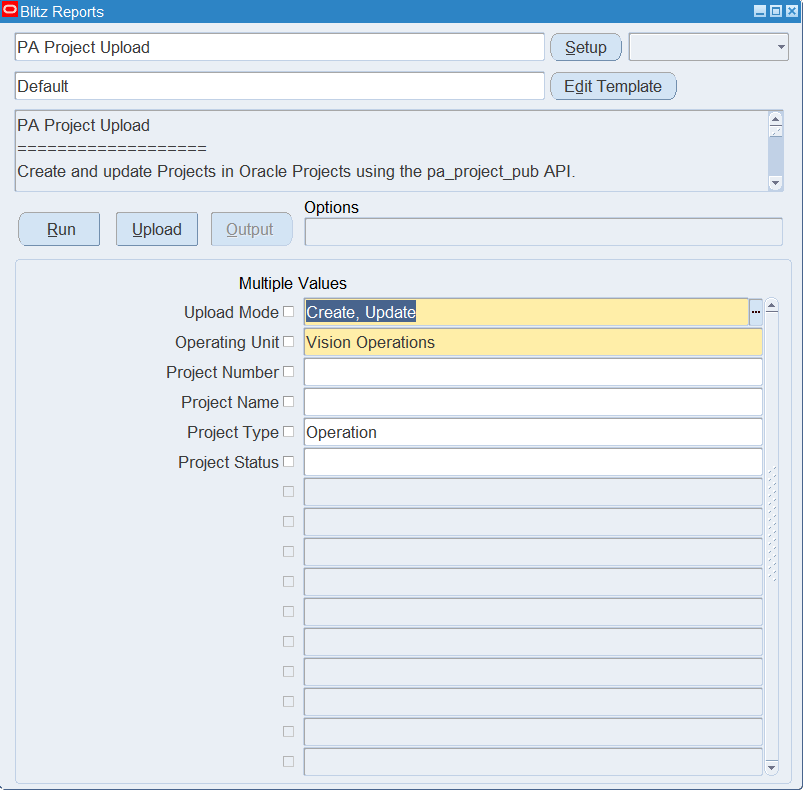
Open PA Project Upload in Blitz Report and set the parameters:
| Parameter | Meaning |
|---|---|
| Upload Mode | Create (default) opens an empty sheet for new projects; Create, Update downloads existing projects for editing and lets you add new ones. |
| Operating Unit | The operating unit of the projects (required). |
| Project Number | Downloads this project only. |
| Project Name | Downloads the project with this name. |
| Project Type | Downloads projects of this project type. |
| Project Status | Downloads projects with this status. |
Project templates are never downloaded, only projects.
Step 2 – Run to download the Excel file
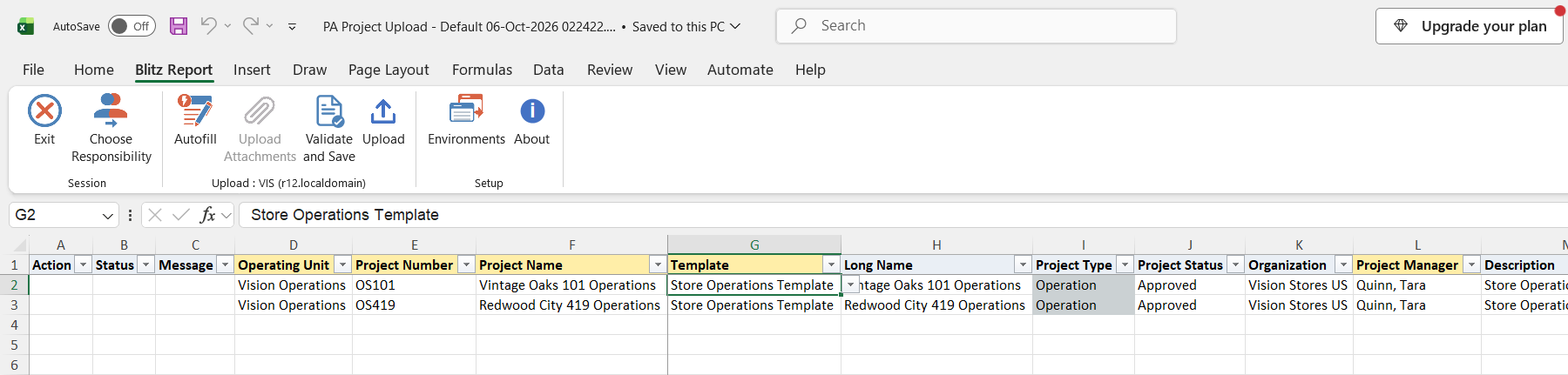
Click Run. The Excel file downloads and opens with one row per project, showing its template, current project manager, primary customer and header settings, or an empty sheet in Create mode.
Step 3 – Enter or change the projects
To change a downloaded project, overwrite the values you want to change, for example the Description, Long Name, Project Status, Completion Date or Project Manager. Only changed values are sent to Oracle; clearing a cell clears that value on the project.
To create a project, add a row with the Operating Unit, a new Project Number (up to 25 characters), the Project Name (up to 30 characters) and the Template to copy from. Entering the Template fills the other columns with the template’s values, such as Project Type, Project Status, Organization, Project Manager, dates, currency and billing setup. Overwrite what differs for the new project, at least the Start Date, and check that the Completion Date copied from the template is not before it. Customer Name becomes the project’s primary customer, and Pm Product Code (default Primavera Systems) records the external project management system that owns the project.
Step 4 – Validate and Save
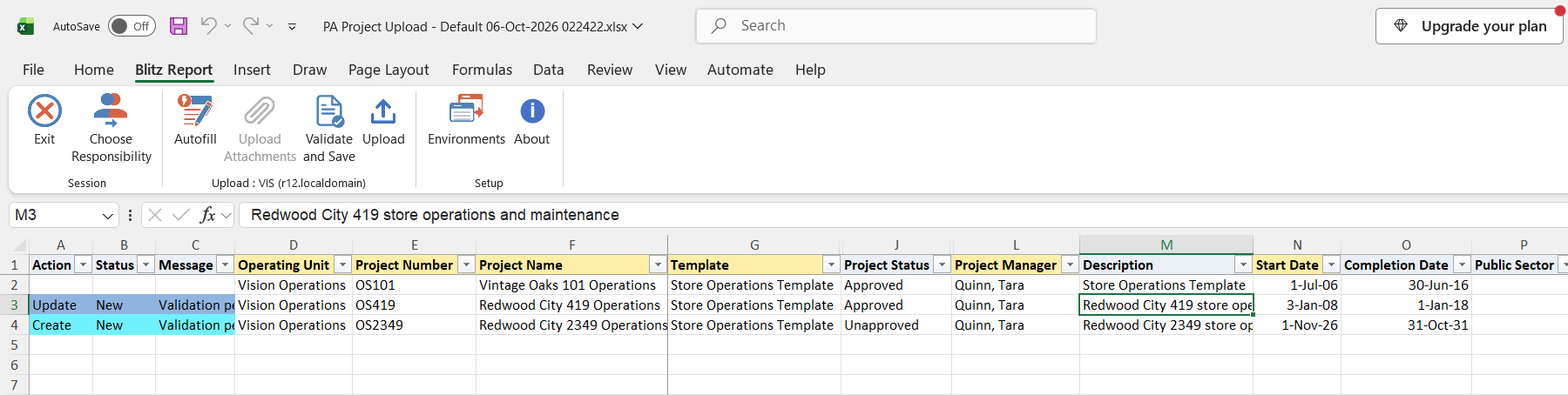
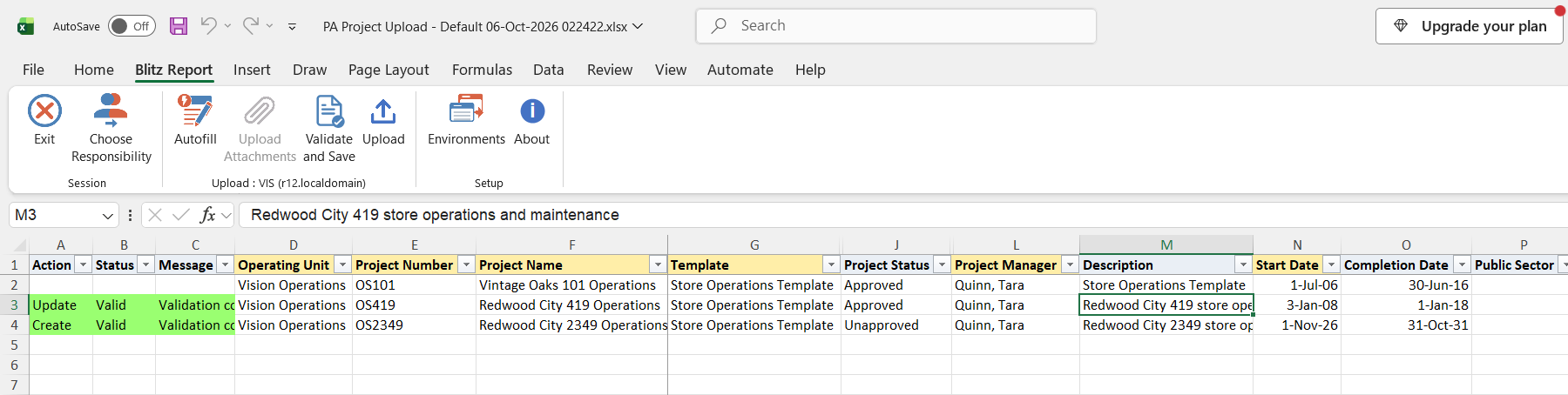
Click Validate and Save. This checks for missing required values, the field lengths and the fields the template requires, then saves the file. Correct any rows it flags before uploading.
Step 5 – Upload the file
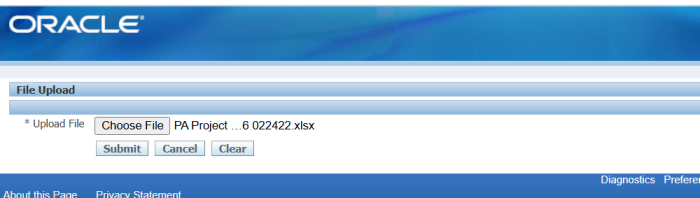
In Blitz Report click Upload and select the saved file. This submits the upload request, which creates or updates each project.
Step 6 – Review the result report
When the request completes, a result report opens listing every uploaded row with its status and message, for example Project created: <project number> or Project updated: <project number>, followed by a note when the project manager was replaced or assigned.
What’s produced
- New projects copied from their template, with their project manager, primary customer and header setup.
- Existing projects updated with the changed values, and project manager changes recorded with dates.
- A result report listing every row with a status (success, warning or error) and a message.
Common questions
How does the upload decide between create and update?
A row updates the project if a project with that Project Number already exists in the operating unit, otherwise it creates a new project from the Template.
What happens when I change the project manager?
On an existing project the current project manager is end-dated as of yesterday and the new one is assigned from today. On a new project, a manager different from the template’s replaces the template’s manager from the project start date.
Can I change the customer or the Pm Product Code of an existing project?
No. Customer Name and Pm Product Code are applied when the project is created and are not changed by an update.
Which Pm Product Code should I use?
Keep the default Primavera Systems unless the project is maintained in another external system. Do not use Microsoft Project: it prevents later date updates on the project (Oracle bug 12954344).
Can I add tasks with this upload?
No. New projects get the tasks of their template. Use PA Task Upload to create and update tasks.
Where are the descriptive flexfield columns?
The Default template shows all columns except the descriptive flexfield attributes. Run the upload without a template to include the Attribute Category and attribute columns.
Troubleshooting
| Message | Cause | What to do |
|---|---|---|
| Required for template: … | The template marks the listed fields (Organization, Project Manager, Description, start date, finish date or customer) as required and they are empty. | Fill the listed columns. |
| Project Number exceeds 25 characters, Project Name exceeds 30 characters, Long Name exceeds 240 characters, Description exceeds 250 characters | A value is longer than Oracle Projects allows. | Shorten the value. |
| Template is required for project creation. | A new project row has no Template. | Select an active project template of the operating unit. |
| MOAC initialization failed | Your responsibility has no access to the row’s operating unit. | Upload from a responsibility with access to the operating unit. |
| DFF validation: … | A descriptive flexfield value is not valid for the project flexfield. | Correct the Attribute Category or attribute value. |
| … (PM creation failed: …), (New PM creation failed: …), (PM replace failed: …) | The project was saved, but the project manager change was rejected, so the row ends with a warning. | Check that the project manager is an active employee with a valid assignment on the start date, and correct the manager in Oracle Projects or upload the row again. |
select null action_, null status_, null message_, null request_id_, null modified_columns_, -- project identifiers haouv.name operating_unit, ppa.segment1 project_number, ppa.name project_name, (select ppa_t.name from pa_projects_all ppa_t where ppa_t.project_id=ppa.created_from_project_id) template, ppa.long_name, ppa.project_type, pps.project_status_name project_status, haouv2.name organization, ppf.full_name project_manager, ppa.description, -- dates ppa.start_date, ppa.completion_date, -- classification decode(ppa.public_sector_flag,'Y',xxen_util.meaning('Y','YES_NO',0)) public_sector, pdr.meaning distribution_rule, -- currency ppa.project_currency_code, ppa.projfunc_currency_code, gdct1.user_conversion_type project_rate_type, ppa.project_rate_date, gdct2.user_conversion_type projfunc_cost_rate_type, ppa.projfunc_cost_rate_date, -- billing setup xxen_util.meaning(ppa.labor_sch_type,'PROJECT SCHEDULE TYPE',275) labor_schedule_type, ppa.labor_schedule_fixed_date, ppa.labor_schedule_discount, xxen_util.meaning(ppa.labor_disc_reason_code,'RATE AND DISCOUNT REASON',275) labor_discount_reason, xxen_util.meaning(ppa.non_labor_sch_type,'PROJECT SCHEDULE TYPE',275) non_labor_schedule_type, haouv4.name non_labor_bill_rate_org, ppa.non_labor_schedule_fixed_date, ppa.non_labor_schedule_discount, xxen_util.meaning(ppa.non_labor_disc_reason_code,'RATE AND DISCOUNT REASON',275) non_labor_discount_reason, psbrsa1.std_bill_rate_schedule employee_bill_rate_schedule, psbrsa2.std_bill_rate_schedule job_bill_rate_schedule, psbrsa3.std_bill_rate_schedule non_labor_bill_rate_schedule, -- burden schedules pirsab2.ind_rate_sch_name revenue_burden_schedule, ppa.rev_ind_sch_fixed_date revenue_ind_sched_fixed_dt, pirsab3.ind_rate_sch_name invoice_burden_schedule, ppa.inv_ind_sch_fixed_date invoice_ind_sched_fixed_dt, -- billing currency xxen_util.meaning(ppa.invproc_currency_type,'INVPROCE_CURR_TYPE',275) invproc_currency_type, ppa.revproc_currency_code, xxen_util.meaning(ppa.project_bil_rate_date_code,'BILL_RATE_DATE_CODE',275) project_bil_rate_date_code, gdct3.user_conversion_type project_bil_rate_type, ppa.project_bil_rate_date, ppa.project_bil_exchange_rate, xxen_util.meaning(ppa.projfunc_bil_rate_date_code,'BILL_RATE_DATE_CODE',275) projfunc_bil_rate_date_code, gdct4.user_conversion_type projfunc_bil_rate_type, ppa.projfunc_bil_rate_date, ppa.projfunc_bil_exchange_rate, xxen_util.meaning(ppa.funding_rate_date_code,'BILL_RATE_DATE_CODE',275) funding_rate_date_code, gdct5.user_conversion_type funding_rate_type, ppa.funding_rate_date, ppa.funding_exchange_rate, -- flags decode(ppa.baseline_funding_flag,'Y',xxen_util.meaning('Y','YES_NO',0)) baseline_funding, decode(ppa.multi_currency_billing_flag,'Y',xxen_util.meaning('Y','YES_NO',0)) multi_currency_billing, decode(ppa.inv_by_bill_trans_curr_flag,'Y',xxen_util.meaning('Y','YES_NO',0)) invoice_by_bill_trx_currency, decode(ppa.assign_precedes_task,'Y',xxen_util.meaning('Y','YES_NO',0)) assign_precedes_task, decode(ppa.split_cost_from_workplan_flag,'Y',xxen_util.meaning('Y','YES_NO',0)) split_cost_from_workplan, decode(ppa.split_cost_from_bill_flag,'Y',xxen_util.meaning('Y','YES_NO',0)) split_cost_from_billing, decode(ppa.sys_program_flag,'Y',xxen_util.meaning('Y','YES_NO',0)) system_program, decode(ppa.allow_multi_program_rollup,'Y',xxen_util.meaning('Y','YES_NO',0)) allow_multi_program_rollup, decode(ppa.projfunc_attr_for_ar_flag,'Y',xxen_util.meaning('Y','YES_NO',0)) projfunc_attr_for_ar, decode(ppa.revaluate_funding_flag,'Y',xxen_util.meaning('Y','YES_NO',0)) revaluate_funding, decode(ppa.include_gains_losses_flag,'Y',xxen_util.meaning('Y','YES_NO',0)) include_gains_losses, decode(ppa.retn_accounting_flag,'Y',xxen_util.meaning('Y','YES_NO',0)) retention_accounting, decode(ppa.cint_eligible_flag,'Y',xxen_util.meaning('Y','YES_NO',0)) capital_interest_eligible, ppa.cint_stop_date capital_interest_stop_date, decode(ppa.enable_top_task_customer_flag,'Y',xxen_util.meaning('Y','YES_NO',0)) enable_top_task_customer, decode(ppa.enable_top_task_inv_mth_flag,'Y',xxen_util.meaning('Y','YES_NO',0)) enable_top_task_invoice_method, decode(ppa.limit_to_txn_controls_flag,'Y',xxen_util.meaning('Y','YES_NO',0)) limit_to_txn_controls, -- cross charge / transfer price decode(ppa.allow_cross_charge_flag,'Y',xxen_util.meaning('Y','YES_NO',0)) allow_cross_charge, decode(ppa.cc_process_labor_flag,'Y',xxen_util.meaning('Y','YES_NO',0)) cross_charge_process_labor, decode(ppa.cc_process_nl_flag,'Y',xxen_util.meaning('Y','YES_NO',0)) cross_charge_process_non_labor, pctsb1.name labor_transfer_price_schedule, ppa.labor_tp_fixed_date labor_transfer_price_fixed_dt, pctsb2.name non_labor_transfer_price_sched, ppa.nl_tp_fixed_date non_labor_xfer_price_fxd_dt, -- setup pwtv.name work_type, jtcv.calendar_name calendar, hla.location_code location, prl.name role_list, to_char(ppm.probability_percentage) probability, ppa.project_value, ppa.expected_approval_date, (select pl.meaning from pa_lookups pl where pl.lookup_type='PA_PROJECT_PRIORITY_CODE' and pl.lookup_code=ppa.priority_code) priority_code, pjgv1.displayed_name cost_job_group, pjgv2.displayed_name bill_job_group, (select flvv.meaning from fnd_lookup_values_vl flvv where flvv.lookup_type='PA_SECURITY_LEVEL' and flvv.lookup_code=to_char(ppa.security_level) and flvv.enabled_flag='Y' and flvv.security_group_id=0) security_level, -- retention / invoice format pif.name retention_billing_invoice_fmt, -- asset / capital xxen_util.meaning(ppa.asset_allocation_method,'ASSET_ALLOCATION_METHOD',275) asset_allocation_method, xxen_util.meaning(ppa.capital_event_processing,'CAPITAL_EVENT_PROCESSING',275) capital_event_processing, pirsab4.ind_rate_sch_name capital_interest_rate_schedule, -- tax ppa.output_tax_code, ppa.retention_tax_code, -- DFF xxen_util.display_flexfield_context(275,'PA_PROJECTS_DESC_FLEX',ppa.attribute_category) attribute_category, xxen_util.display_flexfield_value(275,'PA_PROJECTS_DESC_FLEX',ppa.attribute_category,'ATTRIBUTE1',ppa.rowid,ppa.attribute1) attribute1, xxen_util.display_flexfield_value(275,'PA_PROJECTS_DESC_FLEX',ppa.attribute_category,'ATTRIBUTE2',ppa.rowid,ppa.attribute2) attribute2, xxen_util.display_flexfield_value(275,'PA_PROJECTS_DESC_FLEX',ppa.attribute_category,'ATTRIBUTE3',ppa.rowid,ppa.attribute3) attribute3, xxen_util.display_flexfield_value(275,'PA_PROJECTS_DESC_FLEX',ppa.attribute_category,'ATTRIBUTE4',ppa.rowid,ppa.attribute4) attribute4, xxen_util.display_flexfield_value(275,'PA_PROJECTS_DESC_FLEX',ppa.attribute_category,'ATTRIBUTE5',ppa.rowid,ppa.attribute5) attribute5, xxen_util.display_flexfield_value(275,'PA_PROJECTS_DESC_FLEX',ppa.attribute_category,'ATTRIBUTE6',ppa.rowid,ppa.attribute6) attribute6, xxen_util.display_flexfield_value(275,'PA_PROJECTS_DESC_FLEX',ppa.attribute_category,'ATTRIBUTE7',ppa.rowid,ppa.attribute7) attribute7, xxen_util.display_flexfield_value(275,'PA_PROJECTS_DESC_FLEX',ppa.attribute_category,'ATTRIBUTE8',ppa.rowid,ppa.attribute8) attribute8, xxen_util.display_flexfield_value(275,'PA_PROJECTS_DESC_FLEX',ppa.attribute_category,'ATTRIBUTE9',ppa.rowid,ppa.attribute9) attribute9, xxen_util.display_flexfield_value(275,'PA_PROJECTS_DESC_FLEX',ppa.attribute_category,'ATTRIBUTE10',ppa.rowid,ppa.attribute10) attribute10, -- customer (select hp.party_name from pa_project_customers ppc, hz_cust_accounts hca, hz_parties hp where ppc.project_id=ppa.project_id and ppc.customer_id=hca.cust_account_id and hca.party_id=hp.party_id and rownum=1) customer_name, (select pl.meaning from pa_lookups pl where pl.lookup_type='PM_PRODUCT_CODE' and pl.lookup_code=ppa.pm_product_code) pm_product_code, -- hidden ppa.project_id, 0 upload_row from pa_projects_all ppa, pa_project_statuses pps, hr_all_organization_units_vl haouv, hr_all_organization_units_vl haouv2, hr_all_organization_units_vl haouv4, pa_distribution_rules pdr, per_all_people_f ppf, pa_project_parties ppp, gl_daily_conversion_types gdct1, gl_daily_conversion_types gdct2, gl_daily_conversion_types gdct3, gl_daily_conversion_types gdct4, gl_daily_conversion_types gdct5, pa_std_bill_rate_schedules_all psbrsa1, pa_std_bill_rate_schedules_all psbrsa2, pa_std_bill_rate_schedules_all psbrsa3, pa_ind_rate_schedules_all_bg pirsab2, pa_ind_rate_schedules_all_bg pirsab3, pa_ind_rate_schedules_all_bg pirsab4, pa_cc_tp_schedules_bg pctsb1, pa_cc_tp_schedules_bg pctsb2, pa_work_types_vl pwtv, jtf_calendars_vl jtcv, hr_locations_all hla, pa_role_lists prl, pa_probability_members ppm, per_job_groups_v pjgv1, per_job_groups_v pjgv2, pa_invoice_formats pif where 1=1 and ppa.template_flag='N' and ppa.project_status_code=pps.project_status_code and pps.status_type='PROJECT' and ppa.org_id=haouv.organization_id and haouv.organization_id in (select mgoat.organization_id from mo_glob_org_access_tmp mgoat union select fnd_global.org_id from dual where fnd_release.major_version=11) and ppa.carrying_out_organization_id=haouv2.organization_id and ppa.non_labor_bill_rate_org_id=haouv4.organization_id(+) and ppa.distribution_rule=pdr.distribution_rule(+) and ppa.project_id=ppp.project_id(+) and ppp.project_role_id(+)=1 and nvl(ppp.end_date_active(+),sysdate)>=sysdate and ppp.resource_source_id=ppf.person_id(+) and trunc(sysdate) between ppf.effective_start_date(+) and ppf.effective_end_date(+) and ppa.project_rate_type=gdct1.conversion_type(+) and ppa.projfunc_cost_rate_type=gdct2.conversion_type(+) and ppa.project_bil_rate_type=gdct3.conversion_type(+) and ppa.projfunc_bil_rate_type=gdct4.conversion_type(+) and ppa.funding_rate_type=gdct5.conversion_type(+) and ppa.emp_bill_rate_schedule_id=psbrsa1.bill_rate_sch_id(+) and ppa.job_bill_rate_schedule_id=psbrsa2.bill_rate_sch_id(+) and ppa.non_lab_std_bill_rt_sch_id=psbrsa3.bill_rate_sch_id(+) and ppa.rev_ind_rate_sch_id=pirsab2.ind_rate_sch_id(+) and ppa.inv_ind_rate_sch_id=pirsab3.ind_rate_sch_id(+) and ppa.cint_rate_sch_id=pirsab4.ind_rate_sch_id(+) and ppa.labor_tp_schedule_id=pctsb1.tp_schedule_id(+) and ppa.nl_tp_schedule_id=pctsb2.tp_schedule_id(+) and ppa.work_type_id=pwtv.work_type_id(+) and ppa.calendar_id=jtcv.calendar_id(+) and ppa.location_id=hla.location_id(+) and ppa.role_list_id=prl.role_list_id(+) and ppa.probability_member_id=ppm.probability_member_id(+) and ppa.cost_job_group_id=pjgv1.job_group_id(+) and ppa.bill_job_group_id=pjgv2.job_group_id(+) and ppa.retn_billing_inv_format_id=pif.invoice_format_id(+) |
| Parameter Name | SQL text | Validation | |
|---|---|---|---|
| Upload Mode |
| LOV | |
| Operating Unit |
| LOV | |
| Project Number |
| LOV | |
| Project Name |
| LOV | |
| Project Type |
| LOV | |
| Project Status |
| LOV |