
FA Asset Upload

Description
FA Asset Upload creates, updates and retires Oracle Assets fixed assets in a corporate depreciation book from Excel, through the standard Fixed Assets APIs. The Record Type of each row chooses Addition (create or update an asset) or Retirement. Assets are created and changed immediately, without the Mass Additions interface.
When to use it
- Mass-load newly acquired or migrated fixed assets into a corporate book, including accumulated and year-to-date depreciation from a legacy system.
- Bulk-update asset descriptions, tag numbers, serial numbers, manufacturer, model and other descriptive details.
- Reclassify assets to another category.
- Make financial adjustments to cost, depreciation method, life, prorate convention, salvage value or depreciation limit.
- Transfer assets to another expense account, location or employee.
- Retire assets in full, by cost or by units.
Before you start
- Access to the upload in Blitz Report, in a responsibility with access to the depreciation book.
- The book has an open depreciation period. Additions, adjustments and retirements are dated in that period.
- The asset category is assigned to the book with default rules for the date placed in service.
- After uploading retirements, run the standard Calculate Gains and Losses program to complete them.
Step 1 – Set the parameters
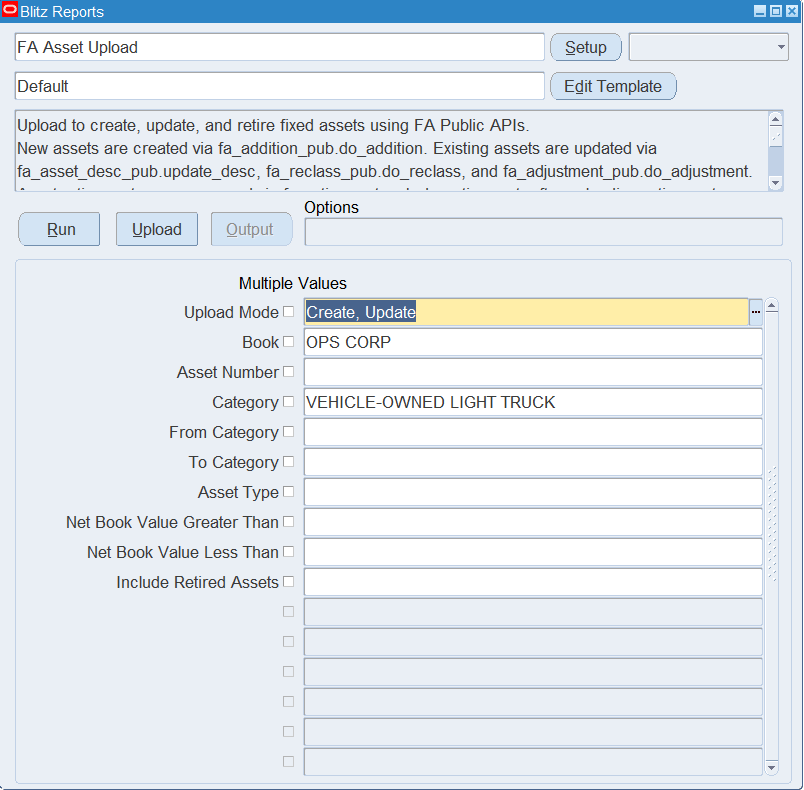
Open FA Asset Upload in Blitz Report and set the parameters:
| Parameter | Meaning |
|---|---|
| Upload Mode | Create opens an empty sheet for new assets; Create, Update (default) downloads existing assets for editing and lets you add new ones. |
| Book | The corporate depreciation book to download. |
| Asset Number | Downloads a single asset of the book. |
| Category | Downloads the assets of one category. |
| From Category / To Category | Downloads the assets of a category range. |
| Asset Type | Restricts the download to Capitalized, CIP, Expensed or Group assets. |
| Net Book Value Greater Than / Less Than | Restricts the download to assets whose net book value is at least or at most this amount. |
| Include Retired Assets | Yes also downloads fully retired assets as Addition rows, for descriptive updates. |
Each existing asset downloads as one Addition row per book, and each existing retirement as a Retirement row with its Retire Status.
Step 2 – Run to download the Excel file
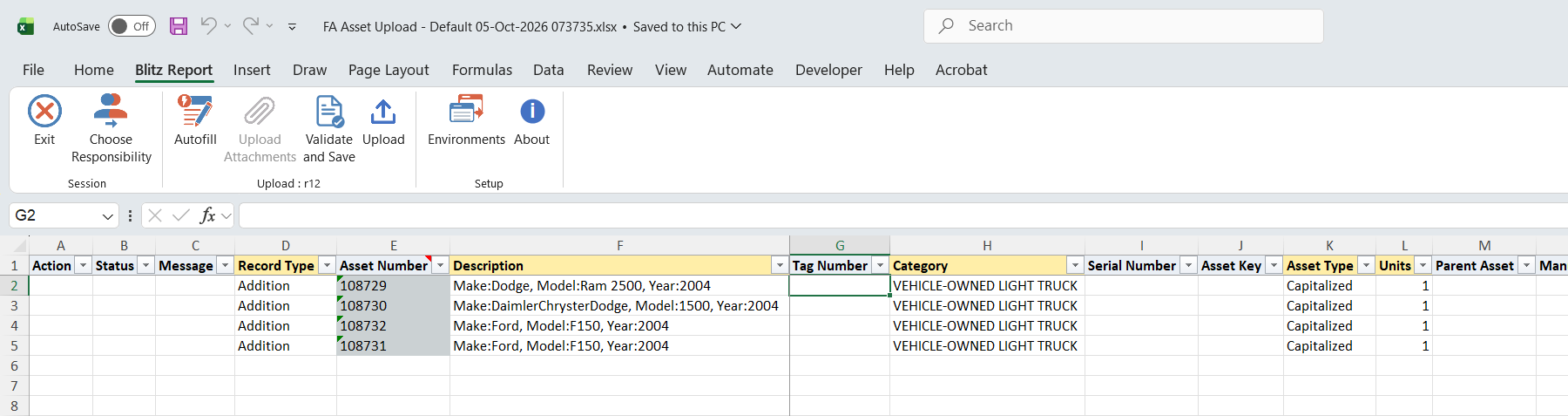
Click Run. The Excel file downloads and opens with the selected assets, or an empty sheet in Create mode.
Step 3 – Enter or change the assets
New asset: add a row with Record Type Addition and enter the Description, Category, Book, Cost, Expense Account and Location. Asset Type, Units, Depreciation Method, Life Years, Life Months, Prorate Convention and Date Placed In Service (end of the open period) default from the book and category; change them where needed. Leave Asset Number blank to have Oracle Assets assign the next number. Enter Ytd Depreciation and Depreciation Reserve only for assets brought in with accumulated depreciation.
Existing asset: change the values on the downloaded row. Descriptive changes update the asset, a new Category reclassifies it, changed financial values are applied as an adjustment, and a changed Expense Account, Location or Employee transfers the asset. A changed Depreciate flag is posted as a separate adjustment. An adjustment is amortized when you enter an Amortization Start Date or when the asset already carries an amortized adjustment, and otherwise expensed in the current period.
The Expense Account and Location can be entered as the full combination, through the alias columns, or segment by segment; the employee by name or number.
Retirement: add a row with Record Type Retirement, the Asset Number and Book, and a Retirement Type. Date Retired defaults to the end of the open period and Cost Retired to the full cost; enter a lower Cost Retired, or Units Retired instead, for a partial retirement. Proceeds Of Sale, Cost Of Removal, Sold To, Reference Num and Trade In Asset Number are optional.

Step 4 – Validate and Save
Click Validate and Save. This checks for missing required values and runs the upload’s validation of the asset, book, category, depreciation method and life, account, location and retirement values, then saves the file. Correct any rows it flags before uploading.

Step 5 – Upload the file
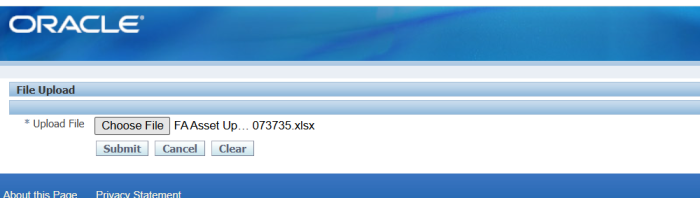
In Blitz Report click Upload and select the saved file. This submits the upload request, which creates, updates and retires the assets. Each row is processed on its own: a row that fails leaves its asset unchanged.
Step 6 – Review the result report
When the request completes, a result report opens listing every uploaded row with its status and message.

What’s produced
- New assets in the depreciation book, with their distribution to the expense account, location and employee.
- Descriptive updates, reclassifications, adjustments and transfers of existing assets.
- Pending retirements, completed by Calculate Gains and Losses.
- A result report listing every row with a status (success or error) and a message.
Common questions
Do I need to run Post Mass Additions after the upload?
No. The upload creates assets directly. To work on the Prepare Mass Additions queue, use the FA Mass Additions Upload.
Where do I see the number of an asset created with a blank Asset Number?
The result report shows the row as uploaded, so the Asset Number stays blank there. Download the book again in Create, Update mode, or query the asset in the Asset Workbench.
Can I change the assignment of an asset with several distributions?
No. Expense Account, Location and Employee changes are applied to assets with a single active distribution. Use the Assignments window in the Asset Workbench for the others.
Which retirements are not supported?
Group assets, partial retirements of CIP assets, unit retirements in tax books, and partial unit retirements of assets with several distributions. An asset with a pending retirement or reinstatement cannot be retired again until Calculate Gains and Losses has run.
Why are fully retired assets missing from my download?
They are excluded by default. Set Include Retired Assets to Yes to include them; their retirements always download as Retirement rows.
Troubleshooting
| Message | Cause | What to do |
|---|---|---|
| This asset number is reserved for automatic asset numbering. | A new asset with a numeric Asset Number in the range Oracle Assets numbers automatically. | Leave Asset Number blank, or use a number below the automatic range. |
| Combination of depreciation method and life is not valid. | The Depreciation Method has no rate for the Life Years and Life Months entered. | Enter a life defined for the method, or pick another method. |
| Default rules not found for category, book, and date placed in service. | The category has no default rules in the book for the Date Placed In Service. | Check the category’s book setup or the Date Placed In Service. |
| Book type code is incorrect for this asset. | The existing asset is not active in the Book on the row. | Correct the Book. |
| Invalid expense account / Invalid location / Invalid asset key | The entered segment values do not form a valid combination. | Correct the segment values, or pick the combination from the list. |
| Asset has n active distributions. Assignment changes for assets with multiple distributions are not supported through this upload | A changed Expense Account, Location or Employee on an asset with several distributions. | Make the transfer in the Asset Workbench. |
| Retirement date … is not in the current open period | Date Retired is outside the book’s open period. | Enter a date in the open period. |
| Cost retired (…) exceeds the current cost / Units retired (…) exceeds the current units | The retired cost or units are larger than the asset’s. | Enter a value up to the current cost or units. |
| Asset is already fully retired. | A retirement row for a fully retired asset. | Remove the row. |
| A pending retirement transaction already exists for this asset. | Calculate Gains and Losses has not yet processed an earlier retirement. | Run Calculate Gains and Losses, then upload again. |
| Trade-in asset cannot be the same as the asset being retired. | Trade In Asset Number equals the retired asset. | Enter another trade-in asset or clear it. |
SQL 288 lines
select null action_, null status_, null message_, null modified_columns_, null request_id_, 'Addition' record_type, fav.asset_number, fav.description, fav.tag_number, fcbk.concatenated_segments category, fav.serial_number, fakk.concatenated_segments asset_key, (select fl0.meaning from fa_lookups fl0 where fl0.lookup_type='ASSET TYPE' and fl0.lookup_code=fav.asset_type) asset_type, fav.current_units units, fab_p.asset_number parent_asset, fav.manufacturer_name manufacturer, fav.model_number model, fw.warranty_number, fl.lease_number, (select fl0.meaning from fa_lookups fl0 where fl0.lookup_type='YESNO' and fl0.lookup_code=fav.in_use_flag) in_use, (select fl0.meaning from fa_lookups fl0 where fl0.lookup_type='YESNO' and fl0.lookup_code=fav.inventorial) in_physical_inventory, (select fl0.meaning from fa_lookups fl0 where fl0.lookup_type='PROPERTY TYPE' and fl0.lookup_code=fav.property_type_code) property_type, (select fl0.meaning from fa_lookups fl0 where fl0.lookup_type='1245/1250 PROPERTY' and fl0.lookup_code=fav.property_1245_1250_code) property_class, (select fl0.meaning from fa_lookups fl0 where fl0.lookup_type='OWNLEASE' and fl0.lookup_code=fav.owned_leased) ownership, (select fl0.meaning from fa_lookups fl0 where fl0.lookup_type='NEWUSE' and fl0.lookup_code=fav.new_used) bought, fav.commitment, fav.investment_law, fb.book_type_code book, fb.cost, fb.original_cost, case when (select fdp.fiscal_year from fa_deprn_periods fdp where fds.book_type_code=fdp.book_type_code and fds.period_counter=fdp.period_counter)=fbc.current_fiscal_year then fds.ytd_deprn else 0 end ytd_depreciation, fds.deprn_reserve depreciation_reserve, (select fl0.meaning from fa_lookups fl0 where fl0.lookup_type='SALVAGE_DEPRN_LIMIT_TYPE' and fl0.lookup_code=decode(fb.salvage_type,'AMT','AMOUNT','PCT','PERCENT',fb.salvage_type)) salvage_value_type, fb.percent_salvage_value, fb.salvage_value, fb.reval_ceiling revaluation_ceiling, fb.reval_amortization_basis revaluation_amortization_basis, fb.recoverable_cost, (fb.original_cost-nvl(fds.deprn_reserve,0)) net_book_value, fb.deprn_method_code depreciation_method, (select fl0.meaning from fa_lookups fl0 where fl0.lookup_type='YESNO' and fl0.lookup_code=fb.depreciate_flag) depreciate, floor(fb.life_in_months/12) life_years, mod(fb.life_in_months,12) life_months, fb.date_placed_in_service, fb.prorate_convention_code prorate_convention, fth.amortization_start_date, fb.bonus_rule, (select fl0.meaning from fa_lookups fl0 where fl0.lookup_type='SALVAGE_DEPRN_LIMIT_TYPE' and fl0.lookup_code=decode(fb.deprn_limit_type,'AMT','AMOUNT','PCT','PERCENT',fb.deprn_limit_type)) depreciation_limit_type, fb.allowed_deprn_limit_amount depreciation_limit_amount, fb.allowed_deprn_limit depreciation_limit_pct, fab_g.asset_number group_asset, null expense_account_alias, gcck.concatenated_segments expense_account, gcck.segment1 expense_segment1, gcck.segment2 expense_segment2, gcck.segment3 expense_segment3, gcck.segment4 expense_segment4, gcck.segment5 expense_segment5, null location_alias, flk.concatenated_segments location, flk.segment1 location_segment1, flk.segment2 location_segment2, flk.segment3 location_segment3, flk.segment4 location_segment4, flk.segment5 location_segment5, flk.segment6 location_segment6, flk.segment7 location_segment7, papf.full_name employee_name, papf.employee_number, fav.attribute_category_code attribute_category, fav.attribute1, fav.attribute2, fav.attribute3, fav.attribute4, fav.attribute5, fav.attribute6, fav.attribute7, fav.attribute8, fav.attribute9, fav.attribute10, fav.attribute11, fav.attribute12, fav.attribute13, fav.attribute14, fav.attribute15, null date_retired, null cost_retired, null units_retired, null proceeds_of_sale, null cost_of_removal, null retirement_type, null retire_prorate_conv, null sold_to, null reference_num, null trade_in_asset_number, null transaction_name, null retire_status from fa_additions_vl fav, fa_books fb, fa_transaction_headers fth, fa_book_controls fbc, gl_ledgers gl, fa_categories_b_kfv fcbk, fa_category_books fcb, fa_deprn_summary fds, fa_distribution_history fdh, fa_locations_kfv flk, gl_code_combinations_kfv gcck, fa_asset_keywords_kfv fakk, fa_add_warranties faw, fa_warranties fw, fa_leases fl, fa_additions_b fab_p, fa_additions_b fab_g, per_all_people_f papf where 1=1 and :p_upload_mode like '%' || xxen_upload.action_update and nvl(:p_create_empty_file,'N')<>'Y' and fav.asset_id=fb.asset_id and fb.date_ineffective is null and (nvl(:p_include_retired_assets,'N')='Y' or fb.period_counter_fully_retired is null) and fb.transaction_header_id_in=fth.transaction_header_id and fb.book_type_code=fbc.book_type_code and fbc.set_of_books_id=gl.ledger_id and fav.asset_category_id=fcbk.category_id and fcbk.category_id=fcb.category_id and fb.book_type_code=fcb.book_type_code and fav.asset_id=fds.asset_id and fb.book_type_code=fds.book_type_code and fds.period_counter=(select max(fds2.period_counter) from fa_deprn_summary fds2 where fds.asset_id=fds2.asset_id and fds.book_type_code=fds2.book_type_code) and fav.asset_id=fdh.asset_id and fb.book_type_code=fdh.book_type_code and (fdh.date_ineffective is null or fb.period_counter_fully_retired is not null and fdh.date_ineffective=(select max(fdh2.date_ineffective) from fa_distribution_history fdh2 where fdh.asset_id=fdh2.asset_id and fdh.book_type_code=fdh2.book_type_code)) and fdh.location_id=flk.location_id and fdh.code_combination_id=gcck.code_combination_id and fav.asset_key_ccid=fakk.code_combination_id(+) and fav.asset_id=faw.asset_id(+) and faw.warranty_id=fw.warranty_id(+) and fav.lease_id=fl.lease_id(+) and fav.parent_asset_id=fab_p.asset_id(+) and fb.group_asset_id=fab_g.asset_id(+) and fdh.assigned_to=papf.person_id(+) and papf.effective_start_date(+)<=trunc(sysdate) and papf.effective_end_date(+)>=trunc(sysdate) union all select null action_, null status_, null message_, null modified_columns_, null request_id_, 'Retirement' record_type, fav.asset_number, fav.description, fav.tag_number, fcbk.concatenated_segments category, fav.serial_number, fakk.concatenated_segments asset_key, (select fl0.meaning from fa_lookups fl0 where fl0.lookup_type='ASSET TYPE' and fl0.lookup_code=fav.asset_type) asset_type, fav.current_units units, fab_p.asset_number parent_asset, fav.manufacturer_name manufacturer, fav.model_number model, null warranty_number, fl.lease_number, (select fl0.meaning from fa_lookups fl0 where fl0.lookup_type='YESNO' and fl0.lookup_code=fav.in_use_flag) in_use, (select fl0.meaning from fa_lookups fl0 where fl0.lookup_type='YESNO' and fl0.lookup_code=fav.inventorial) in_physical_inventory, (select fl0.meaning from fa_lookups fl0 where fl0.lookup_type='PROPERTY TYPE' and fl0.lookup_code=fav.property_type_code) property_type, (select fl0.meaning from fa_lookups fl0 where fl0.lookup_type='1245/1250 PROPERTY' and fl0.lookup_code=fav.property_1245_1250_code) property_class, (select fl0.meaning from fa_lookups fl0 where fl0.lookup_type='OWNLEASE' and fl0.lookup_code=fav.owned_leased) ownership, (select fl0.meaning from fa_lookups fl0 where fl0.lookup_type='NEWUSE' and fl0.lookup_code=fav.new_used) bought, fav.commitment, fav.investment_law, fb.book_type_code book, fb.cost, fb.original_cost, case when (select fdp.fiscal_year from fa_deprn_periods fdp where fds.book_type_code=fdp.book_type_code and fds.period_counter=fdp.period_counter)=fbc.current_fiscal_year then fds.ytd_deprn else 0 end ytd_depreciation, fds.deprn_reserve depreciation_reserve, (select fl0.meaning from fa_lookups fl0 where fl0.lookup_type='SALVAGE_DEPRN_LIMIT_TYPE' and fl0.lookup_code=decode(fb.salvage_type,'AMT','AMOUNT','PCT','PERCENT',fb.salvage_type)) salvage_value_type, fb.percent_salvage_value, fb.salvage_value, fb.reval_ceiling revaluation_ceiling, fb.reval_amortization_basis revaluation_amortization_basis, fb.recoverable_cost, (fb.original_cost-nvl(fds.deprn_reserve,0)) net_book_value, fb.deprn_method_code depreciation_method, (select fl0.meaning from fa_lookups fl0 where fl0.lookup_type='YESNO' and fl0.lookup_code=fb.depreciate_flag) depreciate, floor(fb.life_in_months/12) life_years, mod(fb.life_in_months,12) life_months, fb.date_placed_in_service, fb.prorate_convention_code prorate_convention, null amortization_start_date, fb.bonus_rule, (select fl0.meaning from fa_lookups fl0 where fl0.lookup_type='SALVAGE_DEPRN_LIMIT_TYPE' and fl0.lookup_code=decode(fb.deprn_limit_type,'AMT','AMOUNT','PCT','PERCENT',fb.deprn_limit_type)) depreciation_limit_type, fb.allowed_deprn_limit_amount depreciation_limit_amount, fb.allowed_deprn_limit depreciation_limit_pct, fab_g.asset_number group_asset, null expense_account_alias, gcck.concatenated_segments expense_account, gcck.segment1 expense_segment1, gcck.segment2 expense_segment2, gcck.segment3 expense_segment3, gcck.segment4 expense_segment4, gcck.segment5 expense_segment5, null location_alias, flk.concatenated_segments location, flk.segment1 location_segment1, flk.segment2 location_segment2, flk.segment3 location_segment3, flk.segment4 location_segment4, flk.segment5 location_segment5, flk.segment6 location_segment6, flk.segment7 location_segment7, null employee_name, null employee_number, fav.attribute_category_code attribute_category, fav.attribute1, fav.attribute2, fav.attribute3, fav.attribute4, fav.attribute5, fav.attribute6, fav.attribute7, fav.attribute8, fav.attribute9, fav.attribute10, fav.attribute11, fav.attribute12, fav.attribute13, fav.attribute14, fav.attribute15, fr.date_retired, fr.cost_retired, fr.units units_retired, fr.proceeds_of_sale, fr.cost_of_removal, fr.retirement_type_code retirement_type, fr.retirement_prorate_convention retire_prorate_conv, fr.sold_to, fr.reference_num, (select fab2.asset_number from fa_additions_b fab2 where fab2.asset_id=fr.trade_in_asset_id) trade_in_asset_number, fth.transaction_name, fr.status retire_status from fa_additions_vl fav, fa_retirements fr, fa_books fb, fa_transaction_headers fth, fa_book_controls fbc, fa_categories_b_kfv fcbk, fa_category_books fcb, fa_deprn_summary fds, fa_distribution_history fdh, fa_locations_kfv flk, gl_code_combinations_kfv gcck, fa_asset_keywords_kfv fakk, fa_leases fl, fa_additions_b fab_p, fa_additions_b fab_g where 1=1 and :p_upload_mode like '%' || xxen_upload.action_update and nvl(:p_create_empty_file,'N')<>'Y' and fav.asset_id=fr.asset_id and fr.book_type_code=fb.book_type_code and fb.transaction_header_id_out=fr.transaction_header_id_in and fth.transaction_header_id=fr.transaction_header_id_in and fav.asset_id=fb.asset_id and fb.book_type_code=fbc.book_type_code and fb.book_type_code=fcb.book_type_code and fav.asset_category_id=fcbk.category_id and fcbk.category_id=fcb.category_id and fds.asset_id=fav.asset_id and fds.book_type_code=fb.book_type_code and fds.period_counter=(select max(fds2.period_counter) from fa_deprn_summary fds2 where fds.asset_id=fds2.asset_id and fds.book_type_code=fds2.book_type_code) and fav.asset_id=fdh.asset_id and fdh.book_type_code=fb.book_type_code and fdh.date_effective<=fth.date_effective and nvl(fdh.date_ineffective,fth.date_effective+1)>=fth.date_effective and fdh.location_id=flk.location_id and fdh.code_combination_id=gcck.code_combination_id and fav.asset_key_ccid=fakk.code_combination_id(+) and fav.lease_id=fl.lease_id(+) and fav.parent_asset_id=fab_p.asset_id(+) and fb.group_asset_id=fab_g.asset_id(+) |
Parameters 10
| Parameter | Type | List of values SQL | |
|---|---|---|---|
| Upload Mode | LOV | ||
| Book | LOV Oracle |
| |
| Asset Number | LOV |
| |
| Category | LOV |
| |
| From Category | LOV |
| |
| To Category | LOV |
| |
| Asset Type | LOV |
| |
| Net Book Value Greater Than | Number |
| |
| Net Book Value Less Than | Number |
| |
| Include Retired Assets | LOV |