
PA Transaction Upload
PA Transaction Upload loads pre-approved expenditure items into Oracle Projects from Excel – labor hours, usages, expenses, supplier costs and other cost transactions from external cost collection systems. Each row is staged in the Projects transaction interface, and Transaction Import then creates the expenditures and expenditure items for each transaction source and batch. The upload creates new transactions; it does not change existing expenditure items.
When to use it
- Import costs from external or legacy systems (third-party payroll, timekeeping, usage or expense feeds) as project expenditure items.
- Load labor, usage, miscellaneous or supplier-cost transactions in bulk against projects and tasks.
- Bring in accounted transactions that already carry their GL date and debit and credit accounts.
- Post negative transactions or accruals that reverse in the next period for period-end adjustments.
- Stage transactions only, and run Transaction Import later from Oracle Projects.
Before you start
- Your responsibility has access to the operating unit, and Projects is implemented for it.
- An active Transaction Source for the kind of cost you load. Its setup decides what each row needs: costed sources need a Raw Cost, accounted sources a GL Date with debit and credit accounts, and sources that disallow duplicate references a unique Original Transaction Ref.
- The projects and tasks exist and are chargeable on the expenditure item date, and the Projects and GL periods for that date are open.
- Employees on labor and expense rows have an active primary assignment with a job.
Step 1 – Set the parameters
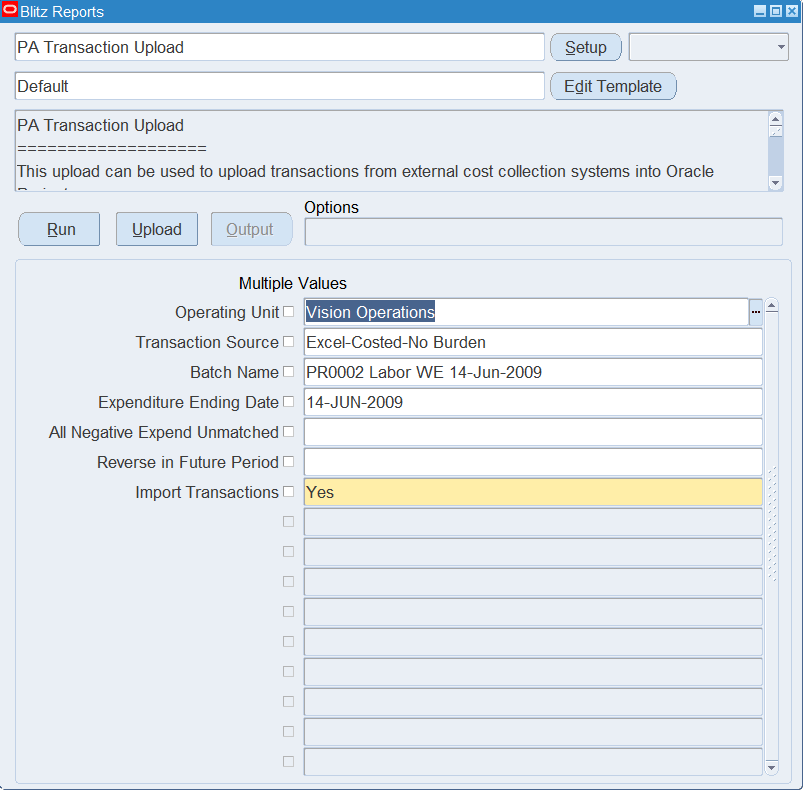
Open PA Transaction Upload in Blitz Report and set the parameters. They only default values into new rows of the Excel file:
| Parameter | Meaning |
|---|---|
| Operating Unit | Defaults the Operating Unit of each row. Lists the operating units with Projects implemented. |
| Transaction Source | Defaults the Transaction Source, and with it the Expnd Type Class (the source’s expenditure type class, for example Straight Time). |
| Batch Name | Defaults the Batch Name. Transaction Import processes the rows by transaction source and batch. |
| Expenditure Ending Date | Defaults the Expnd Ending Date to the week-ending date of the expenditure week that contains this date, following the operating unit’s expenditure cycle. |
| All Negative Expend Unmatched | Yes defaults Negative Txn Flag to Yes on rows with a negative Quantity, so they are imported as unmatched negative transactions instead of reversing a matching original item. |
| Reverse in Future Period | Yes defaults Accrual Flag to Yes on every row, so the transactions are imported as accruals that reverse in the next period. |
| Import Transactions | Yes (default) runs Transaction Import right after the rows are staged. No only stages them in the interface for a later Transaction Import run. |
Step 2 – Run to download the Excel file
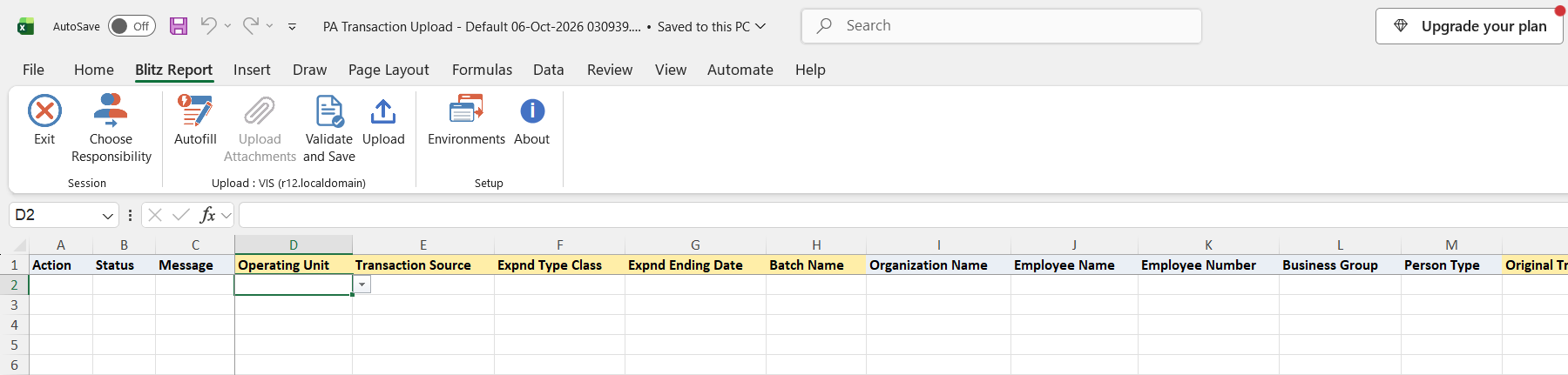
Click Run. The Excel file downloads and opens with an empty sheet for entering new transactions.
Step 3 – Enter the transactions
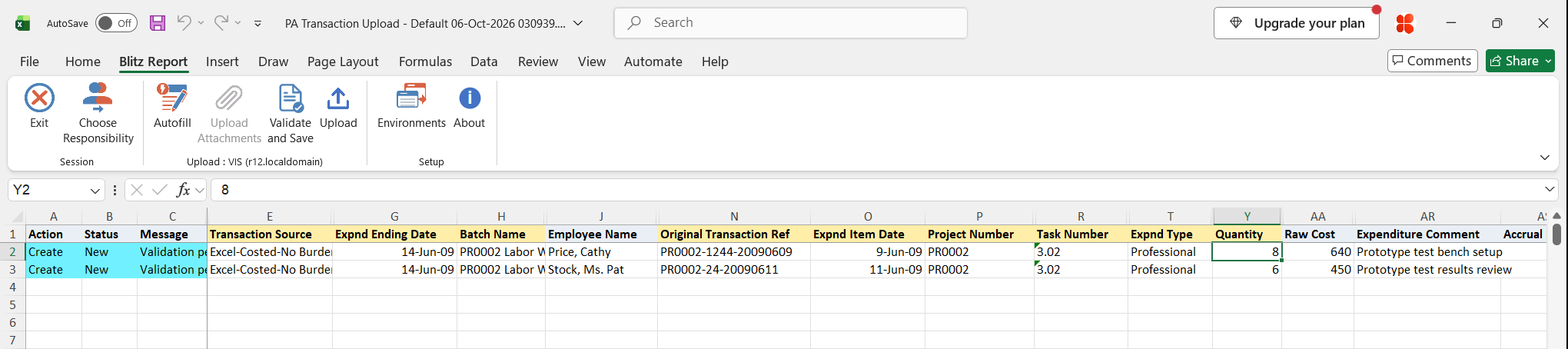
Enter one row per expenditure item. Each row needs the Operating Unit, Transaction Source, Expnd Type Class, Expnd Ending Date and Batch Name (defaulted from the parameters), an Original Transaction Ref that identifies the transaction in the source system, the Expnd Item Date, Project Number, Task Number, Expnd Type and Quantity. The Expnd Item Date must fall within the expenditure week ending on the Expnd Ending Date.
- Labor (Straight Time, Overtime) and expense report rows need the employee: pick the Employee Name, and Employee Number, Business Group and Person Type default. Other rows, except supplier invoices, need an employee or an Organization Name.
- Usage rows need a Non Labor Resource; its Non Labor Org defaults.
- Enter Raw Cost for costed sources and Burdened Cost for sources that allow burdening. For a currency other than the ledger currency, enter the Currency and, on accounted sources, the Acctd Exchange Rate Type and Date (and the rate for a User rate type).
- Accounted sources also need the Gl Date, Debit Acct, Credit Acct and Acctd Raw Cost.
- Optionally enter an Expenditure Comment, the Assignment Name and Work Type Name, or the supplier and purchase order columns for contingent worker costs.
Step 4 – Validate and Save
Click Validate and Save. This checks for missing required values and runs the upload’s validation against the transaction source rules (week-ending date, duplicate reference, employee, costed, burdened and accounted rules, currency and usage requirements), then saves the file. Correct any rows it flags before uploading.
Step 5 – Upload the file
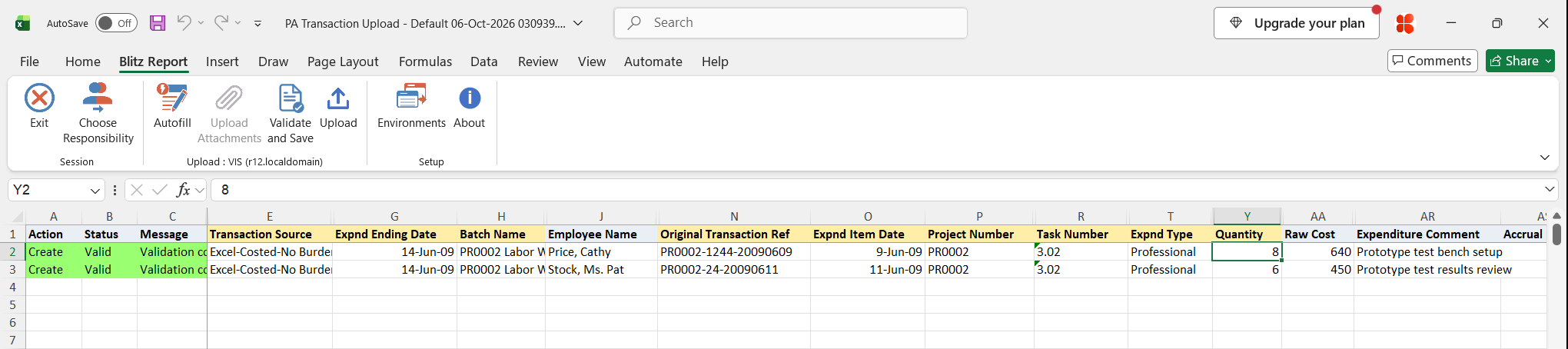
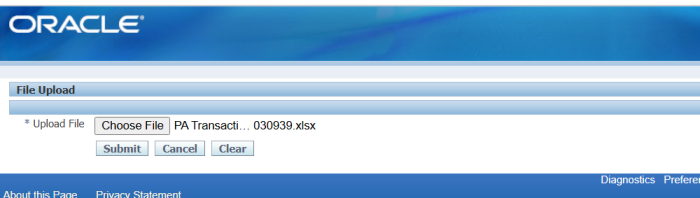
In Blitz Report click Upload and select the saved file. This submits the upload request, which validates the project, task and employee of each row, inserts the rows into the transaction interface and, unless Import Transactions is No, runs Transaction Import.
Step 6 – Review the result report
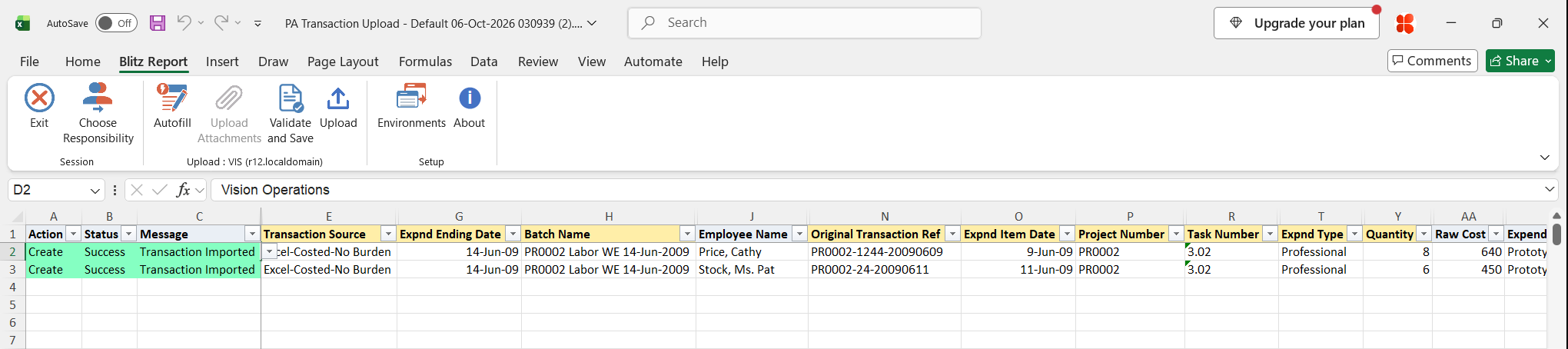
When the request completes, a result report opens listing every uploaded row with its status and message. Imported rows show Transaction Imported with the created expenditure item’s details; rows that Transaction Import rejected show the rejection reason.
What’s produced
- Pre-approved expenditure items in Oracle Projects, grouped into expenditures by the transaction source and batch, or staged interface rows when Import Transactions is No.
- A result report listing every row with a status (success or error) and a message.
Common questions
Does the upload create the expenditure items directly?
No. It writes the rows to the Projects transaction interface and then runs Transaction Import, which applies the standard Oracle Projects validation and creates the expenditure items.
Can I change or reverse an item that is already imported?
Not by editing it: the upload only creates transactions. To reverse an item, upload a negative transaction with its reference in Reversed Orig Transaction Ref, or adjust it in Oracle Projects.
How are duplicates prevented?
If the transaction source does not allow duplicate references, Validate and Save rejects a row whose Original Transaction Ref already exists on an expenditure item of that source.
Which Expnd Ending Date do I need?
The week-ending date of the operating unit’s expenditure cycle for the week of the item date. Set the Expenditure Ending Date parameter to any date in that week and the column defaults correctly.
What happens with Import Transactions = No?
The rows stay pending in the transaction interface. Run Transaction Import in Oracle Projects for the transaction source and batch to create the items.
Troubleshooting
| Message | Cause | What to do |
|---|---|---|
| Expenditure Ending Date is not a valid Week Ending Date | The Expnd Ending Date is not the last day of an expenditure week for the operating unit. | Use the defaulted date, or the week-ending date of the item’s week. |
| Expenditure Item Date cannot be later than the Expenditure Ending Date. | The Expnd Item Date is after the Expnd Ending Date. | Correct the item date, or use the ending date of the item’s week. |
| An expenditure item with this Original Transaction Reference already exists. | The source does not allow duplicate references and the reference is already used. | Use a unique Original Transaction Ref, or check that the item was not already imported. |
| Transaction Source is invalid. | The source does not exist or is not active. | Pick an active Transaction Source from the list. |
| Expnd Type Class is invalid | The class is not a valid expenditure type class. | Pick the Expnd Type Class from the list, or let it default from the source. |
| Employee number is mandatory | A labor or expense report row has no employee. | Enter the Employee Name or Employee Number. |
| Employee or organization is mandatory. | A row of another class has neither an employee nor an organization. | Enter an employee or the Organization Name. |
| Invalid Employee | No employee with that number and name has a primary assignment with a job on the Expnd Ending Date. | Check the employee and their assignment, or the Organization Name and Business Group entered. |
| Raw Cost is required for Costed Transactions. | The source is costed and Raw Cost is empty. | Enter the Raw Cost. |
| Burdened Cost is not allowed for this Transaction Source. | Burdened Cost was entered for a source that does not allow burdening. | Clear Burdened Cost, or use a burdened source. |
| Burdened Cost is required for this Transaction Source. | The source allows burdening, or the row is a burden transaction, and Burdened Cost is empty. | Enter the Burdened Cost. |
| GL Date, Debit Account and Credit Account are required for Accounted Transactions. | The source is accounted and the GL accounting columns are incomplete. | Fill Gl Date, Debit Acct and Credit Acct. |
| Acctd Raw Cost is required for Non-Burdened Accounted Transactions. | An accounted source row has no Acctd Raw Cost. | Enter the Acctd Raw Cost. |
| Acctd Rate Type and Acctd Rate Date is required for this transaction. | A foreign-currency row of an accounted source has no exchange rate type or date. | Enter Acctd Exchange Rate Type and Acctd Exchange Rate Date. |
| Non Labor Resource and Non Labor Org are required for Usage Transactions. | A usage row is missing its resource or organization. | Pick the Non Labor Resource and its Non Labor Org. |
| Unaccounted Expense report transactions are not allowed. | An expense report row uses a source that is not accounted. | Use an accounted transaction source for expense reports. |
| Negative Accrual Transactions are not permitted in this Operating Unit. | A negative row with Accrual Flag Yes in an operating unit that does not allow negative accruals. | Set Accrual Flag to No, or post a positive accrual. |
| Invalid Project / Invalid Task | The project is not chargeable in the operating unit, or the task is not a task of that project. | Pick the Project Number and Task Number from the lists. |
| Transaction Import has not been processed | The row was staged but Transaction Import did not process it. | Check the upload request log, then run Transaction Import for the source and batch. |
| One or more related expenditure items is in error | Transaction Import rejected another row of the same expenditure, so the whole expenditure was rejected. | Fix the rejected row of that expenditure and upload the rows again. |
select null action_, null status_, null message_, null request_id_, null modified_columns_, null row_id, -- haouv.name operating_unit, (select pts.user_transaction_source from pa_transaction_sources pts where pts.transaction_source = ptia.transaction_source) transaction_source, xxen_pa_upload.get_system_linkage_meaning(ptia.system_linkage) expnd_type_class, ptia.expenditure_ending_date expnd_ending_date, ptia.batch_name batch_name, ptia.orig_transaction_reference original_transaction_ref, -- ptia.organization_name organization_name, null employee_name, ptia.employee_number employee_number, ptia.person_business_group_name business_group, ptia.person_type person_type, ptia.override_to_organization_name override_to_organization, -- ptia.expenditure_item_date expnd_item_date, ptia.project_number project_number, null project_name, ptia.task_number task_number, null task_name, ptia.expenditure_type expnd_type, -- ptia.non_labor_resource non_labor_resource, --usages ptia.non_labor_resource_org_name non_labor_org, --usages ptia.assignment_name assignment_name, -- timecards ptia.work_type_name work_type_name, -- ptia.quantity quantity, -- ptia.denom_currency_code currency, ptia.denom_raw_cost raw_cost, ptia.denom_burdened_cost burdened_cost, ptia.acct_raw_cost acctd_raw_cost, ptia.acct_burdened_cost acctd_burdened_cost, ptia.raw_cost_rate, ptia.burdened_cost_rate, -- ptia.acct_rate_type acctd_exchange_rate_type, ptia.acct_rate_date acctd_exchange_rate_date, ptia.acct_exchange_rate acctd_exchange_rate, ptia.acct_exchange_rounding_limit acctd_exchange_rounding_limit, -- ptia.receipt_currency_code, ptia.receipt_currency_amount, ptia.receipt_exchange_rate, ptia.project_rate_type, ptia.project_rate_date, ptia.project_exchange_rate, ptia.projfunc_cost_rate_type project_func_rate_type, ptia.projfunc_cost_rate_date project_func_rate_date, ptia.projfunc_cost_exchange_rate project_func_exchange_rate, -- ptia.reversed_orig_txn_reference reversed_orig_transaction_ref, ptia.unmatched_negative_txn_flag negative_txn_flag, xxen_util.meaning(ptia.accrual_flag,'YES_NO',0) accrual_flag, xxen_util.meaning(ptia.billable_flag,'YES_NO',0) billable_flag, -- ptia.gl_date gl_date, (select gcck.concatenated_segments from gl_code_combinations_kfv gcck where gcck.code_combination_id = ptia.dr_code_combination_id) debit_acct, (select gcck.concatenated_segments from gl_code_combinations_kfv gcck where gcck.code_combination_id = ptia.cr_code_combination_id) credit_acct, -- ptia.vendor_number vendor_number, ptia.po_number po_number, ptia.po_line_num po_line_number, ptia.po_price_type po_price_type, -- ptia.expenditure_comment, -- ptia.orig_user_exp_txn_reference orig_user_expnd_trx_ref, ptia.orig_exp_txn_reference1 orig_expnd_transaction_ref1, ptia.orig_exp_txn_reference2 orig_expnd_transaction_ref2, ptia.orig_exp_txn_reference3 orig_expnd_transaction_ref3, ptia.cdl_system_reference1 cdl_system_ref1, ptia.cdl_system_reference2 cdl_system_ref2, ptia.cdl_system_reference3 cdl_system_ref3, ptia.cdl_system_reference4 cdl_system_ref4, ptia.cdl_system_reference5 cdl_system_ref5, -- ptia.attribute_category attribute_category, ptia.attribute1 pa_expnd_attribute1, ptia.attribute2 pa_expnd_attribute2, ptia.attribute3 pa_expnd_attribute3, ptia.attribute4 pa_expnd_attribute4, ptia.attribute5 pa_expnd_attribute5, ptia.attribute6 pa_expnd_attribute6, ptia.attribute7 pa_expnd_attribute7, ptia.attribute8 pa_expnd_attribute8, ptia.attribute9 pa_expnd_attribute9, ptia.attribute10 pa_expnd_attribute10, -- xxen_util.meaning(nvl(:p_submit_import,'Y'),'YES_NO',0) import_transactions from pa_transaction_interface_all ptia, hr_all_organization_units_vl haouv where 1=1 and ptia.org_id = haouv.organization_id and :p_upload_mode like '%' || xxen_upload.action_update and haouv.name = nvl(:p_operating_unit,haouv.name) and ptia.transaction_source = nvl(:p_transaction_source,ptia.transaction_source) and ptia.batch_name = nvl(:p_batch_name,ptia.batch_name) and nvl(:p_expnd_ending_date,sysdate) = nvl(:p_expnd_ending_date,sysdate) and nvl(:p_unmatched_neg_txn_flag,'X') = nvl(:p_unmatched_neg_txn_flag,'X') and nvl(:p_accrual_flag,'X') = nvl(:p_accrual_flag,'X') |
| Parameter Name | SQL text | Validation | |
|---|---|---|---|
| Operating Unit | LOV | ||
| Transaction Source | LOV | ||
| Batch Name | Char | ||
| Expenditure Ending Date | Date | ||
| All Negative Expend Unmatched | LOV | ||
| Reverse in Future Period | LOV | ||
| Import Transactions | LOV Oracle |