
INV Unit Of Measure Upload

Description
INV Unit Of Measure Upload creates and updates Oracle Inventory unit of measure classes and their units of measure from Excel, including their descriptive flexfield attributes. It is available on Oracle EBS R12.2 and later.
When to use it
- Create new unit of measure classes together with their base units during an implementation.
- Add units of measure to existing classes.
- Update the descriptions or descriptive flexfield attributes of many classes or units at once.
- Set inactive dates to retire units or classes in bulk.
Before you start
- Your instance is on Oracle EBS R12.2 or later. On earlier releases the upload stops with a not-supported message.
- Access to the upload in Blitz Report, in a responsibility that can maintain units of measure.
- For a new class, you know its base unit: the unit all other units of the class convert to.
Step 1 – Set the parameters
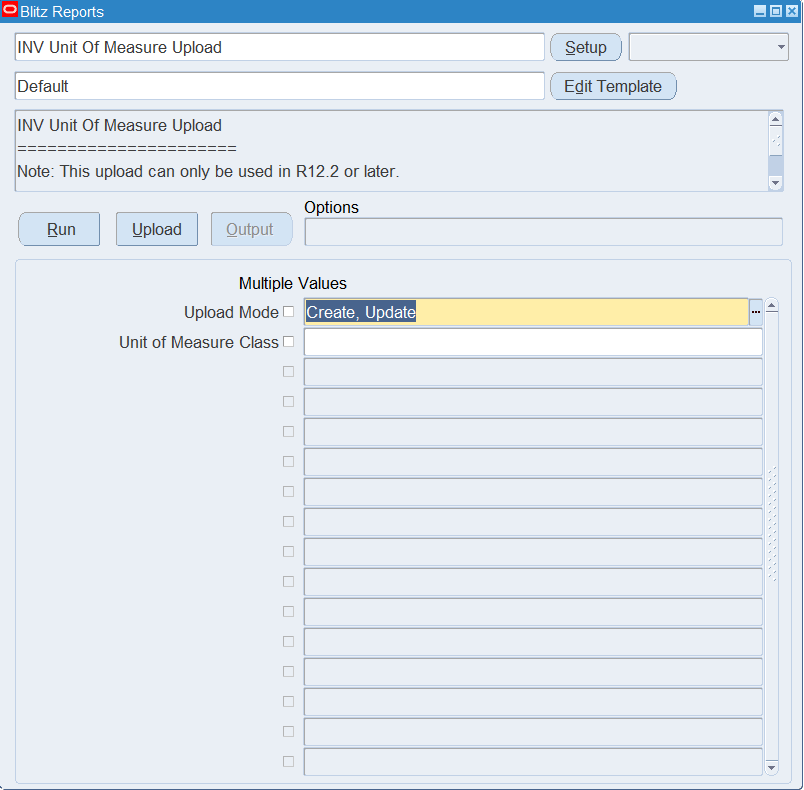
Open INV Unit Of Measure Upload in Blitz Report and set the parameters:
| Parameter | Meaning |
|---|---|
| Upload Mode | Create (default) opens an empty sheet for new classes and units; Create, Update downloads the existing classes and units for editing and lets you add new ones. |
| Unit of Measure Class | Restricts the download to one unit of measure class. |
Step 2 – Run to download the Excel file
Click Run. The Excel file downloads and opens with one row per unit of measure, showing its class, or an empty sheet in Create mode.
Step 3 – Enter or change the classes and units
UOM Class, Unit Of Measure and UOM Code identify a unit and cannot be changed on a downloaded row. Change the UOM Description or UOM Inactive Date of a unit, or the Class Description or Class Inactive Date of its class.
To add a unit to an existing class, add a row with the UOM Class, a new Unit Of Measure (up to 25 characters) and UOM Code (up to 3 characters), and copy the Class Description and Class Inactive Date from an existing row of that class, so the class itself stays unchanged. Leave Base UOM Flag empty.
To create a new class, enter its base unit as the first row of the class, with the new UOM Class (up to 10 characters), its Class Description and Base UOM Flag set to Y, then add one row per further unit of the class with Base UOM Flag empty.
The class columns are applied from the first row of each class in the file, so keep them the same on all rows of a class.
Step 4 – Validate and Save
Click Validate and Save. This checks for missing required values and saves the file. Correct any rows it flags before uploading.
Step 5 – Upload the file
In Blitz Report click Upload and select the saved file. This submits the upload request, which creates or updates each class and unit using the Oracle Inventory unit of measure API.
Step 6 – Review the result report
When the request completes, a result report opens listing every uploaded row with its status and message.
What’s produced
- Unit of measure classes and units of measure created or updated.
- A result report listing every row with a status (success or error) and a message.
Common questions
Can I delete a unit or a class?
No. The upload only creates and updates. To retire a unit or class, set its UOM Inactive Date or Class Inactive Date.
Can I change the base unit of a class?
No. The base unit of an existing class cannot be changed. Keep Base UOM Flag Y on the base unit’s row and empty on all other rows.
How does the upload know whether to create or update?
It looks up the class by its UOM Class and the unit by its UOM Code. Existing ones are updated, new ones are created. In Create mode, rows for units that already exist are rejected.
Does it create the conversions between units?
No. Maintain unit of measure conversions with INV Unit Of Measure Conversion Upload.
Does it work on R12.1 or 11i?
No. It uses the Oracle unit of measure API introduced in R12.2.
Troubleshooting
| Message | Cause | What to do |
|---|---|---|
| This upload is only supported in release R12.2 or later. The Oracle API is not available in earlier releases. | Shown on Run when the instance is below R12.2. | Use the upload on an R12.2 or later instance. |
| This upload is not supported in releases prior to R12.2 | The same check at upload time. | Use the upload on an R12.2 or later instance. |
| Please specify UOM Class, Unit of Measure, and the UOM Code | One of the identifying columns is empty. | Fill UOM Class, Unit Of Measure and UOM Code. |
| UOM Class exceeds maximum length (10), UOM Code exceeds maximum length (3), Unit of Measure exceeds maximum length (25), UOM Class description exceeds maximum length (50), UOM description exceeds maximum length (50) | A value is longer than allowed. | Shorten the value to the length shown. |
| When creating new UOM Class, the first row for the UOM Class must contain the Base UOM with the Base UOM Flag set to Y | The first row of a new class is not its base unit. | Move the base unit row first for the class and set Base UOM Flag to Y. |
| UOM Class could not be processed from a prior row | An earlier row of the same class failed, so its units are not processed. | Fix the error on the first row of the class and upload again. |
| The Base UOM for a UOM Class cannot be changed | Base UOM Flag is Y on a unit that is not the base unit of the class, or empty on the base unit’s row. | Set Base UOM Flag to Y only on the class’s base unit row. |
| Error retrieving Base UOM for Class | The existing class has no base unit, or it is being changed by someone else. | Check the class in the Unit of Measure Classes window and try again. |
| Existing UOMs cannot be updated in Create Model | Upload Mode is Create and the UOM Code already exists. | Use a new UOM Code, or upload in Create, Update mode. |
| This UOM is locked for update by someone else | Another user or process is changing the class or unit. | Upload again once the other change is saved. |
SQL 65 lines
select /*+ push_pred(uom) */ null action_, null status_, null message_, null request_id_, null modified_columns_, to_date(null) timestamp_, :p_upload_mode upload_mode_, -- mucv.uom_class, mucv.description class_description, mucv.disable_date class_inactive_date, --uom.base_uom_code, -- decode(muomv.base_uom_flag,'Y','Y',null) base_uom_flag, muomv.unit_of_measure_tl unit_of_measure, muomv.uom_code, muomv.description uom_description, muomv.disable_date uom_inactive_date, -- mucv.attribute_category class_attrib_category, mucv.attribute1 class_attribute1, mucv.attribute2 class_attribute2, mucv.attribute3 class_attribute3, mucv.attribute4 class_attribute4, mucv.attribute5 class_attribute5, mucv.attribute6 class_attribute6, mucv.attribute7 class_attribute7, mucv.attribute8 class_attribute8, mucv.attribute9 class_attribute9, mucv.attribute10 class_attribute10, mucv.attribute11 class_attribute11, mucv.attribute12 class_attribute12, mucv.attribute13 class_attribute13, mucv.attribute14 class_attribute14, mucv.attribute15 class_attribute15, -- muomv.attribute_category uom_attrib_category, muomv.attribute1 uom_attribute1, muomv.attribute2 uom_attribute2, muomv.attribute3 uom_attribute3, muomv.attribute4 uom_attribute4, muomv.attribute5 uom_attribute5, muomv.attribute6 uom_attribute6, muomv.attribute7 uom_attribute7, muomv.attribute8 uom_attribute8, muomv.attribute9 uom_attribute9, muomv.attribute10 uom_attribute10, muomv.attribute11 uom_attribute11, muomv.attribute12 uom_attribute12, muomv.attribute13 uom_attribute13, muomv.attribute14 uom_attribute14, muomv.attribute15 uom_attribute15, -- mucv.last_update_date class_lud, mucv.last_updated_by class_luby, muomv.last_update_date uom_lud, muomv.last_updated_by uom_luby, to_number(null) upload_row from mtl_uom_classes_vl mucv, mtl_units_of_measure_vl muomv where muomv.uom_class=mucv.uom_class and 1=1 |
Parameters 2
| Parameter | Type | List of values SQL | |
|---|---|---|---|
| Upload Mode | LOV |
| |
| Unit of Measure Class | LOV |
|