
INV Unit Of Measure Conversion Upload

Description
INV Unit Of Measure Conversion Upload creates and updates Oracle Inventory unit of measure conversions from Excel: standard conversions, item-specific intra-class and inter-class conversions, and lot-specific inter-class conversions. It downloads existing conversions in a readable form such as 1 Box = 24 x Each, and creates or updates the rows you add or change. On Oracle EBS R12.1 it creates new item-specific intra-class and inter-class conversions only.
When to use it
- Mass-load item-specific conversions, for example case and pallet quantities, when setting up new items.
- Add inter-class conversions such as weight or volume per each for a list of items.
- Maintain standard conversions and lot-specific conversions (R12.2 and later).
- Change conversion rates or set inactive dates in bulk (R12.2 and later).
- Review and export the existing conversions of selected units, classes or items.
Before you start
- You are signed in to an Inventory responsibility. When you open the upload, Oracle asks for an inventory organization: choose one in which your items exist, because the items on the uploaded rows are validated in that organization.
- The units of measure, their classes, and any items and lots already exist.
- Updates, standard conversions and lot conversions require Oracle EBS R12.2 or later. On R12.1 only new item-specific intra-class and inter-class conversions can be created.
Step 1 – Set the parameters
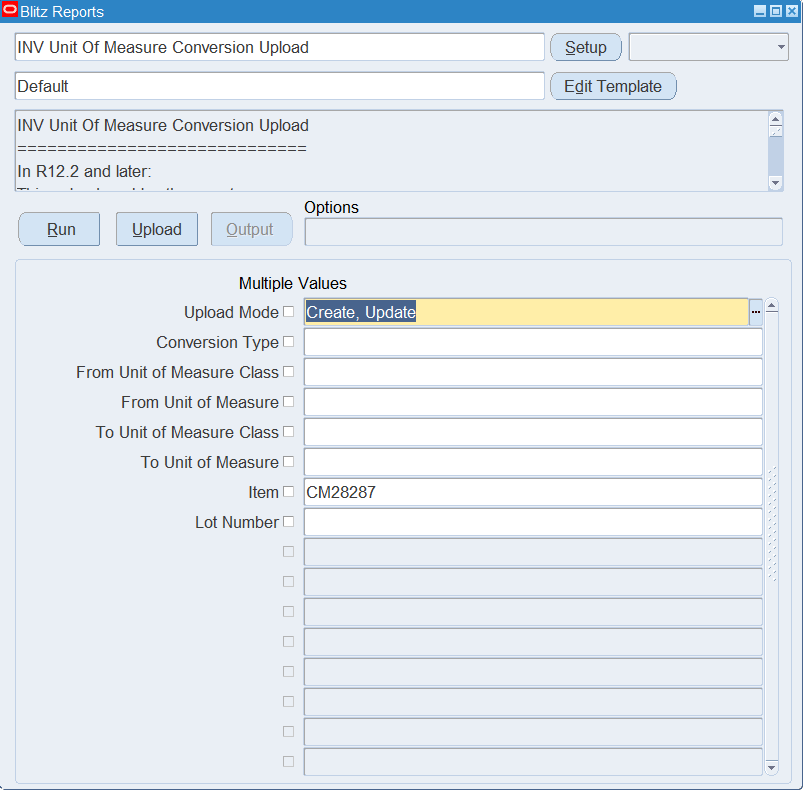
Open INV Unit Of Measure Conversion Upload in Blitz Report and set the parameters:
| Parameter | Meaning |
|---|---|
| Upload Mode | Create (default) opens an empty sheet for new conversions; Create, Update downloads the existing conversions for editing and lets you add new ones. |
| Conversion Type | Downloads one type only: Standard, Intra-class, Inter-class or Lot Inter-class. |
| From Unit of Measure Class / From Unit of Measure | Downloads conversions from this class or unit. |
| To Unit of Measure Class / To Unit of Measure | Downloads conversions to this class or unit. |
| Item | Downloads the item-specific and lot conversions of this item. |
| Lot Number | Downloads the conversions of this lot. |
Step 2 – Run to download the Excel file
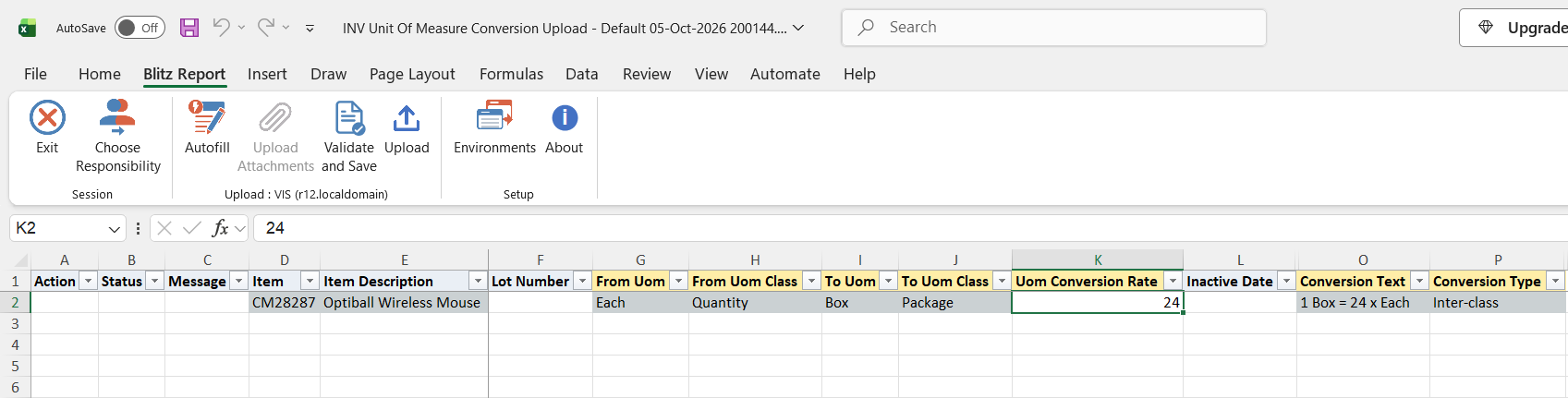
Click Run. The Excel file downloads and opens with one row per existing conversion, or an empty sheet in Create mode. The Conversion Text column shows each conversion as 1 To Uom = rate x From Uom, and the Conversion Type column shows its type.
Step 3 – Enter or change the conversions
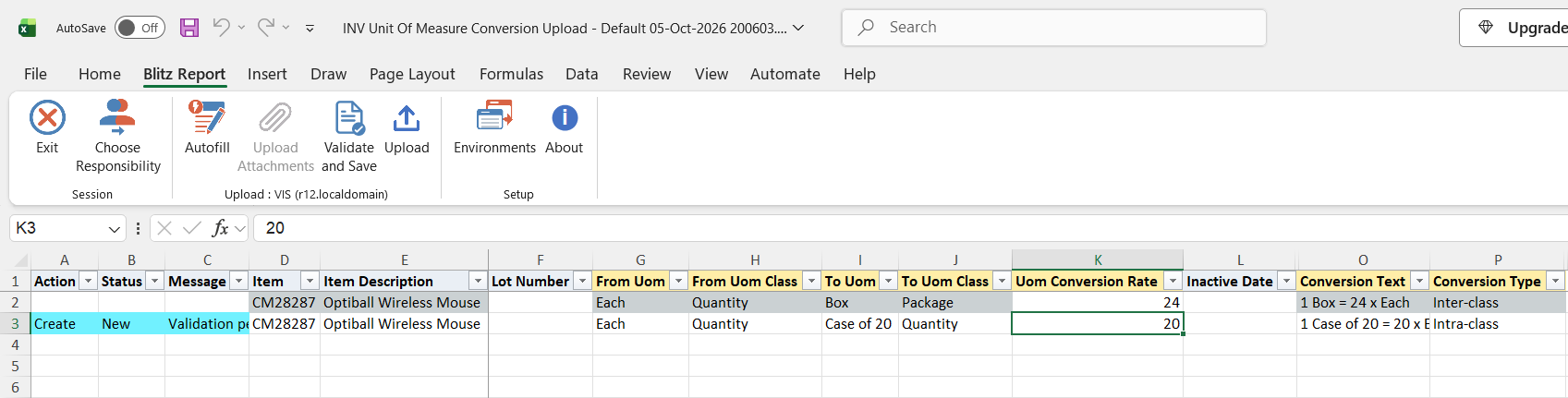
To add a conversion, add a row with the From Uom and To Uom, their classes in From Uom Class and To Uom Class, and the Uom Conversion Rate, which is the number of From units in one To unit. The From Uom is the base unit of its class; with an Item it is the base unit of the class of the item’s primary unit of measure.
- Standard: no Item, To Uom in the same class as the From Uom (R12.2 and later).
- Intra-class: an Item, To Uom in the same class, for example 1 Case of 20 = 20 x Each for one item.
- Inter-class: an Item, To Uom is the base unit of another class, for example 1 Box (Package) = 24 x Each.
- Lot Inter-class: an Item and a Lot Number of a lot-controlled item, To Uom in another class (R12.2 and later). Optionally choose a Lot Update Type to update the lot’s on-hand balances or recalculate its quantities, and a Lot Update Reason.
Item Description, Conversion Text and Conversion Type are filled automatically. On a downloaded row the item, units and classes identify the conversion and cannot be changed; change the Uom Conversion Rate, or enter an Inactive Date to retire the conversion (R12.2 and later).
Step 4 – Validate and Save
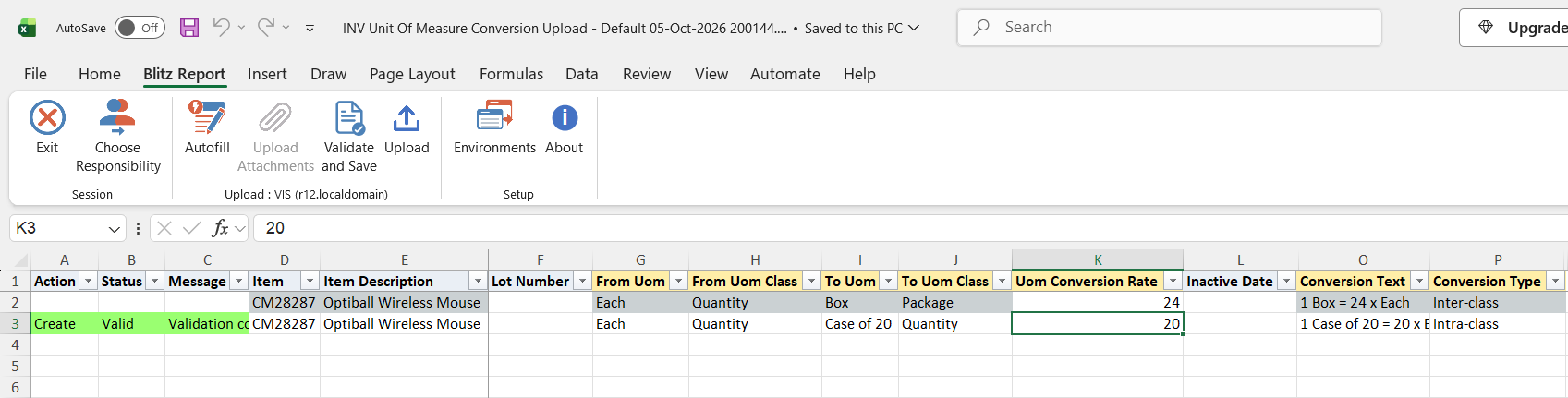
Click Validate and Save. This checks for missing required values and saves the file. Correct any rows it flags before uploading.
Step 5 – Upload the file
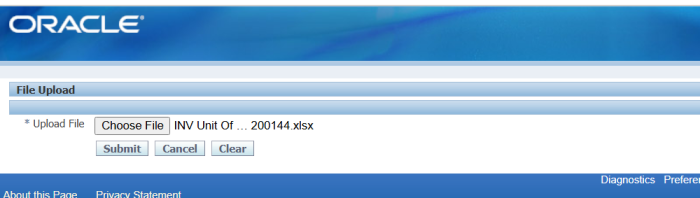
In Blitz Report click Upload and select the saved file. This submits the upload request, which creates or updates each conversion.
Step 6 – Review the result report
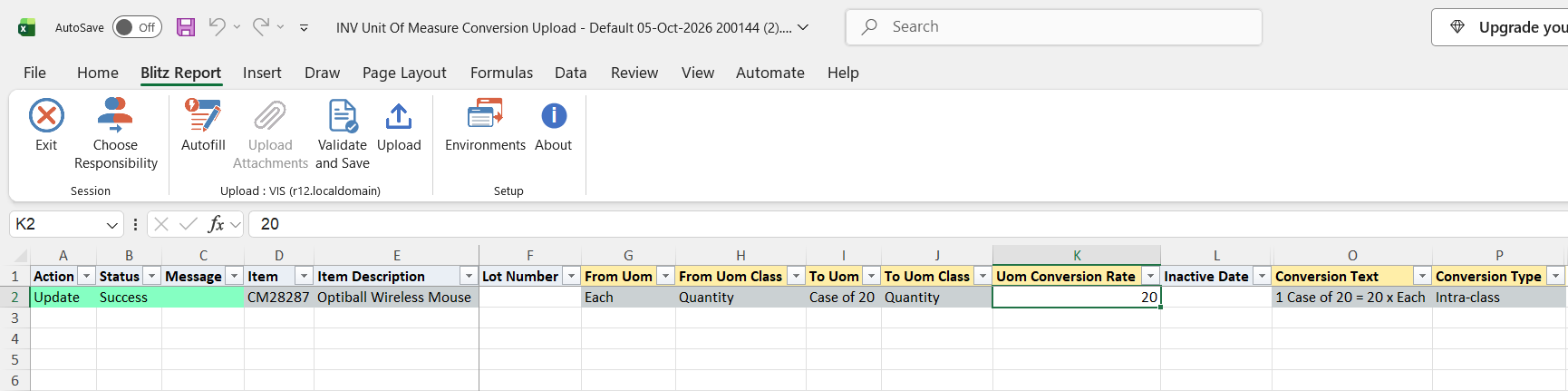
When the request completes, a result report opens listing every uploaded row with its status and message, showing the conversion as stored in Oracle.
What’s produced
- Standard, item-specific and lot-specific unit of measure conversions, created or updated.
- A result report listing every row with a status (success or error) and a message.
Common questions
Can I delete a conversion with this upload?
No. Enter an Inactive Date to retire a conversion (R12.2 and later).
Why can’t I update a conversion, or create a standard or lot conversion?
Your environment is on R12.1, where the Oracle API only creates item-specific intra-class and inter-class conversions. Updates, standard and lot conversions require R12.2 or later.
Do I have to enter the Conversion Type?
No. It is derived from the row: a Lot Number makes it Lot Inter-class, different From and To classes make it Inter-class, an Item with the same class makes it Intra-class, otherwise it is Standard.
Which way round is the rate?
The Uom Conversion Rate is the number of From units in one To unit, as shown in the Conversion Text: 1 Case of 20 = 20 x Each has the From Uom Each, the To Uom Case of 20 and the rate 20.
Which item conversions are downloaded?
Item-specific intra-class and inter-class conversions apply to the item in all organizations and are listed with the item of the master organization. Lot conversions are listed for the organization you chose when opening the upload.
Troubleshooting
| Message | Cause | What to do |
|---|---|---|
| Please specify both the From/To UOM Code and Class and a Conversion Rate | A from or to unit, its class, or the rate is missing. | Fill in all of them. |
| Item is invalid | The item does not exist in the organization chosen when opening the upload, or no organization was chosen. | Reopen the upload, choose an organization in which the item exists, and download again. |
| Existing Conversions cannot be updated in Create Model | The conversion already exists and the Upload Mode is Create. | Upload in Create, Update mode, or remove the row. |
| Item is required in for Lot Converions | A Lot Number without an Item. | Enter the item of the lot. |
| Item is required in release R12.1. Standard UOM Converions cannot be created in R12.1 | A row without an Item on R12.1. | Enter an item; standard conversions require R12.2. |
| Lot UOM Converions cannot be created in release R12.1 | A Lot Number on R12.1. | Create item-specific conversions instead; lot conversions require R12.2. |
| UOM Converions cannot be updated in release R12.1. This UOM conversion already exists | On R12.1, the conversion already exists for this item, or for no item when the item is not found. | Leave existing conversions unchanged on R12.1; if the row also says Item is invalid, fix the item first. |
| This UOM Conversion is locked for update by someone else | Another user or process is changing the conversion. | Upload the row again later. |
| The API failed to Create the Conversion (or Update) | Oracle reported success but the conversion was not found afterwards. | Check the units and item, and the request log. |
| Any other message | The Oracle unit of measure API rejected the row. | Correct the row as the message describes and upload it again. |
SQL 161 lines
with uom_conv_qry as ( -- -- standard and intra-class -- select decode(muc.inventory_item_id,0,'Standard','Intra-class') conversion_type, -- msiv.concatenated_segments item, msiv.description item_description, null lot_number, -- muomvf.unit_of_measure_tl from_uom, mucv.uom_class_tl from_uom_class, muc.conversion_rate uom_conversion_rate, muomvt.unit_of_measure_tl to_uom, mucv.uom_class_tl to_uom_class, muc.disable_date inactive_date, -- '1 ' || muomvt.unit_of_measure_tl || ' = ' || muc.conversion_rate || ' x ' || muomvf.unit_of_measure_tl conversion_text, -- muc.last_update_date, muc.last_updated_by from mtl_uom_conversions muc, mtl_units_of_measure_vl muomvf, mtl_units_of_measure_vl muomvt, mtl_uom_classes_vl mucv, mtl_system_items_vl msiv, mtl_parameters mp where muc.uom_class = muomvf.uom_class and muomvf.base_uom_flag = 'Y' and muc.uom_class = muomvt.uom_class and muc.uom_code = muomvt.uom_code and muomvt.base_uom_flag != 'Y' and muc.uom_class = mucv.uom_class and muc.inventory_item_id = msiv.inventory_item_id (+) and msiv.organization_id = mp.organization_id (+) and (muc.inventory_item_id = 0 or mp.organization_id = mp.master_organization_id ) union all -- -- inter-class -- select -- 'Inter-class' conversion_type, -- msiv.concatenated_segments item, msiv.description item_description, null lot_number, -- muomvf.unit_of_measure_tl from_uom, mucvf.uom_class_tl from_uom_class, mucc.conversion_rate uom_conversion_rate, muomvt.unit_of_measure_tl to_uom, mucvt.uom_class_tl to_uom_class, mucc.disable_date inactive_date, -- '1 ' || muomvt.unit_of_measure_tl || ' = ' || mucc.conversion_rate || ' x ' || muomvf.unit_of_measure_tl conversion_text, -- mucc.last_update_date, mucc.last_updated_by from mtl_uom_class_conversions mucc, mtl_units_of_measure_vl muomvf, mtl_units_of_measure_vl muomvt, mtl_uom_classes_vl mucvf, mtl_uom_classes_vl mucvt, mtl_system_items_vl msiv, mtl_parameters mp where mucc.from_uom_class = muomvf.uom_class and mucc.from_uom_code = muomvf.uom_code and mucc.to_uom_class = muomvt.uom_class and mucc.to_uom_code = muomvt.uom_code and mucc.from_uom_class = mucvf.uom_class and mucc.to_uom_class = mucvt.uom_class and mucc.inventory_item_id = msiv.inventory_item_id and msiv.organization_id = mp.organization_id and mp.organization_id = mp.master_organization_id union all -- -- lot inter-class -- select -- 'Lot Inter-class' conversion_type, -- msiv.concatenated_segments item, msiv.description item_description, mlucc.lot_number, -- muomvf.unit_of_measure_tl from_uom, mucvf.uom_class_tl from_uom_class, mlucc.conversion_rate uom_conversion_rate, muomvt.unit_of_measure_tl to_uom, mucvt.uom_class_tl to_uom_class, mlucc.disable_date inactive_date, -- '1 ' || muomvt.unit_of_measure_tl || ' = ' || mlucc.conversion_rate || ' x ' || muomvf.unit_of_measure_tl conversion_text, -- mlucc.last_update_date, mlucc.last_updated_by from mtl_lot_uom_class_conversions mlucc, mtl_units_of_measure_vl muomvf, mtl_units_of_measure_vl muomvt, mtl_uom_classes_vl mucvf, mtl_uom_classes_vl mucvt, mtl_system_items_vl msiv, mtl_parameters mp where mlucc.from_uom_class = muomvf.uom_class and mlucc.from_uom_code = muomvf.uom_code and mlucc.to_uom_class = muomvt.uom_class and mlucc.to_uom_code = muomvt.uom_code and mlucc.from_uom_class = mucvf.uom_class and mlucc.to_uom_class = mucvt.uom_class and mlucc.inventory_item_id = msiv.inventory_item_id and mlucc.organization_id = msiv.organization_id and mlucc.organization_id = mp.organization_id and mp.organization_code = :p_organization_code ) -- -- Main Query Starts Here -- select /*+ push_pred(uomc) */ null action_, null status_, null message_, null request_id_, null modified_columns_, to_date(null) timestamp_, :p_upload_mode upload_mode_, :p_organization_code organization, -- uomc.item, uomc.item_description, uomc.lot_number, -- uomc.from_uom, uomc.from_uom_class, uomc.to_uom, uomc.to_uom_class, uomc.uom_conversion_rate, uomc.inactive_date, -- null lot_update_type, null lot_update_reason, -- uomc.conversion_text, uomc.conversion_type, to_number(null) upload_row from uom_conv_qry uomc where nvl(:p_r122_api_exists,'N') = nvl(:p_r122_api_exists,'N') and 1=1 |
Parameters 8
| Parameter | Type | List of values SQL | |
|---|---|---|---|
| Upload Mode | LOV |
| |
| Conversion Type | LOV |
| |
| From Unit of Measure Class | LOV |
| |
| From Unit of Measure | LOV |
| |
| To Unit of Measure Class | LOV |
| |
| To Unit of Measure | LOV |
| |
| Item | LOV |
| |
| Lot Number | LOV |
|