
MRP Sourcing Rule Upload

Description
MRP Sourcing Rule Upload creates, updates and deletes Oracle sourcing rules and bills of distribution from Excel, including their receiving organizations and shipping sources (Buy From, Transfer From, Make At) with allocation percentages and ranks. Each row of the Excel file is one shipping source; rows with the same rule name form one sourcing rule.
When to use it
- Mass-create sourcing rules or bills of distribution for many organizations.
- Model multi-source supply with allocation percentage splits and ranks across suppliers or source organizations.
- Bulk-update rule descriptions, effective dates, allocation percentages, ranks, ship methods or intransit times.
- Add a shipping source to existing rules, remove one, or delete obsolete rules.
- Copy sourcing rules between environments by downloading from one and uploading to another.
Before you start
- Your responsibility has access to the inventory organizations of the rules.
- Suppliers and purchasing supplier sites, and for Transfer From sources the inter-organization shipping networks and ship methods, are set up.
- Planning uses a sourcing rule only once it is assigned in an assignment set, for example with the MRP Sourcing Rule Assignment Upload.
Step 1 – Set the parameters
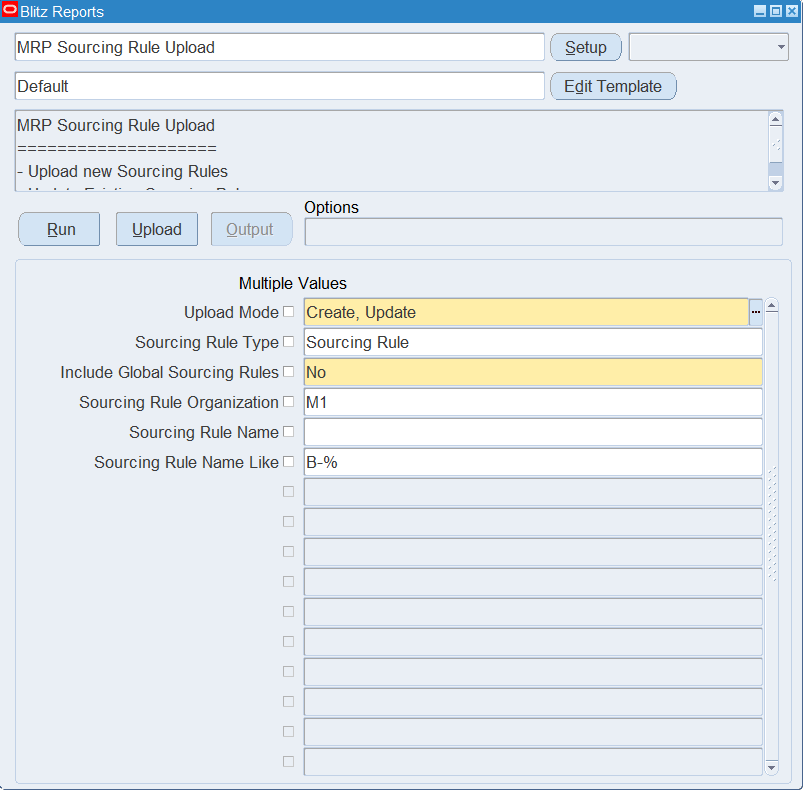
Open MRP Sourcing Rule Upload in Blitz Report and set the parameters:
| Parameter | Meaning |
|---|---|
| Upload Mode | Create (default) opens an empty sheet for new rules; Create, Update downloads existing rules for editing or deleting and lets you add new ones. |
| Sourcing Rule Type | Sourcing Rule (default) or Bill of Distribution. Downloads rules of this type and is the default Rule Type of new rows. |
| Include Global Sourcing Rules | Yes (default) also downloads rules that apply to all organizations; No downloads only rules of the Sourcing Rule Organization. Bills of distribution are always global. |
| Sourcing Rule Organization | Downloads the sourcing rules of this inventory organization. Defaults to your current organization for the Sourcing Rule type. |
| Sourcing Rule Name | The rule(s) to download. |
| Sourcing Rule Name Like | Downloads all rules whose name matches this text, ignoring case (use % as wildcard). |
Step 2 – Run to download the Excel file
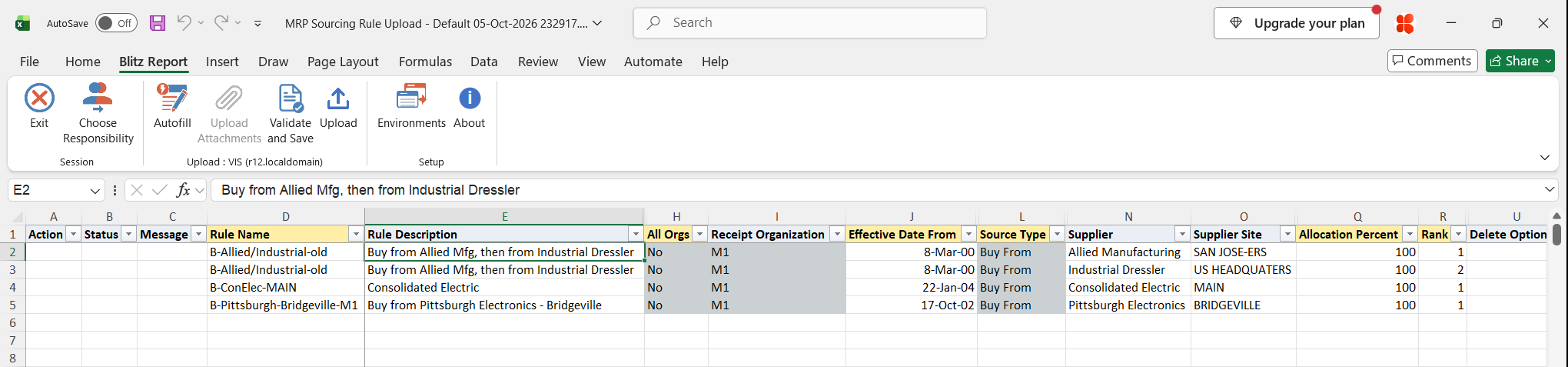
Click Run. The Excel file downloads and opens with one row per shipping source of the selected rules, or an empty sheet in Create mode.
Step 3 – Enter or change the rules and sources
Enter one row per shipping source and repeat the rule and receiving organization values on each row of the same rule:
- Rule Name, Rule Description and All Orgs: No for a rule of one organization, Yes for a global rule. Bills of distribution are always global.
- Receipt Organization: required for a rule with All Orgs = No and left blank for a global sourcing rule. For a bill of distribution, enter one receiving organization per group of rows.
- Effective Date From (defaults to today) and optional Effective Date To.
- Source Type: Buy From with a Supplier and Supplier Site (the Supplier Site Op Unit fills in when the site exists in one operating unit), or Transfer From / Make At with a Source Organization. Make At defaults the source organization to the receipt organization; for Transfer From the list shows the organizations with a shipping network to the receipt organization.
- Allocation Percent and Rank: the percentages of the sources with the same rank should add up to 100.
- Ship Method and Intransit Time for Transfer From sources; the intransit time defaults from the ship method.
On downloaded rows you can change the description, Effective Date To, allocation percent, rank, ship method and intransit time. Rule Type, All Orgs, Receipt Organization and Source Type cannot be changed on an existing rule. Planning Active is display only and is set by the upload. To delete, set Delete Option to Sourcing Rule (the whole rule) or Shipping Org (that one source) on a downloaded row.
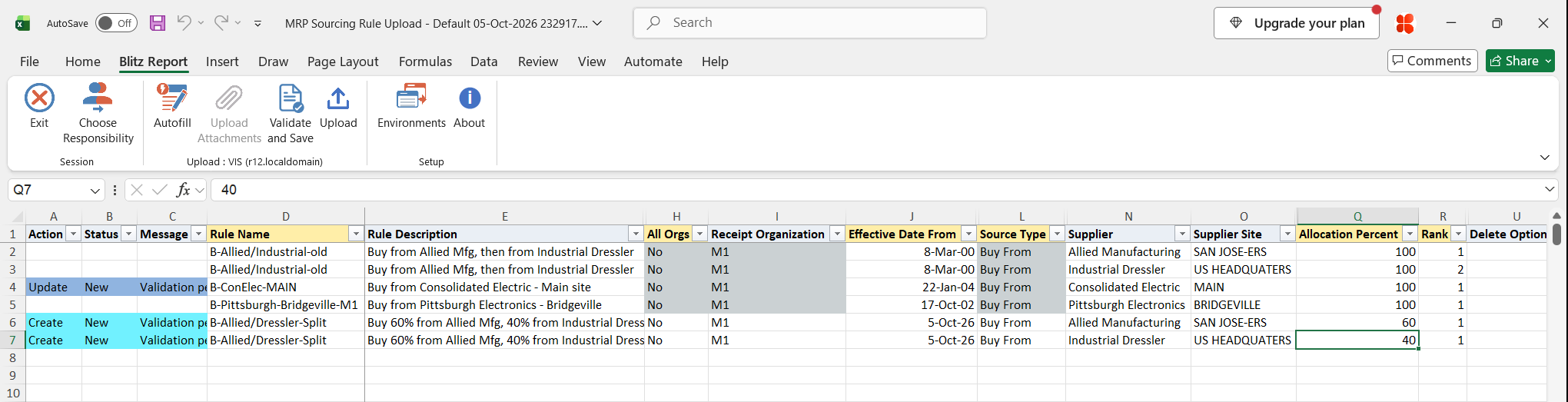
Step 4 – Validate and Save
Click Validate and Save. This checks for missing required values and saves the file. Correct any rows it flags before uploading.
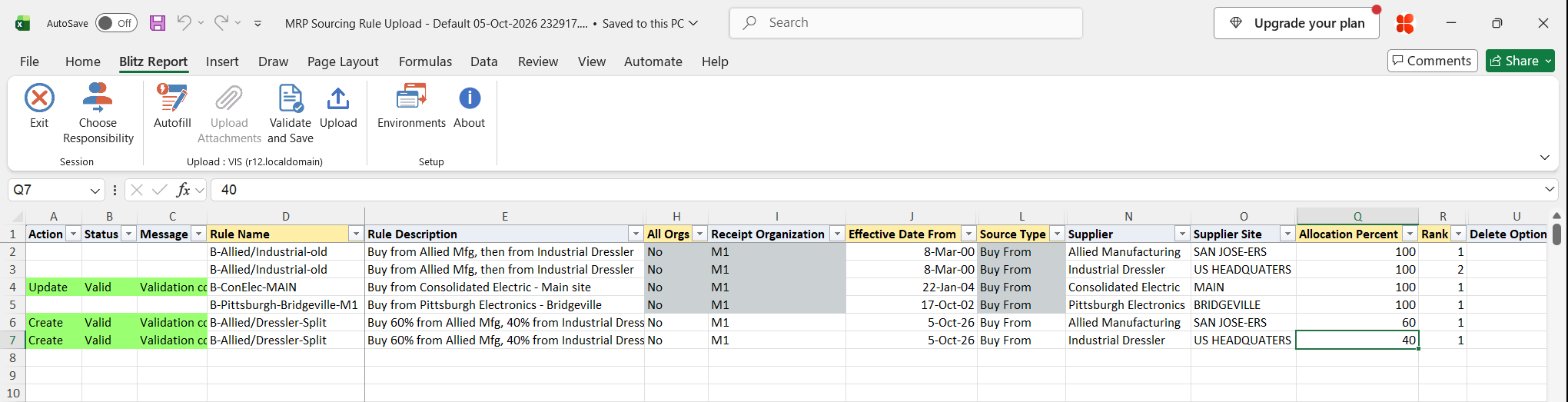
Step 5 – Upload the file
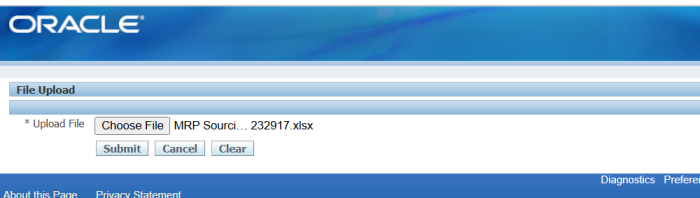
In Blitz Report click Upload and select the saved file. This submits the upload request, which creates, updates or deletes each sourcing rule with its receiving organizations and shipping sources.
Step 6 – Review the result report
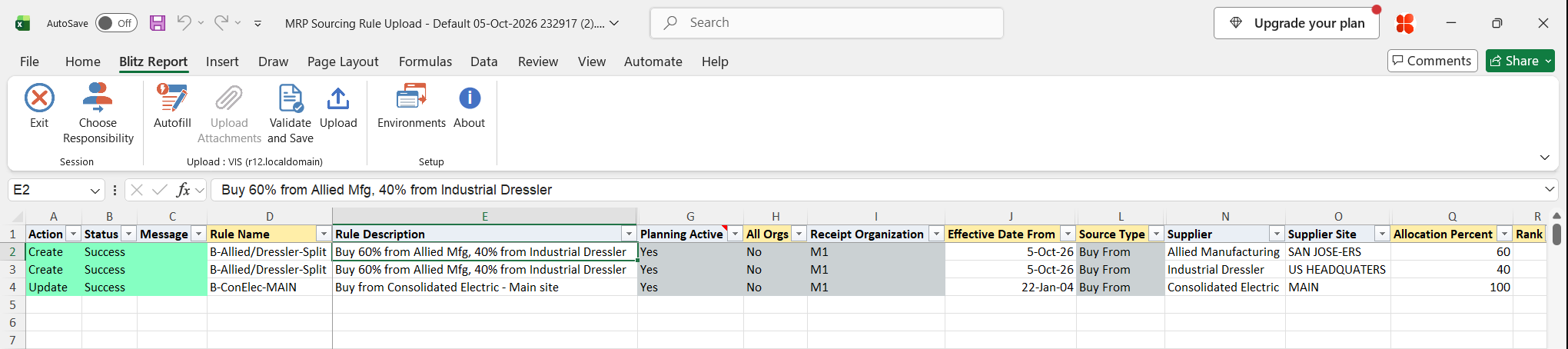
When the request completes, a result report opens listing every uploaded row with its status and message, and the Planning Active flag of each rule.
What’s produced
- Sourcing rules and bills of distribution created, updated or deleted, with their receiving organizations and shipping sources.
- Planning Active set to Yes when the allocation percentages of each rank add up to 100 for every receiving organization, otherwise No.
- A result report listing every row with a status (success or error) and a message.
Common questions
How do I split supply 60/40 across two suppliers?
Enter two Buy From rows for the same rule, receipt organization and effective date, both with Rank 1, and Allocation Percent 60 and 40. For a primary and a backup supplier, give each 100 percent with Rank 1 and Rank 2.
Why is Planning Active No for my rule?
The allocation percentages of at least one rank do not add up to 100 for a receiving organization. Correct the percentages and upload again.
Can I change a rule’s type or organization later?
No. Rule type, organization, receipt organization and source type of existing entries cannot be changed; create a new rule or source instead.
Can I delete just a receiving organization line?
No. You can delete the whole sourcing rule or an individual shipping source.
What happens when one row of a rule fails?
The whole rule is not saved. The failing rows show the error and the other rows of the rule show “One or more other lines in this sourcing rule have errors”.
Troubleshooting
| Message | Cause | What to do |
|---|---|---|
| You can not update existing Sourcing Rule Entries in Create Mode | The row matches an existing rule, receiving organization and source, and Upload Mode is Create. | Upload in Create, Update mode. |
| You can not delete existing Sourcing Rule Entries in Create Mode | A Delete Option is set and Upload Mode is Create. | Upload in Create, Update mode. |
| Receipt Organization should be null for global Sourcing Rules (All Orgs=Yes) | A receipt organization on a global sourcing rule. | Clear the Receipt Organization, or set All Orgs to No. |
| Receipt Organization must be specified for org specific Sourcing Rules (All Orgs=No) | All Orgs is No and the receipt organization is blank. | Enter the Receipt Organization. |
| Bill of Distributions are Global. The All Orgs flag must be set to Yes for a Bill of Distribution | All Orgs is No on a bill of distribution. | Set All Orgs to Yes. |
| Sourcing Rule Type cannot be changed / Sourcing Rule Organization cannot be changed | The rule exists with another type or organization. | Create a new rule with another name. |
| Supplier is not valid | The supplier name does not exist. | Pick the Supplier from the list. |
| Supplier Site / Operating Unit combination is not valid | The site does not exist for the supplier in that operating unit. | Pick the Supplier Site and Supplier Site Op Unit from the lists. |
| Shipping Source must specify either a Source Organization or Vendor | Neither a source organization nor a supplier and site are entered. | Enter a Source Organization, or a Supplier and Supplier Site. |
| Shipping Source cannot specify both a Source Organization and Vendor | Both a source organization and a supplier are entered. | Keep only the one that matches the Source Type. |
| Source Organization is required for Transfer From and Make At Source Types | Transfer From or Make At without a source organization. | Enter the Source Organization. |
| Vendor is required for Buy From Source Type | Buy From without a supplier and site. | Enter the Supplier and Supplier Site. |
| Source Allocation Percent must be specified / Source Rank be specified | Allocation Percent or Rank is blank. | Enter both on every source row. |
| Shipping Source Type cannot be changed / Shipping Source cannot be switched between vendor and organization | A downloaded source row was changed to another source type. | Delete the source with Delete Option Shipping Org and add a new row. |
| Sourcing Rule cannot be deleted. Sourcing Rule does not exist | Delete Option Sourcing Rule on a rule that does not exist. | Check the rule name and organization, or clear the Delete Option. |
| Shipping Organization cannot be deleted. Shipping Organization entry does not exist | Delete Option Shipping Org on a source that does not exist. | Check the source values, or clear the Delete Option. |
| One or more other lines in this sourcing rule have errors | Another row of the same rule failed, so the whole rule was not saved. | Fix the failing row and upload the rule again. |
SQL 209 lines
with sr_query as ( select -- -- sourcing rule xxen_util.meaning(mrs.sourcing_rule_type,'MRP_SOURCING_RULE_TYPE',700) rule_type, mrs.sourcing_rule_name rule_name, mrs.description rule_description, xxen_util.meaning(nvl2(mp.organization_code,'2','1'),'INV_YES_NO',3) all_orgs, mp.organization_code organization, xxen_util.meaning(mrs.status,'INV_YES_NO',3) active, xxen_util.meaning(decode(mrs.planning_active,1,1,null),'INV_YES_NO',3) planning_active, -- receiving organizations msrov.organization_code receipt_organization, msrov.customer receipt_customer, msrov.address receipt_address, msrov.effective_date effective_date_from, msrov.disable_date effective_date_to, -- shipping organization xxen_util.meaning(mssov.source_type,'MRP_SOURCE_TYPE',700) source_type, mssov.source_organization_code source_organization, asu.vendor_name supplier, asu.segment1 supplier_number, mssov.vendor_site supplier_site, haouv.name supplier_site_op_unit, mssov.allocation_percent, mssov.rank, mssov.ship_method, mssov.intransit_time, -- attributes xxen_util.display_flexfield_context(704,'MRP_SOURCING_RULES',mrs.attribute_category) rule_attribute_category, xxen_util.display_flexfield_value(704,'MRP_SOURCING_RULES',mrs.attribute_category,'ATTRIBUTE1',mrs.rowid,mrs.attribute1) sr_rule_attribute1, xxen_util.display_flexfield_value(704,'MRP_SOURCING_RULES',mrs.attribute_category,'ATTRIBUTE2',mrs.rowid,mrs.attribute2) sr_rule_attribute2, xxen_util.display_flexfield_value(704,'MRP_SOURCING_RULES',mrs.attribute_category,'ATTRIBUTE3',mrs.rowid,mrs.attribute3) sr_rule_attribute3, xxen_util.display_flexfield_value(704,'MRP_SOURCING_RULES',mrs.attribute_category,'ATTRIBUTE4',mrs.rowid,mrs.attribute4) sr_rule_attribute4, xxen_util.display_flexfield_value(704,'MRP_SOURCING_RULES',mrs.attribute_category,'ATTRIBUTE5',mrs.rowid,mrs.attribute5) sr_rule_attribute5, xxen_util.display_flexfield_value(704,'MRP_SOURCING_RULES',mrs.attribute_category,'ATTRIBUTE6',mrs.rowid,mrs.attribute6) sr_rule_attribute6, xxen_util.display_flexfield_value(704,'MRP_SOURCING_RULES',mrs.attribute_category,'ATTRIBUTE7',mrs.rowid,mrs.attribute7) sr_rule_attribute7, xxen_util.display_flexfield_value(704,'MRP_SOURCING_RULES',mrs.attribute_category,'ATTRIBUTE8',mrs.rowid,mrs.attribute8) sr_rule_attribute8, xxen_util.display_flexfield_value(704,'MRP_SOURCING_RULES',mrs.attribute_category,'ATTRIBUTE9',mrs.rowid,mrs.attribute9) sr_rule_attribute9, xxen_util.display_flexfield_value(704,'MRP_SOURCING_RULES',mrs.attribute_category,'ATTRIBUTE10',mrs.rowid,mrs.attribute10) sr_rule_attribute10, xxen_util.display_flexfield_value(704,'MRP_SOURCING_RULES',mrs.attribute_category,'ATTRIBUTE11',mrs.rowid,mrs.attribute11) sr_rule_attribute11, xxen_util.display_flexfield_value(704,'MRP_SOURCING_RULES',mrs.attribute_category,'ATTRIBUTE12',mrs.rowid,mrs.attribute12) sr_rule_attribute12, xxen_util.display_flexfield_value(704,'MRP_SOURCING_RULES',mrs.attribute_category,'ATTRIBUTE13',mrs.rowid,mrs.attribute13) sr_rule_attribute13, xxen_util.display_flexfield_value(704,'MRP_SOURCING_RULES',mrs.attribute_category,'ATTRIBUTE14',mrs.rowid,mrs.attribute14) sr_rule_attribute14, xxen_util.display_flexfield_value(704,'MRP_SOURCING_RULES',mrs.attribute_category,'ATTRIBUTE15',mrs.rowid,mrs.attribute15) sr_rule_attribute15, -- xxen_util.display_flexfield_context(704,'MRP_SR_RECEIPT_ORG',msrov.attribute_category) receipt_attribute_category, xxen_util.display_flexfield_value(704,'MRP_SR_RECEIPT_ORG',msrov.attribute_category,'ATTRIBUTE1',msrov.row_id,msrov.attribute1) sr_receipt_attribute1, xxen_util.display_flexfield_value(704,'MRP_SR_RECEIPT_ORG',msrov.attribute_category,'ATTRIBUTE2',msrov.row_id,msrov.attribute2) sr_receipt_attribute2, xxen_util.display_flexfield_value(704,'MRP_SR_RECEIPT_ORG',msrov.attribute_category,'ATTRIBUTE3',msrov.row_id,msrov.attribute3) sr_receipt_attribute3, xxen_util.display_flexfield_value(704,'MRP_SR_RECEIPT_ORG',msrov.attribute_category,'ATTRIBUTE4',msrov.row_id,msrov.attribute4) sr_receipt_attribute4, xxen_util.display_flexfield_value(704,'MRP_SR_RECEIPT_ORG',msrov.attribute_category,'ATTRIBUTE5',msrov.row_id,msrov.attribute5) sr_receipt_attribute5, xxen_util.display_flexfield_value(704,'MRP_SR_RECEIPT_ORG',msrov.attribute_category,'ATTRIBUTE6',msrov.row_id,msrov.attribute6) sr_receipt_attribute6, xxen_util.display_flexfield_value(704,'MRP_SR_RECEIPT_ORG',msrov.attribute_category,'ATTRIBUTE7',msrov.row_id,msrov.attribute7) sr_receipt_attribute7, xxen_util.display_flexfield_value(704,'MRP_SR_RECEIPT_ORG',msrov.attribute_category,'ATTRIBUTE8',msrov.row_id,msrov.attribute8) sr_receipt_attribute8, xxen_util.display_flexfield_value(704,'MRP_SR_RECEIPT_ORG',msrov.attribute_category,'ATTRIBUTE9',msrov.row_id,msrov.attribute9) sr_receipt_attribute9, xxen_util.display_flexfield_value(704,'MRP_SR_RECEIPT_ORG',msrov.attribute_category,'ATTRIBUTE10',msrov.row_id,msrov.attribute10) sr_receipt_attribute10, xxen_util.display_flexfield_value(704,'MRP_SR_RECEIPT_ORG',msrov.attribute_category,'ATTRIBUTE11',msrov.row_id,msrov.attribute11) sr_receipt_attribute11, xxen_util.display_flexfield_value(704,'MRP_SR_RECEIPT_ORG',msrov.attribute_category,'ATTRIBUTE12',msrov.row_id,msrov.attribute12) sr_receipt_attribute12, xxen_util.display_flexfield_value(704,'MRP_SR_RECEIPT_ORG',msrov.attribute_category,'ATTRIBUTE13',msrov.row_id,msrov.attribute13) sr_receipt_attribute13, xxen_util.display_flexfield_value(704,'MRP_SR_RECEIPT_ORG',msrov.attribute_category,'ATTRIBUTE14',msrov.row_id,msrov.attribute14) sr_receipt_attribute14, xxen_util.display_flexfield_value(704,'MRP_SR_RECEIPT_ORG',msrov.attribute_category,'ATTRIBUTE15',msrov.row_id,msrov.attribute15) sr_receipt_attribute15, -- xxen_util.display_flexfield_context(704,'MRP_SR_SOURCE_ORG',mssov.attribute_category) ship_attribute_category, xxen_util.display_flexfield_value(704,'MRP_SR_SOURCE_ORG',mssov.attribute_category,'ATTRIBUTE1',mssov.row_id,mssov.attribute1) sr_ship_attribute1, xxen_util.display_flexfield_value(704,'MRP_SR_SOURCE_ORG',mssov.attribute_category,'ATTRIBUTE2',mssov.row_id,mssov.attribute2) sr_ship_attribute2, xxen_util.display_flexfield_value(704,'MRP_SR_SOURCE_ORG',mssov.attribute_category,'ATTRIBUTE3',mssov.row_id,mssov.attribute3) sr_ship_attribute3, xxen_util.display_flexfield_value(704,'MRP_SR_SOURCE_ORG',mssov.attribute_category,'ATTRIBUTE4',mssov.row_id,mssov.attribute4) sr_ship_attribute4, xxen_util.display_flexfield_value(704,'MRP_SR_SOURCE_ORG',mssov.attribute_category,'ATTRIBUTE5',mssov.row_id,mssov.attribute5) sr_ship_attribute5, xxen_util.display_flexfield_value(704,'MRP_SR_SOURCE_ORG',mssov.attribute_category,'ATTRIBUTE6',mssov.row_id,mssov.attribute6) sr_ship_attribute6, xxen_util.display_flexfield_value(704,'MRP_SR_SOURCE_ORG',mssov.attribute_category,'ATTRIBUTE7',mssov.row_id,mssov.attribute7) sr_ship_attribute7, xxen_util.display_flexfield_value(704,'MRP_SR_SOURCE_ORG',mssov.attribute_category,'ATTRIBUTE8',mssov.row_id,mssov.attribute8) sr_ship_attribute8, xxen_util.display_flexfield_value(704,'MRP_SR_SOURCE_ORG',mssov.attribute_category,'ATTRIBUTE9',mssov.row_id,mssov.attribute9) sr_ship_attribute9, xxen_util.display_flexfield_value(704,'MRP_SR_SOURCE_ORG',mssov.attribute_category,'ATTRIBUTE10',mssov.row_id,mssov.attribute10) sr_ship_attribute10, xxen_util.display_flexfield_value(704,'MRP_SR_SOURCE_ORG',mssov.attribute_category,'ATTRIBUTE11',mssov.row_id,mssov.attribute11) sr_ship_attribute11, xxen_util.display_flexfield_value(704,'MRP_SR_SOURCE_ORG',mssov.attribute_category,'ATTRIBUTE12',mssov.row_id,mssov.attribute12) sr_ship_attribute12, xxen_util.display_flexfield_value(704,'MRP_SR_SOURCE_ORG',mssov.attribute_category,'ATTRIBUTE13',mssov.row_id,mssov.attribute13) sr_ship_attribute13, xxen_util.display_flexfield_value(704,'MRP_SR_SOURCE_ORG',mssov.attribute_category,'ATTRIBUTE14',mssov.row_id,mssov.attribute14) sr_ship_attribute14, xxen_util.display_flexfield_value(704,'MRP_SR_SOURCE_ORG',mssov.attribute_category,'ATTRIBUTE15',mssov.row_id,mssov.attribute15) sr_ship_attribute15, -- ids mrs.sourcing_rule_id, msrov.sr_receipt_id, mssov.sr_source_id, -- mssov.last_updated_by, mssov.last_update_date from mrp_sourcing_rules mrs, mtl_parameters mp, mrp_sr_receipt_org_v msrov, mrp_sr_source_org_v mssov, ap_suppliers asu, ap_supplier_sites_all assa, hr_all_organization_units_vl haouv where mp.organization_id (+) = mrs.organization_id and msrov.sourcing_rule_id (+) = mrs.sourcing_rule_id and mssov.sr_receipt_id (+) = msrov.sr_receipt_id and asu.vendor_id (+) = mssov.vendor_id and assa.vendor_site_id (+) = mssov.vendor_site_id and haouv.organization_id (+) = assa.org_id and (mrs.organization_id is null or mrs.organization_id in (select xroa.id from xxen_report_org_access xroa where xroa.access_type='INV') ) ) -- -- Main Query Starts Here -- select /*+ push_pred(sr) */ null action_, null status_, null message_, null request_id_, null modified_columns_, null sr_row_id, null ro_row_id, null so_row_id, :p_upload_mode upload_mode, :p_bypass_dff_validation bypass_dff_validation, -- sourcing rule sr.rule_name, sr.rule_description, sr.rule_type, sr.planning_active, sr.all_orgs, -- receiving organizations sr.receipt_organization, sr.receipt_customer, sr.receipt_address, sr.effective_date_from, sr.effective_date_to, -- shipping organization sr.source_type, sr.source_organization, sr.supplier, sr.supplier_number, sr.supplier_site, sr.supplier_site_op_unit, sr.allocation_percent, sr.rank, sr.ship_method, sr.intransit_time, -- attributes sr.rule_attribute_category, sr.sr_rule_attribute1, sr.sr_rule_attribute2, sr.sr_rule_attribute3, sr.sr_rule_attribute4, sr.sr_rule_attribute5, sr.sr_rule_attribute6, sr.sr_rule_attribute7, sr.sr_rule_attribute8, sr.sr_rule_attribute9, sr.sr_rule_attribute10, sr.sr_rule_attribute11, sr.sr_rule_attribute12, sr.sr_rule_attribute13, sr.sr_rule_attribute14, sr.sr_rule_attribute15, -- sr.receipt_attribute_category, sr.sr_receipt_attribute1, sr.sr_receipt_attribute2, sr.sr_receipt_attribute3, sr.sr_receipt_attribute4, sr.sr_receipt_attribute5, sr.sr_receipt_attribute6, sr.sr_receipt_attribute7, sr.sr_receipt_attribute8, sr.sr_receipt_attribute9, sr.sr_receipt_attribute10, sr.sr_receipt_attribute11, sr.sr_receipt_attribute12, sr.sr_receipt_attribute13, sr.sr_receipt_attribute14, sr.sr_receipt_attribute15, -- sr.ship_attribute_category, sr.sr_ship_attribute1, sr.sr_ship_attribute2, sr.sr_ship_attribute3, sr.sr_ship_attribute4, sr.sr_ship_attribute5, sr.sr_ship_attribute6, sr.sr_ship_attribute7, sr.sr_ship_attribute8, sr.sr_ship_attribute9, sr.sr_ship_attribute10, sr.sr_ship_attribute11, sr.sr_ship_attribute12, sr.sr_ship_attribute13, sr.sr_ship_attribute14, sr.sr_ship_attribute15, -- null delete_option, -- ids sr.organization, sr.active, sr.sourcing_rule_id, sr.sr_receipt_id, sr.sr_source_id, to_number(null) group_id, to_number(null) upload_row from sr_query sr where :p_include_global = :p_include_global and 1=1 |
Parameters 6
| Parameter | Type | List of values SQL | |
|---|---|---|---|
| Upload Mode | LOV |
| |
| Sourcing Rule Type | LOV |
| |
| Include Global Sourcing Rules | LOV | ||
| Sourcing Rule Organization | LOV |
| |
| Sourcing Rule Name | LOV |
| |
| Sourcing Rule Name Like | Char |
|