
Mod_plsql is a module included in EBS 12.2 Apache web server. It can be used to develop web application pages using server PL/SQL. The following steps need to be taken to enable this module.
2 Manual Configuration
2.1 Create a Test Procedure
2.2 Create the Following Directories
2.3 Generate the Obfuscated APPS Password
2.4 Update custom.conf Configuration File
2.5 Restart Apache
2.6 Test the Custom Procedure
2.7 Drop the Test Procedure
2.8 Known Issues
2.8.1 Configuration Issue
2.8.2 Cloning Issue
1 Automated mod_plsql Configuration
To configure mod_plsql in EBS 12.2 automatically execute the following script from the unzipped Blitz installer directory:
blitz_report_r12_v********/etc/configure_mod_plsql_122.sh |
The sample script output is presented below:
[applmgr@r12 etc]$ ./configure_mod_plsql_122.sh APPS password for environment VIS [apps] : Executing tnsping to get the database connection details. TNS Ping Utility for Linux: Version 10.1.0.5.0 - Production on 27-MAY-2025 18:11:05 Copyright (c) 1997, 2003, Oracle. All rights reserved. Used parameter files: /u01/oracle/VIS/inst/apps/VIS_r12/ora/10.1.2/network/admin/sqlnet_ifile.ora Used TNSNAMES adapter to resolve the alias Attempting to contact (DESCRIPTION= (ADDRESS=(PROTOCOL=tcp)(HOST=r122.localdomain)(PORT=1521)) (CONNECT_DATA= (SERVICE_NAME=ebs_VIS) (INSTANCE_NAME=CDBVIS))) OK (0 msec) Please enter the database server name: DB_SERVER: r122.localdomain Please enter the database port: DB_PORT: 1521 Please enter the database service name: DB_SERVICE_NAME: ebs_VIS Creating the mod_plsql related directories. drwxr-x---. 2 applmgr oinstall 6 Dec 30 2006 /u01/install/APPS/fs1/EBSapps/10.1.2/Apache/modplsql/cache drwxr-x---. 2 applmgr oinstall 21 Dec 30 2006 /u01/install/APPS/fs1/EBSapps/10.1.2/Apache/modplsql/logs The script finished. Please review the configuration file: /u01/install/APPS/fs1/FMW_Home/webtier/instances/EBS_web_OHS1/config/OHS/EBS_web/custom.conf Please restart Apache to apply the changes. |
2 Manual Configuration
Please execute the following steps for the manual mod_plsql configuration.
2.1 Create a Test Procedure
Create the following procedure as APPS user:
create or replace procedure helloworld as
begin
  htp.htitle('My first dynamic Web page');
  htp.print('Hello world!');
  htp.print('You are connected to '||sys_context('USERENV','DB_NAME')||' as '||sys_context('USERENV','CURRENT_SCHEMA'));
  htp.line;
end helloworld;
/ |
2.2 Create the Following Directories
Log in to the application server and execute the following command as the applications linux user:
mkdir -p $ORACLE_HOME/Apache/modplsql/logs mkdir -p $ORACLE_HOME/Apache/modplsql/cache |
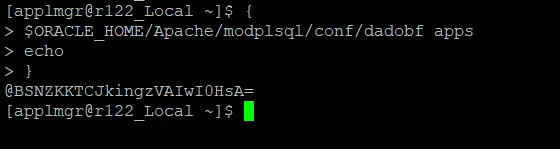
2.3 Generate the Obfuscated APPS Password
Use the following utility to generate the obfuscated password.
Replace ***** to the actual APPS password.
{
$ORACLE_HOME/Apache/modplsql/conf/dadobf *****
echo
} |
Use the generated obfuscated password later in the configuration file plsql.conf.
2.4 Update custom.conf Configuration File
Open the following file:
ls -l $FMW_HOME/webtier/instances/EBS_web_*OHS*/config/OHS/EBS_web*/custom.conf |
E.g.
vi /u01/install/APPS/fs2/FMW_Home/webtier/instances/EBS_web_OHS1/config/OHS/EBS_web/custom.conf |
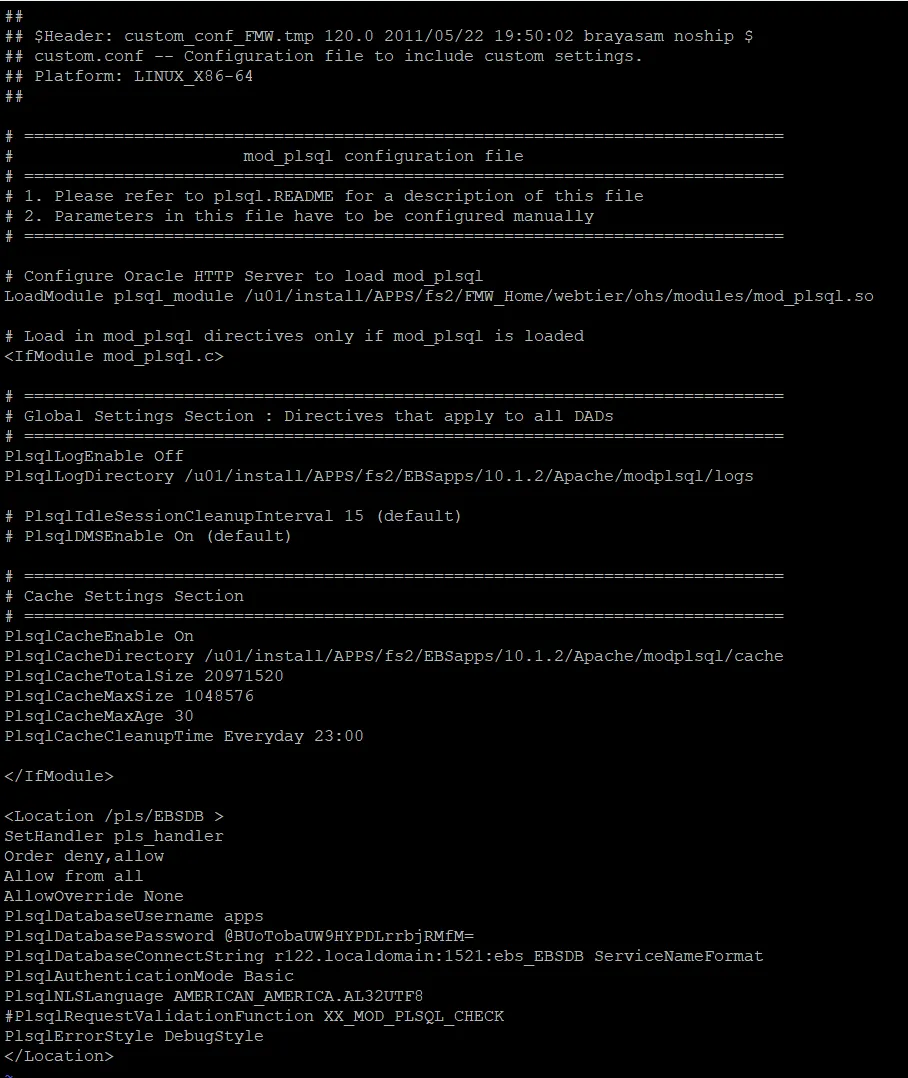
Add the following parameters with the instance specific values:
- plsql_module
- PlsqlLogDirectory
- PlsqlCacheDirectory
- PlsqlDatabasePassword
- PlsqlDatabaseConnectString
- Location should use the last part of the profile Applications Web Agent (APPS_WEB_AGENT) e.g:
If Applications Web Agent is https://r122.localdomain:443/pls/EBSDB then:
Location /pls/EBSDB
Here is the sample configuration file
2.5 Restart Apache
cd $ADMIN_SCRIPTS_HOME ./adapcctl.sh stop ps -ef|grep httpd ./adapcctl.sh start |
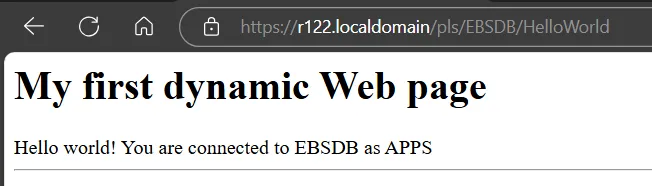
2.6 Test the Custom Procedure
Access the following url constructed using the configuration file entry:
Location /pls/EBSDB |
Execute this command as applmgr to get the instance url:
grep login $CONTEXT_FILE |
And append /pls/EBSDB/HelloWorld to it. E.g:
https://r122.localdomain/pls/EBSDB/HelloWorld |
2.7 Drop the Test Procedure
Drop the procedure as APPS user:
drop procedure helloworld; |
2.8 Known Issues
2.8.1 Configuration Issue
When I tried to use the following library reference:
$ORACLE_HOME/Apache/modplsql/bin/modplsql.so |
I faced issues starting Apache:
/u01/install/APPS/fs2/FMW_Home/webtier/ohs/bin/apachectl startssl: execing httpd httpd.worker: Syntax error on line 1042 of /u01/install/APPS/fs2/FMW_Home/webtier/instances/EBS_web_OHS1/config/OHS/EBS_web/httpd.conf: Syntax error on line 28 of /u01/install/APPS/fs2/FMW_Home/webtier/instances/EBS_web_OHS1/config/OHS/EBS_web/oracle_apache.conf: Syntax error on line 10 of /u01/install/APPS/fs2/FMW_Home/webtier/instances/EBS_web_OHS1/config/OHS/EBS_web/custom.conf: Cannot load /u01/install/APPS/fs2/EBSapps/10.1.2/Apache/modplsql/bin/modplsql.so into server: /u01/install/APPS/fs2/EBSapps/10.1.2/Apache/modplsql/bin/modplsql.so: wrong ELF class: ELFCLASS32 |
The fix is to repoint the config file to the correct library:
LoadModule plsql_module /u01/install/APPS/fs2/FMW_Home/webtier/ohs/modules/mod_plsql.so |
2.8.2 Cloning Issue
I faced the following issue when cloning Oracle EBS 12.2:
INFO : [PLUGIN][OHS] Aug 27, 2025 13:31:26 - CLONE-26171 Validating config properties of config group custom.conf ... FINE : Aug 27, 2025 13:31:26 - CLONE-22043 Path is empty. INFO : Aug 27, 2025 13:31:26 - CLONE-21203 The PlsqlDatabasePassword password file: "", either does not exist or is zero size. INFO : [PLUGIN][OHS] Aug 27, 2025 13:31:26 - CLONE-26149 Unable to retrieve password for PlsqlDatabasePassword from file . |
The root cause of the issue is that mod_plsql is not supported with EBS 12.2. custom.conf is added to the FMW_Home.jar archive during preclone. So to clone EBS, open the mod_plsql configuration file, e.g. $FMW_HOME/webtier/instances/EBS_web_*OHS*/config/OHS/EBS_web*/custom.conf and comment the PlsqlDatabasePassword parameter in the source EBS instance. Then rerun preclone in the source EBS, copy the apps tier to the target and run the clone.