
Mod_plsql is a module included in EBS 11i Apache web server. It can be used to develop web application pages using server PL/SQL. The following steps need to be taken to enable this module.
Create a Test Procedure
1 Configure mod_plsql
2 Configure the Custom Template
3 Bounce the HTTP Server After Making the Changes
4 Test the Custom Web Page
5 Drop the Test Procedure as APPS
1 Configure mod_plsql
2 Configure the Custom Template
3 Bounce the HTTP Server After Making the Changes
4 Test the Custom Web Page
5 Drop the Test Procedure as APPS
Create a Test Procedure
Create the following procedure as APPS user:
create or replace procedure helloworld as
begin
  htp.htitle('My first dynamic Web page');
  htp.print('Hello world');
  htp.line;
end helloworld;
/ |
1 Configure mod_plsql
In order to avoid the issues described in Doc ID 370048.1 perform the following steps:
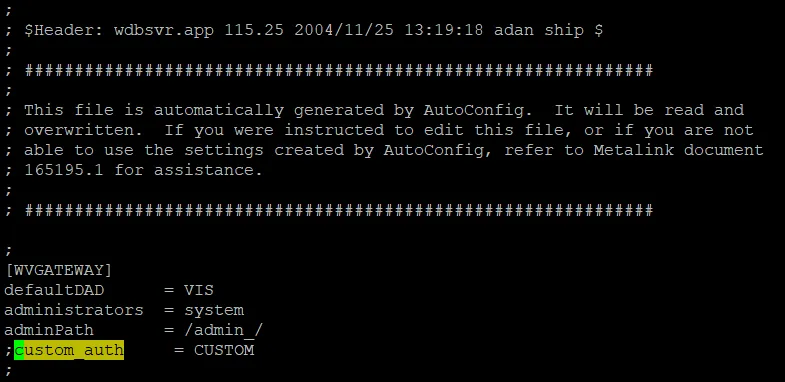
Backup the following file. Open it and Comment out the “custom_auth = CUSTOM” line in wdbsvr.app file (insert a ; at the beginning of the line).
$IAS_ORACLE_HOME/Apache/modplsql/cfg/wdbsvr.app |
2 Configure the Custom Template
In order to preserve the changes in the configuration file, perform the same changes in the associated template file
cd $FND_TOP/admin/template mkdir -p custom cp wdbsvr.app custom cd custom vi wdbsvr.app |

3 Bounce the HTTP Server After Making the Changes
cd $COMMON_TOP/admin/scripts/$CONTEXT_NAME ./adapcctl.sh stop ps -ef|grep httpd ./adapcctl.sh start |
4 Test the Custom Web Page
Access the following url:
http://[ebs_url]/pls/[SID]/[Procedure name] |
Example:
http://11i.localdomain:8000/pls/vis/helloworld |
If the test webpage is displayed then the mod_plsql configuration was successful.

5 Drop the Test Procedure as APPS
drop procedure helloworld; |