
Customer

Discussion Replies Created
Is a refresh needed to check the request status?
If I only want to see requests that are either scheduled for the future or currently running, how do I filter the output?
Can they modify report SQL or configuration?
 Customer · · in Oracle Enterprise Command Center Framework Release 12.2 installation and integration with Oracle EBS 12.2.8
We need to quickly diagnose if critical base patches (AD/TXK) are missing, which could cause compilation issues.
What about managing user access to reports?
What is the default interval, and how do I disable the automatic refresh entirely?
Customer · · in Oracle Enterprise Command Center Framework Release 12.2 installation and integration with Oracle EBS 12.2.8 If we are troubleshooting similar HTTP 400 errors post-installation, what specific resource should we check? We are seeing ‘No function from PO_PCC_ECC_ODERS_FUNC is available to current logged in responsibility id’.
Does the template access level affect whether the user can see all templates?
Customer · · in Oracle Enterprise Command Center Framework Release 12.2 installation and integration with Oracle EBS 12.2.8 We successfully completed the integration step, checking system profile options like `s_ecc_protocol` and running autoconfig. Why would this package still be missing or invalid?
If a user has ‘Private only’ access, can they edit a template they created, even if it was marked as shared?
What separator is recommended, and how should Excel cells be formatted?
What is the highest level of template access a user can receive?
Why is the hyphen restricted?
Let me clarify my question again: how some reports can be enabled only to certain reports.
This requirement can be meet in new version?
For example: report: AR Aging – 7 Buckets – By Salesperson/Agent
it’s output can be enabled only to certain folder?
my question should be correct below:
how some reports can be enabled only to certain folder(or dir in app setrver)?
If I am calculating a period range, should I still ensure the base period format is correct?
Hi Eric,
It may also be possible to email a report to SharePoint.
How To Upload Files To SharePoint By Sending An Email (cloudinfra.net)
Hi Andy,
Thanks for your reply. We’ve updated our ATG patching instructions to re-run installation script after cutover.
Thank you Eric!!
Hi Andy,
That was easy. Thanks again!
Hi Andy,
Thank you for the explanation. First I thought the “3” was an error number, but as Mrugesh stated it’s the 3rd segment, I could have guessed that having setup the segments .
The issue on our CRP1 environment is indeed end-dated segment values, or parents without children. Both situations might appear in EBS in PROD as well, but of course we will not list the parents without children in the FSG.
But disabled or end-dated segment values may still have data in older periods so should be listed. Did I see these disabled values in grey in the FSG report? Think that is a good feature!
Once our consultant/finance lead start looking into the FSG report, we’ll raise questions or suggestions when needed.
In the meantime I’m trying to match reports and uploads to our CEMLI-List items, I will list the ones that I miss and/or could expect and revert, likely in 1-2 weeks from now.
Thanks Andy, It works!!!
Hi Andy,
I’m so sorry, totally my fault, I was in a rush and ran a script to share multiple reports with multiple responsibilities and did not run a commit at the end. The responsibilities simply did not have any reports assigned to it!
All working fine now after the commit, such a stupid error, apologies for wasting your time!
Can you give an example of the output format?
ok, we can have zoom meeting next week except Tuesday morning. Many thanks.
Hi Eric,
I downloaded the XML file and I got the same result. The LOV sql query looks correct but I don’t understand why it is redirecting to customer name..
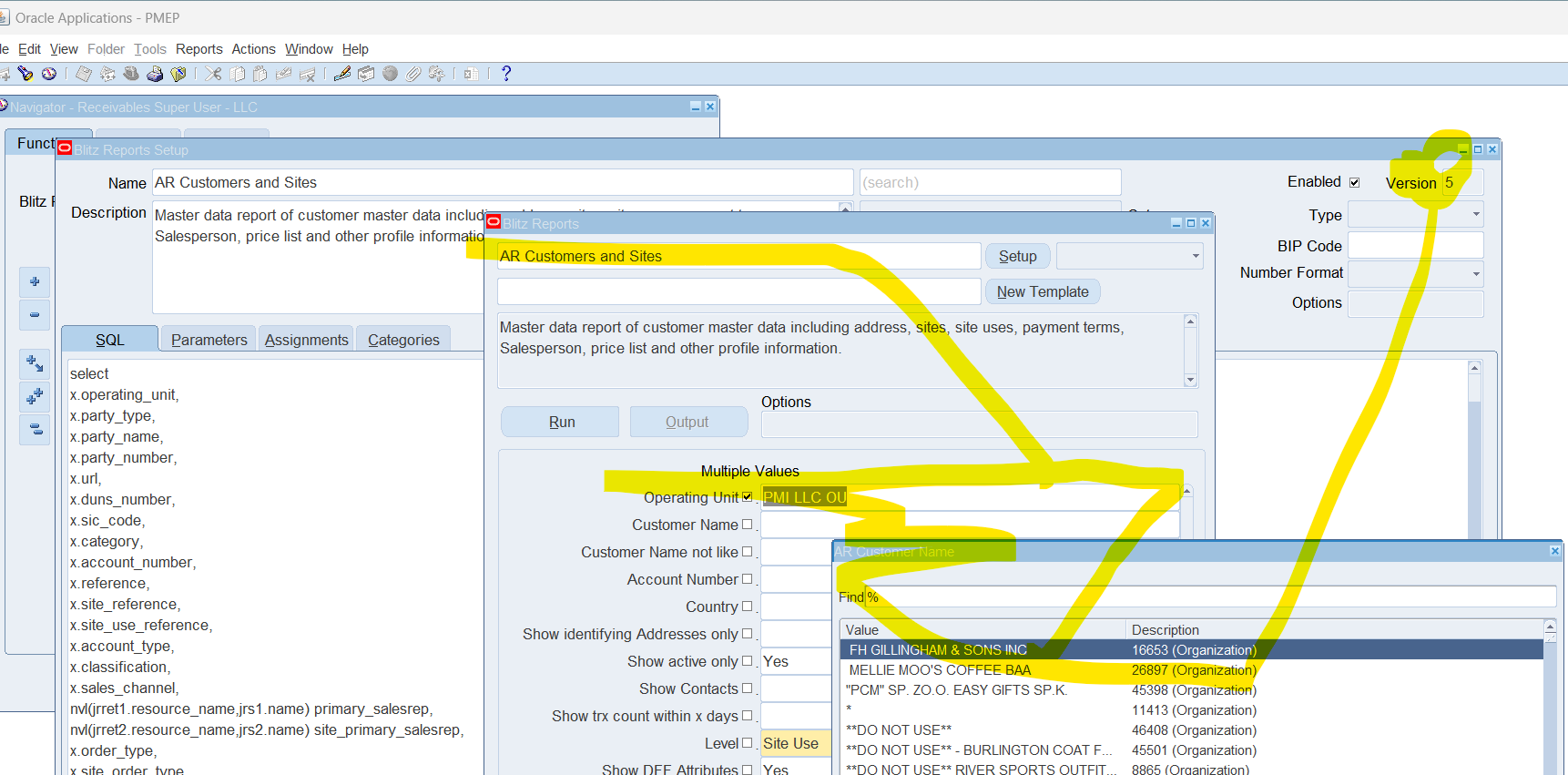
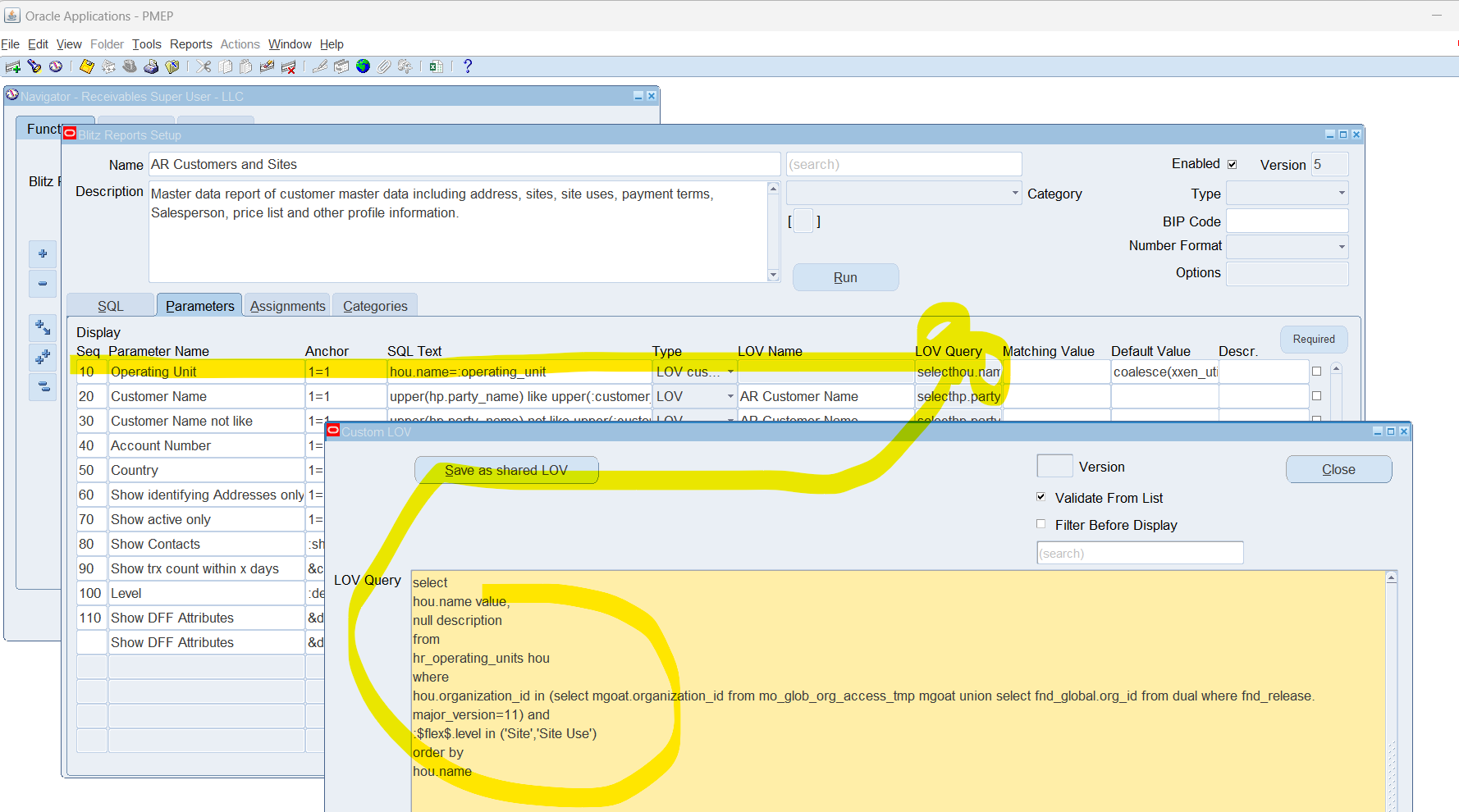
Hi Andy,
Thanks for the tip. I was able to rename the output file from SEPT-20 to SEP-20! I really appreciate your quick response!

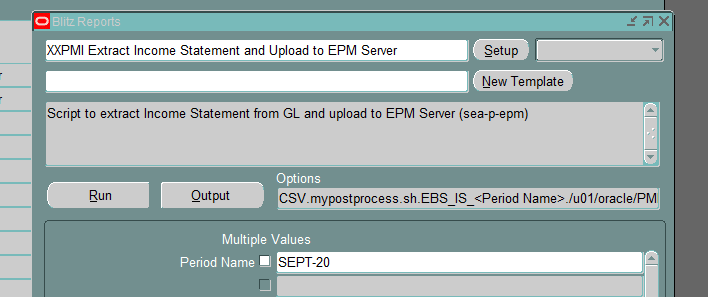

No worries, Andy. This was definitely not an urgent request. I just wanted to see if you already had a solution for what the user requested.
Currently the report I have scheduled to run daily will email the results to a static list of customer service representatives. I believe the concern our Customer Service Manager has is her team is looking through a lot of emails each day, so she would like each person on her team to only receive an email delivery of this report if their name (or email address) is listed beside any of the qualified orders. So it would actually be the same report results sent to each person, but they would only receive the email if their name was on the report results. (Currently they receive the email and must look through the results to see if there are any orders assigned to them.)
This doesn’t seem like much of a hardship to me, as the report does not contain a large list of data to look through. However, if we have the ability to accommodate such a request, I thought I would be able to use it in other cases as well.
Again, this is certainly nothing urgent–more a nice-to-have than a requirement–in my opinion.
Hi Andy,
Even I thought same however thought of checking with you just before ignoring these errors.
Thank you for looking in to it.
Hi,
Report “GL Trial Balance – Detail” is working fine for individual Ledger, If I run the same report for Ledger Set, it is not fetching the data.
Ex: Ran the report for Ledger “RGI_US_USD”, it was good. Ran the same report for the ledger set “GRGI_USD_USD”, report output was null. GRGI_US_USD ledger set has ledgers RGI_USD_USD and RGI_US_USD_ADJ
So, the problem is not directly with Blitz Report packages but an underlying database component?
Thank you very much for the quick response, Ashish! I didn’t realize the Autofill button had that functionality. That is very useful!
Is there an output parameter for the resulting Blitz Report ID?
So, I pass the application short name and the concurrent program name?


Thank you Andy. Will try that.
What is included in the DBA toolkit component of the larger Blitz Report toolkit?
Hi Andy,
I would like to revisit the topic of being able to utilize GL Journal Upload multiple times over the course of a year.
Typically, a user will download the template once and create the appropriate lines to correspond to the accounts that they want to create for the manual journal entry. The following month they will go to the previous month’s file that was uploaded, change the accounting period to the next period, change the dollar amounts and the upload the file again.
I am not having any success with the GL Journal Upload process trying to utilize the same downloaded file for uploading multiple times.
Let me know if you have any time to schedule a quick call to see what I might be doing wrong.
Thanks
We can setup scheduled job now. Thank you.
Thanks for the quick response.
Delivery Option method works.
Just to be clear – this is what i’m doing to clear the cache….

Our Blitz report version is 3.2.4, you mean it is older version and not Token function, am I right?
How do I safely disable the trigger and then proceed with the installation?
Is the output format for these DBA reports always Excel, or can we output different diagnostic formats if needed?
Thanks so much for the reply, Andy! Sorry I missed your call yesterday. If the upload can separate out the orgs when loading without having to remember to load the parts in distinct report uploads, this will be perfect! Looking forward to testing.
Followed your steps:
- still empty in apps node—Logfile: logFile-1.txt
- add Z:\invalid_directory –LogFile: logFile-2.txt
Hi Andy,
Thank you, I will request the update is made in one of our DEV environments.
Thank you. We will prioritize the resolution fix as per the MOS document and verify JWS is enabled.
Thanks Andy
Can you send me instructions or link on how to upgrade to 3.2.6. Let me read the install notes, and then we will decide if we should upgrade now in Windows environment or not.
Thank you!
This seems to confirm that the stability of the Java/Forms client environment is paramount, especially for Mac users who may also need Java Web Start (JWS) enabled.
That worked for the report. I keep checking the Changelog for Blitz and was only able to see 3.2.6. Good to know there is an updated version. I will work to get these downloaded and tested.
Thank you very much for the quick reply and the detailed explanation. One of the option will definitely work for us. I will check with the user what she prefers.
If we define an ‘official’ report, like a standardized query for checking tablespace size based on `dba_tablespace_usage_metrics` , can we restrict who can modify that official version?
Is the Blitz report certified on EBS R12.2.12 on Linux (Windows) platform?
What should we prepare if on R12.2.12 on Linux? Thanks.
The issue has been resolved after applying the patch.
Thank you for your quick response.
Yes, removing that parameter from the ‘Show Item Descriptive Attributes’ is allowing it to run.
Thanks,
Just to confirm that I received a call from Andy Haack last night.
He was intrigued by my issues, so called me up.
We went through my issue and believe this is Oracle not tidying up the FND_CONCURRENT_REQUESTS table after the Blitz Report fails.
The Blitz Report failure itself is genuine, due to end user code being syntactically incorrect.
So, fantastic service from you guys.
I’m happy to close off my issue.
Anything else, let me know.
Great, now we are able to create a new directory in the database and did it show up in the LOV.
How it can be enabled only to certain reports?
Thanks.
Yes performance issue is what making us think in this direction.
Since Blitz Report operates as a Java form run from the standard EBS menus , does this mean that its UI is equally susceptible to these Mac OS resolution issues if the underlying EBS configuration isn’t fixed?

 Customer · · in Design issue in Reports based on Subledger Transactions showing Accounting information
I think it would be a good idea to extend the Subledger Reports with Accounting information with an additional column showing the final SLA accounts once generated. That would be very helpful because SLA modification is a common feature used by many customers, I assume.
To be honest I expected that Oracle Development would have extended the Standard Reports in the same way, as SLA modification was introduced as powerful feature by Oracle and the Subledger Reports with Accounting details are recommended to reconcile Subledger with General Ledger. But this is nothing you have impact on.
I guess when you would extend the Subledger with Accounting details Blitz Reports with this additional piece of information you would make a lot of customers more happy with the Blitz reports then they already are J
Please let me know if you could manage this.
Many thanks
What organization features help prevent us from having multiple conflicting versions of the same custom DBA query floating around the team?
Also in this same report Unit Cost is not populating and found this in the log. We are still on version 3.3 would upgrading to 3.3.1 resolve this issue or even both issues?
Attachments:
 Customer · · in EBS 12.1.3 BI Publisher Excel templates generate XLS instead of XLSX and limit row number to 65,536
This sounds like an essential feature for our high-data volume modules. How quickly can we test this volume capacity in our environment?
Customer · · in EBS 12.1.3 BI Publisher Excel templates generate XLS instead of XLSX and limit row number to 65,536 Does this mean implementing Blitz Report eliminates all the complex setup related to trying to configure BI Publisher for XLSX output in 12.1.3?
We use a Pluggable Database (PDB) setup. Are these AWR reports compatible, and are there any prerequisite settings?
How can I restrict this analysis to only the processes directly interacting with the users (foreground processes)?
Customer · · in EBS 12.1.3 BI Publisher Excel templates generate XLS instead of XLSX and limit row number to 65,536 This inability to generate XLSX output is severely impacting our high-volume operational reporting. How does Blitz Report overcome this specific row volume barrier immediately?
If we revert to the free version, will this warning still appear?
If I only provide the matching value for one entry, but the user doesn’t enter anything for the parameter, will the query run without the conditional clause?
What is the default warning period if I do not set the profile?
We have an existing seeded report, ‘FND Concurrent Requests’, that seems to use this matching value approach for the Phase and Status parameters. Is that a good example to follow?
Can I use wildcards in the Matching Value definition? For instance, if the process type name starts with ‘Quick%’, I want a generic WHERE clause applied.
Does the system automatically register the report program with the system administrator functions once the SQL is pasted and saved?
Does this require two entries with the same parameter name, and if so, how does the system know which one to display to the user on the run window?
If we create many reports, how do we prevent users from getting lost when trying to find the right one?
We need a process to easily share the SQL logic of the new V6 ECC reports with our consulting partners for configuration review.
If we were previously using Discoverer reports that were linked to ECC data, can we migrate them easily?
We need to ensure that reports based on ECC SQL respect our security policies during data export.
Is there a full checklist of validation reports recommended after importing Discoverer EEX files?
After importing the worksheets, I see that the parameters defined in Discoverer were also converted. How did Blitz Report derive the parameter types and LOVs?
If we experience performance issues related to the ECC V6 upgrade, how can the DBA team quickly diagnose the database health?
If I use the folder import option and multiple worksheets use the same folder combination, how does the system represent the original worksheets in Blitz Report?
During the migration, how can we track user adoption to see who is still relying on Discoverer versus those transitioning to Blitz Report?
We need to extract large volumes of existing ECC data for comparison and validation post-upgrade. Can Blitz Report handle the administrative export of this data?
What is the key difference between importing by ‘Discoverer Worksheet’ versus ‘Discoverer Folders’, and when is the folder approach recommended?
The standard location (`eul5_documents.doc_document`) stores the workbook in a binary format, making extraction difficult. How does this report manage to retrieve the SQL?
Can I use an offset with this date?
Is there an issue if I use the term ‘select’ inside a parameter’s default value definition?
If I apply this modification to my SQL, what happens if I run the report in XLSX format instead of CSV?
If I need to import BI Publisher reports in bulk, should I still use the BIP Code field for each report?
If the ledger is specified, where does the function get the calendar definition?
Is there a free trial period to evaluate the performance of Blitz Report with our large data volumes?
How do I quickly view the underlying XML content of the BI Publisher data definition after entering the BIP Code?
If a scheduled report runs but retrieves zero data rows (no changes occurred), will an empty output file still be sent?
If we continue to face compatibility issues with other Oracle components, how can we check if critical EBS patches are properly applied?
Can you provide the core logic structure for this parameter SQL restriction?
We have some complex reports in Discoverer that draw from non-Oracle databases via database links. Can Blitz Report support this cross-database reporting complexity?
If we decide to migrate our Discoverer worksheets immediately, what is the prerequisite for the automated migration process?
What is the default setting if I don’t configure a limit?
What is the strategic implication of this connectivity failure for our organization?
What happens if a report output exceeds this size limit?
If we don’t use the time limit feature, can we schedule the Monitor less often?
Would this workaround apply if we were on an older 11g version?
Does the Monitor program perform other tasks besides canceling long-running reports?
What is the parameter workaround for the DBA to implement immediately?
How often should the Monitor program be scheduled?
If the row limit is exceeded for an XLSX output, how is the excess data handled?
If we still use Java Web Start to launch some forms in our 12.2 environment, is that functionality stable?
When importing Polaris RWB reports using the API, how do I control the view expansion setting?
What is the default value for this limit?
If we need to quickly export metadata about the ECC data sets for V9 validation, can Blitz Report assist?
We are migrating reports from Polaris Reporting Workbench (RWB). Does the RWB import process consolidate reports like the Discoverer Folder import does?
We also have numerous custom BI Publisher reports that we want to convert. Is there a similar API for mass importing them?
We also need an automated way to monitor the alert log for critical messages that occur since the last check. Which report should I schedule?
If we run in NOARCHIVELOG mode, how is the approximate redo rate calculated for capacity planning purposes?
We rely on Blitz Report for critical operational reports now based on ECC SQL. Will the V9 upgrade impact the functionality of these reports?
After the V9 upgrade, if our users experience HTTP access issues, potentially related to TLS configuration, what should we check first?
Is there a standardized process for checking if patches like `34215413` are actually applied across our different application tops?
If I need the detail of project transaction sources for auditing, is there a report for that setup?
What about using standard bind variables (`:bind`) without anchors? Is that discouraged?
If I want to allow users to select multiple values for a column (like multiple account numbers), does the `n=n` approach support this automatically?
Is there a minimum build version requirement for the inclusion of the actuals data in this report?
Does this report include budgets that were created using Financial Planning functionality?
What are the limitations of the `n=n` anchor compared to a lexical anchor?
How does the system ensure the restriction is applied only when the parameter value is provided, since the SQL text is defined separately?
If we implement this, can we target reporting specifically to track changes on certain columns of high-risk tables?
Is there an error message indicating this specific issue?
What happens if I use ‘JAN-2007’ when Oracle expects ‘Jan-07’?
After the data is loaded into the interface table, how do I configure the upload to submit the standard Oracle import concurrent program automatically?
So, setting the profile option to ‘No’ gives me maximum visibility over my assignments?
If I were using an API based upload instead, what would the mandatory columns be?
If I am a developer, is this filtering still strictly applied?
How is the `row_id_` column specifically derived in the SQL to correctly identify the rows?
I want to see all reports I have access to, regardless of which responsibility I used to log in. How do I change this filtering?
What are the prerequisites in the database for running reports on a standby database?
What is the format required for the target database value?
Thank you, this confirms we have access to the necessary technical guidance for the V4 upgrade.
We noticed there are also upgrade documents for V5 , V6 , and V7. Does this suggest Oracle will continue to mandate frequent ECC updates?
Can we use Blitz Report as a validation tool before and after the V3 to V4 upgrade to quickly extract ECC data sets and confirm consistency?
What is the resulting string format?
During such framework upgrades, traditional reporting often breaks or becomes unstable. If we rely on Blitz Report for critical data extraction, will this process impact our ability to run reports using the underlying ECC SQLs?
Does this automatically set the printing area?
What is the default orientation?
If we want to enable the ‘Multiple Values’ checkbox for a parameter, is there any restriction on the anchor type we can use?
If a developer needs to insert dynamic SQL text multiple times within the report’s main SQL, is that supported with a single anchor?
Does the toolkit assist with auditing the data migration steps themselves?
We need to ensure that when we extract a high volume of Payables data, we don’t hit the obsolete 65,536 row limit commonly associated with older Oracle reporting technologies.
Does this only affect Discoverer Worksheet imports?
We need to ensure that external data sources previously used by Discoverer reports are still accessible after migration.
Given the breadth of ECC dashboards, how quickly can a report for a specific financial dashboard (e.g., Payables detail) be implemented?
What is the default setting for this profile?
If our consultants rely on existing SQL scripts developed for the Discoverer or BI Publisher data models, can they directly leverage them in Blitz Report?
Can we also capture the underlying SQL text for detailed diagnostics in these alert reports?
What guarantees the quality of the Excel output for complex financial figures, especially since GL reporting deals with hierarchies (Parent Totals) and currency precision?
What is the benefit of expanding views into subqueries?
For BI Publisher reports, which often start as complex XML data sets (like the CSTRAIVR XML), how does the conversion process simplify redevelopment?
We have heard Blitz Report offers automated features for Discoverer migration. How complete is this automation process?
What detailed filtering mechanisms are available? We need to pinpoint specific types of issues quickly, like long-running or failed requests.
When importing folders, how do I control whether underlying database view SQLs are imported as subqueries or just referenced?
If the package is `XXEN_UTIL`, what are the steps?
What about access control for these sensitive financial reports?
If we introduce new reports into the system for auditing, how can we ensure that the report definition itself is managed and tracked?
Does implementing this reporting capability require extensive development time or registering custom objects every time a new audit report is needed?
We need visibility into the VAT Recovery Listing Report, but standard forms don’t meet our client’s requirements.
If we identify a need for a new financial report based on a specific Cost Accounting query, how quickly can IT deliver it?
We are also concerned about restricting sensitive data access within reports. How does Blitz Report enforce data security?
How fast is the data extraction process for these large financial volumes compared to standard concurrent requests?
Where is this setting found?
Can this auditing feature specifically track changes to essential data points, such as changes to the Promise Date in Order Management?
We struggle specifically with ‘ungarbling’ the EBS Financial Accounting data, such as correctly deriving the GL Account Analysis, especially when dealing with parent totals and summary accounts.
How does ‘Filter Before Display’ solve the loading issue?
Traditional methods for querying audit tables can be cumbersome. How does Blitz Report simplify extracting and interpreting this data for reporting?
We need to ensure that the managers are correctly defined in the database before starting the custom service. What tables should a DBA confirm?
If we discover an issue, can the tool also output the BI Publisher template or delivery options used by the failed request?
We need the monitoring report to capture the parameters passed to the concurrent programs to troubleshoot failures.
If I need to see the item-level detail for which items actually received a new cost based on a successful submission, what report should I use?
What technical parameters can we monitor using the Blitz Report tool to assess the health of the custom manager’s workload?
After implementation, how can we efficiently monitor the workload and queue status of this new custom manager, specifically looking for backlog or long-running requests?
What parameters are mandatory for running this submission audit?
Conversely, if I need to find completed jobs that are *not* eligible for closing (i.e., those exceeding tolerance or having requirements), which report should I use?
We often ignore bulk supply items and scrap quantities when assessing completion requirements. Can the report accommodate this?
That is exactly what we need. Once created, how do we ensure quick access to this utility report?
What parameters control the tolerance for closing a job, and are they mandatory?
How do I ensure the generated XML file has a clean name based on the report name?
Can you share the general structure or the necessary components that the custom Blitz Report SQL query would use with that function?
If I need to track the status of large payment processes managed by the Payment Manager, which report should I use?
Does this function handle the final database commit, or is that left to the calling procedure?
If I need a summary of posted payments categorized by GL account, is there a related report for that?
And if the parameter value is left blank?
In the case where multiple payments exist for one invoice, how are the check and invoice level amounts displayed to avoid duplication?
Customer · · in How to convert and fastrack Oracle BI Publisher report development in 5 simple steps So, we can essentially use BI Publisher’s pre-approved data structure, but ditch its templating engine entirely?
We need a quick method to check the status of concurrent managers and requests if a performance issue is suspected.
So the placeholder &gl_period_pivot would be replaced entirely with the list of period names enclosed in quotes, correct?
If our IT team approves individual fixes, is there an Excel Trust Center setting that helps users?
We plan to schedule the Posted Payment Register report monthly. How can we ensure it automatically uses the correct period without manual intervention?
How do we ensure that unauthorized users (non-DBAs) cannot access sensitive diagnostic reports, such as AWR data?
Customer · · in How to convert and fastrack Oracle BI Publisher report development in 5 simple steps Finally, for deployment, how does the migration between EBS environments (Dev -> Test -> Prod) compare to migrating a traditional BI Publisher report?
Oracle E-Business Suite reporting straight into Excel: 2,900+ ready-made reports, your own SQL, 150+ Excel uploads.