
Customer

Discussion Replies Created
Does the import process consider which worksheets were actually executed recently?
If we were to develop new reports, can we integrate them into these JWS-launched forms?
Is the email functionality available in all EBS versions?
We need to automate the launch task on the Mac OS desktop using a script, as described in some documentation. Can you confirm the simplest way to create this automation file (`open_forms.command`)?
Can developers set the default email using a dynamic SQL statement instead of a fixed address?
I confirmed with our DBA; JWS is indeed not enabled. If we enable JWS for 12.2, are there any known issues with the jnlp files not being cleaned up after session timeouts?
Our users are on the latest macOS (Tahoe 26, M4 chip) and Java 1.8.0_461. We followed some steps for generating an `open_forms.command` script, but the EBS session only displayed the Oracle copyright information. Could this be a JWS issue?
Where does the default email address that populates this field come from?
Once linked, can I easily switch between relative and absolute cell references?
I want the Period Name to be dynamic, pulled from a separate cell (A1). How do I link the parameter input to that Excel cell?
Where do I configure the templates to be used for drilldown?
Can I also customize the reports used for drilling into attachments or subledger details?
Does the converter automatically identify the Oracle FSG components?
How do I customize which columns appear in the drilldown output?
Where is the Row Set calculation logic mapped?
And how is the row description mapped?
Does this VPD policy secure data access through other tools like SQL Developer?
What specific setting provides the bypass access?
If I need the full details of the PO itself (header, lines, receiving, and AP invoices), what is the most comprehensive report?
If the requisition was internal (an Internal Requisition), is there a report to track both the requisition and the resulting Internal Sales Order (ISO)?
 Customer · · in How to create a Delivery in Full On Time metric in Oracle E-Business Suite using Blitz Report™
Can this DIFOT report be exported in a format ready for pivot table analysis for deep dive performance reviews?
Is there any temporary solution while we plan the patch application?
Customer · · in How to create a Delivery in Full On Time metric in Oracle E-Business Suite using Blitz Report™ How can we quickly test the new DIFOT report once finalized?
Customer · · in How to create a Delivery in Full On Time metric in Oracle E-Business Suite using Blitz Report™ If we define this DIFOT report, can we ensure that the development process itself is fully compliant with internal change control procedures?
Customer · · in How to create a Delivery in Full On Time metric in Oracle E-Business Suite using Blitz Report™ We are concerned about changes to the original promise date, as this affects the integrity of the DIFOT calculation. Can we track who modified the promise date fields?
We use standard EBS security. Is the access to these sensitive Inventory transactions governed by standard security practices?
I plan to save this custom LOV for reuse in other reports. How can I ensure this LOV is centrally stored and accessible?
Customer · · in How to create a Delivery in Full On Time metric in Oracle E-Business Suite using Blitz Report™ Once the report is copied, what steps are needed to focus the output specifically on the DIFOT KPI?
When creating the LOV query for the Supplier Name, what mandatory columns must the LOV SQL select?
Can this setting be overridden at the runtime options window?
We need to ensure that the reports we run during the close process don’t cause further performance degradation.
If I need to audit Purchase Price Variance (PPV) that arises during the receipt process, is there a standard report equivalent available?
Where can I review the log file if an execution fails?
What is the default behavior if the profile is not set?
If my SQL text is complex, perhaps using a greater-than operator (`column >= :bind_variable`), will the automated IN-clause replacement still work?
And if I define an LOV custom query and want to share it later?
If I input 361012 seconds, what result should I expect?
If I only want to see the matched and modified receipts without the full PO detail, which report is recommended?
Hello,
Sorry for late reply, it took some time for user to confirm report is ok now.
Thank you for your help.
Does Blitz Report offer any seeded or example reports for Inventory Period-End optimization that we can immediately leverage?
If I want to enforce this suppression behavior for a specific report that serves as a critical outbound interface, can I set it to ‘Protected’ type?
We still have an older environment on 11i. Is there an equivalent report for that version?
If I use a standard comparison operator in the parameter SQL text, like `vendor_id = :bind_variable`, and the user checks the ‘Multiple Values’ box, will the system automatically convert it to an `IN` clause?
I noticed there are ‘Validate From List’ and ‘Filter Before Display’ checkboxes. What function do these serve?
What is the typical format of the result?
Since this is an alert report, I need confirmation that it ran, even if it was empty. How do I force the email delivery?
How quickly can we develop a custom report that specifically targets pending or failed Inventory transactions, reducing our close time?
If I start with a shared LOV (type LOV) but realize I need to modify the query only for my current report, what is the best practice to avoid affecting other reports?
Hi,
I imported your attachment and asked user to test report and while report works, there is still difference between Blitz and standard Oracle reports.
That’s a significant improvement over our current decentralized storage method for SQL scripts.
Hello,
I imported xml report from link you provided but now report gets several errors, for example below:
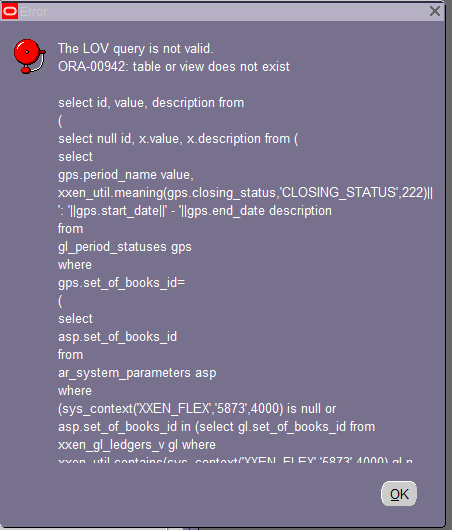
Could you check it? Thanks.
Does this require manual logging, or is the version history tracked automatically?
How do I ensure I capture the actual bind variable values used, which are critical for reproducing the issue?
That sounds useful. Can I restrict the results just to the SQL run by that specific custom program or UI function?
If I need to force a long date format (full year and leading zero for day), is that a separate profile?
If I leave this profile unset, what format is used?
If the problem is related to the overall workflow setup, are there any other general setup reports I should check?
If the issue is specifically related to notifications not reaching users or being stuck, which report focuses on the notification itself?
Can we test this commitment to support and development before committing to a license?
Given this continuous development, how do we ensure stability and manage changes within our locally customized reports?
What are some of the recent technical enhancements built into Blitz Report that directly improve user experience?
How does your team ensure that each new report request results in a quality addition to the standard library rather than just a one-off custom solution?
While ISG handles system-to-system integration, we also need tools for ad-hoc, human-readable data extraction, preferably without relying on the custom applications. Can Blitz Report serve this function alongside ISG?
I need to configure admin access for users outside of the integrated EBS server, for direct testing of the ECC core application. Where is this configuration set?
Since we are enabling external communication, what steps must we take to ensure this connection is secure, particularly regarding TLS/HTTPS?
If we implement Oracle VPD on the underlying EBS tables, can the ECC security handlers leverage those VPD policies as well?
This seems similar to registering the Oracle user XXEN. Is that also necessary?
What is the primary role of the Integrated SOA Gateway in terms of integration within the Oracle EBS ecosystem?
Can you provide an example of what one of these JSON filter conditions looks like?
Where is the Data Group configured?
Is this setup difficult, or does it require extensive modifications to the underlying Oracle Forms codebase?
How does this method compare to exporting data from ECC dashboards for BI ingestion?
Since this involves raw data extraction, is security maintained for the data accessed by the BI tools?
If we use the mass import utility to bring in thousands of old Discoverer worksheets , how complex is it to define the output format (Excel vs. CSV) for each imported report?
What is the highest level of access for template modification?
If I am a standard user, can I still create my own templates?
Does generating CSV output via Blitz Report impose the data volume constraints associated with native Oracle Concurrent Requests, or older BI Publisher XLS formats?
I want to share another template only with users in the ‘AP Manager’ responsibility. What sharing levels are available?
If I need to update the SQL for almost all my reports (e.g., adding a specific hint), is there a tool for mass SQL modification?
We are specifically looking for insights into metrics that are commonly ‘overlooked’ when running EBS on Cloud.
Since we use Oracle Multitenant (CDB/PDB) on the cloud, are the AWR reports compatible with the new data storage method?
If we allow them to run SQL, how fast is the process, and what about output formatting? BI Publisher formatting is cumbersome.
If I set the mode to only align with headers, does this scale still apply?
Where are the custom number format codes defined for individual columns?
What is the default percentage scale?
When should I absolutely use this option, despite the performance hit?
Why is the AWR data so critical in the cloud environment, and how does Blitz Report simplify accessing it compared to standard DBA methods?
If the relationships are missing, what other report might confirm if our existing intercompany accounts are correctly defined?
Where is the `javaws` executable located that is required to open the downloaded `jnlp` file?
If we want to export the raw IP data along with related concurrent request monitoring details, can we join those data sets?
Does this report require any date or organization parameters?
We had the old Look and Feel (SWAN/SKYROS) applied before migration. After JWS, it defaulted to the modern Alta Look and Feel. Can we revert the UI style?
What details should I be looking for when querying the `apps.fnd_nodes` table?
We need to ensure these reports are run frequently for immediate threat analysis. Does Blitz Report minimize performance impact?
Is there a report to check if our inventory periods were properly summarized after being closed?
Since this relies on the period close snapshot, what parameter must I provide to specify the period?
How quickly can this type of custom security report be implemented and rolled out to the security team?
I only want to report differences that exceed $100. How can I configure the sensitivity of the report?
What table or mechanism does the DBA typically use within the database to capture the client’s IP address upon login?
Once we have the IP address and location data extracted, how can we visualize this information easily? We prefer a dynamic visualization tool.
We need to ensure that when we update the URL or parameters for a hyperlink in a report, that change is logged.
If I create this tablespace, should I then rerun `adsplice` from the beginning?
If we use the Zoom function to integrate a Blitz Report into an EBS form, is that different from embedding a hyperlink in the Excel output?
Does implementing hyperlinks in this way affect the speed of the report run?
If I notice multiple parameters using identical Custom LOV queries, how can I consolidate them to simplify maintenance and ensure consistency?
Is there a profile option to enforce disabling translations system-wide?
Is there an option to exclude headers entirely, for certain simple interface files?
How must the underlying SQL query be structured to output a column that is recognized by Blitz Report as a clickable hyperlink?
If the SQL syntax is valid but the LOV is still slow, what common optimization hint should I look for, especially concerning migrated reports?
Is this a common practice for output intended for interfaces?
Does it handle complex GL segment hierarchies, like reporting consolidated totals for parent accounts?
If I need to compare item costs between two different organizations and convert the currency, which report handles that?
What is the key mandatory parameter for running this report?
So, `autoconfig` itself doesn’t notify the manager of the new application context?
Does this work in conjunction with the ‘Blitz Report XLSX Date Format’ profile?
Can we use this same technology to replace legacy Discoverer reports required for operational validation during the upgrade?
What is the default date format behavior?
Can I restrict this audit to only purchased items, or exclude items that are designated as inactive?
How does the toolkit help minimize reporting delivery time for the support and consulting teams during the pressured upgrade window?
If I accidentally delete the sheet, will the report functions still work?
If we need to perform time-critical mass data exports—for instance, millions of records for financial comparisons—can the toolkit handle this volume reliably?
If I prefix report names, is there a risk of the report name exceeding the maximum length?
Are there any hidden properties I need to avoid changing as well?
Our consulting team uses many custom SQL scripts for quick checks. Is there an efficient way for them to use these scripts within the toolkit environment and share the results instantly?
Is there a default prefix if this profile is left blank?
Finally, we need to verify that all newly applied patches are explicitly flagged as ‘APPLIED’ in the database.
Specifically regarding setup and data migration, can we automate the extraction of BR100s, which are critical for documenting and validating configurations?
We also need to decommission older Discoverer reports that might rely on features deprecated in R12.2.8.
What is the key functional area addressed by the ASCP exception replacement?
We also need to check transactions that are currently available for reconciliation in Cash Management. Which report provides that list?
We need to perform comprehensive financial data verification post-upgrade. How can Blitz Report assist our financial team?
What two mandatory parameters define the time frame for this analysis?
How can we implement proactive monitoring during the upgrade to alert us if any critical concurrent programs related to post-upgrade processes run long or fail?
Does the report also capture A/P Accrual Write-Off Variances, and if so, how are they categorized?
Does this report offer any summary views, or only detailed transaction listings?
Does this tool enforce any limitations on the number of exceptions we can export at once?
How does the report distinguish between IPV and ERV in the output?
We are concerned about ADOP phases getting stuck, particularly `fs_clone`, as this halts the entire upgrade. How can we diagnose this efficiently if it happens during the maintenance window?
If we define an exception report, how do we ensure it is easily accessible only to the planning team?
What are the specific operational benefits compared to simply running standard Oracle ASCP reports?
If cache traffic is high, what does that usually indicate?
What are the key categories of traffic measured in this report that I should look for?
If I accidentally use the Hide Zeros feature, how do I restore the hidden rows?
If I use the Advanced Required Parameters feature, what does the button label show?
Customer · · in Oracle Enterprise Command Center administration and enriched dashboard data export to Excel We need to implement this immediately. What is the typical setup time for a new user to start running ECC data extracts?
My financial reports often contain many rows that result in zero balances for the period, making them cluttered. Is there a quick way to clean up the report presentation?
I heard there is a way to make Parameter A OR Parameter B mandatory, not necessarily both. How is that accomplished?
What is the consequence if the user attempts to run the report without filling a required field?
We also sometimes need PDF output instead of Excel for certain statutory reports. Is that supported?
What about change control? If a consultant modifies the underlying SQL for the DIFOT metric, how is that tracked?
If we were migrating from 12.2.8 to 12.2.9, would similar steps apply?
Customer · · in Oracle Enterprise Command Center administration and enriched dashboard data export to Excel Is this capability part of the broader toolkit mentioned for EBS projects and upgrades?
Is the Snapshot tool similar to using the ‘Paste Values’ function in Excel?
Our security team requires confirmation that all EBS Java Archives (Jar Files) are properly signed after the patching to maintain code integrity.
Customer · · in Oracle Enterprise Command Center administration and enriched dashboard data export to Excel So, instead of relying on the ECC application layer for export, we use the original SQL queries that feed the ECC visualizations?
If we create a key metric report, like Delivery in Full On Time (DIFOT), how quickly can we implement and test that using Blitz Report’s features?
We want our reports to analyze Order Management data. Can Blitz Report help optimize the standard export experience from forms like the Sales Order Organizer, which can be slow?
We need to ensure all custom reports remain fully functional after the upgrade, especially high-volume financial extracts. How can we quickly identify potential issues with data access or performance post-upgrade?
What is the technical process for integrating a report using Zoom? Does it require complex registration procedures typical of standard Concurrent Programs?
If an ADOP application phase hangs or fails silently, what is the initial diagnostic focus for the DBA team?
What is the command to manually disable the SQL Tuning Advisor using `dbms_auto_task_admin`?
If we proceed with separate ADOP cycles, how can we efficiently verify the status of the AD/TXK delta patches before starting the final RUP application?
We also want to stop the Automatic Database Diagnostic Monitor (ADDM). How is that typically disabled?
What is the recommended action for Automatic Optimizer Statistics Collection in EBS?
If we decide to join the Champion program, what is the prerequisite?
If we implement these reports, how can we ensure that only authorized HR personnel can view the sensitive payroll data?
If I need to upload a large SQL for a report, is that governed by this limit too?
What about reports related to manufacturing and scheduling? We need better visibility into WIP Production Job Details.
What is the default size limit for uploaded LOVs?
For the Concurrent Manager Load report, how does this help our DBA team analyze performance bottlenecks compared to standard EBS monitoring?
What is the default setting for this profile?
If a user has this setting, can they still modify shared templates owned by a different user?
Once I run the profiler, what commands do I use to start and stop data collection?
We also need visualization tools for HR data, such as employee absence data. Is there a champion contribution covering this area?
I heard there are prerequisites for using `DBMS_PROFILER`. What must I ensure about the compilation mode of my PL/SQL code?
Customer · · in How to develop proven EBS reports using Oracle Enterprise Command Center SQLs in under 5 minutes Which functional areas benefit most from this technique, and does it bypass the need for external tools or complex ECC API calls?
So, similar to BI Publisher, the required inputs are the application short name and the concurrent program name?
We need to ensure all users across various responsibilities have access to the Costing Report module.
Can exceeding this limit cause performance issues?
I recall Oracle sometimes cautions against custom VPD. Is implementing a VPD policy on Blitz Report tables considered supported or safe?
What is the default row limit and why was it chosen?
If we define a custom report focusing on cost management, like linking work in process jobs to final costs, will the output be user-friendly?
Can you provide a technical example of how the policy function limits visibility based on the user executing the report?
Since we deal with sensitive cost data, how quickly can the setup and deployment occur?
How is this integration achieved technically? Does it use modern web interfaces or rely on legacy components?
We also have some legacy BI Publisher reports that are slow. Can Blitz Report import those too?
Are there any prerequisites we need to verify in our Discoverer environment before attempting these imports?
When importing folders, there is an option to ‘Expand Views’. What does this achieve and when should I use the ‘All’ setting?
We need to extract configuration data from FND tables as part of pre-upgrade steps. Are FND reports included in this toolkit?
I noticed some workbooks use the exact same underlying views/folders. Is there a way to consolidate these duplicate reports during migration?
We need to understand the supply chain linkage from final assembly down to components. Which report details the MRP pegging from end assembly?
How does this approach simplify the DBA’s process compared to manually running scripts in the database?
If a DBA needs to quickly analyze the execution plan history for a specific SQL ID identified in the AWR, can Blitz Report assist directly?
Can I mix inclusions and exclusions in a single cell?
If we are running Advanced Supply Chain Planning (ASCP), is there a separate report to extract the planning exceptions from the Planners Workbench?
If we decide to move away from Discoverer entirely, what alternative solution is recommended?
Since migrating to Oracle 19c, our database uses container databases (CDBs) and pluggable databases (PDBs). Has the way AWR data is stored changed, and do the Blitz AWR reports support this multi-tenant architecture?
If I manually type multiple non-range values into the Excel cell, how must they be separated?
How are application servers registered as trusted machines with the database when the `SECURE` parameter is active?
What if the script needs to run another concurrent process? Are the necessary credentials passed?
Oracle E-Business Suite reporting straight into Excel: 2,900+ ready-made reports, your own SQL, 150+ Excel uploads.