
Support

Discussion Replies Created
Ok, good. Let me know when it’s ready and we can schedule a call to show the functionality if you like, as the FSG functionality is new and we did not publish documentation for it yet.
The migration of Excel4apps Reports Wand concurrent programs uses the same API as BI Publisher imports: the PLSQL procedure **`xxen_api.import_concurrent_program`**.
Hello,
The INV Item Upload has been amended to split items with source organizations into a separate import, so now the items are loaded in upto 3 groups:
1. Master Organization Items
2. Child Organizations where the Item does not reference a Source Organization
3. Child Organizations where the Item does reference a Source Organization.
This has been incorporated into the latest Blitz Report installation file which is available for download. It will be necessary to re-install Blitz Report in order to leverage the changed functionality as it involves a back end code change as opposed to just a report definition change.
Kind Regards,
Eric
You must execute `alter trigger apps.note_1342126_1_audit_trig disable;`, rerun the `install.sh` script, and then re-enable it afterwards using `alter trigger apps.note_1342126_1_audit_trig enable;`.
The primary output for analysis is native, formatted Excel. However, the tool supports generating output to CSV or other file types suitable for external tools like Tableau or Power BI. For DBA purposes, the instant Excel delivery simplifies diagnostics greatly.
Hi,
For audit purposes like this, we can generate Blitz Report in pdf format using third party tools, such as libreoffice (license free), but this would require an installation and configuration of that tool on the server side, as explained in the following blog:
https://www.enginatics.com/blog/blitz-report/generate-pdf-blitz-report/
 Support Enginatics · · in Mistake during installation of during the instalation of blitz_report_r12_v3_3_2
Hi,
Those messages can be safely ignored.
I checked the logs and the Blitz upgrade was successful.
Thank you,
Alex
Hi,
Oracle EBS Forms unfortunately has a limitation to a maximum of 32k characters, and this SQL is larger.
To edit such large SQLs, you can double-click on the sql text to download it, modify, and then upload the large SQL again.
Regards,
Andy
Ok, then the Request Type and a separate concurrent manager, for example ‘Blitz Report Slow’ with a smaller number of processes would be the best option.
Hi,
1) Does it show ‘LOV FRM-41830 List of values contains no entries?
2) Does it happen in other instances after the Blitz Upgrade?
3) Could you please ask your DBA to send the upgrade log files zip?
Regards,
Alex
Hi,
There would be no negative impact from removing these checkboxes, but we would need to validate if our upgrade script would not reload them again.
I do not understand the scenario yet however, as only users with System Administrator access would be able to set the profile value on higher levels.
Would you give Developers having access to System Administrator or the Profile>System form in production and just want to prevent them from accidentally setting or changing it on one of the higher values?
Many of our customers do not give system administrator access to all their developers, and we have created an option for them to still maintain the Blitz Report access profile option through an Blitz Report Access Upload, which might also be useful for you.
This upload however currently allows setting values also on responsibility level, as some customers might want to grant Blitz Report access on that level.
Let me know if you would like to have a quick call to clarify.
Regards,
Andy
Hi,
To schedule reports, you would need to have the Blitz Report concurrent program assigned to the request group of your current responsibility.
This can be done either manually for individual request groups, or you can use the recommended method and run the Blitz Report Update Menu Entries concurrent program to automatically add the Blitz Report function and concurrent program to all active responsibilities.
If you would like to make Blitz Report only available for a limited number of users, you can control the Blitz Report usage through the Blitz Report Access profile option.
Thanks and regards,
Andy
The problem could be related to the template. Can you please send me an XML export of your report definition including the templates (setup window > Tools > Export) and the complete log file of the concurrent request?
And please also send a screenshot from your current code version (setup window > Tools > License Key) so that we know the exact code version date.
Hi,
I’m not sure if I fully understood your first question, but I think the answer is yes, you can re-use an existing file that you have previously saved on your computer for multiple uploads.
The upload code identifies the created or changed rows based on the first Action column in the spreadsheet, which needs to show either Create or Update for the records to be processed.
And the Autofill button would trigger the dependency validation and population for all rows, even after copying and pasting records. Such validations would usually only be executed when entering a single record manually.
If you do a PO Requisition creation, for example, you could copy and paste a list of inventory item numbers into the Item field and click on the Autofill button to populate the dependent fields
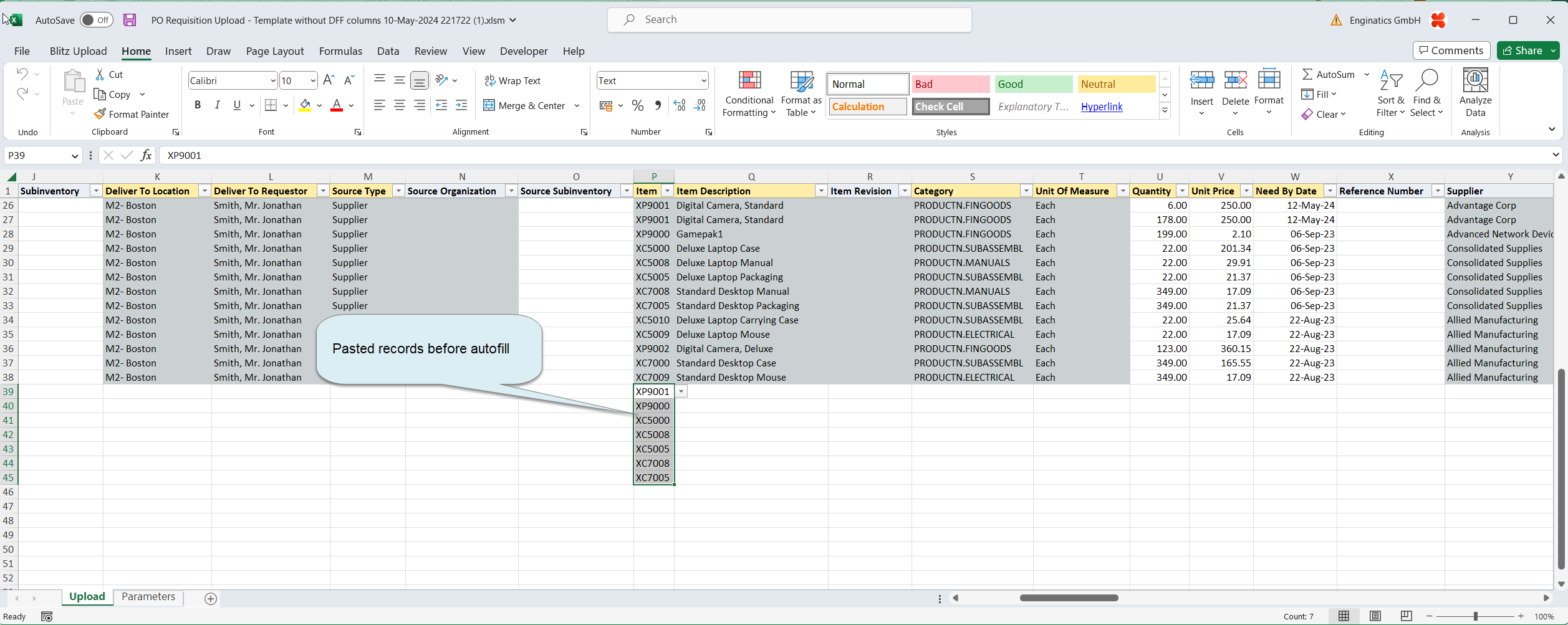

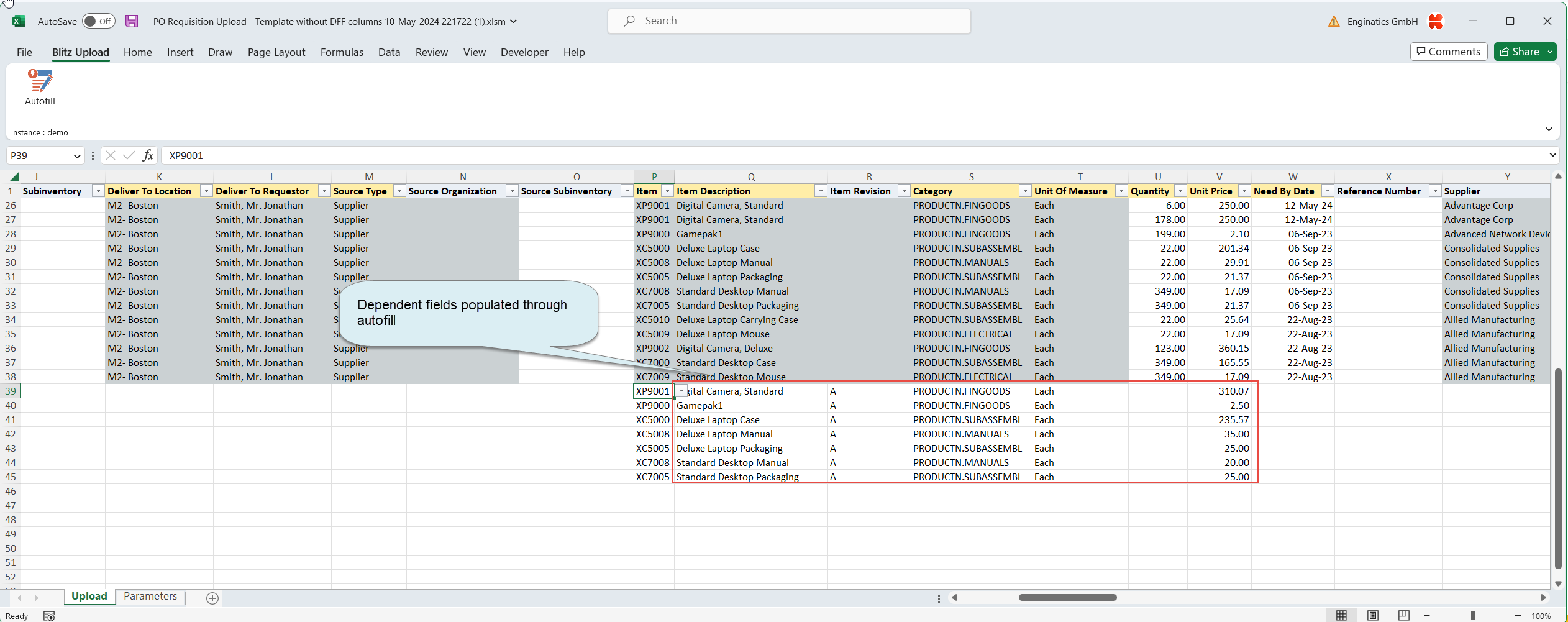
Let me know if you would like to schedule a quick call to review the functionality together.
Regards,
Andy
Hi,
Yes, the item upload allows creation of the items in one single step, but in this case, as the creation in the 001, 005, 009 orgs is happening in the same session as 006, this fails at the moment.
My colleague Eric mentioned that he can correct this by splitting such scenarios into separate load sessions.
We will let you know when we have a new version ready to download and test.
And btw.: I started creating videos, for example an item load video, related to Blitz Report functionality and new features, and will hopefully find time to publish more on a regular basis on our youtube channel, which might be interesting for you.
Regards,
Andy
Hi,
You don’t need to change the SQL, and the users could even select or re-order the columns themselves by creating their own templates.
With Developer access, you could also create a template and define it as default for all users:

Let me know if that works for you, or we can have a quick call to review it together.
And we are still working on the performance fix for this upload btw..
Regards,
Andy
Hi,
Thanks for spotting this. We have corrected the report. Please download and import the latest version and let us know if it works: FA Asset Summary (Germany).
Thanks and regards,
Piyush
We have enhanced our installation script as discussed, so that it would no longer update the Blitz Report Access profile option setup during upgrades.
If you uncheck the Updatable flag on Site level, this change would be persistent next time you will apply an upgrade.
Regards,
Andy
Hi,
This report was imported from the BIP Report with the short code XX_CUST_DOLLARS, which is assigned to the shown request groups.
The imported Blitz Report inherits the same security assignment as the original concurrent program that was imported.
Regards,
Andy
Hi Richard
You may need to set the Blitz Report Access profile option to the ‘System’ for your and other EBS super users.
It should not be required to disable uploads additionally as they are not available for users by default.
Please refer to the following developer guide section.
“The upload functionality has additional security and the Upload button is inactive by default even for developers. To upload data, users or developers require assignments created by someone having the Blitz Report Access profile option set to the highest level ‘System’. Only users users with System access can modify and or run any of the uploads, or create assignments for them. Unlike reports, Enginatics does not provide seeded assignments for uploads, and customers would need to assign the uploads as required.
Users with access profile set to ‘User Admin’, ‘Developer’ or ‘System’ can access all reports in the system, irrespective of report assignments, and can run them, depending on report type and access profile as shown above. Uploads can only be done if there are assignments for them, or by users with an access profile of ‘System’.”
Regards,
Alex
Hi,
I think we can ignore these warnings, as they are related to the OAF (HTML) version of Blitz Report, which I believe you are not using.
The important part would be the ISG configuration and there are no ISG related warnings, so it should be ok after you cleared the cache from the Functional Administrator.
Regards,
Andy
This specific trigger, often created during an investigation (per Oracle note 1342126.1), is prematurely referencing the sequence’s current value (`CURRVAL`) before it has been initialized in the current session. This trigger should ideally be removed after the investigation, but if still required, it must be temporarily disabled.
Hi,
We have meanwhile updated our code to handle multiple item category assignments, and we are preparing a new installation file at the moment.
We will let you know when this new code is available for download, presumably by the end of this week.
Regards,
Andy
That is absolutely right. For users on EBS 12.2 and later, Oracle recommends migrating from the Java Plug-In to the Java Web Start (JWS) technology. This shift allows Forms to run in browsers that have ended support for the older Netscape Plug-in API and ensures stability, which is vital for Forms-based tools like Blitz Report.
Hi,
THe Entry Method LOV is dependent on the Project Number and Budget Type fields. So if no project number is selected first, the Entry Method LOV will return no values.
Hi,
Can you please let the user know to update the excel trust center settings explained in the link below?
https://www.enginatics.com/blitz-report-developer-guide/#excel_trust_center

Thanks and Kind Regards,
Piyush Khandelwal
This is a known issue after the patching.
Hi,
This error shows up as your 3.2.5 Blitz Report version does not work with the new FSG report yet.
To use this new functionality, we would need to upgrade to the latest Blitz Report code version first.
Would you request this from the Clarmont/DSP team, or how would the upgrade process work?
Regards,
Andy
Yes, access control is managed by EBS security and Blitz Report’s assignment features. While running the report is controlled by Responsibility access , modifying the underlying SQL definition (the technical version) is restricted to developers or authorized users. The version control system ensures transparency by providing an audit history of all changes.
Hi,
Yes, you can either hide the Parameters tab in Excel, or completely delete it, and then upload the Excel file as a template and the generated file would also have the tab hidden or removed.
Regards,
Andy
Hi,
The latest version of the AR Aging report is using a new function to dynamically display the Party and Customer Account Descriptive Attributes. This function is not available in your current version of BR leading to the error you are getting.
If you run the report without the Show Party DFF Attributes and the Show Account DFF Attributes set to yes, then you should not get the error.
However, I have attached our latest version of the report without these parameters enabled for the time being to avoid the error. Next time you upgrade to the latest BR version it will revert to our standard library version with the parameters included.
Kind Regards,
Eric
Attachments:

We can not use the conc manager incompatibility on program level, as every blitz report runs under the same concurrent program name.
We could however achieve incompatibility on report level by creating a concurrent manager for one specific blitz report only with only one process and then using the Request Type to run that report only on the new single process manager.
What would be the reason to prevent users from running the same report in parallel?
It would be good to learn from your requirement as reports are usually read only and it would not harm running them in parallel (other than possible performance impact).
Support Enginatics · · in Design issue in Reports based on Subledger Transactions showing Accounting information With the introduction of the SLA module, Oracle’s approach has been to retain the Inventory Reports as running based on the Inventory Accounting setups, and for the users to use the Ledger based reports for the SLA Accounting.
The “INV Material Account Distribution Detail”‘ Blitz report is an implementation of the Oracle Standard report of the same name, and as per MOS Note 781015.1, this report is not intended to look at the SLA tables.
I can extend the report to show the final SLA Accounts once generated, but as we have users using the report as a replacement for the standard report, I could not redesign it in such a way that it no longer works as per the standard report.
In regards to available Blitz reports that include the SLA Accounting, you can look to use the GL Account Analysis or GL Account Analysis (Distributions) reports with a Journal Source of Cost Management to review the journals generated from SLA along with the details of the originating Inventory Transactions.
Support Enginatics · · in Best method converting other user’s SQL to Blitz using same Parameter on multiple locations in the SQL Correct. As Blitz Report is implemented as a standard Java form that runs from the standard EBS menus , it relies entirely on the configuration and stability of the underlying EBS Forms architecture and the Java deployment mechanism (like Java Web Start). Therefore, resolving the core resolution mismatch addressed by the MOS note is essential for optimal user experience across all Forms-based applications, including Blitz Report.
Unfortunately, the current Blitz Report version does not have this functionality yet.
We have had this on our todo list for a while already and will definitely build it in the future, but as there are many code dependencies, it is not a quick development.
The only possibility to create different worksheets with Blitz Report right now would be using the Sheet Break functionality on the Template screen.
So as a workaround for now, you might be able to use a union all query and break up the data by a column value, but this has the limitation that the column names would need to be the same across the different datasets.
Regards,
Andy
Thank you for noticing this.
We’ll investigate and get back to you with the results.
This error is due to an incomplete template definition, which contains a pivot filter without columns or values.
The error message unfortunately is not meaningful or explaining this and I added this to our enhancement list to provide a better message in such cases.
Please add columns to the rows or values fields, which should resolve the issue.
Attachments:
 Support Enginatics · · in Design issue in Reports based on Subledger Transactions showing Accounting information
I have extended the “INV Material Account Distribution Detail” Blitz report to include the SLA Account and Account Description and SLA Entered/Accounted amounts. The updated version can be downloaded from the Enginatics library (https://www.enginatics.com/reports/inv-material-account-distribution-detail/) and imported into your instances.
Due to resource constraints, we will review and update any additional reports on a customer driven basis so we can prioritize our workload. Please let me know if you come across any other reports that are causing immediate concerns and I will add them to my task list to modify.
Support Enginatics · · in Best method converting other user’s SQL to Blitz using same Parameter on multiple locations in the SQL Hi,
You could replace such placeholders from a &lexical to a :bind, as done in the attached example.
&p_ou_id -> :p_ou_id
&p_org_id -> :p_org_id
And then reference these directly in the parameters.
Attachments:

This issue happens when a patch overwrites our customizations in FND_WEBFILE or FND_WEBFILEPUB.
If a customer is reluctant to upgrade Blitz in most cases it may be enough to rerun install.sh from the already downloaded older Blitz installation pack.
However sometimes new versions of the packages are included in the patches, so we add them to the latest Blitz releases.
So when you analyze the patch impact, you may want to check if the patch delivers AFCPFILB.pls and AFCPWFPB.pls.
Thank you,
Alex
Hi,
There are a number of reports available in the Enginatics library which have been imported directly from BI Publisher, but which we have not validated as working correctly in Blitz Report as yet. Only once they are validated are they assigned to the Enginatics category and included as standard in the BR installation file. The INV Lot Transaction Register report is one such report.
We typically validate the BI Publisher imported reports only when we have a request from a customer to use the report, or as in your case, where they have downloaded and tried to use the report and noticed issues.
I have reviewed and amended the report to work correctly in Blitz Report now and added it to the Enginatics category.
You can download and import the latest version of the report from the Enginatics Library (https://www.enginatics.com/reports/inv-lot-transaction-register/)
Kind Regards,
Andy
The centralization within Blitz Report helps tremendously. It is much more convenient to maintain your reports in Blitz Report because it allows you to provide a detailed description, ownership information, and critically, it offers version control. Every alteration to the SQL logic is tracked automatically.
Support Enginatics · · in EBS 12.1.3 BI Publisher Excel templates generate XLS instead of XLSX and limit row number to 65,536 The installation takes less than 15 minutes , and you can immediately begin using the software. Blitz Report is entirely free for your first 30 different reports, allowing you to run critical high-volume stress tests before any licensing commitment.
I asked my colleagues, and they confirmed that the VBA code which we use for the Blitz upload functionality would not work in the online Excel version.
I remember that your company looked at Blitz Report around 4 years ago and we have introduced a lot of functionality meanwhile that could be interesting for you.
Regards,
Andy
No, the report should work fine in R3.2.6. Could you please send me the log file, so I can have an understanding of time taken and the count of records being returned by the report.
I have made some adjustments to the report to see if this improves the performance. Please find attached the amended version. Can you please let me know if this version improves the performance.
If not I will need to get the execution plan from the report running in your instance so we can review where the performance impact is.
Kind Regards,
Eric
Is it possible for you to try searching from System Administrator > Concurrent > Requests?
Thank you,
Alex
My colleagues were quicker than expected.
You can download the latest Blitz Report version, and it should now allow updating multiple item categories.
Please test and let us know if you find any issues.
Thanks and regards,
Andy
I just had a quick look and the error is due to our code not considering different flexfield contexts correctly.
The correction is a small change, but we would need to provide an update to the xxem_msc package, which we will include in a new Blitz Report deployment file.
The creation of a new deployment file will probably take until Monday, as there are dependencies.
You can confirm that this would resolve the problem by removing the default ‘Yes’ from the ‘Show Item Descriptive Attributes’ parameter in attached report.
Attachments:

Yes, this is a recognized issue, particularly where the Forms resolution is inferior compared to the Mac OS resolution. Oracle addresses this through specific instructions detailed in My Oracle Support (MOS) documentation, such as Doc ID 2924556.1, which provides the solution for adjusting EBS Forms based applications on Mac OS workstations.
Not sure if you saw my chat message: To run, modify or assign the uploads, you would need to have your Blitz Report Access profile option set to ‘System’ instead of ‘Developer’
We use this for additional security, as you might not want to give full access to the upload functionality to all your developers.
Support Enginatics · · in EBS 12.1.3 BI Publisher Excel templates generate XLS instead of XLSX and limit row number to 65,536 Precisely. You eliminate the need for complicated XML formatting and the technical hurdles associated with forcing BI Publisher templates to generate XLSX output. You simply define the required SQL, and Blitz Report outputs the perfectly formatted data directly to Excel.
Blitz Report simplifies DBA tasks by coming with a set of constantly updated seeded DBA reports. If you need to modify a seeded report, you can easily create your own custom version of the report. By doing so within the Blitz Report interface, you ensure that the customized script is maintained in an organized manner, unlike decentralized text documents.
Yes, these AWR reports are generally compatible with PDBs. You typically need to ensure AWR autoflush is enabled within the PDB by executing: `alter session set container=PDB1;` followed by `alter system set awr_pdb_autoflush_enabled=true;`.
Support Enginatics · · in EBS 12.1.3 BI Publisher Excel templates generate XLS instead of XLSX and limit row number to 65,536 Blitz Report is architected entirely differently, fundamentally bypassing this restriction. It delivers the output as native Excel files and explicitly states that it has no volume limitations. Whether your report is for 500,000 inventory items or millions of transactions, Blitz Report processes the request efficiently.
You can use the ‘Session Type’ parameter to restrict the output specifically to foreground, background, or all server processes. This helps focus the analysis on user-facing bottlenecks.
Run the DBA AWR Wait Class by Time report. This report shows non-idle session wait times broken down by wait class over time, identifying unusual wait events during specific AWR snapshot intervals.
If the user does not enter a value for the parameter, none of the associated conditional SQL texts with matching values will be inserted into the extraction SQL . The primary mechanism for dynamic SQL, whether using the `n=n` or `&lexical` anchor, ensures that if a parameter value is left blank, the corresponding reference (or clause) is removed before SQL execution . This maintains query efficiency by preventing the execution of unnecessary conditional logic.
No, the warning is shown only for non trial/free licenses.
The default warning period is 14 days.
Support Enginatics · · in EBS 12.1.3 BI Publisher Excel templates generate XLS instead of XLSX and limit row number to 65,536 Yes, this is a well-documented constraint within EBS 12.1.3 environments. The root cause is that the BI Publisher Excel templates in this version default to generating output in the older XLS format, which has an inherent technical restriction of exactly 65,536 rows. To handle larger datasets, the output must be generated in the newer XLSX format, which is not the standard behavior for these templates.
The seeded report ‘FND Concurrent Requests’ serves as an excellent reference, as it explicitly uses the Matching Value functionality to insert different WHERE clauses for parameters like ‘Phase’ and ‘Status’ . It dynamically selects the most appropriate SQL text to achieve better performance based on the specific parameter value provided by the user at runtime .
You configure the profile option ‘Blitz Report License Expiration Warning Days’. You should set this to your desired number of days.
Yes, the Matching Value field supports the use of wildcard characters . If you use wildcards and the user’s entered parameter value matches multiple defined matching values for the same anchor, Blitz Report applies a rule of precedence. It inserts the SQL text associated with the best match, which is defined as the matching value entry with the longest string length .
Yes, a significant benefit of Blitz Report is that there is no need to manually register the program with the system administrator. Blitz Report handles this aspect, along with version control, immediately upon report creation/saving.
Yes, this setup requires multiple entries for the same parameter name, each with a different matching value or anchor . To manage the display on the run window, only one of those entries should have a defined Display Sequence, Parameter Type, and List of Values (LOV) setup . The other entries, used purely for defining conditional SQL injection via matching values, should have their display sequence left blank .
For usability, we highly recommend utilizing the categorization feature. You can categorize the report (for example, ‘Toolkit – Business Operations’). This categorization allows for quick searching and retrieval whenever the report is subsequently used by the authorized users.
Since Blitz Report maintains full version control and an audit trail of the report’s SQL definition within the EBS instance , sharing and collaborating on the underlying logic becomes straightforward and traceable.
Blitz Report utilizes standard EBS security concepts for access control. Reports can be explicitly assigned to a specific user, module, site, or an Oracle Responsibility. This granular control ensures that only authorized personnel can access and run the customized SQL reports you develop.
You can achieve this conditional logic efficiently using the Matching Value feature within the parameter definition . You would create two separate entries for the ‘Process Type’ parameter name: one entry defined with a Matching Value of ‘ORDER’ and its corresponding SQL text, and a second entry with a Matching Value of ‘RETURN’ and its corresponding, distinct SQL text. Blitz Report’s runtime SQL generation logic ensures that only the SQL text associated with the matching value entered by the user is dynamically inserted into the main report SQL .
Yes, after running ‘Blitz Report Discoverer Import,’ you should verify the results using several reports, including ‘Blitz Report LOV SQL Validation’, ‘Blitz Report SQL Validation’, and ‘Blitz Report Parameter Uniqueness Validation’.
The migration process can be simplified. Blitz Report is positioned as the primary Oracle Discoverer replacement, offering automated migration of worksheets , allowing them to benefit from the direct access to the ECC data model via optimized SQL.
Blitz Report enforces security by adhering to standard Oracle Virtual Private Database (VPD) security policies. This applies granular row- and column-level control to the data extracted, regardless of whether the source is a standard EBS table or an ECC data set.
The DBA toolkit includes specialized reports for Database Health and Tuning. Specifically, access to updated AWR reports is critical for diagnosing performance regressions in multitenant environments post-upgrade.
During the Discoverer worksheet import, Blitz Report automatically derives the parameter types by examining the Discoverer EUL items . It then automatically creates List of Values (LOVs) for the specific item classes utilized by those workbook parameters .
Run the DIS Discoverer and Blitz Report Users report. It tracks user adoption by showing the monthly execution counts of Discoverer worksheets and Blitz Reports per user.
Yes, Blitz Report excels at Oracle Enterprise Command Center administration tasks. It provides a mechanism for exporting enriched dashboard data to Excel. Furthermore, since Blitz Report uses ECC SQL directly , it ensures that the extracted data logic is consistent with the pre-upgrade dashboards.
When consolidating via ‘Discoverer Folders’, the different workbooks and their respective selected columns are converted into Blitz Report templates associated with the consolidated report . If a folder combination was used by just one worksheet, the imported Blitz Report name will be ‘Workbook Name: Sheet Name’ to aid recognition .
The ‘Discoverer Worksheet’ option imports individual worksheets, resulting in a one-to-one conversion to Blitz Reports , . The ‘Discoverer Folders’ import option is recommended when you need consolidation . It imports only distinct folder or view object combinations . If multiple worksheets rely on the same underlying folders, they are consolidated into a single Blitz Report with multiple templates, significantly reducing the maintenance overhead , .
The report leverages an active trigger function, `eul_trigger$post_save_document`, which writes each worksheet’s SQL query to the table `ams_discoverer_sql`.
Preparation involves thorough patch application and verification. Use the Blitz Report capability for DBAs to run custom queries utilizing AD_PATCH.IS_PATCH_APPLIED. This ensures all prerequisite EBS and ECC patches are correctly marked as ‘APPLIED’ before initiating the V6 upgrade scripts.
Use the DIS Worksheet SQLs report. This report retrieves Discoverer worksheet SQL queries.
The Discoverer import features rely on the History Days parameter to filter reports based on recent execution . This information is derived from the `EUL5_QPP_STATS` table, which stores worksheet query execution statistics upon exiting Discoverer . When using the ‘Discoverer Worksheet’ import option, the LOV defaults to showing worksheets run within the specified number of History Days . For API-based mass migration, such as using `XXEN_API.IMPORT_DISCOVERER_WORKSHEET`, you should adjust the example script’s logic to filter by your desired timeframe (365 days) .
If the report runs in XLSX output format, Blitz Report automatically removes the =” and ” characters from the data, ensuring the data displays correctly without the formatting characters.
If a parameter’s default value starts with the keyword ‘select’, Blitz Report recognizes this and executes the SQL to dynamically derive the default value instead of treating the text as a fixed value . This is commonly used for defaulting dates (e.g., `select to_char(sysdate, ‘MON-RR’) from dual`) or retrieving user-specific information .
Yes, the Offset parameter allows you to retrieve future or past periods by specifying a positive or negative numerical offset value. A negative offset retrieves past periods, such as -1 for the previous period.
To prevent Excel’s automated type detection, you must modify your SQL to explicitly format the column as text by prefixing it with an equal sign and enclosing it in double quotes: ‘=”‘ || column_name || ‘”‘ column_alias.
The period names returned are Ledger-specific, meaning they follow the calendar of the selected ledger.
If you are migrating existing BI Publisher reports in bulk, you should use the Import API . The procedure `XXEN_API.IMPORT_CONCURRENT_PROGRAM` programmatically imports the BI Publisher report, including its parameter definitions, and sets up the corresponding Blitz Report entry . However, the core report extraction SQL will need to be verified to ensure it correctly selects from the GTT populated by the `beforeReportTrigger` .
You can quickly download and review the data definition XML template . This is achieved by double-clicking onto the BIP Code field within the Blitz Report setup window , . This action initiates a download of the associated XML file, allowing you to confirm the `dataTrigger` section logic .
Yes, the Blitz Report software is completely free to use for your first 30 reports. This also usually includes a guided installation session with the team.
You should use the function `br_period_from_date`. This function returns the accounting period name corresponding to the specified date.
By default, if a scheduled report retrieves zero data rows, Blitz Report suppresses the delivery of an empty output file. If you need empty files to be sent, you must set the profile option ‘Blitz Report Suppress Empty File Delivery’ to ‘No’.
You can use the Blitz Report functionality developed for DBAs to run custom queries utilizing AD_PATCH.IS_PATCH_APPLIED directly from EBS forms, providing quick verification of patch status related to any compatibility fixes.
A successful example uses a restriction like: `rctla.last_update_date >= (select fcr0.actual_start_date from fnd_concurrent_requests fcr, fnd_concurrent_requests fcr0 where fcr.request_id = fnd_global.conc_request_id and fcr.parent_request_id = fcr0.request_id)`.
Yes, Blitz Report fully supports leveraging this logic using the BIP Code field in the report header . When you populate this field with the BI Publisher data definition code, Blitz Report is configured to execute the dataTrigger section (e.g., `beforeReportTrigger`) of the associated data definition XML template . This allows the GTT to be populated by the pre-processing logic, and your Blitz Report SQL can then extract the data directly from the GTT .
Yes, Blitz Report supports accessing external data sources. Provided you configure Oracle Heterogeneous Services and ODBC connections, Blitz Report can connect Oracle E-Business Suite to external databases like Vertica or MySQL via database links, supporting your complex data requirements.
You can restrict the query to records modified since the previous scheduled request run by using a specific parameter SQL logic that references the concurrent request history. An example uses the request’s actual start date from the previous run.
The automated migration feature allows for the importing of worksheets directly into Blitz Report, handling the underlying SQL and metadata derived from Discoverer’s business areas/folders. Once imported, the report relies on standard EBS/database connections, bypassing the problematic Discoverer 11g authentication stack entirely.
This lack of compatibility emphasizes the urgency of finding a reliable replacement. Blitz Report is positioned as the primary Oracle Discoverer replacement, offering fully automated migration features to quickly convert your existing reports, thereby eliminating dependencies on deprecated tools and ensuring continuous reporting capabilities.
The default setting is ‘no limit’.
The compatibility of older tools like Discoverer 11g with the security and network changes introduced in Oracle Database 19c is problematic. The error ‘No matching authentication protocol’ strongly suggests that the older client libraries or authentication methods used by Discoverer 11.1.1.7 are no longer compatible or enabled by default in your 19c database instance.
If the output exceeds this limit, the email will be sent without the attachment and will show a corresponding message in the email body.
Yes, if the time limit feature is not used, a longer schedule, such as daily, can be set up. This still ensures the other essential cleanup and administrative actions are performed.
Yes, if you are using an older 11g version (10.2.0.3 to 11.1.0.7), a similar bug exists, and the same workaround to set `_projection_pushdown` to false is recommended.
Yes, it performs several critical cleanup tasks. These include marking terminated or error report runs as *complete*, purging outdated log data and SQL history, and removing inactive users from the Blitz Report license user table.
The required workaround is to execute the command: `alter system set “_projection_pushdown” = false`.
You can use the profile option ‘Blitz Report Email Attachment Size Limit (bytes)’. This sets the maximum attachment size for Blitz Reports sent via email.
If you are actively using the time limit feature, it is recommended to schedule the Monitor program frequently, for example, every 5 minutes. Reports will continue running until the Monitor ‘wakes up’ to stop them.
This is a known database bug, Oracle bug 25203656, impacting 12.1.0.2. You can resolve the issue either by applying the corresponding patch 25203656, or by setting a database parameter as a workaround.
If the limit is exceeded (or if the default Excel sheet row limit is hit), the data overflows to additional sheets at every 1,048,575 rows for XLSX output format.
You must ensure JWS is enabled and properly configured for your 12.2 instance. If forms are not launching, confirm the value of the `ICX: Forms Launcher` system profile and verify the configuration of the EBS nodes by querying `apps.fnd_nodes`.
The termination is handled by the ‘Blitz Report Monitor’ concurrent program. This is necessary to automatically cancel reports exceeding the set time limit, which prevents excessive server load, especially if a report was submitted with insufficient parameter restrictions.
The Polaris RWB import API, `IMPORT_REPORTING_WORKBENCH`, includes the parameter `p_expand_view_sqls` . This parameter accepts values like ‘none’, ‘all’, or ‘custom’ . Setting it to ‘custom’ ensures expansion only for views starting with `XX%` or custom application short names . Views referencing Polaris RWB objects starting with `XXRX%` will be expanded regardless of this setting .
The default is ‘no limit’.
Yes, you can configure the profile option ‘Blitz Report Row Limit’. This sets the default limit for the maximum number of rows returned by Blitz Report if it is not set up on the individual report level.
Yes, Blitz Report is effective for Oracle Enterprise Command Center administration. It allows the export of enriched dashboard data and related metadata to Excel, supporting the validation of the upgraded V9 data structures.
Yes, the Polaris Reporting Workbench import process is designed to consolidate reports based on the underlying database views . If multiple RWB reports are based on the same views, they are consolidated into a single Blitz Report . The RWB report-specific column selections are then imported as individual Blitz Report templates associated with the consolidated report .
Schedule the DBA Alert Log report. You could schedule it in incremental mode to send an email with errors that occurred since the last run.
Yes, custom BI Publisher reports are imported using the PL/SQL procedure `XXEN_API.IMPORT_CONCURRENT_PROGRAM` . This function requires the `p_application_short_name` and `p_concurrent_program_name` as parameters . You can use the example script `mass_import_bi_publisher_reports.sql` to import all custom BI Publisher reports where the data source starts with `XX%` . This same `IMPORT_CONCURRENT_PROGRAM` API is also used for migrating Excel4apps Reports Wand reports .
Since Blitz Report uses the underlying ECC SQL directly, as long as the data sets remain available and the SQL logic is compatible with the upgraded V9 data model, the reports should function. However, testing is mandatory, and having version control on your reports ensures easy comparison of pre- and post-upgrade SQL definitions.
In NOARCHIVELOG mode, the DBA Archive / Redo Log Rate report calculates the approximate redo rate based on the number of log switches per hour and the log file size.
To mass import ECC dataset queries, you utilize the PL/SQL procedure `XXEN_API.IMPORT_ECC_DATASET` . This API takes the `p_dataset_key` as input, which identifies the specific ECC data set . An example script, `mass_import_ecc_reports.sql`, is available to automatically import all available ECC queries into Blitz Report . This allows users to access ECC data of unlimited size in a real-time Excel environment .
You must confirm that your ECC environment is properly secured and configured for HTTPS/TLS communication. Errors related to common name invalidity (`ERR_CERT_COMMON_NAME_INVALID`) or general access issues indicate a configuration problem with the SSL certificates or the WebLogic ports (e.g., `ECC_MANAGED_SSL_PORT`).
Yes, the DBA Log Switches report is available to review the frequency of log file switches.
Yes, utilize a rapid verification method by creating a Blitz Report query based on the AD_PATCH.IS_PATCH_APPLIED database function. This allows the DBA to specify the bug number, application top ID, and language to quickly confirm the ‘APPLIED’ status.
You can use the PA Transaction Sources report to audit the setup of transaction sources used in Projects.
While Blitz Report supports standard bind parameters similar to other reporting solutions, using anchors for dynamic SQL is generally recommended to avoid performance issues associated with coding conditional logic like `nvl(:bind_variable, column_name)` for optional inputs. If you do use simple bind variables, be aware that certain words are reserved by Oracle and cannot be used as bind variable names; you can find a list of these reserved words by querying `v$reserved_words` where `reserved = ‘Y’` or `res_semi = ‘Y’`.
For multi-value selection to work automatically using the standard parameter functionality, the parameter SQL text must have the table column on the left side and the `:bind` variable on the right side of the comparison operator (e.g., `column_name = :bind_variable`). If the SQL text is too complex, or if you use a non-standard operator like `>=:bind_variable`, automated IN-clause replacement is not possible, and the multiple values checkbox will be unavailable for that parameter. However, for complex multi-value scenarios where the query itself depends on the input, you can leverage the `xxen_util.contains` function in your logic.
ECC upgrades require meticulous attention to prerequisite patches. You must reference the specific list of required patches provided in the V9 documentation. For example, the upgrade notes might reference critical patches like `34215413` related to the Supply Chain Management (SCM) online help.
Yes, the inclusion of actuals data requires a Blitz Report Build Data later than 04-APR-2025 03:21:50.
The primary limitation of the `n=n` anchor is that it can only be used for injecting additional `WHERE` clauses, because the syntax `1=1` must remain in the run-time SQL. In contrast, the `&lexical` anchor offers much greater flexibility, capable of adding any required SQL snippet, such as dynamic tables, `ORDER BY` clauses, or even full subselects, making it suitable for structural changes beyond just filtering.
No, the PA Project Budget report only covers Standard Project Budgets and does not include Financial Plan Budgets.
Use the PA Project Budget report. This report focuses on Standard Project Budgets and has been extended to display the actuals matching the budget line data points.
Support Enginatics · · in How to track master data changes using Oracle EBS Audit function and Blitz Report™ Yes, Blitz Report facilitates this with reports like the ‘Audit Table Changes by Column Report’. This precise reporting capability helps operational teams quickly identify and track exactly what fields were modified, enhancing both compliance and operational speed. Furthermore, Blitz Report offers the easiest way to report this data in EBS with immediate Excel output.
Blitz Report intelligently manages this process: it only inserts the parameterized `WHERE` clause into the main extraction SQL at runtime if the user actually enters a value for that specific parameter. If the user provides a value, the corresponding `WHERE` clause is injected at the position of the `1=1` anchor. If no value is provided, the original `where 1=1` clause remains, and no additional filtering is applied, ensuring high performance.
Support Enginatics · · in How to track master data changes using Oracle EBS Audit function and Blitz Report™ Blitz Report is highly effective for master data maintenance and compliance teams. It integrates seamlessly with the EBS Audit function to track changes. Crucially, unlike the standard Oracle audit report which can be nearly unreadable and lacks related data (such as the supplier name), Blitz Report can pull this essential contextual data and format it clearly.
The recommended method for handling optional parameters in `WHERE` clauses, specifically to avoid potential performance problems associated with coding like `nvl(:bind_variable, column_name)`, is to use the `n=n` anchor. Your main report SQL should include the clause `where 1 = 1` which serves as the anchor point. The parameter setup then defines the SQL text for the restriction (e.g., `upper(hp.party_name) like upper(:customer_name)`) and specifies the `n=n` anchor.
Yes, such a mismatch will trigger an ‘invalid (Period)’ message in the output.
If you enter variations that do not match Oracle’s format (like ‘JAN-2007’ instead of ‘Jan-07’), it will result in no data being returned.
The rule is strict: the Period Name must exactly match the format configured in Oracle. Case and date format must align precisely.
You configure the submission of the standard Oracle import concurrent request using the Post Procedure feature . Under the Upload setup tab, you define a post procedure that is executed after the primary upload processing is complete, typically responsible for submitting the subsequent concurrent request that consumes the data from the interface table , .
Yes, setting that profile option to ‘No’ ensures that Blitz Report shows all reports accessible from all active responsibilities of your user, overriding the current login responsibility filter.
For API based uploads, the SQL requirements are slightly simpler, requiring only the first three columns . The SQL must contain `action_`, `status_`, and `message_` columns in the first three positions . The format is typically `null action_, null status_, null message_` . The `row_id_` column is not mandatory in this scenario .
For developers, the default setting for this profile option is typically ‘No’, meaning they usually see all accessible reports by default. Additionally, users with access profiles set to ‘User Admin’, ‘Developer’, or ‘System’ can access all reports in the system regardless of assignments.
The `row_id_` column must explicitly identify the row in the underlying interface table . You derive it using the syntax: `
To extend the List of Values (LOV) of reports so that you see all reports assigned to you, you need to set the profile option ‘Blitz Report Filter Reports by Responsibility’ to ‘No’. If set to ‘No’, all reports available to you (from all responsibilities) are displayed.
For Interface Table based uploads, your main extraction SQL is required to contain four specific columns in the first four positions , . These columns must be: `action_`, `status_`, `message_`, and `row_id_` , . You typically initialize these columns with `null` values, for example: `null action_, null status_, null message_,
The list of reports shown by default depends on a profile option setting. It can be restricted to reports assigned to your current logon responsibility only.
Prerequisites include using Oracle database 19c or higher, Active Data Guard licensing, and configuring DML Redirection.
You must specify a TNS descriptor defined in `$TNS_ADMIN/tnsnames.ora` on the application server.
You use the profile option ‘Blitz Report Target Database’. This allows specifying a standby database for report execution.
Oracle consistently releases new versions of the ECC Framework, introducing new dashboards and capabilities. Documenting these frequent paths (V3, V4, V5, V6, V7, V9, V11) helps our customers navigate the recurring need to update their ECC environment.
Absolutely. Blitz Report is part of the project implementation and upgrade toolkit. It allows consulting and support teams to run quick validation reports, leveraging the capability to mass export volume data from the ECC data sets to Excel for comparison and integrity checks.
Blitz Report offers reporting stability precisely because it resides independently within the EBS Forms interface and runs directly against the EBS tables using proven SQL. Although the ECC dashboard may experience downtime during the framework upgrade, your Blitz Reports using the underlying ECC data logic should remain functional, provided the core EBS environment is stable.
The result is a string showing the number of days, hours, minutes, and seconds. For example, 361,012 seconds converts to ‘4d 4h 16m 52s’.
This sets the page layout orientation, which is essential for print settings.
Yes, you should use the function `XXEN_UTIL.TIME(p_seconds in number)`. It takes the number of seconds as input.
Yes, we maintain detailed technical documentation for various ECC upgrades. The post ‘Oracle Enterprise Command Center Framework upgrade to V4’ specifically addresses this path. You should refer to this documentation for clear, step-by-step instructions on executing the ECC_UPGRADE process.
Yes, the multiple values functionality is only available for parameters using anchor styles `1=1` or `&lexical`, not for `:bind` anchors.
The default orientation is Landscape.
You use the profile option ‘Blitz Report XLSX Orientation’. This sets the page layout orientation for Blitz Report XLSX output files.
Yes, the same anchor may be used multiple times inside a report SQL, and Blitz Report inserts the corresponding parameter text for each occurrence at run-time.
Use the Blitz Report Parameter Anchor Validation report. It checks if all parameter anchors exist in the `xxen_report_parameter_anchors` table, ensuring correct linkage.
The platform itself aids compliance. All custom report assets created or modified within the toolkit retain full version control with audit comments, providing transparency into the reporting assets used throughout the migration project.
That limitation is explicitly overcome by Blitz Report. The system has no volume limitations , making it ideal for mass exporting volume data like full Payables ledger details, a task categorized under the Data Management component of our toolkit.
The profile is listed under the Discoverer import settings and applies specifically to the conversion process of Discoverer SQLs.
Blitz Report supports reporting across external data sources. Provided you maintain or establish the necessary Oracle Database Gateways or database links (for sources like Vertica, MySQL) , your reports migrating from Discoverer can continue leveraging this cross-database connectivity.
The implementation speed is one of the key benefits. You can develop reports using the proven ECC SQLs in under 5 minutes. We offer reports covering all these core functional areas, including GL, Payables, and Receivables.
The default setting is ‘No’.
Support Enginatics · · in Oracle E-Business Suite – Concurrent Request Monitoring and Alert Reporting Yes, there is an option to include an additional column displaying the active session SQL Text. However, be aware that setting this option may slow down report execution significantly, so it should be used judiciously for targeted monitoring.
Yes, consultants can utilize their existing SQL scripts immediately. They simply drop them directly into the Blitz Report form, eliminating the need for registering new concurrent programs and initiating version control automatically.
The output is guaranteed as a perfectly formatted Excel file. Blitz Report handles data type integrity, ensuring that critical financial data like currency figures are correctly formatted. Furthermore, features like applying filters automatically save the EBS user time during analysis.
Yes, you can use the profile option ‘Blitz Report Discoverer Import Literals as Binds’. When set to ‘Yes’, Blitz Report automatically replaces literals with binds during Discoverer import.
Expansion simplifies maintenance, as the SQL can be modified directly in the Blitz Report form instead of requiring database view recompilation.
The tool allows you to quickly convert and fast-track Oracle BI Publisher report development. Developers essentially transfer the core SQL data logic from the XML Data Definition into a Blitz Report, rapidly achieving perfectly formatted Excel output without wrestling with BI Publisher templates.
Blitz Report is designed to solve this exact pain point by leveraging the validated ECC SQL logic and delivering superior output. By running the corresponding ECC query logic through Blitz Report, you instantly bypass the CSV file type limitation and data output volume limitations of the ECC dashboards.
Support Enginatics · · in Oracle E-Business Suite – Concurrent Request Monitoring and Alert Reporting The report parameters are highly granular, designed specifically to pinpoint problematic requests. You can filter based on status (e.g., `* Error;Warning, etc`), phase (e.g., `Completed, etc`), or execution time (e.g., `Running longer than x Minutes` or `Waiting for x Minutes`). Furthermore, you can include detailed metadata like the `Execution Method` or narrow down the selection by `Concurrent Program Short Name`.
Blitz Report features fully automated Discoverer migration, capable of importing worksheets and their underlying metadata. This significantly reduces the manual effort typically required to transition away from Discoverer.
You control this using the `p_expand_custom_view_sqls` parameter. Options include ‘All’ (for full expansion), ‘Custom’ (for views starting with XX% or custom application short names), or ‘none’.
Yes, the Blitz Report toolkit is comprehensive. Within the category of Operational reports, the tool provides import functions that allow for the direct replacement of both Discoverer and BI Publisher reports. This ensures all legacy reporting assets can be consolidated onto the modern Blitz Report platform.
You must connect as APPS and execute `drop package XXEN_UTIL;`, followed by running the package specification and body scripts (`@XXEN_UTIL.pks` and `@XXEN_UTIL.pkb`) from the installer’s SQL directory.
Support Enginatics · · in Oracle E-Business Suite – Concurrent Request Monitoring and Alert Reporting Blitz Report addresses the limitations of standard Oracle Alert, where Excel exception files cannot be sent and emails are only in text format. Our standard exception reporting method delivers the output directly in an Excel file emailed to the relevant teams. This allows immediate, actionable analysis rather than just a simple text notification.
Yes, you use the PLSQL procedure **`xxen_api.import_discoverer_folders`**. This option consolidates different workbooks that access the same folders into single Blitz Reports.
Support Enginatics · · in How to track master data changes using Oracle EBS Audit function and Blitz Report™ Blitz Report includes internal mechanisms for version control. When you create a new report, the tool registers it with a version control number and automatically tracks modifications with an audit/version history, ensuring reports are not duplicated and modifications are traceable.
Support Enginatics · · in EBS financial analysis with pivot tables – Reporting that won’t break the bank Access control is built-in. Reports can be assigned to a specific user, module, site, or responsibility. Furthermore, report output files respect the standard Oracle Virtual Private Database (VPD) security policies to protect sensitive financial data.
This violation occurs during recursive SQL execution while granting privileges in the compilation process. The solution is to manually drop and recreate the failing package.
Support Enginatics · · in How to track master data changes using Oracle EBS Audit function and Blitz Report™ No. One of the primary benefits is agility. Blitz Report allows consultants with their favorite SQL scripts to drop them directly into the tool and start generating reports immediately, avoiding the lengthy process of registering new concurrent programs.
Support Enginatics · · in EBS financial analysis with pivot tables – Reporting that won’t break the bank The standard Oracle EBS VAT reporting forms often fall short of client needs. Experts participating in the Blitz Report Champion program have created alternative solutions, such as the VAT Recovery Listing Report, leveraging the flexibility of Blitz Report to offer enhanced functionality.
Support Enginatics · · in EBS financial analysis with pivot tables – Reporting that won’t break the bank New reports can be created extremely quickly. For instance, Blitz Report is a dedicated reporting solution for Oracle EBS Cost Accounting. A developer can create a perfectly formatted Excel report based on a simple SQL query, complete with parameters and version control, often in under 10 minutes.
Support Enginatics · · in How to track master data changes using Oracle EBS Audit function and Blitz Report™ Security is paramount. You can control exactly which tables Blitz Report can access by implementing standard Oracle Virtual Private Database (VPD) security policies. This allows enforcement of row-level and column-level security policies, ensuring that sensitive data is secured based on the user’s role or responsibility.
Support Enginatics · · in How to track master data changes using Oracle EBS Audit function and Blitz Report™ If you have configured the EBS Audit capability to track changes to critical fields like the promise date (setup parameters), Blitz Report can report on those changes. It allows rapid generation of comprehensive reports showing who changed what and when, critical for maintaining data integrity and speeding up operations.
Support Enginatics · · in EBS financial analysis with pivot tables – Reporting that won’t break the bank Blitz Report delivers reduced processing overhead, resulting in incredibly fast performance. It is specifically suitable for Time Critical reports designed for mass exporting volume data, enabling financial teams to get the answers they need quicker.
You can modify this setting via Tools > LOVs, where the LOV is defined, or if it is a custom LOV, within the parameter definition itself.
Support Enginatics · · in EBS financial analysis with pivot tables – Reporting that won’t break the bank Blitz Report provides functionality focused on Ungarbling Oracle EBS Financial Accounting. This includes dedicated reports and logic for handling GL Account Analysis and correctly calculating GL Balance and hierarchical structures like Parent Total and YTD figures directly from the underlying Oracle tables.
Support Enginatics · · in How to track master data changes using Oracle EBS Audit function and Blitz Report™ Blitz Report is designed to work seamlessly with the technical output of the EBS audit function. It allows Master Data Maintenance (MDM) teams and support consultants to run complex SQL queries against the audit tables easily, presenting the changes in a clear, formatted Excel file.
Support Enginatics · · in EBS financial analysis with pivot tables – Reporting that won’t break the bank Blitz Report simplifies EBS financial analysis with pivot tables by providing reliable data exports that are clean and structured for immediate use in Excel. The tool ensures the data retrieved won’t break the bank in terms of processing cost or time.
When checked, ‘Filter Before Display’ prompts the user to enter a partial value *before* the LOV attempts to display, forcing the form to query only a restricted dataset, thereby avoiding the slow initial load time.
Oracle E-Business Suite reporting straight into Excel: 2,900+ ready-made reports, your own SQL, 150+ Excel uploads.