
WSH Transit Time Upload creates, updates and deletes transit times from Excel, the way the Transit Times form does. A row is one ship method of a lane, which is an origin and destination pair of locations, regions or zones, with the intransit time in days and the optional daily capacities and cost per unit weight. It downloads existing transit times for editing, saves each row with the same validations as the form, and returns a result report with the outcome of every row.
When to use it
- Set up the lanes and ship methods of a new warehouse or distribution network in one step.
- Correct intransit times or change the default ship method of many lanes at once.
- Maintain the daily weight and volume capacities and the cost per unit weight of the ship methods.
- Replace the ship method of a lane, or remove ship methods that are no longer used.
Before you start
- You are signed in to a responsibility with access to the upload in Blitz Report.
- The ship methods are active. For an origin that is the location of an inventory organization, the carrier service of the ship method is enabled for that organization.
- The regions and zones you use are defined in Regions and Zones. The upload does not create regions.
Choose a template
The default template is Default.
| Template | Use it for |
|---|---|
| Default (default) | Transit times with all columns, without the descriptive flexfield attributes. |
| Create | An empty sheet for new transit times. Upload Mode is locked to Create and the download filters are hidden. |
| Descriptive Flexfield | The descriptive flexfield attributes of the transit times, with the columns that identify the row. |
| Intransit Time | Mass correction of intransit times and default ship methods, with only the lane, Ship Method, Intransit Time and Default Method columns. |
Step 1 – Set the parameters
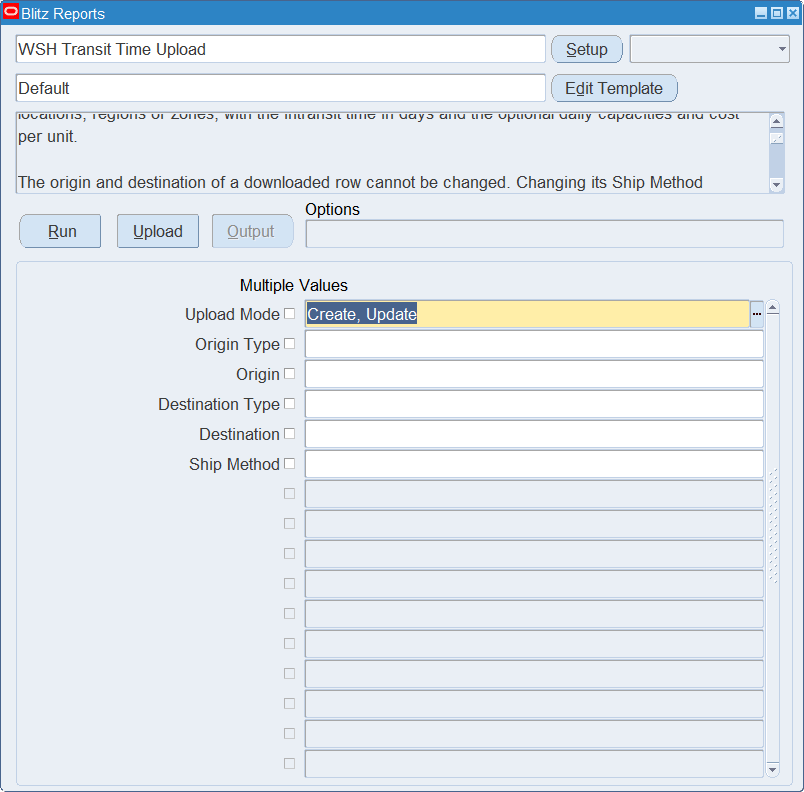
Open WSH Transit Time Upload in Blitz Report, choose the template and set the parameters. They decide which transit times are downloaded.
| Parameter | Meaning |
|---|---|
| Upload Mode | Create gives you an empty sheet. Create, Update (default) also downloads the existing transit times. |
| Origin Type | Downloads only transit times with this origin type: Location, Region or Zone. |
| Origin | Downloads only transit times from this location, region or zone. The list shows the points of the Origin Type. |
| Destination Type | Downloads only transit times with this destination type. |
| Destination | Downloads only transit times to this location, region or zone. |
| Ship Method | Downloads only transit times of this ship method. |
Step 2 – Run to download the Excel file
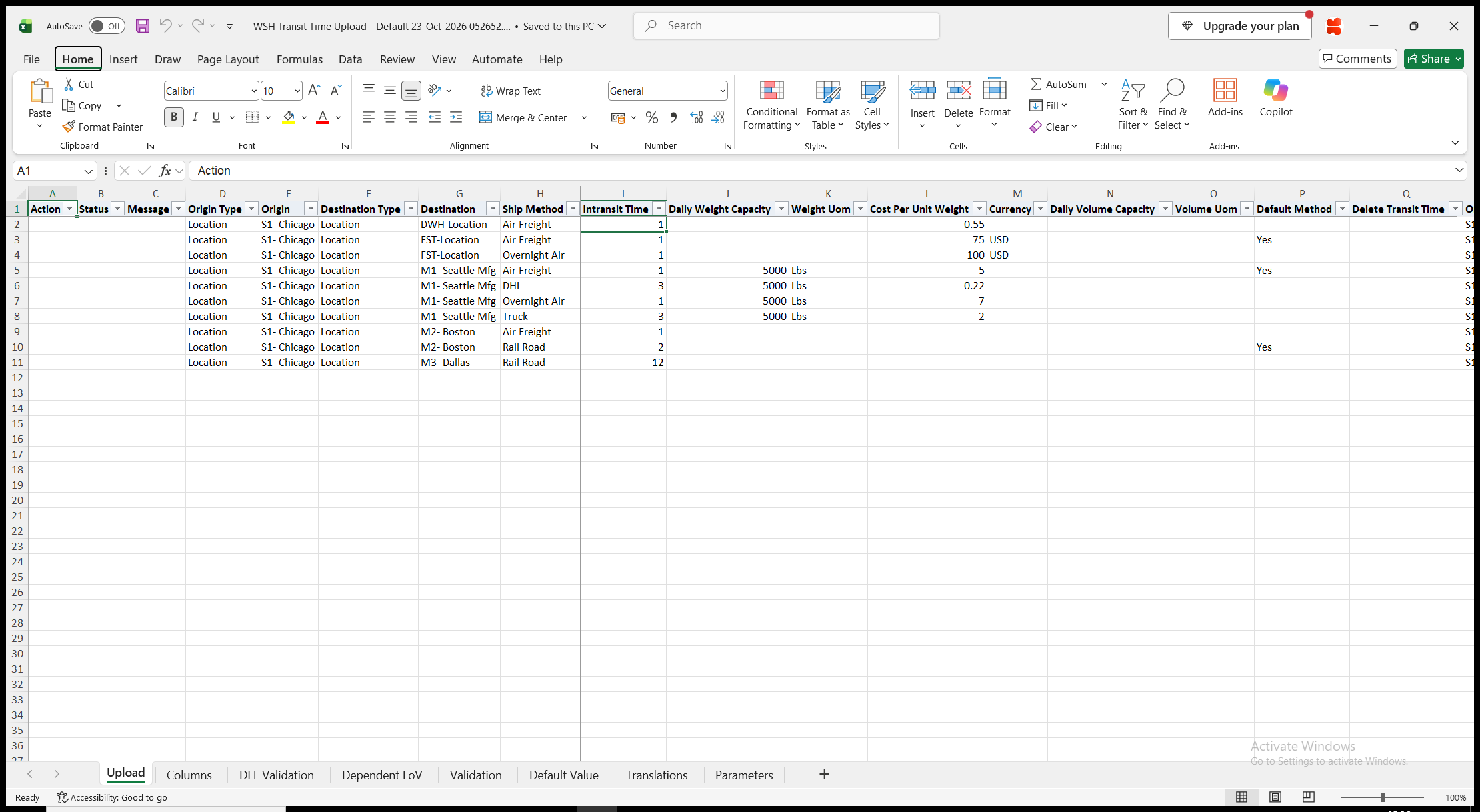
Click Run. With Create, Update, the file has one row per ship method of a lane, so a lane with three ship methods has three rows. Origin Description and Destination Description are read-only. With Create, the sheet is empty.
Step 3 – Enter the transit times
Change the downloaded rows, or add rows for new lanes and ship methods.
- Origin Type and Origin, Destination Type and Destination – the lane. The type is Location (default), Region or Zone. A region is listed as its country, state, city and postal code range, separated by commas, and a zone by its name. A location or region name that occurs more than once is followed by its description in brackets. The origin and destination of a downloaded row cannot be changed.
- Ship Method – changing it on a downloaded row changes the ship method of that transit time.
- Intransit Time – the transit time in days, required for a new transit time. It defaults to the maximum transit time of the ship method’s carrier service, where one is defined.
- Daily Weight Capacity with Weight Uom, Cost Per Unit Weight with Currency, and Daily Volume Capacity with Volume Uom. The unit or currency is required when its quantity or cost is entered.
- Default Method – Yes makes the ship method the default of the lane. The other ship methods of the lane lose the flag.
- Delete Transit Time – Yes on a downloaded row removes the ship method from the lane.
Step 4 – Validate and Save
Click Validate and Save. This checks for missing required values and for values that are not in their lists, checks that Intransit Time is not negative and that each capacity and cost has its unit or currency, marks the rows Valid and saves the file. Correct any rows it flags before uploading.
Step 5 – Upload the file
In Blitz Report click Upload and select the saved file. The upload request processes the rows in order. Each row is saved or rejected on its own, so a rejected row leaves nothing behind and does not affect the other rows.
Step 6 – Review the result report
When the request completes, a result report opens listing every uploaded row with its status and a message such as Transit time created., Transit time updated., Transit time deleted. or No change., or the reason the row was rejected. When Default Method moves to another ship method, the message names the ship method that lost it, for example Transit time updated. Air Freight is no longer the default ship method. The result report shows the values as they were saved in Oracle.
What’s produced
- Transit times, saved as the Transit Times form saves them: the ship methods of each origin and destination lane with their intransit times, capacities, cost per unit weight and default flag.
- Each row is committed on its own. A row that fails leaves nothing behind and does not affect the other rows.
- A result report listing every row with a status (success or error) and a message.
Common questions
How do I move a transit time to another origin or destination?
The origin and destination of a downloaded row cannot be changed. Enter a new row for the new lane, and enter Yes in Delete Transit Time on the old row.
How do I replace the ship method of a lane?
Change the Ship Method on the downloaded row. The new ship method must not exist on the lane already.
How do I change the default ship method of a lane?
Enter Yes in Default Method on the row of the new default. As in the form, the other ship methods of the lane lose the flag, and the message names them. The Intransit Time template shows only the columns needed for this.
How do I remove a capacity or a cost?
Clear Daily Weight Capacity, Cost Per Unit Weight or Daily Volume Capacity. Its unit or currency is cleared with it.
Can I create regions or zones?
No. Define them in Regions and Zones. The upload uses the country, state, city and postal code regions and the zones that exist.
Why does the download contain lanes between inventory organizations?
The ship methods of shipping networks between inventory organizations are transit times between the organizations’ locations, so they are downloaded as well when the organizations’ locations are set.
How do I enter descriptive flexfield values?
Use the Descriptive Flexfield template. Its attribute columns show the segment prompts of your flexfield setup.
Troubleshooting
| Message | Cause | What to do |
|---|---|---|
| Missing values for required field/s: … | A required column is blank, for example Intransit Time of a new transit time whose ship method has no default. | Fill in the columns named. |
| Record with this combination already exists. | The Ship Method of a downloaded row was changed to a ship method that the lane already has. | Change or delete the lane’s row of that ship method instead, or choose another ship method. |
| The origin and destination of an existing transit time cannot be changed. | Origin Type, Origin, Destination Type or Destination was changed on a downloaded row. | Restore the downloaded values. Enter a new row for the new lane and delete the old one. |
| Several transit times exist for this origin, destination and ship method. Download them to update or delete one of them. | A row you added matches more than one existing transit time. | Download the lane and change or delete the downloaded rows. |
| The downloaded transit time no longer exists. | The transit time was deleted after the download. | Download again. |
| The transit time cannot be deleted because it does not exist. | Delete Transit Time is Yes on a row that matches no transit time. | Clear Delete Transit Time, or correct the lane and ship method. |
| Ship Method … is not active. | The ship method is disabled or outside its active dates. | Choose an active ship method. |
| Ship Method … is not enabled for the inventory organization at origin … | The origin is the location of an inventory organization, and the carrier service of the ship method is not enabled for that organization. | Enable the carrier service for the organization, or choose another ship method. |
| Intransit Time cannot be negative. | Intransit Time is below zero. | Enter zero or more days. |
| Weight UOM is required when Daily Weight Capacity is entered. / Currency is required when Cost Per Unit Weight is entered. / Volume UOM is required when Daily Volume Capacity is entered. | A capacity or cost has no unit or currency. | Enter the Weight Uom, Currency or Volume Uom. |