
IGI Dossier Maintenance Upload creates dossier transactions – budget transfers – in Oracle Public Sector Financials International (IGI) from Excel. Each dossier moves budget from a source budget line to one or more destination budget lines. The upload creates the dossier header with status In Process, its source line and its destination lines, ready for funds checking, funds reservation and approval in the Dossier Maintenance form.
When to use it
- Create many budget-transfer dossiers at once instead of keying them one by one.
- Build a dossier with several destination lines from a spreadsheet.
- Add destination lines to a dossier that is still in process.
- Download existing dossier transactions of a ledger to review their lines and amounts.
Before you start
- Oracle Public Sector Financials International is set up with at least one dossier type, including its source and destination account ranges and, optionally, a numbering scheme.
- Your responsibility has access to the ledger the dossiers belong to.
- The source and destination budgets are open or current, the periods are open or future-entry, and the source account has budget available.
Step 1 – Set the parameters
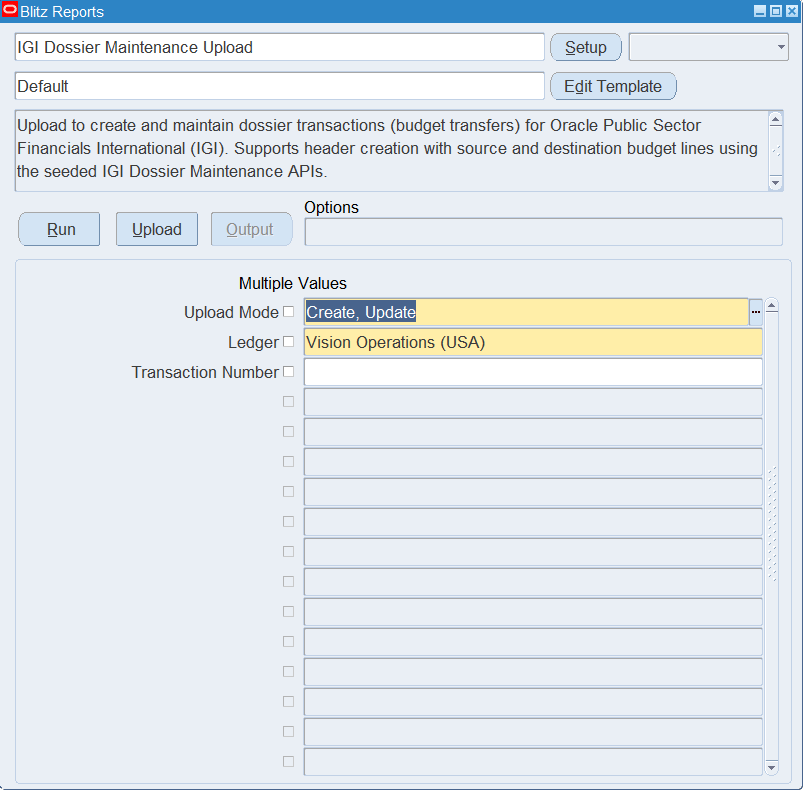
Open IGI Dossier Maintenance Upload in Blitz Report and set the parameters:
| Parameter | Meaning |
|---|---|
| Upload Mode | Create opens an empty sheet for new dossiers; Create, Update also downloads the existing dossier transactions of the ledger, one row per destination line. |
| Ledger | The ledger whose dossier transactions are downloaded. |
| Transaction Number | Downloads only this dossier transaction. Available with Create, Update. |
Step 2 – Run to download the Excel file
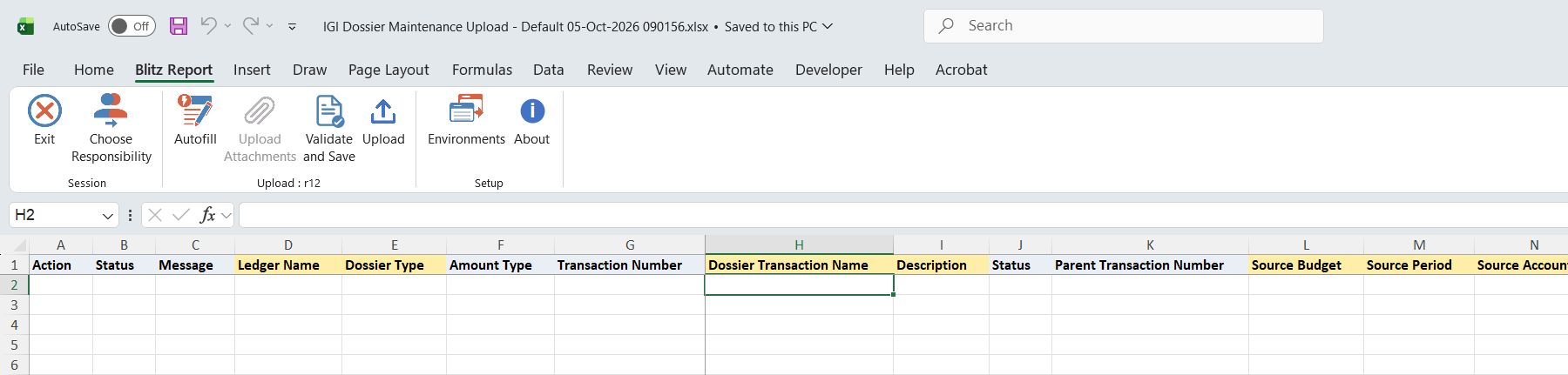
Click Run. Blitz Report downloads and opens the Excel file: empty for Create, or with the existing dossier lines for Create, Update.
Step 3 – Enter or change the data
Enter one row per destination line:
- Ledger Name, Dossier Type, Dossier Transaction Name and Description identify and describe the dossier. Rows with the same ledger, dossier type and dossier transaction name form one dossier.
- Source Budget, Source Period and Source Account name where the budget comes from. A dossier has one source line, taken from its first row.
- Dest Budget, Dest Period, Dest Account and Dest Budget Amount name where the budget goes and how much. The destination account must lie within one of the destination account ranges of the dossier type.
- Parent Transaction Number is optional: the number of an existing transaction of the same dossier type to link the dossier to.
Leave the read-only columns alone. Amount Type comes from the dossier type, the dossier Status starts as In Process, and Transaction Number is assigned on upload. Source Funds Available and Dest Funds Available show the budget balance less encumbrances and actuals of the account in the period, and the New Balance columns the balance after the transfer. Source Budget Amount is the total of the dossier’s destination amounts.
Step 4 – Validate and Save
Click Validate and Save. It checks for missing required values and runs the upload’s validation: the destination account must fall within a destination range of the dossier type, and the destination amount must not exceed the destination funds available. Rows that pass show Valid, and the file is saved.
Step 5 – Upload the file
In Blitz Report click Upload and select the saved file. This submits the upload request. For each dossier the first row creates the header and the source line, and every row adds a destination line. A dossier transaction name that already exists for the ledger and dossier type adds the row as a further destination line to that dossier.
Step 6 – Review the result report
A separate result report opens and lists every row with its status and message. A successful row names the dossier transaction number and the destination line number created.
What’s produced
- Dossier transactions with status In Process, each with a source line and one or more destination lines.
- Transaction numbers from the dossier type’s numbering scheme (prefix, delimiter and next number), or DOS- followed by a sequence number when the type has no enabled numbering scheme.
- A source budget amount equal to the total of the destination amounts, with the funds available and new balance of every line.
- A result report with a status and message on every row.
Common questions
Does the upload reserve funds or approve the dossier?
No. Dossiers are created In Process. Check funds, reserve funds and approve them in the Dossier Maintenance form.
How do I build a dossier with several destination lines?
Enter several rows with the same ledger, dossier type and dossier transaction name, one per destination line. The source budget amount becomes the total of the destination amounts.
Can I change an existing dossier?
No. The upload creates dossiers and adds destination lines; it does not change existing headers or lines. A downloaded row that you edit and upload is added as a further destination line, so change existing dossiers in the Dossier Maintenance form.
Can I choose the transaction number?
No. Transaction Number is read-only and is assigned from the dossier type’s numbering scheme.
Troubleshooting
| Message | Cause | What to do |
|---|---|---|
| Destination account … does not fall within any configured budget line range | The destination account is outside the destination account ranges of the dossier type. | Choose an account within the ranges, or extend the ranges of the dossier type. |
| Destination budget amount (…) exceeds funds available (…) | The destination amount is higher than the funds available on the destination account in that budget and period. | Reduce the amount, or check the destination budget, period and account. |
| Total destination amounts (…) exceed source funds available (…) for account … | The destination lines of the dossier add up to more than the budget available on the source account. | Reduce the destination amounts, or use a source account or period with enough budget. |
| Source budget not found or not open/current: … Destination budget not found or not open/current: … | The budget does not exist or is neither open nor current. | Pick an open or current budget from the list. |
| Source period not found: … Destination period not found: … | The period does not exist for the ledger. | Pick a period of the ledger from the list. |
| Source account not found: … Destination account not found: … | The account combination does not exist in the dossier type’s chart of accounts. | Pick an account from the list. |
| Ledger not found: … Dossier not found: … | The ledger or dossier type name is not valid. | Pick the value from the list. |