
Blitz Upload Example (API) is a minimal, working upload of type API, shipped as a starting point for developers building their own Blitz Upload. It maintains a small demo table, xxen_upload_example (Id, Name, Date Of Birth), by calling the PL/SQL procedure xxen_upload_example_api.create_update_record once for every uploaded row. Use it to see each part of an upload definition working end to end, then copy it and replace the SQL and procedure with your own. Upload development is described in the Blitz Report Developer Guide.
What it demonstrates
| Part of the definition | In this example |
|---|---|
| Upload SQL | Selects the four framework columns action_, status_, message_ and modified_columns_ (hidden), followed by the data columns Id, Name and Date Of Birth from xxen_upload_example. The SQL downloads existing rows for update and defines the columns of the Excel file. The 1=1 anchor in its where clause is where the Name parameter is injected. |
| Parameter | Name, filtering the download with xue.name=:name on the 1=1 anchor, so it also allows multiple values. Leave it blank to download all rows. |
| Upload columns | Id (Number), Name and Date Of Birth (Date), all required. Name has a custom list of values (Oracle EBS user names) with filter before display. The list has no id column, so the display value is passed to the procedure as it is. |
| Upload type and object | Type API with the upload object xxen_upload_example_api.create_update_record, called once per row (API with parameters). |
| Upload parameters | Maps the procedure’s parameters to the columns: p_id to Id, p_name to Name, p_date_of_birth to Date Of Birth, the in parameter action_ to the row’s action code, and the out parameters status_ and message_ to the row’s status code and message (Upload parameters). |
| Result SQLs | The default Error SQL, and a Success SQL that joins the upload’s data view (xxen_blitz_upload_examp_4014_u xu) to xxen_upload_example by Id, so the result report shows the values stored in the table (Upload results). Order By is id. |
The procedure it calls:
procedure create_update_record(
p_id in number,
p_name in varchar2,
p_date_of_birth in date,
action_ in varchar2,
status_ out varchar2,
message_ out varchar2
);
On a Create row it inserts the record unless the Id already exists, in which case it returns status error and Record already exists. On an Update row it updates Name and Date Of Birth of the record with that Id. The action is compared with the constants xxen_upload.action_create and xxen_upload.action_update, and the status is set with xxen_upload.status_success or xxen_upload.status_error. A row without an error gets Record processed successfully. In your own procedure, write through the standard Oracle API for your object instead of direct table DML.
Before you start
- Profile option Blitz Report Access set to System, to see the Setup window and to copy an upload with its upload definition.
- The example table and package are installed with Blitz Report; nothing else needs to be set up to run it.
Use it as a starting point
- Select the example in Blitz Report and use Tools > Copy Report (Copy Report). The copy is named COPY OF: Blitz Upload Example (API); rename it in Setup.
- Replace the upload SQL with a query on your own object, keeping the four framework columns first.
- Create your own PL/SQL procedure with the same
action_,status_andmessage_parameters, and enter it as the upload object. The upload parameters are populated and mapped to the SQL columns by name when you select the API. - Set the column validations (lists of values, defaults, required and read-only columns), and change the Success SQL to join the uploaded rows to your tables by their business key.
Step 1 – Set the parameters
Open Blitz Upload Example (API) in Blitz Report and set the parameter:
| Parameter | Meaning |
|---|---|
| Name | Downloads only the rows with this name. Leave it blank to download all rows of the example table. |
The example has no Upload Mode parameter: the file always contains the existing rows, and you can add new rows below them.
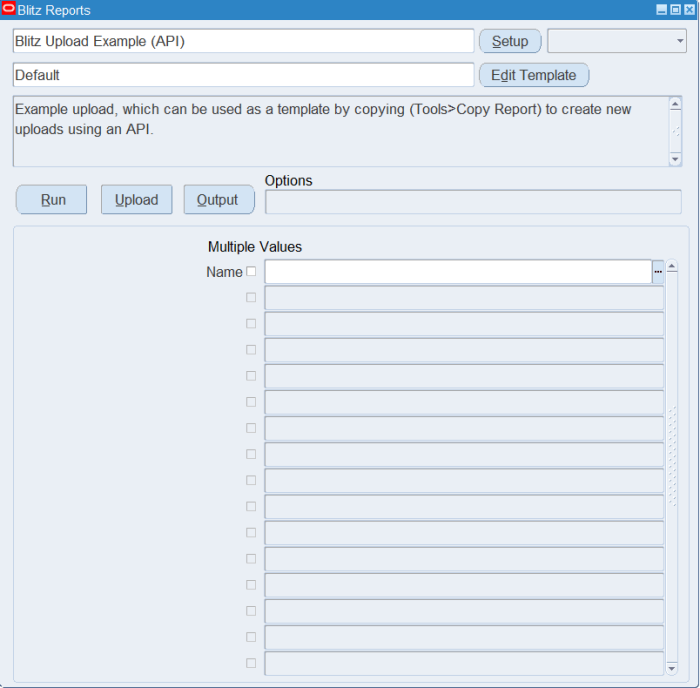
Step 2 – Run to download the Excel file
Click Run. The Excel file downloads and opens with one row per existing record.
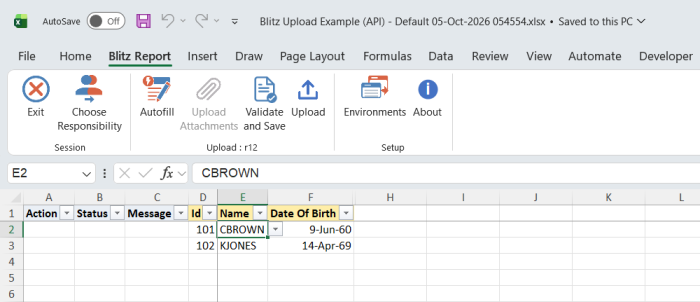
Step 3 – Enter or change the data
Change the Name or Date Of Birth of a downloaded row, which marks it Update, or add a row with a new Id, a Name from the list of values and a Date Of Birth, which marks it Create. The Id identifies the record, so do not change it on a downloaded row.
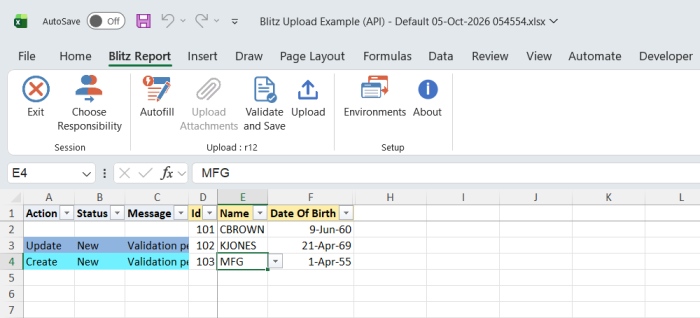
Step 4 – Validate and Save
Click Validate and Save. This checks for missing required values and saves the file. Correct any rows it flags before uploading.
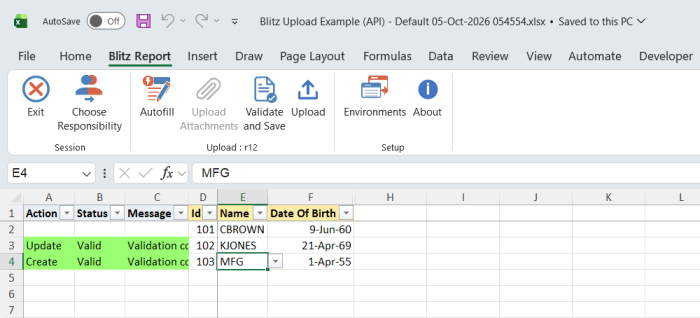
Step 5 – Upload the file
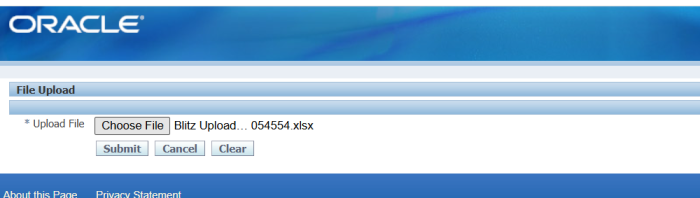
In Blitz Report click Upload and select the saved file. This submits the upload request, which calls the procedure for each changed or new row.
Step 6 – Review the result report
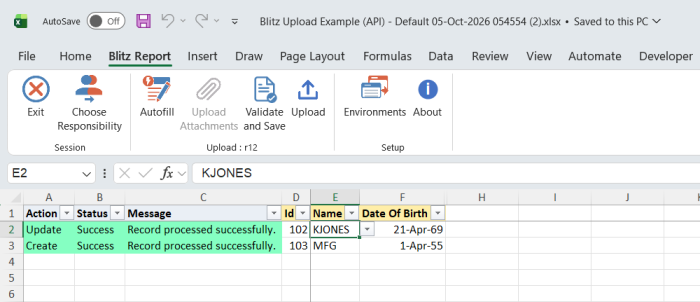
When the request completes, a result report opens listing every uploaded row with its status and message, and the values read back from the table by the Success SQL.
What’s produced
- Records created or updated in the example table
xxen_upload_example. - A result report listing every uploaded row with a status (success or error) and a message.
Common questions
How does the example differ from the other two example uploads?
Blitz Upload Example (API without parameters) calls a procedure without parameters once per upload run, which reads the uploaded rows from the upload’s data view and writes each row’s status and message back. Blitz Upload Example (Interface Table) inserts the rows into an interface table without any PL/SQL. The upload types section of the developer guide explains when to use which.
Why are the upload columns and parameters missing from my copy?
Copy Report copies the upload type, object, columns, parameters and result SQLs only when your Blitz Report Access is System. Set the profile and copy again.
Does my copy still read the example’s data view?
No. The copy gets its own data view, and the copied Success and Error SQLs are pointed to it automatically.
Why is the action passed to the procedure?
The framework passes the row’s action code (Create or Update, as marked in Excel) to the action_ parameter, so the procedure knows whether to insert or update. Your procedure can also look the record up itself and decide.
How do I pass an id instead of the displayed value?
Give the column’s list of values an id column. The framework then passes the id of the selected value to the mapped parameter; the Name list of values in this example has none, so the name itself is passed.
How do I see what the framework executes?
See upload debugging in the developer guide.
Troubleshooting
| Message | Cause | What to do |
|---|---|---|
| Record already exists. | A Create row with an Id that is already in the table, or a second new row with the same Id in the file. | Use a new Id, or download the record and change it as an Update row. |
| Missing values for required field/s | Id, Name or Date Of Birth is blank. | Fill all three columns. |