
Blitz Upload Example (API without parameters) is a minimal, working upload of type API, shipped as a starting point for developers building their own Blitz Upload. It maintains the same small demo table as its sibling, xxen_upload_example (Id, Name, Date Of Birth), but calls a PL/SQL procedure without parameters, xxen_upload_example_api.create_update_record_no_params, just once per upload run. The procedure reads the uploaded rows itself from the upload’s data view and writes each row’s status and message back into it. Use it as the template for uploads whose rows cannot be processed one at a time, then copy it and replace the SQL and procedure with your own. Upload development is described in the Blitz Report Developer Guide; the row-by-row variant is Blitz Upload Example (API), and the variant without PL/SQL is Blitz Upload Example (Interface Table).
What it demonstrates
| Part of the definition | In this example |
|---|---|
| Upload SQL | Selects the four framework columns action_, status_, message_ and modified_columns_ (hidden), followed by the data columns Id, Name and Date Of Birth from xxen_upload_example. The SQL downloads existing rows for update and defines the columns of the Excel file. The 1=1 anchor in its where clause is where the Name parameter is injected. |
| Parameter | Name, filtering the download with xue.name=:name on the 1=1 anchor, so it also allows multiple values. Leave it blank to download all rows. |
| Upload columns | Id (Number), Name and Date Of Birth (Date), all required. Name has a custom list of values (Oracle EBS user names) with filter before display. |
| Upload type and object | Type API with the upload object xxen_upload_example_api.create_update_record_no_params, a procedure without parameters (API without parameters). Because it has no parameters, the framework calls it once for the whole upload instead of once per row. |
| Upload parameters | None. Nothing is mapped: the procedure selects the uploaded values from the upload’s data view xxen_blitz_upload_examp_9718_u, where each Excel column is a view column of the same name (Upload data view). |
| Result SQLs | The default Error SQL, and a Success SQL that joins the data view (xxen_blitz_upload_examp_9718_u xu) to xxen_upload_example by Id for the rows with status success, so the result report shows the values stored in the table (Upload results). Order By is id. |
The procedure it calls, shortened:
procedure create_update_record_no_params is
begin
  for c in (select xu.* from xxen_blitz_upload_examp_9718_u xu where xu.status_code_=xxen_upload.status_valid) loop
    begin
      --update the record with id c.id, or insert it if it does not exist
      l_record_status:=xxen_upload.status_success;
      l_record_message:='Succesfully processed';
    exception
      when others then
        l_record_status:=xxen_upload.status_error;
        l_record_message:='Error: '||dbms_utility.format_error_backtrace||dbms_utility.format_error_stack;
    end;
    update xxen_blitz_upload_examp_9718_u xu set
    xu.status_code_=l_record_status,
    xu.message_=l_record_message
    where
    xu.upload_rowid=c.upload_rowid;
  end loop;
end create_update_record_no_params;
It loops through the rows with status code xxen_upload.status_valid, which are the Create and Update rows that passed validation. For each row it checks whether a record with that Id exists: if so it updates Name and Date Of Birth, otherwise it inserts a new record. The row’s action is not read, so the table decides between insert and update. An exception on a row is caught, and that row alone gets status error with the Oracle error stack as its message. Finally it updates status_code_ and message_ in the data view for the row, identified by upload_rowid. In your own procedure, write through the standard Oracle API for your object instead of direct table DML.
Before you start
- Profile option Blitz Report Access set to System, to see the Setup window and to copy an upload with its upload definition.
- The example table and package are installed with Blitz Report; nothing else needs to be set up to run it.
Use it as a starting point
- Select the example in Blitz Report and use Tools > Copy Report (Copy Report). The copy is named COPY OF: Blitz Upload Example (API without parameters); rename it in Setup.
- Replace the upload SQL with a query on your own object, keeping the four framework columns first.
- The copy gets its own data view, shown in the Data View field on the SQL tab of Setup. Create your own procedure without parameters that selects the valid rows from that view and updates
status_code_andmessage_for each of them, and enter it as the upload object. The view name is part of your procedure’s code, so the example procedure cannot be reused as it is. - Set the column validations (lists of values, defaults, required and read-only columns), and change the Success SQL to join the uploaded rows to your tables by their business key.
Step 1 – Set the parameters
Open Blitz Upload Example (API without parameters) in Blitz Report and set the parameter:
| Parameter | Meaning |
|---|---|
| Name | Downloads only the rows with this name. Leave it blank to download all rows of the example table. |
The example has no Upload Mode parameter: the file always contains the existing rows, and you can add new rows below them.
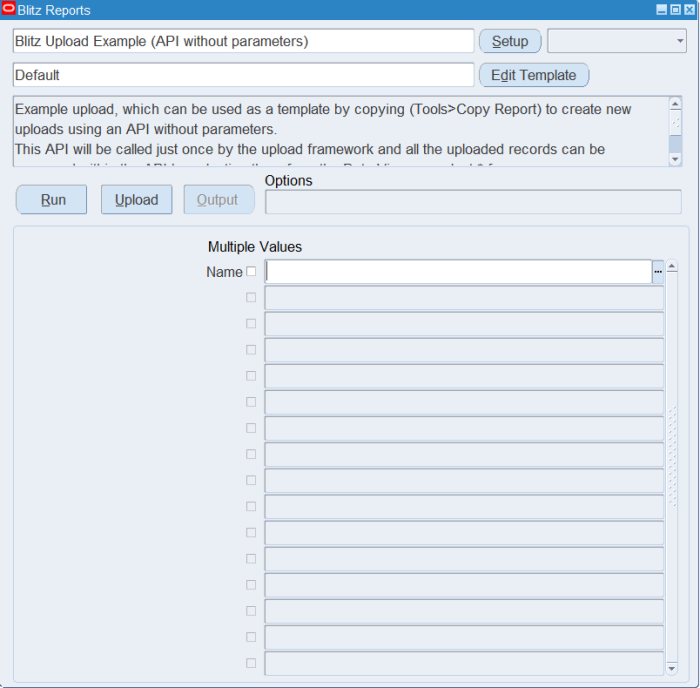
Step 2 – Run to download the Excel file
Click Run. The Excel file downloads and opens with one row per existing record.
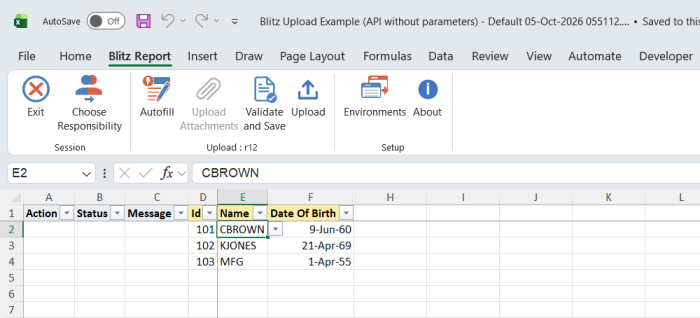
Step 3 – Enter or change the data
Change the Name or Date Of Birth of a downloaded row, which marks it Update, or add a row with a new Id, a Name from the list of values and a Date Of Birth, which marks it Create. The Id identifies the record, so do not change it on a downloaded row: the procedure would insert a record with the new Id.
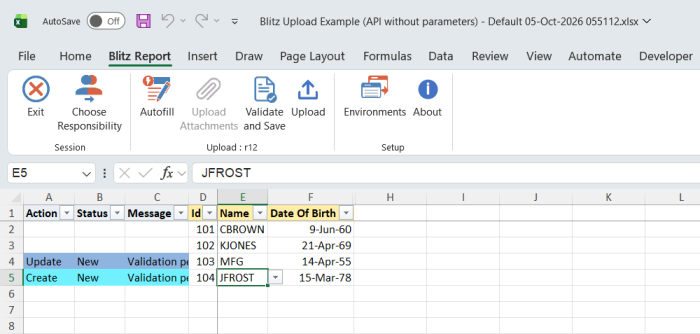
Step 4 – Validate and Save
Click Validate and Save. This checks for missing required values and saves the file. Correct any rows it flags before uploading.
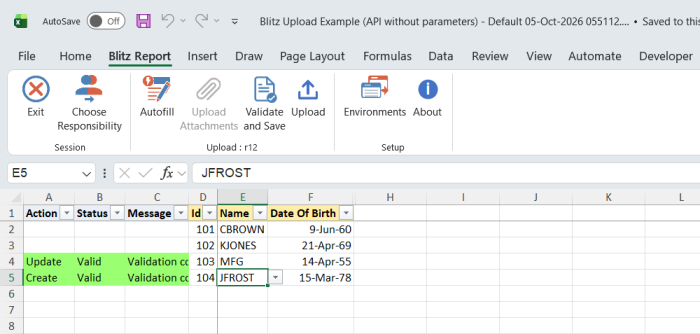
Step 5 – Upload the file
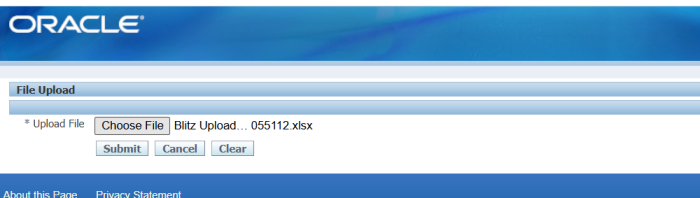
In Blitz Report click Upload and select the saved file. This submits the upload request, which calls the procedure once to process all changed and new rows.
Step 6 – Review the result report
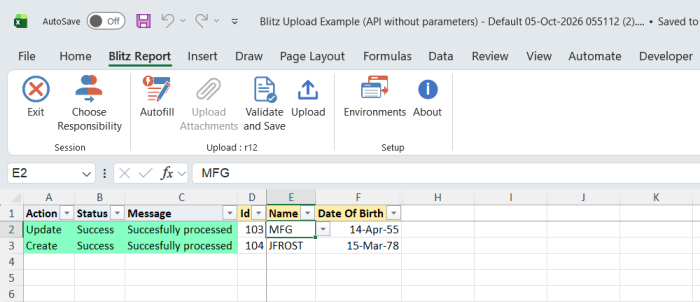
When the request completes, a result report opens listing every uploaded row with the status and message the procedure wrote back, and the values read back from the table by the Success SQL.
What’s produced
- Records created or updated in the example table
xxen_upload_example. - A result report listing every uploaded row with a status (success or error) and a message.
Common questions
When should I use an API without parameters instead of an API with parameters?
When rows cannot be processed independently, for example all lines of an order or a timecard in one API call, or when you want to control the processing loop yourself. For independent rows, Blitz Upload Example (API) is simpler: the framework calls the procedure per row and passes the values. The upload types section of the developer guide compares the types.
Why does a Create row with an existing Id not fail?
The example procedure ignores the row’s action and updates the record when the Id exists. Your procedure can read the action from the data view’s action column and handle Create and Update separately.
Are list of values ids passed to my procedure?
No. The framework’s automatic value to id translation applies only to an API with parameters. The data view holds the values as entered in Excel, so the procedure translates them itself or passes them to an Oracle API that accepts display values.
Why are the upload columns missing from my copy?
Copy Report copies the upload type, object, columns and result SQLs only when your Blitz Report Access is System. Set the profile and copy again.
How do I see what the framework executes?
See upload debugging in the developer guide. The data view can also be queried directly to inspect the uploaded rows of a past run.
Troubleshooting
| Message | Cause | What to do |
|---|---|---|
| Error: followed by an Oracle error stack | The insert or update of that row raised a database error. | Correct the value shown in the error and upload the row again. The other rows are processed independently. |
| Missing values for required field/s | Id, Name or Date Of Birth is blank. | Fill all three columns. |