
1 Download the software
2 Installation
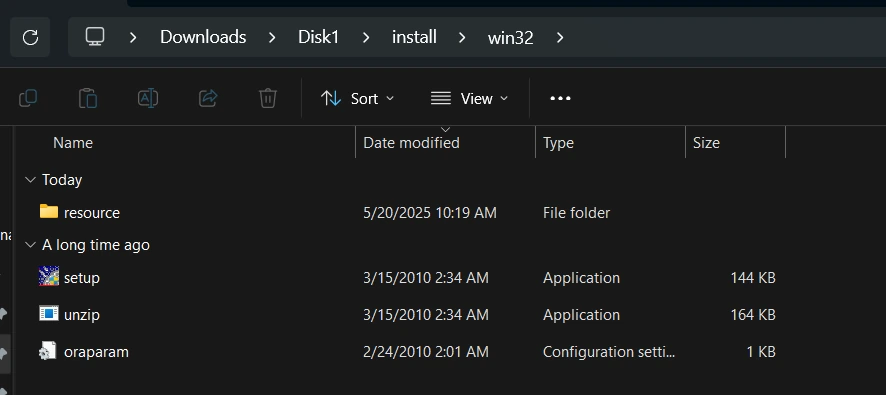
2.1 Run setup.exe from Disk1\install\win32
2.2 Installation wizard
3 Errors after the installation
3.1 MSVCR71.dll is missing
3.2 The required Applications tables cannot be found
4 Next step: export your workbooks
Introduction
Oracle de-supported Discoverer in 2017, but the Discoverer Administrator client is still needed for one-off work against an existing End User Layer – most commonly to export workbooks as .eex files when migrating them to Blitz Report, and to administer EUL access.
The client installer is 32-bit and fails in a non-obvious way on 64-bit Windows. This post covers the installation and the two errors that stop it, using Oracle BI Discoverer Desktop and Administrator 11.1.1.3.0 on Windows 11.
1 Download the software
The client ships as a single file, ofm_disco_desktop_and_admin_win_11.1.1.3.0_disk1_1of1.zip. Oracle’s original OTN download link now redirects to the Oracle Discoverer Software page, which now lists only the 11.1.1.7.0 release through Oracle Software Delivery Cloud – the Desktop and Administrator client itself is no longer offered for download. If you no longer have a copy of the installer, please contact us before you start.
The client connects to your existing End User Layer, so its version does not have to match your Discoverer server. If the EUL sits on a recent database, see Does Oracle Discoverer 11g work with Oracle Database 19c?
2 Installation
2.1 Run setup.exe from Disk1\install\win32
Unzip the installer. Do not run the setup.exe in the root of the unzipped folder – on 64-bit Windows it fails with:
ERROR: The shiphome you are trying to install is not the proper shiphome for the current platform.
The shiphome is for Microsoft Windows (32-bit) platform.
Try downloading the appropriate shiphome for current platform or contact Oracle Support.
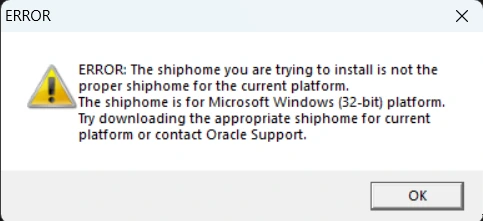
There is no 64-bit client. Run setup.exe from the Disk1\install\win32 subfolder instead, which installs and runs fine on 64-bit Windows.
2.2 Installation wizard
On the Components to Install screen, select both Discoverer Desktop and Discoverer Administrator. Administrator provides dis51adm.exe, the executable used by the workbook export commands; Desktop (dis51usr.exe) is only needed to open workbooks interactively.

The remaining screens can be accepted with their defaults, and the installation completes in a few minutes.

3 Errors after the installation
3.1 MSVCR71.dll is missing
Starting Discoverer Desktop or Administrator for the first time usually fails with:
dis51usr.exe - System Error
The program can't start because MSVCR71.dll is missing from your computer.
Try reinstalling the program to fix this problem.
MSVCR71.dll is the Visual C++ 7.1 runtime, which current Windows releases no longer ship. As described in MOS note 1255244.1, copy the DLL into C:\Windows\SysWOW64 on 64-bit Windows (C:\Windows\System32 on 32-bit Windows) and restart the application.
If any Oracle Fusion Middleware or Forms 11g home is installed on the machine, you already have a copy under <ORACLE_HOME>\jdk\jre\bin\msvcr71.dll. Otherwise the DLL can be downloaded from dll-files.com.
3.2 The required Applications tables cannot be found
When Discoverer Administrator connects to an EBS End User Layer, it may warn that “You have connected to an Applications EUL, but the required Applications tables cannot be found on the same database.” The EUL schema is missing SELECT grants on the EBS foundation tables and EXECUTE on FND_CLIENT_INFO – the script and the details are in Fix missing EUL grants for Discoverer Administrator.
4 Next step: export your workbooks
With dis51adm.exe in place, the whole Discoverer library can be exported and migrated in one pass: the DIS Workbook Export Script report generates one ready-to-run export command per workbook, and the resulting .eex files are imported into Blitz Report as reports with their parameters, conditions and cross-tab layouts. See Discoverer replacement with Blitz Report for the complete migration process.
If you need help with the installation or would like us to run the migration for you, please contact us.