
AI coding tools such as Claude Code write, compile and test Oracle E-Business Suite custom code largely on their own. In our own development the AI does about 98% of the work; the developer gives direction and reviews the result. This guide describes the setup we use ourselves, so that every EBS team can build the same.
2. The setup
3. Bring the custom code into Git
4. Install the Vision VM
5. Install Claude Code: which interface to use
6. Give Claude Code access to the VM
7. Share the team’s knowledge in rules and skills
8. Optional: a read-only account that sees code only
9. Working with it
10. What a Vision instance cannot tell you
11. Get the VM
1. The obstacle: AI may not connect to EBS environments
An EBS database holds supplier bank accounts, employee records, prices and customer data. An AI agent that can query it sends what it reads to the AI vendor. IT departments therefore keep AI tools away from production and, as test instances are usually clones of production, from those as well. Where an AI assistant is allowed, it is a chat window next to the developer, who copies code back and forth by hand.
The custom code is a different matter. PL/SQL packages, forms, report definitions and interface programs rarely contain anything confidential. Whether your code may be shared with an AI vendor is your company’s decision; this setup needs the code only, never the data.
2. The setup
Every developer runs an Oracle EBS Vision instance as a Hyper-V virtual machine on the own Windows laptop. Vision is a complete EBS installation with demo data only. The custom code lives in a Git repository. Claude Code works on the laptop: it reads and changes the code in the Git working copy and compiles, runs and tests it on the Vision VM. The company’s EBS environments receive changes from Git through the usual release process and are never connected to the AI.
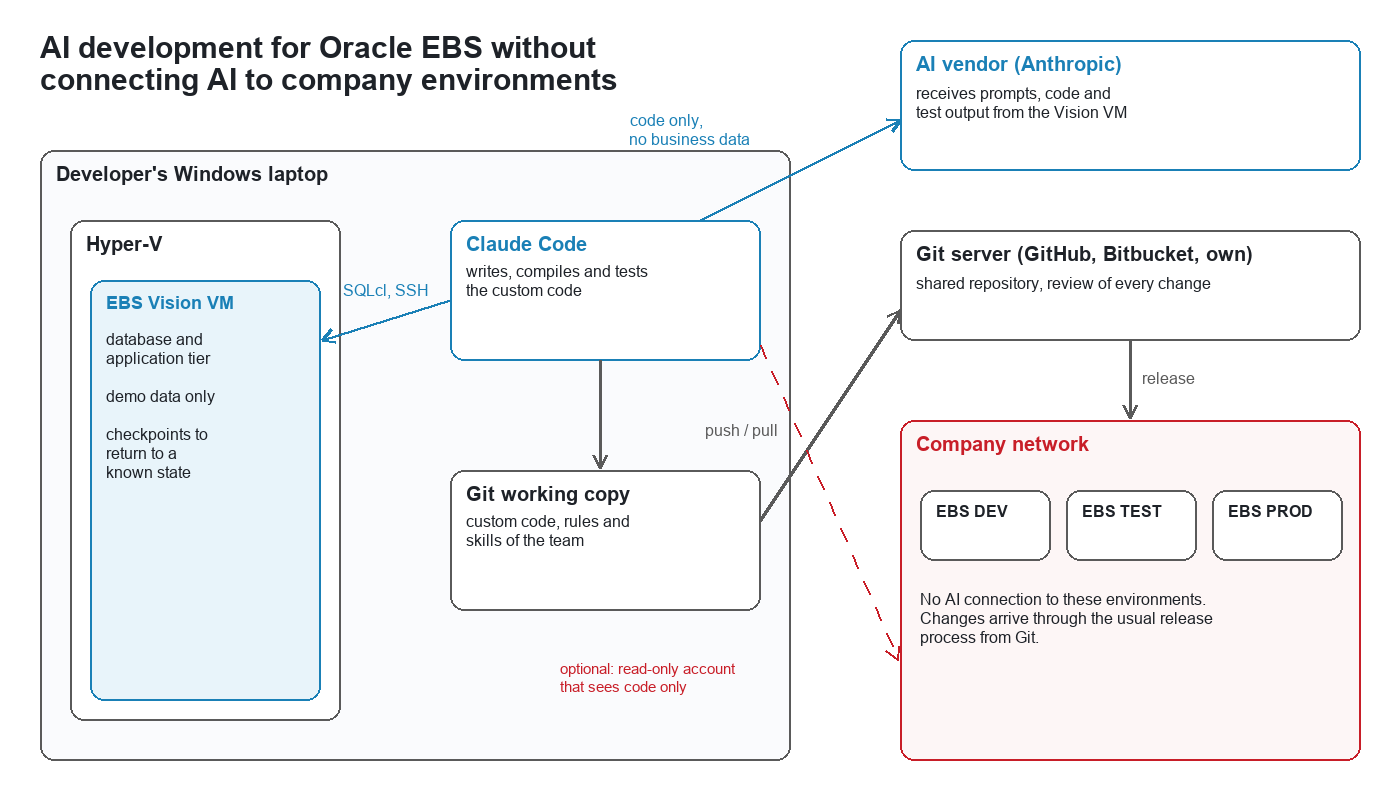
A VM per developer has two further effects. Nobody waits for a shared development instance or breaks a colleague’s test. And a Hyper-V checkpoint returns the instance to a known state within seconds, after a failed experiment or before the next task, which makes it safe to let the AI try things.
3. Bring the custom code into Git
The first step is a Git repository (GitHub, Bitbucket or your own server) that holds all custom code as the master: packages, views, triggers, forms and libraries, report definitions and templates, concurrent program and setup loader files, shell scripts and installation scripts. Git is where the AI reads and changes the code, where every change is reviewed, and where releases are built from.
A typical structure:
xx-ebs-custom/ CLAUDE.md project overview and working rules for the AI .claude/rules/ knowledge per topic (section 7) .claude/skills/ procedures the team repeats (section 7) sql/ packages, views, triggers, table scripts forms/ .fmb, .pll reports/ .rdf, data templates, layout templates fndload/ concurrent programs, value sets, lookups, menus (.ldt) bin/ shell scripts install/ installation and upgrade scripts |
If the code is in another version control system or only on the servers today, export it once from the development instance and the custom application tops and commit it. From then on, changes go through Git only.
Where there is no access to the code master or the servers, for example with EBS frontend access only, three Blitz Reports export code from the instance:
- DBA Objects with Show DDL set to Yes exports the DDL or source code of any database object: tables, indexes, views, triggers, packages.
- DBA Text Search finds the packages, procedures, functions and triggers that contain a given text and exports their source.
- The Blitz Report Custom Reports Converter gathers a custom program with its report definition, parameters, value sets and dependent database objects.
4. Install the Vision VM
We provide two VMs for a Windows laptop with Hyper-V:
| EBS 12.1.3 | EBS 12.2.15 | |
| Database | 19c | 19c |
| Memory for the VM | 6 GB (fits a 16 GB laptop) | at least 14 GB |
| Download | 38 GB | larger, in several parts |
| Disk space | 290 GB | 380 GB |
| Installed | ORDS, Blitz Report with a trial license | |
Each VM comes with a setup script and a step by step guide. The script enables Hyper-V, adds the VM’s host name to the hosts file, creates the VM’s internal network, verifies and extracts the download, imports the VM, installs the certificate the VM’s web pages use, takes a first checkpoint and starts EBS. After that, EBS is reachable in the browser at https://r12.localdomain/OA_HTML/AppsLogin (12.1.3) or https://r122.localdomain/OA_HTML/AppsLogin (12.2).
Take a checkpoint whenever the instance is in a state worth returning to, and before every larger experiment.
5. Install Claude Code: which interface to use
Claude Code is one program with several interfaces, which is confusing at first. They all read the same project files (CLAUDE.md, settings, MCP servers), so the choice is a matter of preference and can be changed at any time.
| Interface | What it is | Use it for |
| VS Code extension | The extension “Claude Code” from the Extensions view of Visual Studio Code, also available for Cursor. A chat panel inside the editor that shows every proposed change as a diff next to the code. | Daily development. Our team works in it, and it is what we recommend to developers. |
| Terminal (CLI) | The command claude, started in the project folder in a terminal window. | Working without an editor, on a server or in scripts. Setup commands such as claude mcp add (section 6) are run here. |
| Claude desktop app | The Code tab of the Claude app for Windows and macOS, with several sessions side by side, each in its own project folder. | Running several tasks in parallel, and people who do not work in an editor. |
| Claude Code on the web | claude.ai/code. The session runs on Anthropic’s servers against a GitHub repository. | Not for this setup: it cannot reach the Vision VM on your laptop. |
| Claude in Chrome | A browser extension for Chrome and Edge. Not an interface of its own, but a tool that Claude Code connects to: start claude --chrome, or type @browser in the VS Code panel. | Letting Claude Code operate the browser: log in to EBS on the VM, open pages, test them as a user would, take screenshots. |
Install the VS Code extension and the terminal version; the extension alone does not make the claude command available in a terminal. The terminal version is installed in PowerShell with:
irm https://claude.ai/install.ps1 | iex |
Install Git for Windows as well: besides Git it provides the Bash shell that Claude Code runs its commands in. At the first start Claude Code asks you to log in. It needs a paid Claude plan (Pro, Max, Team or Enterprise) or an Anthropic Console account billed by usage; companies can also run it through Amazon Bedrock, Google Cloud or Microsoft Foundry. The browser extension works with a Claude plan only.
6. Give Claude Code access to the VM
Claude Code needs three things: the Git working copy, a database connection and a shell on the VM.
Git working copy. Clone the repository and open the folder in VS Code, or start claude in it. Everything in the folder is readable and changeable for Claude Code; commits and pushes stay under the developer’s control.
Database: the SQLcl MCP server. Oracle SQLcl (version 25.2 or later, with Java 17 or 21) includes an MCP server, through which Claude Code runs SQL and PL/SQL on a saved connection. Save the connection once; the password is asked and stored by SQLcl, not written into any project file:
sql /nolog conn -save vision -savepwd apps@//r12.localdomain:1521/VIS |
Then register the server in Claude Code, from the project folder:
claude mcp add sqlcl -- C:\Oracle\sqlcl\bin\sql.exe -mcp |
Claude Code can now connect to vision, compile packages, query the data dictionary and the demo data, and read compilation errors.
Shell: SSH with a key. For everything on the application tier (compiling forms, loading setup files with FNDLOAD, copying files to the custom top, reading concurrent request logs and outputs), Claude Code uses SSH. Create a key and authorize it for the VM’s users, in a Windows command prompt:
ssh-keygen -t ed25519 type %USERPROFILE%\.ssh\id_ed25519.pub | ssh [email protected] "mkdir -p ~/.ssh && chmod 700 ~/.ssh && cat >> ~/.ssh/authorized_keys && chmod 600 ~/.ssh/authorized_keys" type %USERPROFILE%\.ssh\id_ed25519.pub | ssh [email protected] "mkdir -p ~/.ssh && chmod 700 ~/.ssh && cat >> ~/.ssh/authorized_keys && chmod 600 ~/.ssh/authorized_keys" |
Tell the AI about the environment. Describe the instance in a file in the repository: host names, database service, the environment file to source, the custom top, the EBS test user and responsibility, how to start and stop EBS, and how to deploy each kind of object. Passwords do not belong in that file. Our published AI skills for Oracle EBS include a skill that creates this file with you, and the EBS knowledge the AI needs: coding standards, report and upload development, custom report migration and performance tuning. Install them in Claude Code with:
/plugin marketplace add enginatics/ai-skills /plugin install blitz-report-ai-skills@enginatics |
7. Share the team’s knowledge in rules and skills
Custom code is developed by a team, and an AI starts every session without memory. What makes the setup improve over time is that everything the AI needs to know is written into files in the same Git repository as the code, so that every developer’s AI reads the same knowledge and every correction reaches the whole team with the next pull.
- CLAUDE.md in the repository root is loaded in every session: what the project is, the folder layout, and the rules that are never to be broken (for example: never commit without being asked, deploy to the Vision VM and test before reporting done).
- Rules (
.claude/rules/*.md) hold the knowledge per topic: coding standards, the environment, module specifics such as the interfaces and APIs your code uses, naming conventions, known traps. A rules file can name the paths it applies to, so that it loads only when such a file is touched and the always-loaded set stays small. - Skills (
.claude/skills/<name>/SKILL.md) hold procedures of several steps that the team repeats: deploy a package, build and test a concurrent program, write the release notes.
What we have learned running this for our own product:
- When the AI makes a mistake, do not only correct the result. Tell it to write the rule that would have prevented the mistake into the matching rules file, and commit that with the fix.
- A rule is a standing instruction or a non-obvious fact, in one or two sentences. Stories of what went wrong once belong in the commit message.
- Before writing a new rule, search for an existing one and replace it. Rules files that only grow become noise.
- Review changes to rules like code. They change how every colleague’s AI behaves.
- Let hooks enforce what must never happen (for example a commit that contains a password or an untested object) instead of relying on a rule alone.
8. Optional: a read-only account that sees code only
Where the code master is incomplete, or the AI should compare the repository with what is installed, a further step is an account on the company’s development instance that can read code and object definitions but no table of any EBS schema. This is a connection to a company environment, so it needs your security team’s approval; the setup works without it.
Database account, created by a DBA. It grants single dictionary views, not select any dictionary or select_catalog_role, which would also expose SQL text with literal values (v$sql) and column statistics that contain data values:
create user ai_code_reader identified by "<password>"; grant create session to ai_code_reader; begin for c in ( select x.column_value view_name from table(sys.odcivarchar2list( 'DBA_OBJECTS','DBA_SOURCE','DBA_VIEWS','DBA_TRIGGERS','DBA_SYNONYMS','DBA_DEPENDENCIES','DBA_ERRORS','DBA_PROCEDURES','DBA_ARGUMENTS', 'DBA_TABLES','DBA_TAB_COLUMNS','DBA_TAB_COMMENTS','DBA_COL_COMMENTS','DBA_INDEXES','DBA_IND_COLUMNS','DBA_IND_EXPRESSIONS', 'DBA_CONSTRAINTS','DBA_CONS_COLUMNS','DBA_SEQUENCES','DBA_MVIEWS','DBA_TYPES','DBA_TYPE_ATTRS' )) x ) loop execute immediate 'grant select on sys.'||c.view_name||' to ai_code_reader'; end loop; end; / |
With these grants the account reads the source of every package, view and trigger and the definition of every table and index, and nothing else: a select from apps.fnd_user or any other application table fails with ORA-00942.
Operating system account on the application tier, for forms, reports and scripts in the custom top. It gets read access to the custom top only and no access to the applmgr account, whose environment and configuration files lead to the APPS password:
useradd -m aicode setfacl -R -m u:aicode:rX $XXCUST_TOP setfacl -R -d -m u:aicode:rX $XXCUST_TOP mkdir -p ~aicode/.ssh cat developer_key.pub >> ~aicode/.ssh/authorized_keys chown -R aicode: ~aicode/.ssh chmod 700 ~aicode/.ssh chmod 600 ~aicode/.ssh/authorized_keys |
Check both accounts before use: the database account must fail on an application table, and the operating system account must not be able to read $APPL_TOP, $INST_TOP or the context file. Scripts in a custom top sometimes contain passwords; search for them first.
9. Working with it
A task goes through the same steps each time. The developer describes what is needed. The AI reads the code and the rules, takes a baseline on the Vision VM (the output of the program before the change), makes the change, deploys and compiles it, runs it again with the same parameters, compares the results and reports with numbers. The developer reviews the change in Git and merges it; the release to the company’s development instance follows your normal process.
Do not underestimate what the AI can do in this setup. Beyond PL/SQL and SQL it works on:
- Oracle Forms and libraries: it changes .fmb and .pll files through their XML form and compiles them on the VM.
- Oracle Reports and BI Publisher: it reads report definitions and data templates, changes them or rewrites their logic.
- Setups: concurrent programs, value sets, lookups, menus and personalizations as loader files.
- The user interface: with browser and computer control it logs in to EBS on the VM, opens forms and pages, tests them as a user would and takes screenshots.
- Documentation: it writes the technical design, test evidence and user guides from the code and the screenshots it took.
- Performance: it finds and corrects slow code; see AI performance tuning for Oracle EBS.
10. What a Vision instance cannot tell you
Vision has neither your data nor your setups. Custom tables are created there from their definitions and filled with test rows, which proves that code compiles and behaves the same before and after a change, not how it performs on your data volumes. The final test stays on your own development or test instance, as for any change.
11. Get the VM
We share our EBS 12.1.3 and 12.2 Vision VMs for Hyper-V with companies running Oracle EBS and with their partners, including the setup script and the import guide. Contact us, mention “Vision VM” and your EBS release, and we send you the download link.